
- Forums
- Product Forums
- General Purpose MicrocontrollersGeneral Purpose Microcontrollers
- i.MX Forumsi.MX Forums
- QorIQ Processing PlatformsQorIQ Processing Platforms
- Identification and SecurityIdentification and Security
- Power ManagementPower Management
- Wireless ConnectivityWireless Connectivity
- RFID / NFCRFID / NFC
- Advanced AnalogAdvanced Analog
- Neural Processing UnitsNeural Processing Units
- MCX Microcontrollers
- S32G
- S32K
- S32V
- MPC5xxx
- Other NXP Products
- S12 / MagniV Microcontrollers
- Powertrain and Electrification Analog Drivers
- Sensors
- Vybrid Processors
- Digital Signal Controllers
- 8-bit Microcontrollers
- ColdFire/68K Microcontrollers and Processors
- PowerQUICC Processors
- OSBDM and TBDML
- S32M
- S32Z/E
-
- Solution Forums
- Software Forums
- MCUXpresso Software and ToolsMCUXpresso Software and Tools
- CodeWarriorCodeWarrior
- MQX Software SolutionsMQX Software Solutions
- Model-Based Design Toolbox (MBDT)Model-Based Design Toolbox (MBDT)
- FreeMASTER
- eIQ Machine Learning Software
- Embedded Software and Tools Clinic
- S32 SDK
- S32 Design Studio
- GUI Guider
- Zephyr Project
- Voice Technology
- Application Software Packs
- Secure Provisioning SDK (SPSDK)
- Processor Expert Software
- Generative AI & LLMs
-
- Topics
- Mobile Robotics - Drones and RoversMobile Robotics - Drones and Rovers
- NXP Training ContentNXP Training Content
- University ProgramsUniversity Programs
- Rapid IoT
- NXP Designs
- SafeAssure-Community
- OSS Security & Maintenance
- Using Our Community
-
- Cloud Lab Forums
-
- Knowledge Bases
- ARM Microcontrollers
- i.MX Processors
- Identification and Security
- Model-Based Design Toolbox (MBDT)
- QorIQ Processing Platforms
- S32 Automotive Processing Platform
- Wireless Connectivity
- CodeWarrior
- MCUXpresso Suite of Software and Tools
- MQX Software Solutions
- RFID / NFC
- Advanced Analog
- Neural Processing Units
-
- NXP Tech Blogs
Hello,
We've made our custom board with 8GB of DDR4 based on FRWYLS1046A KIt and can't bring-up the memory controller. We are using QCVS tool for debugging the DDR. It gives DDR initialization failed. D_INIT was not cleared by Hardware.
DDR used is MT40A512M16LY-075E and is similar to DDR used in the FRWY Kit except for speed grade.
Is their any default timing settings?
Thanks in advance,
已解决! 转到解答。

 yipingwang
Please refer to the attached QCVS DDR project, which I created using reading "From target" LS1046AFRWY, you could specify the workspace folder as "ddr_ls1046afrwy" to open this project.
yipingwang
When you create a QCVS DDRC project following new project wizards, in panel "DDR configuration", you could select "Configuration mode" according to your target board.
If there is SPD on your target board, you could select Configuration mode as "Read SPD".
If there is no SPD, you could connect FRWYLS1046A demo board to CodeWarrior, boot up u-boot on FRWYLS1046A, then select "Configuration mode" as "From target" to create a QCVS DDRC project. Double click "DDR_mc1:DDR" to open Properties panel, please modify parameters in this panel according to MT40A512M16LY-075E data sheet.
Thanks for the project.
With this QCVS project , all the test are pass and also we are able read memory using Memory tab of the code warrior. We modified the values as per the project in atf/plat/nxp/ls1046ardb/ddr_init.c with CONFIG_STATIC_DDR enabled and compiled and fused pbl and fip.bin file. After this , it again stops at BL31 and uboot is not loading.
Also we are not able to read memory through code warrior.
Do i need to change any other files??
yipingwang
Please refer to the following procedure to use CodeWarrior to attach to your target board to do read memory 0x82000000 and let me know the result.
In CodeWarrior IDE, please create a bare board project from File->New->CodeWarrior Stationery, please build this project from Project->Build Project.
In "Target Connections" panel, please duplicate LS1046A_RDB and configure Target Connection Configuration(CodeWarrior TAP Connection).
Then click Debug->Debug Configurations->GDB Hardware Debugging-><project name>, please configure "Debugger" panel as the following.
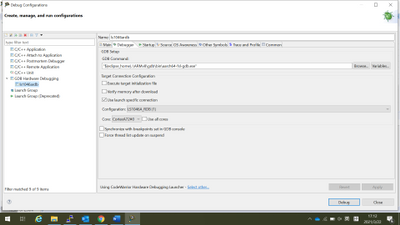
Please configure Startup panel as the following
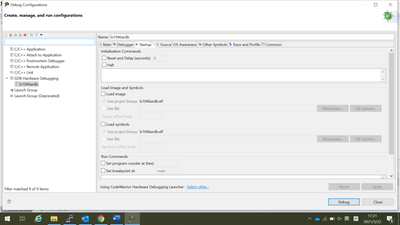
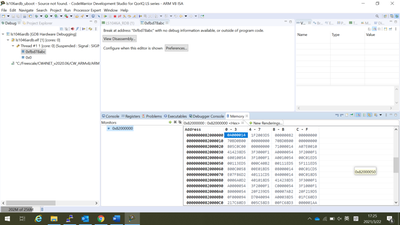
Then click "Debug" to connect to the target board, then click "suspend" in CodeWarrior IDE.
Then click Window->Show view->Memory, click "+“ to read memory 0x82000000, please check whether you could read similar content as the following.
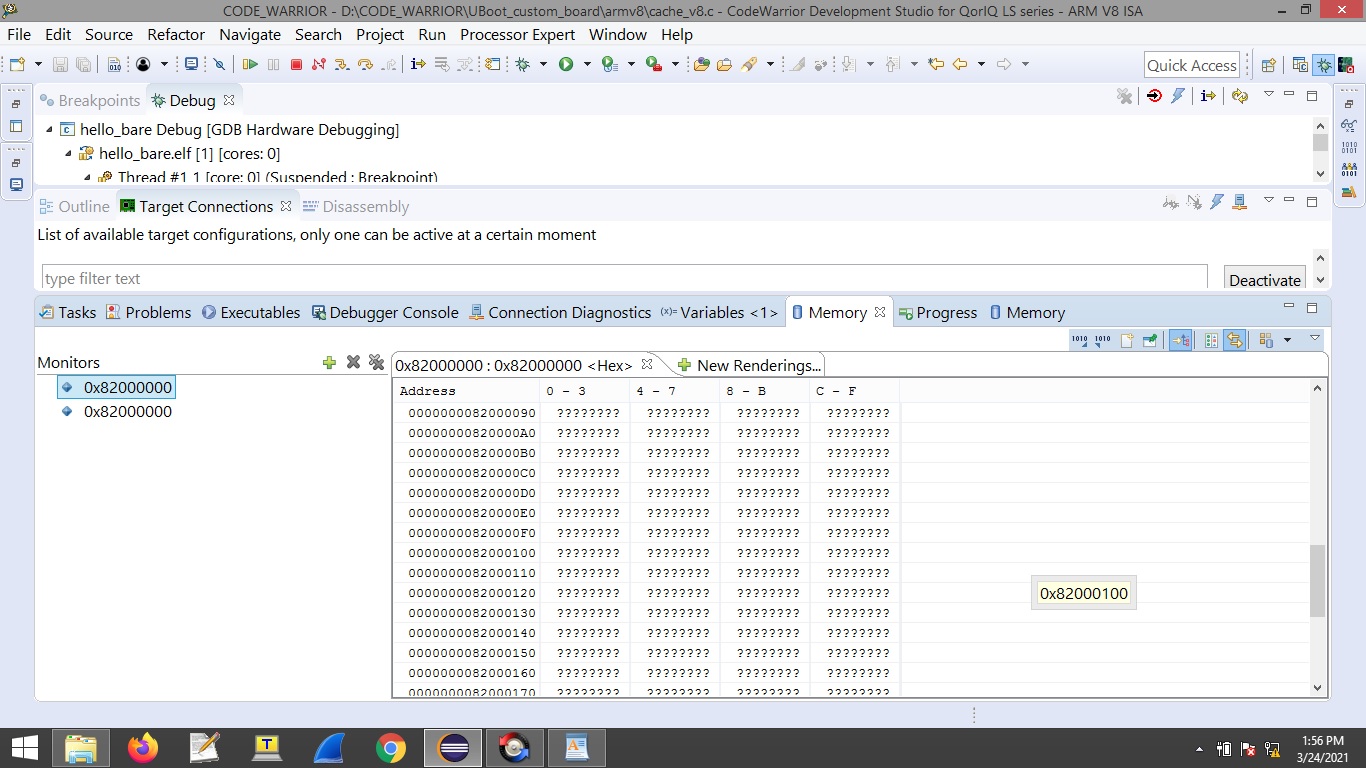
DDR_CLK is 2100MT/s. we modified static_2100. I have attached the rcw file and uart log file with regs captured. After multiple attempts we can debug uboot and it hangs after cpu_arch_init function in cpu.c file. Most of the times, debug does not happen. I have attached code warrior error window also.
yipingwang
Before read memory 0x82000000 in CodeWarrior IDE, you need to click "suspend button" to stop the CPU.
For u-boot debugging, you could refer to https://community.nxp.com/t5/CodeWarrior-for-QorIQ-Knowledge/Use-CodeWarrior-for-ARMv8-to-Debug-U-bo...
In addition, it seems that your target board is unstable, please try other custom board to do debugging.
yipingwang
According to your description, there is no problem in DDR initialization now, u-boot can start to execute. You could debug u-boot with CodeWarrior to find the exact place where u-boot stuck.
In addition, it seems that your custom board is not stable, you could change to other custom board to do more verification.
The issue was in rcw file. We had commented #include <usb_phy_freq.rcw> line in rcw as there is no usb in our custom card. After uncommenting the line uboot loading is okay.
Thanks for your help.
