
- Forums
- Product Forums
- General Purpose MicrocontrollersGeneral Purpose Microcontrollers
- i.MX Forumsi.MX Forums
- QorIQ Processing PlatformsQorIQ Processing Platforms
- Identification and SecurityIdentification and Security
- Power ManagementPower Management
- Wireless ConnectivityWireless Connectivity
- RFID / NFCRFID / NFC
- Advanced AnalogAdvanced Analog
- Neural Processing UnitsNeural Processing Units
- MCX Microcontrollers
- S32G
- S32K
- S32V
- MPC5xxx
- Other NXP Products
- S12 / MagniV Microcontrollers
- Powertrain and Electrification Analog Drivers
- Sensors
- Vybrid Processors
- Digital Signal Controllers
- 8-bit Microcontrollers
- ColdFire/68K Microcontrollers and Processors
- PowerQUICC Processors
- OSBDM and TBDML
- S32M
- S32Z/E
-
- Solution Forums
- Software Forums
- MCUXpresso Software and ToolsMCUXpresso Software and Tools
- CodeWarriorCodeWarrior
- MQX Software SolutionsMQX Software Solutions
- Model-Based Design Toolbox (MBDT)Model-Based Design Toolbox (MBDT)
- FreeMASTER
- eIQ Machine Learning Software
- Embedded Software and Tools Clinic
- S32 SDK
- S32 Design Studio
- GUI Guider
- Zephyr Project
- Voice Technology
- Application Software Packs
- Secure Provisioning SDK (SPSDK)
- Processor Expert Software
- Generative AI & LLMs
-
- Topics
- Mobile Robotics - Drones and RoversMobile Robotics - Drones and Rovers
- NXP Training ContentNXP Training Content
- University ProgramsUniversity Programs
- Rapid IoT
- NXP Designs
- SafeAssure-Community
- OSS Security & Maintenance
- Using Our Community
-
- Cloud Lab Forums
-
- Knowledge Bases
- ARM Microcontrollers
- i.MX Processors
- Identification and Security
- Model-Based Design Toolbox (MBDT)
- QorIQ Processing Platforms
- S32 Automotive Processing Platform
- Wireless Connectivity
- CodeWarrior
- MCUXpresso Suite of Software and Tools
- MQX Software Solutions
- RFID / NFC
- Advanced Analog
- Neural Processing Units
-
- NXP Tech Blogs
- Home
- :
- Software Forums
- :
- Processor Expert Software
- :
- Re: PE example project fo TWR-K60 linker file wrong?
PE example project fo TWR-K60 linker file wrong?
- Subscribe to RSS Feed
- Mark Topic as New
- Mark Topic as Read
- Float this Topic for Current User
- Bookmark
- Subscribe
- Mute
- Printer Friendly Page
PE example project fo TWR-K60 linker file wrong?

- Mark as New
- Bookmark
- Subscribe
- Mute
- Subscribe to RSS Feed
- Permalink
- Report Inappropriate Content
This file seems worng:
C:\Freescale\CW MCU v10.4\MCU\CodeWarrior_Examples\Processor_Expert\Kinetis\TWR-K60N512\PWM\Project_Settings\Linker_Files
MEMORY {
interrupts (RX) : ORIGIN = 0x1FFF0000, LENGTH = 0x000001E0 ==>should be 0x00000000
code (RX) : ORIGIN = 0x1FFF01E0, LENGTH = 0x00015220 ==>should be 0x00000410
data (RW) : ORIGIN = 0x20005400, LENGTH = 0x0000AC00
cfmprotrom (RX) : ORIGIN = 0x00000400, LENGTH = 0x00000010
}
because the code is not in FLASH, so the programming is not working after recycle the power. Am I right?
Regards
Sam

 TICS_Fiona
- Mark as New
- Bookmark
- Subscribe
- Mute
- Subscribe to RSS Feed
- Permalink
- Report Inappropriate Content
Yes, this demo is running in RAM. If you would like it running in Flash, you may re-configure the 'Generate linker file' -> 'ROM/RAM Areas' options in CPU component, which are under Build Options Tab in CPU component Inspector. PE will re-generate link file.
- Mark as New
- Bookmark
- Subscribe
- Mute
- Subscribe to RSS Feed
- Permalink
- Report Inappropriate Content
I try other project in this directory, it will regenerate link file if I change the build settings, for example if I change the setting for SDHC project:
SDHC:MK60DN512Z_INTERNAL_FLASH ==> SDHC:MK60DN512Z_INTERNAL_RAM
The file at "C:\Freescale\CW MCU v10.4\MCU\CodeWarrior_Examples\Processor_Expert\Kinetis\TWR-K60N512\SDHC\Project_Settings\Linker_Files\ProcessorExpert.lcf" will change accordingly.
But for PWM project, the linker file "C:\Freescale\CW MCU v10.4\MCU\CodeWarrior_Examples\ Processor_Expert\Kinetis\TWR-K60N512\PWM\Project_Settings\Linker_Files\ProcessorExpert.lcf" will not being changed when I change the build settings,
SDHC:MK60DN512Z_INTERNAL_RAM ==> SDHC:MK60DN512Z_INTERNAL_FLASH.
Is this same for your CW10.4?
Regards
Sam
 Petr_H
- Mark as New
- Bookmark
- Subscribe
- Mute
- Subscribe to RSS Feed
- Permalink
- Report Inappropriate Content
Hi
What you need to do is to switch to the appropriate Generator configuration (..._Internal_flash). The configurations are visile in the Component view and should be pre-set to select appropriate CPU component (notice that there are two - one is for set-up for code in RAM, the other for code in FLASH).
However, when I imported the PWM project, it seems that it's incorrectly set, because when you change the configuration, it does not switch the CPU, which is the component that actually produces the .LCF file. (There is a typo in the configuration name, there is MK60FN1M0.... instead MKDN60.....)
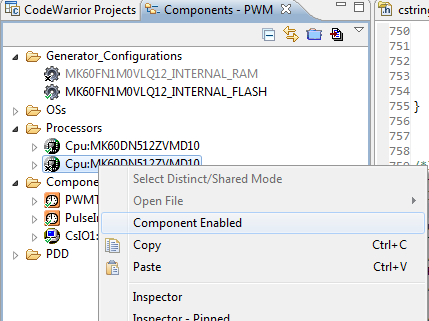
The workaround is to select the CPU manually (you can also see the picture below):
- Invoke pop-up menu for the second CPU component
- Select "Component enabled" option.
- Re-generate the code.
best regards
Petr Hradsky
Processor Expert Support Team
- Mark as New
- Bookmark
- Subscribe
- Mute
- Subscribe to RSS Feed
- Permalink
- Report Inappropriate Content
Hi Petr,
Following your instruction, I can change the .lcf file when I change between RAM and FLASH, the PWM.afx.xMAP file seems correct,
when I set it to FLASH, it works during debug mode, but when I recycle the power it doesn't work at all.
The attached files are the files in my PC, please check whether it is the same in your PC?
Regards
Sam
Petr_H
- Mark as New
- Bookmark
- Subscribe
- Mute
- Subscribe to RSS Feed
- Permalink
- Report Inappropriate Content
I have imported your project and it seems set to RAM.
Please check if your project looks as on this picture:
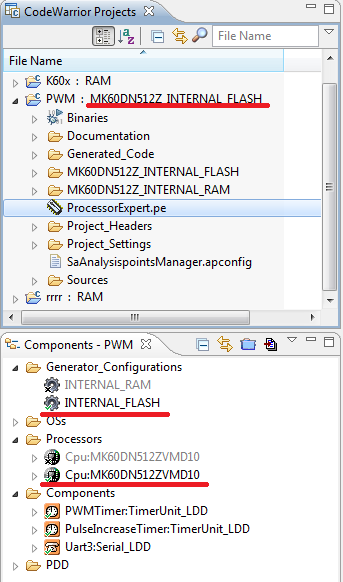
Does it match?
If not, select the Generator configuration using command "Select active configuration":
(This is the normal way how the targets should be switched in PEx as it ensures that it changes CPU settings and also switches CodeWarrior build configuration):
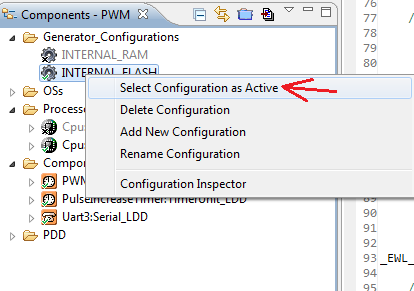
Then try to clean and build the project again.
best regards
Petr Hradsky
Processor Expert Support Team
- Mark as New
- Bookmark
- Subscribe
- Mute
- Subscribe to RSS Feed
- Permalink
- Report Inappropriate Content
Hi Petr,
Thanks.
I check the settings, all correct as you indicated.
I check the ProcessorExperter.lcf and PWM.afx.xMAP file, it is in the FLASH.
It works for my DEBUGGER, but it still not working after I recycle the power.
I can't work out the reason, but I find the function "printf("*** \n\r");" print message to console
during debugging, for other examples the print message goes to Uart3.
Something wrong with this project.
Regards
Sam
Petr_H
- Mark as New
- Bookmark
- Subscribe
- Mute
- Subscribe to RSS Feed
- Permalink
- Report Inappropriate Content
Then it might be somehow related to debug connection. Can you completely disconnect the debug connection? Or at least quit CodeWarrior and then switch off/on the power.
On Kinetis L I have experienced that the application doesn't run standalone when the CodeWarrior is running. The debugger somehow blocks cpu from running eve though it's not active in the IDE. After closing CW the application was running after power on normally.
best regards
Petr Hradsky
Processor Expert Support Team
