
- Forums
- Product Forums
- General Purpose MicrocontrollersGeneral Purpose Microcontrollers
- i.MX Forumsi.MX Forums
- QorIQ Processing PlatformsQorIQ Processing Platforms
- Identification and SecurityIdentification and Security
- Power ManagementPower Management
- Wireless ConnectivityWireless Connectivity
- RFID / NFCRFID / NFC
- Advanced AnalogAdvanced Analog
- Neural Processing UnitsNeural Processing Units
- MCX Microcontrollers
- S32G
- S32K
- S32V
- MPC5xxx
- Other NXP Products
- S12 / MagniV Microcontrollers
- Powertrain and Electrification Analog Drivers
- Sensors
- Vybrid Processors
- Digital Signal Controllers
- 8-bit Microcontrollers
- ColdFire/68K Microcontrollers and Processors
- PowerQUICC Processors
- OSBDM and TBDML
- S32M
- S32Z/E
-
- Solution Forums
- Software Forums
- MCUXpresso Software and ToolsMCUXpresso Software and Tools
- CodeWarriorCodeWarrior
- MQX Software SolutionsMQX Software Solutions
- Model-Based Design Toolbox (MBDT)Model-Based Design Toolbox (MBDT)
- FreeMASTER
- eIQ Machine Learning Software
- Embedded Software and Tools Clinic
- S32 SDK
- S32 Design Studio
- GUI Guider
- Zephyr Project
- Voice Technology
- Application Software Packs
- Secure Provisioning SDK (SPSDK)
- Processor Expert Software
- Generative AI & LLMs
-
- Topics
- Mobile Robotics - Drones and RoversMobile Robotics - Drones and Rovers
- NXP Training ContentNXP Training Content
- University ProgramsUniversity Programs
- Rapid IoT
- NXP Designs
- SafeAssure-Community
- OSS Security & Maintenance
- Using Our Community
-
- Cloud Lab Forums
-
- Knowledge Bases
- ARM Microcontrollers
- i.MX Processors
- Identification and Security
- Model-Based Design Toolbox (MBDT)
- QorIQ Processing Platforms
- S32 Automotive Processing Platform
- Wireless Connectivity
- CodeWarrior
- MCUXpresso Suite of Software and Tools
- MQX Software Solutions
- RFID / NFC
- Advanced Analog
- Neural Processing Units
-
- NXP Tech Blogs
- Home
- :
- Software Forums
- :
- Processor Expert Software
- :
- Error when disable interrupt of ADC component (Processor Expert)
Error when disable interrupt of ADC component (Processor Expert)
- Subscribe to RSS Feed
- Mark Topic as New
- Mark Topic as Read
- Float this Topic for Current User
- Bookmark
- Subscribe
- Mute
- Printer Friendly Page

- Mark as New
- Bookmark
- Subscribe
- Mute
- Subscribe to RSS Feed
- Permalink
- Report Inappropriate Content
Hi,
I am doing some test with KLZ25 board with Processor Export.
When I add a ADC component, it works well.

but when I disable its interrupt, there will be an error:
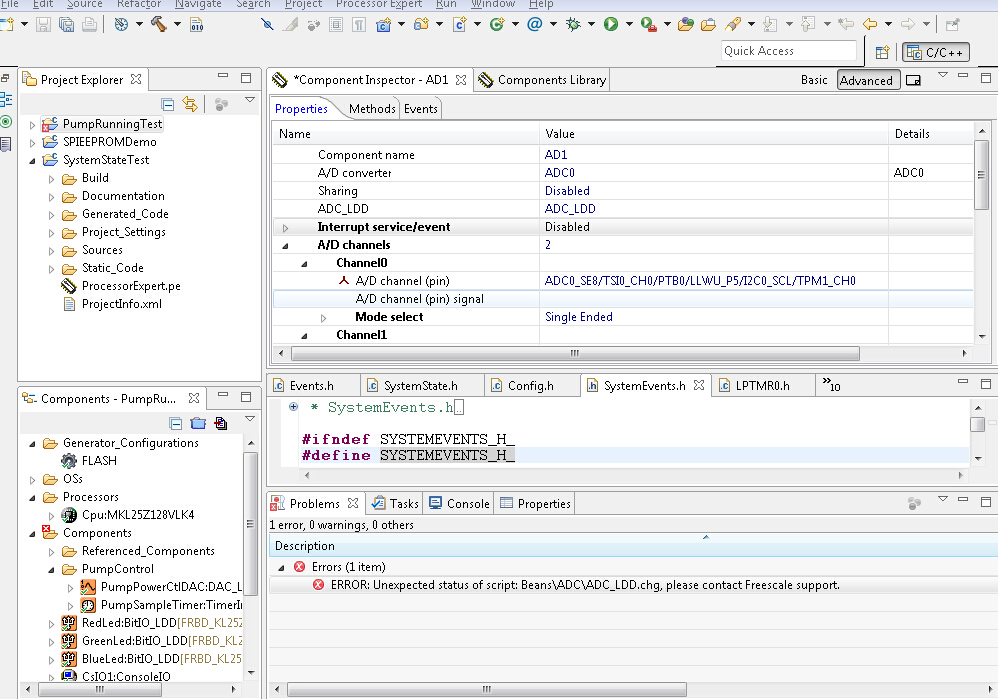
I can not figure out the problem. Does it mean I can not disable the ADC interrupt?
Thanks,
Henry Xin
Solved! Go to Solution.

 Alice_Yang
- Mark as New
- Bookmark
- Subscribe
- Mute
- Subscribe to RSS Feed
- Permalink
- Report Inappropriate Content
Hi henry,
Please update the Processor Expert Software : help -> Install New Software,

and i recommend you updated other related software if you use .
On my side , there is no error refer to you said to configure :
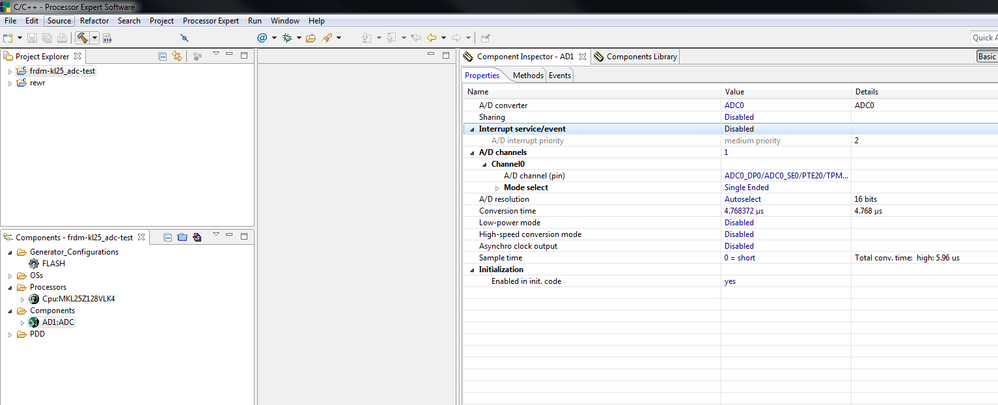
Best Regards,
Alice
------------------------------------------------------------------------------------------
If this post answers your question, please click the Correct Answer button.
-----------------------------------------------------------------------------------
If this post help your question, please click the helpful Answer button.
Alice_Yang
- Mark as New
- Bookmark
- Subscribe
- Mute
- Subscribe to RSS Feed
- Permalink
- Report Inappropriate Content
Hello Henry,
On my side , when only add the ADC_LDD component , disable the interrupt , there is no error :
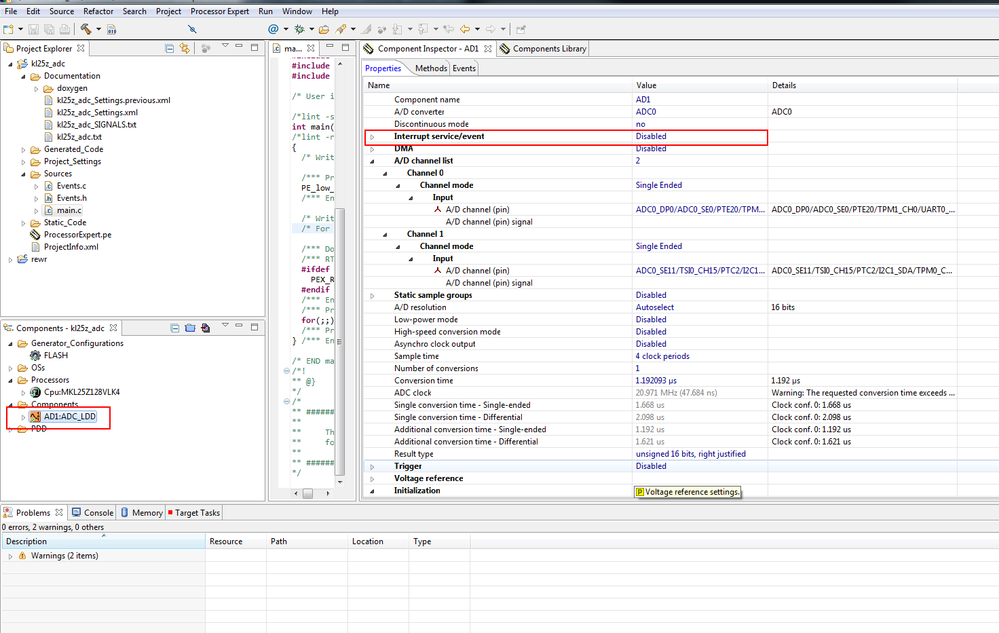
Please tell me which Processor Expert you use ?
And i think it is maybe not the problem of disable the interrupt.
Please create a simple project ,only add the ADC component, then test it .If still have error , please send you project to me , i will test it on my side .
Have a great day,
Alice
-----------------------------------------------------------------------------------------------------------------------
Note: If this post answers your question, please click the Correct Answer button. Thank you!
-----------------------------------------------------------------------------------------------------------------------
- Mark as New
- Bookmark
- Subscribe
- Mute
- Subscribe to RSS Feed
- Permalink
- Report Inappropriate Content
Hi Alice,
Thanks for your reply.
But I tried to create a simple project which only has an ADC component, and still got error as:
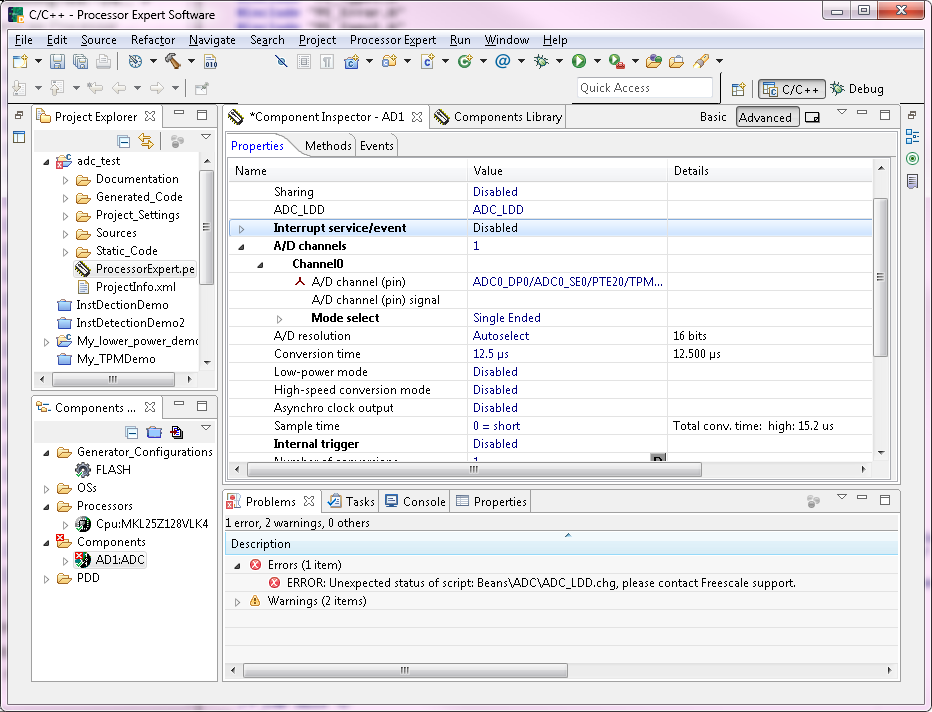
Following is my PE version information:
Processor Expert Software,
Microcontroller Driver Suite
(c) Copyright Freescale Semiconductor, Inc. All rights reserved.
http://www.freescale.com/processorexpert
Version: 10.4.0
Build: b140319
BR
Henry
- Mark as New
- Bookmark
- Subscribe
- Mute
- Subscribe to RSS Feed
- Permalink
- Report Inappropriate Content
By the way I used the ADC component in the "CPU Internal Peripherals" category, not in the "Logical Device drivers" category.
Thanks,
Henry
Alice_Yang
- Mark as New
- Bookmark
- Subscribe
- Mute
- Subscribe to RSS Feed
- Permalink
- Report Inappropriate Content
Hi henry,
Please update the Processor Expert Software : help -> Install New Software,
and i recommend you updated other related software if you use .
On my side , there is no error refer to you said to configure :
Best Regards,
Alice
------------------------------------------------------------------------------------------
If this post answers your question, please click the Correct Answer button.
-----------------------------------------------------------------------------------
If this post help your question, please click the helpful Answer button.
- Mark as New
- Bookmark
- Subscribe
- Mute
- Subscribe to RSS Feed
- Permalink
- Report Inappropriate Content
Hi Alice,
After updating the PE, It works well with me.
Thank you very much.
Henry
