
- Forums
- Product Forums
- General Purpose MicrocontrollersGeneral Purpose Microcontrollers
- i.MX Forumsi.MX Forums
- QorIQ Processing PlatformsQorIQ Processing Platforms
- Identification and SecurityIdentification and Security
- Power ManagementPower Management
- Wireless ConnectivityWireless Connectivity
- RFID / NFCRFID / NFC
- Advanced AnalogAdvanced Analog
- Neural Processing UnitsNeural Processing Units
- MCX Microcontrollers
- S32G
- S32K
- S32V
- MPC5xxx
- Other NXP Products
- S12 / MagniV Microcontrollers
- Powertrain and Electrification Analog Drivers
- Sensors
- Vybrid Processors
- Digital Signal Controllers
- 8-bit Microcontrollers
- ColdFire/68K Microcontrollers and Processors
- PowerQUICC Processors
- OSBDM and TBDML
- S32M
- S32Z/E
-
- Solution Forums
- Software Forums
- MCUXpresso Software and ToolsMCUXpresso Software and Tools
- CodeWarriorCodeWarrior
- MQX Software SolutionsMQX Software Solutions
- Model-Based Design Toolbox (MBDT)Model-Based Design Toolbox (MBDT)
- FreeMASTER
- eIQ Machine Learning Software
- Embedded Software and Tools Clinic
- S32 SDK
- S32 Design Studio
- GUI Guider
- Zephyr Project
- Voice Technology
- Application Software Packs
- Secure Provisioning SDK (SPSDK)
- Processor Expert Software
- Generative AI & LLMs
-
- Topics
- Mobile Robotics - Drones and RoversMobile Robotics - Drones and Rovers
- NXP Training ContentNXP Training Content
- University ProgramsUniversity Programs
- Rapid IoT
- NXP Designs
- SafeAssure-Community
- OSS Security & Maintenance
- Using Our Community
-
- Cloud Lab Forums
-
- Knowledge Bases
- ARM Microcontrollers
- i.MX Processors
- Identification and Security
- Model-Based Design Toolbox (MBDT)
- QorIQ Processing Platforms
- S32 Automotive Processing Platform
- Wireless Connectivity
- CodeWarrior
- MCUXpresso Suite of Software and Tools
- MQX Software Solutions
- RFID / NFC
- Advanced Analog
- Neural Processing Units
-
- NXP Tech Blogs
- Home
- :
- パワーマネージメント
- :
- パワーマネージメント
- :
- Re: PF3000/1 Tool Issue
PF3000/1 Tool Issue
- RSS フィードを購読する
- トピックを新着としてマーク
- トピックを既読としてマーク
- このトピックを現在のユーザーにフロートします
- ブックマーク
- 購読
- ミュート
- 印刷用ページ

 MatsunagaHitosh
- 新着としてマーク
- ブックマーク
- 購読
- ミュート
- RSS フィードを購読する
- ハイライト
- 印刷
- 不適切なコンテンツを報告
PF3000 GUI does not find/detect FRDM-KL25Z board.
Windows 10 can recognize BOOTLOADER/FRDM-KL25Z with connecting SDA port, but GUI cannot detect KL25Z and not turn on LED on KITPF3000FRDMPGM.
Could you advice how to fix this issue?
Here is current configuration.
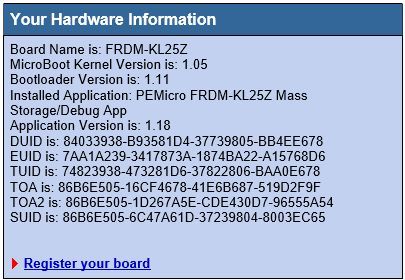
Best Regards,
Matsunaga
解決済! 解決策の投稿を見る。
 TomasVaverka
- 新着としてマーク
- ブックマーク
- 購読
- ミュート
- RSS フィードを購読する
- ハイライト
- 印刷
- 不適切なコンテンツを報告
Hi Matsunaga-san,
I suppose you need to program the KL25Z board with the attached PF3000_HID_GUI_KLZ25Z bin file.
Please connect the USB cable to the Open SDA connector of the board, the board should be detected by the computer as a normal USB disk, just drag and drop the PF3000_HID_GUI_KLZ25Z.bin file into the FRDM-KL25Z “USB disk”.
Then, unplug the USB cable, connect the KITPF3000FRDMPGM board on top of the FRDM- KL25Z and connect the USB cable into the KL25Z_USB connector (different from the Open SDA connector).
Then open the PF3000_HID_GUI and click on enable target check box and it should be ready to work.
Hope it helps!
Best regards,
Tomas
PS: If my answer helps to solve your question, please mark it as "Correct" or “Helpful”. Thank you.
- 新着としてマーク
- ブックマーク
- 購読
- ミュート
- RSS フィードを購読する
- ハイライト
- 印刷
- 不適切なコンテンツを報告
hi,
Programmer board is detecting as mass storage device. How to solve this issue. ?
But it was detecting properly few days ago.
TomasVaverka
- 新着としてマーク
- ブックマーク
- 購読
- ミュート
- RSS フィードを購読する
- ハイライト
- 印刷
- 不適切なコンテンツを報告
Hi Matsunaga-san,
I suppose you need to program the KL25Z board with the attached PF3000_HID_GUI_KLZ25Z bin file.
Please connect the USB cable to the Open SDA connector of the board, the board should be detected by the computer as a normal USB disk, just drag and drop the PF3000_HID_GUI_KLZ25Z.bin file into the FRDM-KL25Z “USB disk”.
Then, unplug the USB cable, connect the KITPF3000FRDMPGM board on top of the FRDM- KL25Z and connect the USB cable into the KL25Z_USB connector (different from the Open SDA connector).
Then open the PF3000_HID_GUI and click on enable target check box and it should be ready to work.
Hope it helps!
Best regards,
Tomas
PS: If my answer helps to solve your question, please mark it as "Correct" or “Helpful”. Thank you.
MatsunagaHitosh
- 新着としてマーク
- ブックマーク
- 購読
- ミュート
- RSS フィードを購読する
- ハイライト
- 印刷
- 不適切なコンテンツを報告
Hi Tomas
Problem was solved by your attached file.
Thank you!
Matsunaga
