
- Forums
- Product Forums
- General Purpose MicrocontrollersGeneral Purpose Microcontrollers
- i.MX Forumsi.MX Forums
- QorIQ Processing PlatformsQorIQ Processing Platforms
- Identification and SecurityIdentification and Security
- Power ManagementPower Management
- Wireless ConnectivityWireless Connectivity
- RFID / NFCRFID / NFC
- Advanced AnalogAdvanced Analog
- Neural Processing UnitsNeural Processing Units
- MCX Microcontrollers
- S32G
- S32K
- S32V
- MPC5xxx
- Other NXP Products
- S12 / MagniV Microcontrollers
- Powertrain and Electrification Analog Drivers
- Sensors
- Vybrid Processors
- Digital Signal Controllers
- 8-bit Microcontrollers
- ColdFire/68K Microcontrollers and Processors
- PowerQUICC Processors
- OSBDM and TBDML
- S32M
- S32Z/E
-
- Solution Forums
- Software Forums
- MCUXpresso Software and ToolsMCUXpresso Software and Tools
- CodeWarriorCodeWarrior
- MQX Software SolutionsMQX Software Solutions
- Model-Based Design Toolbox (MBDT)Model-Based Design Toolbox (MBDT)
- FreeMASTER
- eIQ Machine Learning Software
- Embedded Software and Tools Clinic
- S32 SDK
- S32 Design Studio
- GUI Guider
- Zephyr Project
- Voice Technology
- Application Software Packs
- Secure Provisioning SDK (SPSDK)
- Processor Expert Software
- Generative AI & LLMs
-
- Topics
- Mobile Robotics - Drones and RoversMobile Robotics - Drones and Rovers
- NXP Training ContentNXP Training Content
- University ProgramsUniversity Programs
- Rapid IoT
- NXP Designs
- SafeAssure-Community
- OSS Security & Maintenance
- Using Our Community
-
- Cloud Lab Forums
-
- Knowledge Bases
- ARM Microcontrollers
- i.MX Processors
- Identification and Security
- Model-Based Design Toolbox (MBDT)
- QorIQ Processing Platforms
- S32 Automotive Processing Platform
- Wireless Connectivity
- CodeWarrior
- MCUXpresso Suite of Software and Tools
- MQX Software Solutions
- RFID / NFC
- Advanced Analog
- Neural Processing Units
-
- NXP Tech Blogs
- RSS フィードを購読する
- トピックを新着としてマーク
- トピックを既読としてマーク
- このトピックを現在のユーザーにフロートします
- ブックマーク
- 購読
- ミュート
- 印刷用ページ
binutils-cross_2.38.bb:do_compile failed

- 新着としてマーク
- ブックマーク
- 購読
- ミュート
- RSS フィードを購読する
- ハイライト
- 印刷
- 不適切なコンテンツを報告
Hi,
I am trying to build an image using:
- Description: Ubuntu 22.04.2 LTS
- Release: 22.04
I downloaded yocto :
- repo init -u https://github.com/nxp-imx/ -b imx-linux-kirkstone -m imx-5.15.32-2.0.0.xml
I tried to build using:
- MACHINE=imx7dsabresd DISTRO=fsl-imx-fb source ./imx-setup-release.sh -b build
- MACHINE=imx7dsabresd bitbake fsl-image-machine-test
I get the following error:
ERROR: Task (/home/simon/yocto_imx_5_15_32/sources/poky/meta/recipes-devtools/binutils/binutils-cross_2.38.bb:do_compile) failed with exit code '1'
What am I missing?
- Note1: I already made a link between python and python3 (sudo apt install python-is-python3)
- Note2: I also made a link between pylint and pylint3
$ ls -l pylint*
-rwxr-xr-x 1 root root 956 Dec 5 2021 pylint
lrwxrwxrwx 1 root root 6 Apr 14 14:13 pylint3 -> pylint
Thank you,
Simon

- 新着としてマーク
- ブックマーク
- 購読
- ミュート
- RSS フィードを購読する
- ハイライト
- 印刷
- 不適切なコンテンツを報告
Hi @SVC2 ,
I got the same error information with you, have you solved this problem?
- 新着としてマーク
- ブックマーク
- 購読
- ミュート
- RSS フィードを購読する
- ハイライト
- 印刷
- 不適切なコンテンツを報告
No, I could not resolve the issue.
I had to revert back to Ubuntu 20 to be able to compile.
S.
- 新着としてマーク
- ブックマーク
- 購読
- ミュート
- RSS フィードを購読する
- ハイライト
- 印刷
- 不適切なコンテンツを報告
Thanks Brian,
- I am using: Ubuntu 22.04.2 LTS
- The application pylint3 is deprecated.
$ sudo apt install pylint3
Reading package lists... Done
Building dependency tree... Done
Reading state information... Done
E: Unable to locate package pylint3
- I installed pylint and made a link to pylint3:
$ ls -l /usr/bin/pylint*
-rwxr-xr-x 1 root root 956 Dec 5 2021 /usr/bin/pylint
lrwxrwxrwx 1 root root 6 Apr 14 14:13 /usr/bin/pylint3 -> pylint
- The rest of the application are installed:
$ sudo apt install gawk wget git diffstat unzip texinfo gcc build-essential chrpath socat cpio python3 python3-pip python3-pexpect xz-utils debianutils iputils-ping python3-git python3-jinja2 libegl1-mesa libsdl1.2-dev xterm python3-subunit mesa-common-dev zstd liblz4-tool rsync curl
Reading package lists... Done
Building dependency tree... Done
Reading state information... Done
build-essential is already the newest version (12.9ubuntu3).
cpio is already the newest version (2.13+dfsg-7).
debianutils is already the newest version (5.5-1ubuntu2).
diffstat is already the newest version (1.64-1build2).
gawk is already the newest version (1:5.1.0-1build3).
gcc is already the newest version (4:11.2.0-1ubuntu1).
iputils-ping is already the newest version (3:20211215-1).
python3-jinja2 is already the newest version (3.0.3-1).
python3-pexpect is already the newest version (4.8.0-2ubuntu1).
socat is already the newest version (1.7.4.1-3ubuntu4).
wget is already the newest version (1.21.2-2ubuntu1).
xz-utils is already the newest version (5.2.5-2ubuntu1).
zstd is already the newest version (1.4.8+dfsg-3build1).
chrpath is already the newest version (0.16-2).
liblz4-tool is already the newest version (1.9.3-2build2).
libsdl1.2-dev is already the newest version (1.2.15+dfsg2-6).
python3-git is already the newest version (3.1.24-1).
python3-subunit is already the newest version (1.4.0-3).
texinfo is already the newest version (6.8-4build1).
xterm is already the newest version (372-1ubuntu1).
curl is already the newest version (7.81.0-1ubuntu1.10).
git is already the newest version (1:2.34.1-1ubuntu1.8).
mesa-common-dev is already the newest version (22.2.5-0ubuntu0.1~22.04.1).
python3 is already the newest version (3.10.6-1~22.04).
rsync is already the newest version (3.2.7-0ubuntu0.22.04.2).
unzip is already the newest version (6.0-26ubuntu3.1).
libegl1-mesa is already the newest version (22.2.5-0ubuntu0.1~22.04.1).
python3-pip is already the newest version (22.0.2+dfsg-1ubuntu0.2).
The following packages were automatically installed and are no longer required:
libflashrom1 libftdi1-2 libllvm13
Use 'sudo apt autoremove' to remove them.
0 upgraded, 0 newly installed, 0 to remove and 17 not upgraded.
- I downloaded yocto using:
repo init -u https://github.com/nxp-imx/ -b imx-linux-kirkstone -m imx-5.15.32-2.0.0.xml
- Tried to build using:
MACHINE=imx7dsabresd bitbake fsl-image-machine-test
- Build fails:
WARNING: You have included the meta-virtualization layer, but 'virtualization' has not been enabled in your DISTRO_FEATURES. Some bbappend files may not take effect. See the meta-virtualization README for details on enabling virtualization support.
WARNING: Host distribution "ubuntu-22.04" has not been validated with this version of the build system; you may possibly experience unexpected failures. It is recommended that you use a tested distribution.
Loading cache: 100% |###############################################################################################################################################################################| Time: 0:00:10
Loaded 4736 entries from dependency cache.
Parsing recipes: 100% |#############################################################################################################################################################################| Time: 0:00:07
Parsing of 3187 .bb files complete (3186 cached, 1 parsed). 4737 targets, 652 skipped, 5 masked, 0 errors.
NOTE: Resolving any missing task queue dependencies

Build Configuration:
BB_VERSION           = "2.0.0"
BUILD_SYS            = "x86_64-linux"
NATIVELSBSTRING      = "universal"
TARGET_SYS           = "arm-poky-linux-gnueabi"
MACHINE              = "imx7dsabresd"
DISTRO               = "fsl-imx-fb"
DISTRO_VERSION       = "5.15-kirkstone"
TUNE_FEATURES        = "arm vfp cortexa7 neon thumb callconvention-hard"
TARGET_FPU           = "hard"
meta
meta-poky            = "HEAD:27de52e402ae000dfa502d52908cd6e6aef923ec"
meta-oe
meta-multimedia
meta-python          = "HEAD:5357c7a40eaf8d1bcf7ff58edbba8e9527e40c7d"
meta-freescale       = "HEAD:2fb1ce365338126aad365012ebb913b3e4a9f1be"
meta-freescale-3rdparty = "HEAD:de0eb1408150d77f9cce97c559f9a5a3c71e5d6c"
meta-freescale-distro = "HEAD:fc15f5003043da23212596be7366ae2547c308ad"
meta-bsp
meta-sdk
meta-ml
meta-v2x             = "HEAD:9fa550c958b950526e1bb1c8e8ed8b6ac4f29119"
meta-nxp-demo-experience = "HEAD:35c364933945dd15b7a96b60675fc304ce6fb881"
meta-chromium        = "HEAD:d25d8ee98a656b2534d0eec6138ef264529fab4f"
meta-clang           = "HEAD:85d956d95401479ca666139e31f662f60c156d5f"
meta-gnome
meta-networking
meta-filesystems     = "HEAD:5357c7a40eaf8d1bcf7ff58edbba8e9527e40c7d"
meta-qt6             = "HEAD:b2894aad5c1aaa85f2f5c7b94391b7c51c39e555"
meta-virtualization  = "HEAD:973c8d0964c6f40338857efe5b8009b2f647d485"

Initialising tasks: 100% |##########################################################################################################################################################################| Time: 0:00:14
Sstate summary: Wanted 2352 Local 0 Mirrors 0 Missed 2352 Current 83 (0% match, 3% complete)
NOTE: Executing Tasks
ERROR: binutils-cross-arm-2.38-r0 do_compile: oe_runmake failed
ERROR: binutils-cross-arm-2.38-r0 do_compile: ExecutionError('/home/simon/yocto_imx_5_15_32/build/tmp/work/x86_64-linux/binutils-cross-arm/2.38-r0/temp/run.do_compile.397350', 1, None, None)
ERROR: Logfile of failure stored in: /home/simon/yocto_imx_5_15_32/build/tmp/work/x86_64-linux/binutils-cross-arm/2.38-r0/temp/log.do_compile.397350
Log data follows:
... ... ....
ERROR: Task (/home/simon/yocto_imx_5_15_32/sources/poky/meta/recipes-devtools/binutils/binutils-cross_2.38.bb:do_compile) failed with exit code '1'
NOTE: Tasks Summary: Attempted 374 tasks of which 368 didn't need to be rerun and 1 failed.

Summary: 1 task failed:
  /home/simon/yocto_imx_5_15_32/sources/poky/meta/recipes-devtools/binutils/binutils-cross_2.38.bb:do_compile
Summary: There were 2 WARNING messages.
Summary: There were 2 ERROR messages, returning a non-zero exit code.

 brian14
- 新着としてマーク
- ブックマーク
- 購読
- ミュート
- RSS フィードを購読する
- ハイライト
- 印刷
- 不適切なコンテンツを報告
Hi @SVC2,
Thank you for your reply.
Based on your information and considering that I could build this BSP version, the problem could be the host environment.
We could try to restart the build process using the following command:
1. First, use the command
bitbake -c cleanall
This command will help us to clean the entire component build component.
2.Then, we will need to clean the cache related to the build progress saved by bitbake.
bitbake -c cleansstate
Please try these commands and apply the steps given in my last reply.
Best regards, Brian.
- 新着としてマーク
- ブックマーク
- 購読
- ミュート
- RSS フィードを購読する
- ハイライト
- 印刷
- 不適切なコンテンツを報告
1) Cleanup
$ bitbake -c cleanall
Nothing to do.  Use 'bitbake world' to build everything, or run 'bitbake --help' for usage information.
2) Clean Cash
$ bitbake -c cleansstate
Nothing to do.  Use 'bitbake world' to build everything, or run 'bitbake --help' for usage information.
3) Rebuild. Same result.
ERROR: Task (/home/simon/yocto_imx_5_15_32/sources/poky/meta/recipes-devtools/binutils/binutils-cross_2.38.bb:do_compile) failed with exit code '1'
NOTE: Tasks Summary: Attempted 400 tasks of which 390 didn't need to be rerun and 1 failed.

Summary: 1 task failed:
  /home/simon/yocto_imx_5_15_32/sources/poky/meta/recipes-devtools/binutils/binutils-cross_2.38.bb:do_compile
Summary: There were 2 WARNING messages.
Summary: There were 2 ERROR messages, returning a non-zero exit code.
It probably has something to do with the recipes which are not tailored to Ubuntu 22.04.2 LTS?
Thanks,
Simon
brian14
- 新着としてマーク
- ブックマーク
- 購読
- ミュート
- RSS フィードを購読する
- ハイライト
- 印刷
- 不適切なコンテンツを報告
Hi @SVC2,
Thank you for your reply.
Yes, based on some similar problems related to binutils the resolution could be to change your Ubuntu version to 20.04.
Best regards, Brian.
- 新着としてマーク
- ブックマーク
- 購読
- ミュート
- RSS フィードを購読する
- ハイライト
- 印刷
- 不適切なコンテンツを報告
I installed Ubuntu 20.04.6 LTS
Did all the same steps. Now I get the following error:
| mv -f /home/simon-linux22x/yocto_imx_5_15_32/build/tmp/work/cortexa7t2hf-neon-poky-linux-gnueabi/glibc/2.35-r0/build-arm-poky-linux-gnueabi/elf/rtld-libc.aT /home/simon-linux22x/yocto_imx_5_15_32/build/tmp/work/cortexa7t2hf-neon-poky-linux-gnueabi/glibc/2.35-r0/build-arm-poky-linux-gnueabi/elf/rtld-libc.a
| make[3]: Leaving directory '/home/simon-linux22x/yocto_imx_5_15_32/build/tmp/work/cortexa7t2hf-neon-poky-linux-gnueabi/glibc/2.35-r0/git/elf'
| make[2]: Leaving directory '/home/simon-linux22x/yocto_imx_5_15_32/build/tmp/work/cortexa7t2hf-neon-poky-linux-gnueabi/glibc/2.35-r0/git/elf'
| make[1]: Leaving directory '/home/simon-linux22x/yocto_imx_5_15_32/build/tmp/work/cortexa7t2hf-neon-poky-linux-gnueabi/glibc/2.35-r0/git'
| make[1]: *** [Makefile:503: elf/subdir_lib] Error 2
| make: *** [Makefile:9: all] Error 2
| ERROR: oe_runmake failed
| WARNING: exit code 1 from a shell command.
ERROR: Task (/home/simon-linux22x/yocto_imx_5_15_32/sources/poky/meta/recipes-core/glibc/glibc_2.35.bb:do_compile) failed with exit code '1'
NOTE: Tasks Summary: Attempted 983 tasks of which 979 didn't need to be rerun and 2 failed.

Summary: 2 tasks failed:
  /home/simon-linux22x/yocto_imx_5_15_32/sources/poky/meta/recipes-devtools/cmake/cmake-native_3.22.3.bb:do_compile
  /home/simon-linux22x/yocto_imx_5_15_32/sources/poky/meta/recipes-core/glibc/glibc_2.35.bb:do_compile
Summary: There was 1 WARNING message.
Summary: There were 4 ERROR messages, returning a non-zero exit code.
Thanks,
Simon
brian14
- 新着としてマーク
- ブックマーク
- 購読
- ミュート
- RSS フィードを購読する
- ハイライト
- 印刷
- 不適切なコンテンツを報告
Hi @SVC2,
I just built this BSP version for Machine imx7dsabresd successfully using Ubuntu 20.04.5 LTS.
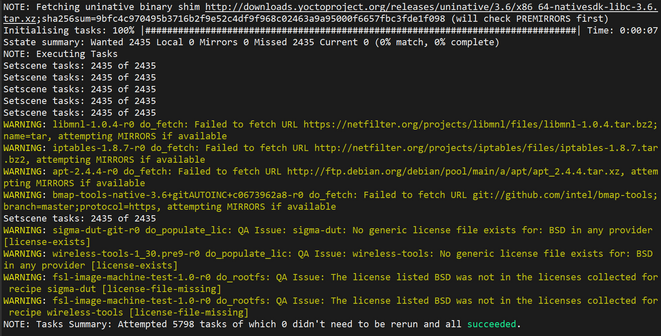
I have some advice for you:
1. Use the following manifest to correctly use the repo tool: GitHub - nxp-imx/imx-manifest at imx-linux-kirkstone
2. Then use the following command to set the build environment: MACHINE=imx7dsabresd DISTRO=fsl-imx-fb source ./imx-setup-release.sh -b build
3. Finally, use this command to start with the build process: bitbake fsl-image-machine-test
Also, is important to set properly the Host Environment you will need to follow the Yocto Project User's Guide for LF5.15.32_2.0.0:
sudo apt install gawk wget git diffstat unzip texinfo gcc build-essential chrpath socat cpio python3 python3-pip python3-pexpect xz-utils debianutils iputils-ping python3-git python3-jinja2 libegl1-mesa libsdl1.2-dev pylint3 xterm python3-subunit mesa-common-dev zstd liblz4-tool rsync curl
Also you can follow the Yocto Project documentation (Yocto Project Quick Build — The Yocto Project ® 4.0.6 documentation) and use the following command to set properly your host environment:
sudo apt install gawk wget git diffstat unzip texinfo gcc build-essential chrpath socat cpio python3 python3-pip python3-pexpect xz-utils debianutils iputils-ping python3-git python3-jinja2 libegl1-mesa libsdl1.2-dev pylint3 xterm python3-subunit mesa-common-dev zstd liblz4-tool
I hope this information will be helpful.
Have a great day!
