
- Forums
- Product Forums
- General Purpose MicrocontrollersGeneral Purpose Microcontrollers
- i.MX Forumsi.MX Forums
- QorIQ Processing PlatformsQorIQ Processing Platforms
- Identification and SecurityIdentification and Security
- Power ManagementPower Management
- Wireless ConnectivityWireless Connectivity
- RFID / NFCRFID / NFC
- Advanced AnalogAdvanced Analog
- MCX Microcontrollers
- S32G
- S32K
- S32V
- MPC5xxx
- Other NXP Products
- S12 / MagniV Microcontrollers
- Powertrain and Electrification Analog Drivers
- Sensors
- Vybrid Processors
- Digital Signal Controllers
- 8-bit Microcontrollers
- ColdFire/68K Microcontrollers and Processors
- PowerQUICC Processors
- OSBDM and TBDML
- S32M
- S32Z/E
-
- Solution Forums
- Software Forums
- MCUXpresso Software and ToolsMCUXpresso Software and Tools
- CodeWarriorCodeWarrior
- MQX Software SolutionsMQX Software Solutions
- Model-Based Design Toolbox (MBDT)Model-Based Design Toolbox (MBDT)
- FreeMASTER
- eIQ Machine Learning Software
- Embedded Software and Tools Clinic
- S32 SDK
- S32 Design Studio
- GUI Guider
- Zephyr Project
- Voice Technology
- Application Software Packs
- Secure Provisioning SDK (SPSDK)
- Processor Expert Software
- Generative AI & LLMs
-
- Topics
- Mobile Robotics - Drones and RoversMobile Robotics - Drones and Rovers
- NXP Training ContentNXP Training Content
- University ProgramsUniversity Programs
- Rapid IoT
- NXP Designs
- SafeAssure-Community
- OSS Security & Maintenance
- Using Our Community
-
- Cloud Lab Forums
-
- Knowledge Bases
- ARM Microcontrollers
- i.MX Processors
- Identification and Security
- Model-Based Design Toolbox (MBDT)
- QorIQ Processing Platforms
- S32 Automotive Processing Platform
- Wireless Connectivity
- CodeWarrior
- MCUXpresso Suite of Software and Tools
- MQX Software Solutions
- RFID / NFC
- Advanced Analog
-
- NXP Tech Blogs
- Home
- :
- 产品论坛
- :
- OSBDM和TBDML
- :
- USBDM semihosting, how to ?
USBDM semihosting, how to ?
USBDM semihosting, how to ?

Hi all,
We have established FDRM-KE02Z40M with USBDM firmware as a standalone programmer/debugger. So far so good, beside certain installation difficulties, it looks connecting to our target board well.
Actually I am looking to a way how to see a console output from target board (to see our printf debug outputs basically). I have tried semihosting options of USBDM, but unfortunately I was not able to catch any outputs in standard KDS console so far. When a debugging session is started or when the GDB console is opened directly from USBDM menu, it has shortly title "Usbdm Gdb Semihosting Console...", but it disappears after any further user activity and turns to normal Console.
The question: what is the proper setting of project and/or USBDM to make "printf" working ?
We use KDS 3.2.0., USBDM .170 (build from github), Kubuntu 14.04, Target proc. is MKE02 and we test PE based projects so far.
USBDM - GDB command is:
/usr/bin/UsbdmGdbServer-debug -target=arm -device=MKE02Z64M4 -port=1234 -tty=4321 -requiredBdm=USBDM-OPENSDA-0001 -power=500,200 -reset=100,100,100 -speed=4000 -erase=Mass -security=Smart -timeout=10 -auto=Always -useReset
Any clue ?
In case the the USBDM semihosting is not viable, is there any other way how to see outputs of target board using FRDM board as debugger - serial port or so ? Please suggest something.
Thanks

Hi Alex,
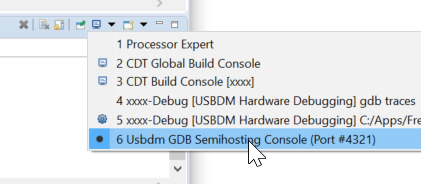
The console window switches to whatever console has the last activity so it will disappear as you have found.
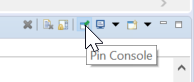
Select the USBDM Console and then "pin it" to stop it disappearing.
Short Video at USBDM SemiHosting - YouTube
