
- Forums
- Product Forums
- General Purpose MicrocontrollersGeneral Purpose Microcontrollers
- i.MX Forumsi.MX Forums
- QorIQ Processing PlatformsQorIQ Processing Platforms
- Identification and SecurityIdentification and Security
- Power ManagementPower Management
- Wireless ConnectivityWireless Connectivity
- RFID / NFCRFID / NFC
- Advanced AnalogAdvanced Analog
- Neural Processing UnitsNeural Processing Units
- MCX Microcontrollers
- S32G
- S32K
- S32V
- MPC5xxx
- Other NXP Products
- S12 / MagniV Microcontrollers
- Powertrain and Electrification Analog Drivers
- Sensors
- Vybrid Processors
- Digital Signal Controllers
- 8-bit Microcontrollers
- ColdFire/68K Microcontrollers and Processors
- PowerQUICC Processors
- OSBDM and TBDML
- S32M
- S32Z/E
-
- Solution Forums
- Software Forums
- MCUXpresso Software and ToolsMCUXpresso Software and Tools
- CodeWarriorCodeWarrior
- MQX Software SolutionsMQX Software Solutions
- Model-Based Design Toolbox (MBDT)Model-Based Design Toolbox (MBDT)
- FreeMASTER
- eIQ Machine Learning Software
- Embedded Software and Tools Clinic
- S32 SDK
- S32 Design Studio
- GUI Guider
- Zephyr Project
- Voice Technology
- Application Software Packs
- Secure Provisioning SDK (SPSDK)
- Processor Expert Software
- Generative AI & LLMs
-
- Topics
- Mobile Robotics - Drones and RoversMobile Robotics - Drones and Rovers
- NXP Training ContentNXP Training Content
- University ProgramsUniversity Programs
- Rapid IoT
- NXP Designs
- SafeAssure-Community
- OSS Security & Maintenance
- Using Our Community
-
- Cloud Lab Forums
-
- Knowledge Bases
- ARM Microcontrollers
- i.MX Processors
- Identification and Security
- Model-Based Design Toolbox (MBDT)
- QorIQ Processing Platforms
- S32 Automotive Processing Platform
- Wireless Connectivity
- CodeWarrior
- MCUXpresso Suite of Software and Tools
- MQX Software Solutions
- RFID / NFC
- Advanced Analog
- Neural Processing Units
-
- NXP Tech Blogs
- Home
- :
- Translated Content
- :
- Multi Source Translation Content
- :
- 1115011_en-US
1115011_en-US
- RSS フィードを購読する
- 新着としてマーク
- 既読としてマーク
- ブックマーク
- 購読
- 印刷用ページ
- 不適切なコンテンツを報告
1115011_en-US
1115011_en-US
Note, the tools described in this page are deprecated and are no longer maintained. For the latest maintained i.MX 6/7 series DDR tools, the user can find these here:
i.MX 6/7 Series DDR Tool Release
Hi All,
DDR_Stress_Tester is a software application for fine tuning DDR parameters and verifying DDR performance on i.MX6 boards. It performs write leveling, DQS gating, read/write delay calibration on the target board to match the layout of the board and archive the best DDR performance.
In addition, the stress test can help the user to verify the DDR performance on their boards.
The following are the features supported:
• Support i.MX6Q, i.MX6D, i.MX6DL, iMX6S, i.MX6SL, and i.MX6SX DDR calibration.
• Support DDR3 write leveling, DQS gating, Read/Write Delay auto-calibration.
• Support LPDDR2 Read/Write Delay auto-calibration.
• Support 16 bits, 32 bits, and 64 bits data bus.
• Support fixed-mapping 2-channel LPDDR2.
• Support DDR stress test between the frequency 135MHz and 672 MHz
If USB OTG port is not available on customer board, please use the images in DDR_Stress_Tester_V1.0.3_UART1_for_SDboot&JTAG.zip.
The bin files in the packages can be loaded by uboot and elf files are used by JTAG load. Please note when the image is loaded by u-boot, the DDR is initialized by u-boot (reference flash_header.S).
To run ddr stress test from u-boot, CONFIG_SPLASH_SCREEN must be disabled in u-boot. Because when enter self refresh mode in ddr stress test, DRAM access will be blocked. If splash screen in u-boot is enabled, IPU will continuously access DRAM, so the system will hang up.
If you have other DMA access in u-boot, it must be disabled.
If customer uses different RX/TX pin for UART, please contact FAE.
| UART1 | 6DQ | 6DL | 6SL | 6SX |
|---|---|---|---|---|
| TX | CSI0_DAT10/ALT3 | CSI0_DAT10/ALT3 | UART1_TXD/ALT0 | GPIO1_IO04/ALT0 |
| RX | CSI0_DAT11/ALT3 | CSI0_DAT11/ALT3 | UART1_RXD/ALT0 | GPIO1_IO05/ALT0 |
The commands to run ddr test in i.MX6Q uboot:
U-Boot > fatload mmc 2:1 0x907000 ddr-stress-test-mx6dq.bin
U-Boot > go 0x907000
For i.MX6Q/6D 4K interleaved LPDDR2, please use version v1.0.3.1.
i.MX6 DDR Stress Test Tool V1.0.3.1 for LPDDR2 4K interleaved mode
For i.MX6/i.MX7 DDR Stress Test Tool with GUI interface, please use version V2.x:
i.MX6/7 DDR Stress Test Tool V2.10
History
V1.0.3: i.MX6SoloX is supported.
V0.042 is not suggested for i.MX6. There are a lot of differences between v0.042 and v1.0.x.
The memory property is different.
I took a look at it in more detail and the actual difference is not USB OTG vs SDBoot, it was the DDRStressTester version.
We were originally testing OSB OTG DDRStressTester v0.042, we were getting 3min for 2GB DDR there. When we started with the SDBoot, we tested with v1.0.2. which gave 8min for 2GB. When I retested v1.0.2 USB OTG, I get 8min for 2GB. Retesting for 512MB does give me the 2min you were getting.
The main items the were significantly longer in v1.0.2 was t0.1 data is addr test, t1 memcpy8 SSN x64 test, t3 memcypy11 random pattern test. What caused the drastic change in performance between v0.042 and v1.0.2?
Thanks
Hi Mark,
I have not see the difference you described.
i.MX6Q: L3.0.35_4.1.0 u-boot ( modification: comment out drv_lcd_init () in common/stdio.c )
DDR density selected (MB): 512
There is no difference on the time to run one loop through USB OTG and through u-boot loading, both are around 2 mins.
You can try to modify the u-boot as my changes.
Grace
Hi Mark,
I have not see the difference you described.
i.MX6Q: L3.0.35_4.1.0 u-boot ( modification: comment out drv_lcd_init () in common/stdio.c )
DDR density selected (MB): 512
There is no difference on the time to run one loop through USB OTG and through u-boot loading, both are around 2 mins.
You can try to modify the u-boot as my changes.
Grace
Hi Grace Si,
We are using the imx6 DDR Stress Tester both through USB OTG and loading through uboot with the SDBoot version.
We noticed in usbotg, we finish one loop in about 3minutes while the SDboot version finished in about 8minutes.
Is this expected and what is causing this time difference?
Thanks
Hi Grace Si,
We are using the imx6 DDR Stress Tester both through USB OTG and loading through uboot with the SDBoot version.
We noticed in usbotg, we finish one loop in about 3minutes while the SDboot version finished in about 8minutes.
Is this expected and what is causing this time difference?
Thanks
Hi Casper,
Please contact your FAE or Marketing.
Grace
Hi Casper,
Please contact your FAE or Marketing.
Grace
hello Grace
is anyway to support us to create that pattern in?
we can pay for a whole sulotion!
or who should i contact?
thanks ^^
We don't have plan for it.
Grace
We don't have plan for it.
Grace
Hello
is it possible to add in precharge power down test in Stress test??
tks ^^
Hello
is it possible to add in precharge power down test in Stress test??
tks ^^
Hello
is it possible to add in precharge power down test in Stress test??
tks ^^
Hello
is it possible to add in precharge power down test in Stress test??
tks ^^
I don't know how I missed this, but knowing that I could launch the DDR Stress Test tool from U-Boot would have saved us a lot of time.
GraceSi wrote:
In my log below, you can see the load size of ddr-stress-test-mx6dq.bin is 87520, but yours is 96660.
None of the binaries in the v1.0.2 or v1.0.3 ZIP files has a size of 87520 bytes. My copy of ddr-stress-test-mx6dq.bin (v1.0.3) is 96660 bytes.
Another point is what I mentioned before, is the RX/TX pin of UART1 of your board same as i.MX6DQ EVK?
If not, please contact your FAE.
i.MX6DQ UART1 :
/* UART1 TXD */
writel(ALT3, IOMUXC_SW_MUX_CTL_PAD_CSI0_DAT10);
/* UART1 RXD */
writel(ALT3, IOMUXC_SW_MUX_CTL_PAD_CSI0_DAT11);
// daisy chain setup
writel(0x1, IOMUXC_UART1_IPP_UART_RXD_MUX_SELECT_INPUT);
If you're successfully talking to U-Boot over UART1, then it's probably already set up correctly :-).
Currently watching the tool rotating through DDR3 clock frequencies...
I don't know how I missed this, but knowing that I could launch the DDR Stress Test tool from U-Boot would have saved us a lot of time.
GraceSi wrote:
In my log below, you can see the load size of ddr-stress-test-mx6dq.bin is 87520, but yours is 96660.
None of the binaries in the v1.0.2 or v1.0.3 ZIP files has a size of 87520 bytes. My copy of ddr-stress-test-mx6dq.bin (v1.0.3) is 96660 bytes.
Another point is what I mentioned before, is the RX/TX pin of UART1 of your board same as i.MX6DQ EVK?
If not, please contact your FAE.
i.MX6DQ UART1 :
/* UART1 TXD */
writel(ALT3, IOMUXC_SW_MUX_CTL_PAD_CSI0_DAT10);
/* UART1 RXD */
writel(ALT3, IOMUXC_SW_MUX_CTL_PAD_CSI0_DAT11);
// daisy chain setup
writel(0x1, IOMUXC_UART1_IPP_UART_RXD_MUX_SELECT_INPUT);
If you're successfully talking to U-Boot over UART1, then it's probably already set up correctly :-).
Currently watching the tool rotating through DDR3 clock frequencies...
I tried to test 4GB DDR3 on CS0 only and got calibration data with option "9" (maximum supported density). However, I got error on t0.1 Address of failure: 0x10000000 Data was: 0x90000000 when I set MMDC0_MDASP to 0x7F. I got error on t0.1 Address of failure: 0xc0000000 Data was: 0xffffffc0 when I set MMDC0_MDASP to 0x5F.
Is this hardware or software limitation?
I tried to test 4GB DDR3 on CS0 only and got calibration data with option "9" (maximum supported density). However, I got error on t0.1 Address of failure: 0x10000000 Data was: 0x90000000 when I set MMDC0_MDASP to 0x7F. I got error on t0.1 Address of failure: 0xc0000000 Data was: 0xffffffc0 when I set MMDC0_MDASP to 0x5F.
Is this hardware or software limitation?
hi Azlum
performance checking we suggest at least 500loops.
Casper
hi Azlum
performance checking we suggest at least 500loops.
Casper
Dear Casper,
How many RAM test loop need to be completed ?
When I run the RAM stress test, it crossed around 470 loops. So whether can I consider this as Pass ?
Regards,
Azlum
Dear Casper,
How many RAM test loop need to be completed ?
When I run the RAM stress test, it crossed around 470 loops. So whether can I consider this as Pass ?
Regards,
Azlum
Hello Grace
i try to modify as below
setmem /32 0x021b000c = 0x3F433F13 // MMDC0_MDCFG0
for txpdll is set a unreasonable value for DDR3 but it still test pass.
does it mean no tXPDLL related in DDR3 stress test??
Hello Grace
i try to modify as below
setmem /32 0x021b000c = 0x3F433F13 // MMDC0_MDCFG0
for txpdll is set a unreasonable value for DDR3 but it still test pass.
does it mean no tXPDLL related in DDR3 stress test??
please go to
Freescale i.MX6 DRAM Port Application Guide-DDR3
Grace
please go to
Freescale i.MX6 DRAM Port Application Guide-DDR3
Grace
hello Grace
suppose it is not modified in stress test aid.
suppose txpdll is setle when DDR3 init! so how can i modify it before init??
hi Grace
but if i want to tuning tXPDLL of DDR3 how can i do in iMX6 solo?
hi Grace
but if i want to tuning tXPDLL of DDR3 how can i do in iMX6 solo?
txpdll should follow the value in datasheet of your DDR3. It is not supposed to be tested.
Grace
txpdll should follow the value in datasheet of your DDR3. It is not supposed to be tested.
Grace
hello
we test DDR3 in IMx6 solo.
we want to know if it can inclulde txpdll test by DDR3 stress test?
it appricated if any solution or suggestion
thank you for your kinldy help ^^
hello
we test DDR3 in IMx6 solo.
we want to know if it can inclulde txpdll test by DDR3 stress test?
it appricated if any solution or suggestion
thank you for your kinldy help ^^
Hi Patrick,
Are you using the binary in
DDR_Stress_Tester_V1.0.3_UART1_for_SDboot&JTAG.zip or DDR_Stress_Tester_V1.0.2_UART1_for_SDboot&JTAG.zip.
Even the name is same, but the binary files in package DDR_Stress_Tester_UART1_for_SDboot&JTAG.zip and DDR_Stress_Tester.zip are different.
In my log below, you can see the load size of ddr-stress-test-mx6dq.bin is 87520, but yours is 96660.
Another point is what I mentioned before, is the RX/TX pin of UART1 of your board same as i.MX6DQ EVK?
If not, please contact your FAE.
i.MX6DQ UART1 :
/* UART1 TXD */
writel(ALT3, IOMUXC_SW_MUX_CTL_PAD_CSI0_DAT10);
/* UART1 RXD */
writel(ALT3, IOMUXC_SW_MUX_CTL_PAD_CSI0_DAT11);
// daisy chain setup
writel(0x1, IOMUXC_UART1_IPP_UART_RXD_MUX_SELECT_INPUT);
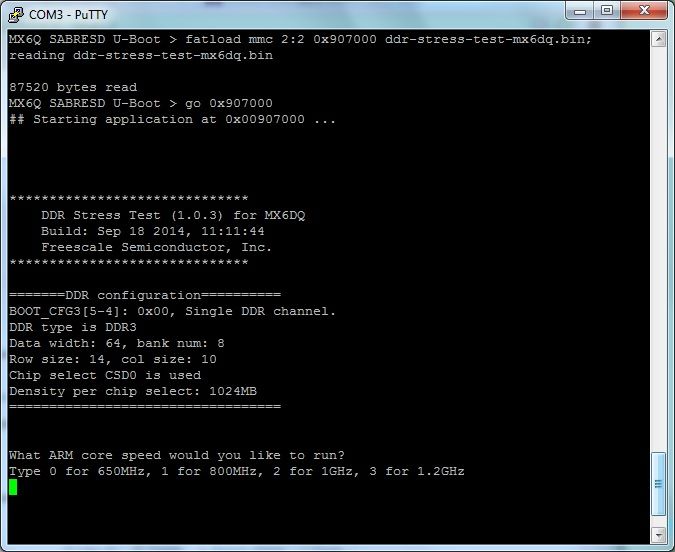
Grace
Hi Patrick,
Are you using the binary in
DDR_Stress_Tester_V1.0.3_UART1_for_SDboot&JTAG.zip or DDR_Stress_Tester_V1.0.2_UART1_for_SDboot&JTAG.zip.
Even the name is same, but the binary files in package DDR_Stress_Tester_UART1_for_SDboot&JTAG.zip and DDR_Stress_Tester.zip are different.
In my log below, you can see the load size of ddr-stress-test-mx6dq.bin is 87520, but yours is 96660.
Another point is what I mentioned before, is the RX/TX pin of UART1 of your board same as i.MX6DQ EVK?
If not, please contact your FAE.
i.MX6DQ UART1 :
/* UART1 TXD */
writel(ALT3, IOMUXC_SW_MUX_CTL_PAD_CSI0_DAT10);
/* UART1 RXD */
writel(ALT3, IOMUXC_SW_MUX_CTL_PAD_CSI0_DAT11);
// daisy chain setup
writel(0x1, IOMUXC_UART1_IPP_UART_RXD_MUX_SELECT_INPUT);
Grace
Hi there,
I'm using an i.MX6Q part on my board and I don't have OTG so I am following your instructions on loading from u-boot or JTAG.
JTAG I've had no luck so I thought I'd switch over to u-boot.
U-Boot > ext2load mmc 0:1 0x907000 ddr-stress-test-mx6dq.bin
96660 bytes read in 43 ms (2.1 MiB/s)
U-Boot > go 0x907000
## Starting application at 0x00907000 ...
then it just sits there and doesn't load anything further...
any ideas?
Hi there,
I'm using an i.MX6Q part on my board and I don't have OTG so I am following your instructions on loading from u-boot or JTAG.
JTAG I've had no luck so I thought I'd switch over to u-boot.
U-Boot > ext2load mmc 0:1 0x907000 ddr-stress-test-mx6dq.bin
96660 bytes read in 43 ms (2.1 MiB/s)
U-Boot > go 0x907000
## Starting application at 0x00907000 ...
then it just sits there and doesn't load anything further...
any ideas?
Hi Leo,
Please check whether the RX/TX pin of UART1 is same as i.MX6DL EVK, if not, the DDR_Stress_Tester_V1.0.3_UART1_for_SDboot&JTAG.zip or DDR_Stress_Tester_V1.0.2_UART1_for_SDboot&JTAG.zip. will not work.
please contact your FAE to build the software to configure the correct UART.
i.MX6DL UART1 :
/* UART1 TXD */
writel(ALT3, IOMUXC_SW_MUX_CTL_PAD_CSI0_DAT10);
/* UART1 RXD */
writel(ALT3, IOMUXC_SW_MUX_CTL_PAD_CSI0_DAT11);
// daisy chain setup
writel(0x1, IOMUXC_UART1_IPP_UART_RXD_MUX_SELECT_INPUT);
Grace
Hi Leo,
Please check whether the RX/TX pin of UART1 is same as i.MX6DL EVK, if not, the DDR_Stress_Tester_V1.0.3_UART1_for_SDboot&JTAG.zip or DDR_Stress_Tester_V1.0.2_UART1_for_SDboot&JTAG.zip. will not work.
please contact your FAE to build the software to configure the correct UART.
i.MX6DL UART1 :
/* UART1 TXD */
writel(ALT3, IOMUXC_SW_MUX_CTL_PAD_CSI0_DAT10);
/* UART1 RXD */
writel(ALT3, IOMUXC_SW_MUX_CTL_PAD_CSI0_DAT11);
// daisy chain setup
writel(0x1, IOMUXC_UART1_IPP_UART_RXD_MUX_SELECT_INPUT);
Grace
Bump.
We are about to crank our new board to 1 GHz timings, and I'd like to be able to get this nailed down. The DDR3 Script Aid is very useful, but ultimately I want to use the Stress Test Tool to dial them in.
So far I've had no (apparent) success being able to run the Stress Test Tool using nothing but JTAG. This may well be because I'm not using JTAG correctly. Is there an FAQ or HOWTO somewhere that might point me in the right direction?
Also: Does setting up the DDR3 timings also set up the core clock? We'd like the ARM cores to run at 1 GHz as well; do we get that for "free" when using the output from the Script Aid?
Bump.
We are about to crank our new board to 1 GHz timings, and I'd like to be able to get this nailed down. The DDR3 Script Aid is very useful, but ultimately I want to use the Stress Test Tool to dial them in.
So far I've had no (apparent) success being able to run the Stress Test Tool using nothing but JTAG. This may well be because I'm not using JTAG correctly. Is there an FAQ or HOWTO somewhere that might point me in the right direction?
Also: Does setting up the DDR3 timings also set up the core clock? We'd like the ARM cores to run at 1 GHz as well; do we get that for "free" when using the output from the Script Aid?
Hi Steve,
Please contact your FAE.
Grace
Hi Steve,
Please contact your FAE.
Grace
The console port on our board is UART4. Could you release a binary file booting from SD to support UART4 console? Or could you release the source code to us to modify by ourselves? Thanks.
Steve
The console port on our board is UART4. Could you release a binary file booting from SD to support UART4 console? Or could you release the source code to us to modify by ourselves? Thanks.
Steve
Please always use WALAT=1, you can refer to below aid.
i.Mx6DQSDL DDR3 Script Aid
https://community.freescale.com/docs/DOC-94917
Sure, flash_header.s should keep same with your test script.
Hi Grace,
The write leveling calibration result of our board is as following:
MMDC_MPWLDECTRL0 ch0 after write level cal: 0x00270021
MMDC_MPWLDECTRL1 ch0 after write level cal: 0x0030002C
MMDC_MPWLDECTRL0 ch1 after write level cal: 0x001F0030
MMDC_MPWLDECTRL1 ch1 after write level cal: 0x000F0026
I am not sure how to judge if the value is larger than 0x2f as User_Guide says:
NOTE
If write-leveling delay is larger than 0x2f, it is suggested to
set the WALAT value on MMDCx_MDMISC register to 1 in
the initialization script and re-run the DDR_Stress_Tester.
And if I should set WALAT to 1 in the script, should I set it to 1 in flash_header.S? In other words, if I calibrated a group of satisfied parameters and the stress test is also OK, should I keep flash_header.S's every register value the same as the test script.inc?
Thank you very much!
Hi Grace,
The write leveling calibration result of our board is as following:
MMDC_MPWLDECTRL0 ch0 after write level cal: 0x00270021
MMDC_MPWLDECTRL1 ch0 after write level cal: 0x0030002C
MMDC_MPWLDECTRL0 ch1 after write level cal: 0x001F0030
MMDC_MPWLDECTRL1 ch1 after write level cal: 0x000F0026
I am not sure how to judge if the value is larger than 0x2f as User_Guide says:
NOTE
If write-leveling delay is larger than 0x2f, it is suggested to
set the WALAT value on MMDCx_MDMISC register to 1 in
the initialization script and re-run the DDR_Stress_Tester.
And if I should set WALAT to 1 in the script, should I set it to 1 in flash_header.S? In other words, if I calibrated a group of satisfied parameters and the stress test is also OK, should I keep flash_header.S's every register value the same as the test script.inc?
Thank you very much!
Hi Petr, regarding Vybrid there's not this tool but DDRV (aka DDR Validation) available within Processor Expert and Eclipse based product Driver Suite (DS) v10.4.1. You have to have installed DS v10.4 and after that you need to apply an update 1 which includes DDRV tool supported for Vybrid processors.
You may find more information about Driver Suite here - http://www.freescale.com/webapp/sps/site/prod_summary.jsp?code=PE_DRIVER_SUITE. Just one note here, DDRV tool is a licensed tool, so you will need to obtain proper license to run this piece of SW. Not sure who is the right person to contact regarding DDRV licensing for Vybrid, but you may try to contact your local FSL representative for an evaluation key.
Hi Petr, regarding Vybrid there's not this tool but DDRV (aka DDR Validation) available within Processor Expert and Eclipse based product Driver Suite (DS) v10.4.1. You have to have installed DS v10.4 and after that you need to apply an update 1 which includes DDRV tool supported for Vybrid processors.
You may find more information about Driver Suite here - http://www.freescale.com/webapp/sps/site/prod_summary.jsp?code=PE_DRIVER_SUITE. Just one note here, DDRV tool is a licensed tool, so you will need to obtain proper license to run this piece of SW. Not sure who is the right person to contact regarding DDRV licensing for Vybrid, but you may try to contact your local FSL representative for an evaluation key.
From the name, I would presume that "DDR_Stress_Tester_V1.0.3_UART1_for_SDboot&JTAG.zip" contained images that were intended to be loaded via JTAG and would interact over UART1. However, I've been unable to get this to work. I'm a newcomer to JTAG in general and OpenOCD in particular, so pilot error is a definite possibility.
Our board is based around the i.MX6DL. I'm using OpenOCD 0.8.0 with an Olimex USB-TINY-H. TRST on the JTAG pod is connected to JTAG_TRST; SRST is connected to POR. As such, I have reset_config set as follows:
reset_config trst_and_srst srst_pulls_trst
This appears to (mostly) work:
> reset halt
adapter speed: 1000 kHz
JTAG scan chain interrogation failed: all zeroes
Check JTAG interface, timings, target power, etc.
Trying to use configured scan chain anyway...
imx6.dap: IR capture error; saw 0x00 not 0x01
Bypassing JTAG setup events due to errors
Locking debug access failed on first, but succeeded on second try.
BUG: can't assert only SRST
Locking debug access failed on first, but succeeded on second try.
imx6.cpu.0: ran after reset and before halt ...
number of cache level 1
imx6.cpu.0 cluster 0 core 0 multi core
target state: halted
target halted in Thumb state due to debug-request, current mode: Supervisor
cpsr: 0x400001f3 pc: 0x00001080
MMU: disabled, D-Cache: disabled, I-Cache: enabled
I also appear to be able to load the image:
> load_image /home/ewhac/devel/iMX6/DDR_Stress_Tester_V1.0.3_UART1/ddr-stress-test-mx6dl.elf
82226 bytes written at address 0x00907000
downloaded 82226 bytes in 4.802489s (16.720 KiB/s)
However, after this point, I can't get anything to work. 'resume 0x907000' appears to do nothing, and subsequent 'halt' commands don't work; I have to reset. When I disassemble the loaded image from 0x907000, I see this:
> arm disassemble 0x907000 32
0x00907000     0xe59ff018     LDR r15, [r15, #0x18]
0x00907004     0xe59ff018     LDR r15, [r15, #0x18]
0x00907008     0xe59ff018     LDR r15, [r15, #0x18]
0x0090700c     0xe59ff018     LDR r15, [r15, #0x18]
0x00907010     0xe59ff018     LDR r15, [r15, #0x18]
0x00907014     0xe1a00000     NOP
0x00907018     0xe59ff014     LDR r15, [r15, #0x14]
0x0090701c     0xe59ff014     LDR r15, [r15, #0x14]
0x00907020     0x00907054     ADDEQS r7, r0, r4, ASR r0
0x00907024     0x0090703c     ADDEQS r7, r0, r12, LSR r0
0x00907028     0x00907040     ADDEQS r7, r0, r0, ASR #0x20
0x0090702c     0x00907044     ADDEQS r7, r0, r4, ASR #0x20
0x00907030     0x00907048     ADDEQS r7, r0, r8, ASR #0x20
0x00907034     0x0090704c     ADDEQS r7, r0, r12, ASR #0x20
0x00907038     0x00907050     ADDEQS r7, r0, r0, ASR r0
0x0090703c     0xeafffffe     B 0x0090703c
0x00907040     0xeafffffe     B 0x00907040
0x00907044     0xeafffffe     B 0x00907044
0x00907048     0xeafffffe     B 0x00907048
0x0090704c     0xeafffffe     B 0x0090704c
0x00907050     0xeafffffe     B 0x00907050
0x00907054     0xeb000054     BL 0x009071ac
0x00907058     0xeb00007d     BL 0x00907254
0x0090705c     0xeb00001b     BL 0x009070d0
0x00907060     0xeb00004a     BL 0x00907190
0x00907064     0xeb00005d     BL 0x009071e0
0x00907068     0xe59f02e4     LDR r0, [r15, #0x2e4]
0x0090706c     0xe321f0d1     MSR CPSR_c, 0x000000d1
0x00907070     0xe240d000     SUB r13, r0, #0x0
0x00907074     0xe321f0d2     MSR CPSR_c, 0x000000d2
0x00907078     0xe240d000     SUB r13, r0, #0x0
0x0090707c     0xe321f0d7     MSR CPSR_c, 0x000000d7
So it's pretty obvious 0x907000 is not the entry point. The ELF file says the entry point is 0x907054, and the disassembly tends to support this. However, 'resume 0x907054' has the same result (no output, unresponsive 'halt').
Just for fun, I tried 'resume 0x90703c', expecting the CPU to enter an infinite loop. But no, not even that works. It's almost as if it's ignoring my attempts to change the program counter.
What am I missing? I'm sure it's something terribly obvious...
From the name, I would presume that "DDR_Stress_Tester_V1.0.3_UART1_for_SDboot&JTAG.zip" contained images that were intended to be loaded via JTAG and would interact over UART1. However, I've been unable to get this to work. I'm a newcomer to JTAG in general and OpenOCD in particular, so pilot error is a definite possibility.
Our board is based around the i.MX6DL. I'm using OpenOCD 0.8.0 with an Olimex USB-TINY-H. TRST on the JTAG pod is connected to JTAG_TRST; SRST is connected to POR. As such, I have reset_config set as follows:
reset_config trst_and_srst srst_pulls_trst
This appears to (mostly) work:
> reset halt
adapter speed: 1000 kHz
JTAG scan chain interrogation failed: all zeroes
Check JTAG interface, timings, target power, etc.
Trying to use configured scan chain anyway...
imx6.dap: IR capture error; saw 0x00 not 0x01
Bypassing JTAG setup events due to errors
Locking debug access failed on first, but succeeded on second try.
BUG: can't assert only SRST
Locking debug access failed on first, but succeeded on second try.
imx6.cpu.0: ran after reset and before halt ...
number of cache level 1
imx6.cpu.0 cluster 0 core 0 multi core
target state: halted
target halted in Thumb state due to debug-request, current mode: Supervisor
cpsr: 0x400001f3 pc: 0x00001080
MMU: disabled, D-Cache: disabled, I-Cache: enabled
I also appear to be able to load the image:
> load_image /home/ewhac/devel/iMX6/DDR_Stress_Tester_V1.0.3_UART1/ddr-stress-test-mx6dl.elf
82226 bytes written at address 0x00907000
downloaded 82226 bytes in 4.802489s (16.720 KiB/s)
However, after this point, I can't get anything to work. 'resume 0x907000' appears to do nothing, and subsequent 'halt' commands don't work; I have to reset. When I disassemble the loaded image from 0x907000, I see this:
> arm disassemble 0x907000 32
0x00907000     0xe59ff018     LDR r15, [r15, #0x18]
0x00907004     0xe59ff018     LDR r15, [r15, #0x18]
0x00907008     0xe59ff018     LDR r15, [r15, #0x18]
0x0090700c     0xe59ff018     LDR r15, [r15, #0x18]
0x00907010     0xe59ff018     LDR r15, [r15, #0x18]
0x00907014     0xe1a00000     NOP
0x00907018     0xe59ff014     LDR r15, [r15, #0x14]
0x0090701c     0xe59ff014     LDR r15, [r15, #0x14]
0x00907020     0x00907054     ADDEQS r7, r0, r4, ASR r0
0x00907024     0x0090703c     ADDEQS r7, r0, r12, LSR r0
0x00907028     0x00907040     ADDEQS r7, r0, r0, ASR #0x20
0x0090702c     0x00907044     ADDEQS r7, r0, r4, ASR #0x20
0x00907030     0x00907048     ADDEQS r7, r0, r8, ASR #0x20
0x00907034     0x0090704c     ADDEQS r7, r0, r12, ASR #0x20
0x00907038     0x00907050     ADDEQS r7, r0, r0, ASR r0
0x0090703c     0xeafffffe     B 0x0090703c
0x00907040     0xeafffffe     B 0x00907040
0x00907044     0xeafffffe     B 0x00907044
0x00907048     0xeafffffe     B 0x00907048
0x0090704c     0xeafffffe     B 0x0090704c
0x00907050     0xeafffffe     B 0x00907050
0x00907054     0xeb000054     BL 0x009071ac
0x00907058     0xeb00007d     BL 0x00907254
0x0090705c     0xeb00001b     BL 0x009070d0
0x00907060     0xeb00004a     BL 0x00907190
0x00907064     0xeb00005d     BL 0x009071e0
0x00907068     0xe59f02e4     LDR r0, [r15, #0x2e4]
0x0090706c     0xe321f0d1     MSR CPSR_c, 0x000000d1
0x00907070     0xe240d000     SUB r13, r0, #0x0
0x00907074     0xe321f0d2     MSR CPSR_c, 0x000000d2
0x00907078     0xe240d000     SUB r13, r0, #0x0
0x0090707c     0xe321f0d7     MSR CPSR_c, 0x000000d7
So it's pretty obvious 0x907000 is not the entry point. The ELF file says the entry point is 0x907054, and the disassembly tends to support this. However, 'resume 0x907054' has the same result (no output, unresponsive 'halt').
Just for fun, I tried 'resume 0x90703c', expecting the CPU to enter an infinite loop. But no, not even that works. It's almost as if it's ignoring my attempts to change the program counter.
What am I missing? I'm sure it's something terribly obvious...
Hi Immanuel,
Please contact your FAE or Marketing.
Grace
Hi Immanuel,
Please contact your FAE or Marketing.
Grace
Hello GraceSi,
We are working on developing test software for the i.MX6 board where we would like to include some of the test cases from the this DDR3 stress tool. Can we get the source of DDR_Stress_Tester_V1.0.3 tool?
Immanuel
Hello GraceSi,
We are working on developing test software for the i.MX6 board where we would like to include some of the test cases from the this DDR3 stress tool. Can we get the source of DDR_Stress_Tester_V1.0.3 tool?
Immanuel
Ok we have no Fly-by layout but what have I have to fill in at the write leveling data at the Excel sheet in the red cells?
Regards
Marcel
Ok we have no Fly-by layout but what have I have to fill in at the write leveling data at the Excel sheet in the red cells?
Regards
Marcel
No we have no Fly-by layout we have T-routing...
Regards
Marcel
No we have no Fly-by layout we have T-routing...
Regards
Marcel
For Fly-by layout, write leveling calibration is needed.
Grace
For Fly-by layout, write leveling calibration is needed.
Grace
Did I have to do write leveling calibration if I have no Fly-by layout config?
Because I always get:
Would you like to run the DQS gating, read/write delay calibration? (y/n)
Starting DQS gating calibration...
. . . . . . . . . . . . . . ERROR FOUND, we can't get suitable value !!!!
dram test fails for all values.
Did I have to do write leveling calibration if I have no Fly-by layout config?
Because I always get:
Would you like to run the DQS gating, read/write delay calibration? (y/n)
Starting DQS gating calibration...
. . . . . . . . . . . . . . ERROR FOUND, we can't get suitable value !!!!
dram test fails for all values.
Hi,
I am attempting to run the stress test tool on an EDM-IMX6 board manufactured by TechNexion (and a Wandboard) to try to resolve some intermittent memory corruption issues we have been seeing when using these boards.
When I run the write leveling calibration, the value for MMDC_MPWLDECTRL1 always comes back with an incorrect value (see output below).
My question is: Is this a problem with the stress test calibration tool, or is this indicative of a design problem on the board?
FYI, I have been unable to get this board to pass the stress test at 475Mhz (it fails almost immediately every time), though it passes at other frequencies, both higher and lower.
Thanks,
Tony
Would you like to run the write leveling calibration? (y/n)
Please enter the MR1 value on the initilization script
This will be re-programmed into MR1 after write leveling calibration
Enter as a 4-digit HEX value, example 0004, then hit enter
0004 You have entered: 0x0004
Start write leveling calibration
Write leveling calibration completed
MMDC_MPWLDECTRL0 ch0 after write level cal: 0x00130017
MMDC_MPWLDECTRL1 ch0 after write level cal: 0x0017000E
MMDC_MPWLDECTRL0 ch1 after write level cal: 0x000F001D
MMDC_MPWLDECTRL1 ch1 after write level cal: 0x017A0013
Is the tool or its alternative available for Vybrid processors?
Is the tool or its alternative available for Vybrid processors?
2
Turns out the code is fine and only the ARM DSTREAM debugger creates the problem for itself. Strange.
2
Turns out the code is fine and only the ARM DSTREAM debugger creates the problem for itself. Strange.
2
Hi Grace,
I'm assuming this stress test runs out of OCRAM, is that correct? If so, can you tell me what the keys are to accessing DDR RAM from OCRAM code? I'm getting a crash every time I try - the debugger completely chokes and won't give me any data. Do I still need to leave some hooks for the DDR in the linker script, for example?
I'm building a stripped down version of the Platform SDK, so I'm thinking the DCD and all should be set up correctly. Runs fine other than this external DDR access issue.
Just looking for some hints on a perplexing problem. Thanks.
2
Hi Grace,
I'm assuming this stress test runs out of OCRAM, is that correct? If so, can you tell me what the keys are to accessing DDR RAM from OCRAM code? I'm getting a crash every time I try - the debugger completely chokes and won't give me any data. Do I still need to leave some hooks for the DDR in the linker script, for example?
I'm building a stripped down version of the Platform SDK, so I'm thinking the DCD and all should be set up correctly. Runs fine other than this external DDR access issue.
Just looking for some hints on a perplexing problem. Thanks.
Hi Patrick,
If you just want to do the stress test, you can skip the calibration. It is normal that write leveling calibration got consistent values. To understand write leveling, you can reference 45.11.6 Write leveling Calibration of reference manual.
Grace
Hi Patrick,
If you just want to do the stress test, you can skip the calibration. It is normal that write leveling calibration got consistent values. To understand write leveling, you can reference 45.11.6 Write leveling Calibration of reference manual.
Grace
Thank you Grace for your quick answer.
Well, i understand that the results of the stress program have to be used to update the DDR3 initialisation process. In fact my question was not exactly this one as i don't use the the initialization script but only U-BOOT (i don't have JTAG access so i upload your binary file through TFTP). Here is how i proceed :
- I have my own U-BOOT relevant to my board
- The board boots on SD card
- I get the U-BOOT prompt
- I tftp the DDR_Stress_Tester_V1.0.1_UART1_for_SDboot&JTAG.zip binary program (DL in my case) on RAM (0x907000 as you mentioned above in the post)
- Go on this address
- Get the values that i mentionned previously
What i noticed is whatever is the value of MDMISC that i write in U-BOOT file (flash_header.s, ie 0x00001740 or 0x00011740), the values for the write leveling process are always above 0x2F so i was wondering if the binary DDR stress program was altering the MDMISC value i write in flash_header.s before launching the test by itself, which could explain why i get always the same value.
Best regards,
Patrick.
Thank you Grace for your quick answer.
Well, i understand that the results of the stress program have to be used to update the DDR3 initialisation process. In fact my question was not exactly this one as i don't use the the initialization script but only U-BOOT (i don't have JTAG access so i upload your binary file through TFTP). Here is how i proceed :
- I have my own U-BOOT relevant to my board
- The board boots on SD card
- I get the U-BOOT prompt
- I tftp the DDR_Stress_Tester_V1.0.1_UART1_for_SDboot&JTAG.zip binary program (DL in my case) on RAM (0x907000 as you mentioned above in the post)
- Go on this address
- Get the values that i mentionned previously
What i noticed is whatever is the value of MDMISC that i write in U-BOOT file (flash_header.s, ie 0x00001740 or 0x00011740), the values for the write leveling process are always above 0x2F so i was wondering if the binary DDR stress program was altering the MDMISC value i write in flash_header.s before launching the test by itself, which could explain why i get always the same value.
Best regards,
Patrick.
Hello,
Can anyone explain me how to load the binary file of DDR_Stress_Tester_V1.0.1_UART1_for_SDboot&JTAG.zip by u-boot? Is there any user guide for loading this from SD card? I want to run the DDR stress test to obtain the optimal DDR configuration.
Any help will be appreciated.
Yijun
Hello,
Can anyone explain me how to load the binary file of DDR_Stress_Tester_V1.0.1_UART1_for_SDboot&JTAG.zip by u-boot? Is there any user guide for loading this from SD card? I want to run the DDR stress test to obtain the optimal DDR configuration.
Any help will be appreciated.
Yijun
In Chapter 5 FAQ of i.MX6 DDR Stress Tester User’s Guide
Do I need to update the DDR initialization script after running the calibration?
Yes. The calibration results are stored in the MMDC registers during the test only. It is suggested to update the initialization script and re-run the test on different boards to confirm the DDR performance and make sure the MMDC register settings are correctly ported to the firmware.
Grace
In Chapter 5 FAQ of i.MX6 DDR Stress Tester User’s Guide
Do I need to update the DDR initialization script after running the calibration?
Yes. The calibration results are stored in the MMDC registers during the test only. It is suggested to update the initialization script and re-run the test on different boards to confirm the DDR performance and make sure the MMDC register settings are correctly ported to the firmware.
Grace
Hi Grace,
On my own design, i ran your DDR_Stress_Tester_V1.0.1_UART1_for_SDboot&JTAG.zip that worked for me (just to confirm the initial values from U-BOOT as i replicated the layout from Sabre SD board), just have observed that the SW levelling values are all above 0x2F :
MMDC_MPWLDECTRL0 ch0 after write level cal: 0x0046004B
MMDC_MPWLDECTRL1 ch0 after write level cal: 0x003C0043
MMDC_MPWLDECTRL0 ch1 after write level cal: 0x002B002B
MMDC_MPWLDECTRL1 ch1 after write level cal: 0x0029003F
As notified in the document, i modified the MDMISC value in my U-BOOT file (0x00001740 => 0x00011740) but nothing changed, does your programm erase my value with your own one and if so what is your value ? and can we keep the write leveling results as it ?
Patrick.
Hi Grace,
On my own design, i ran your DDR_Stress_Tester_V1.0.1_UART1_for_SDboot&JTAG.zip that worked for me (just to confirm the initial values from U-BOOT as i replicated the layout from Sabre SD board), just have observed that the SW levelling values are all above 0x2F :
MMDC_MPWLDECTRL0 ch0 after write level cal: 0x0046004B
MMDC_MPWLDECTRL1 ch0 after write level cal: 0x003C0043
MMDC_MPWLDECTRL0 ch1 after write level cal: 0x002B002B
MMDC_MPWLDECTRL1 ch1 after write level cal: 0x0029003F
As notified in the document, i modified the MDMISC value in my U-BOOT file (0x00001740 => 0x00011740) but nothing changed, does your programm erase my value with your own one and if so what is your value ? and can we keep the write leveling results as it ?
Patrick.
Hi Ariel,
To run ddr stress test from u-boot, CONFIG_SPLASH_SCREEN must be disabled in u-boot.
Because when enter self refresh mode in ddr stress test, DRAM access will be blocked. If splash screen in u-boot is enabled, IPU will continuously access DRAM, so the system will hang up.
Please make sure there is no DMA running to access DRAM in u-boot.
Grace
Hi Ariel,
To run ddr stress test from u-boot, CONFIG_SPLASH_SCREEN must be disabled in u-boot.
Because when enter self refresh mode in ddr stress test, DRAM access will be blocked. If splash screen in u-boot is enabled, IPU will continuously access DRAM, so the system will hang up.
Please make sure there is no DMA running to access DRAM in u-boot.
Grace
Hi Grace! How are you? I use the bin files from "DDR_Stress_Tester_V1.0.1_UART1_for_SDboot&JTAG.zip", but the program hangs when it calibrates the memory. I'm using Freescale Sabre SD board.
----->
MX6Q SABRESD U-Boot > go 0x907000
## Starting application at 0x00907000 ...
******************************
DDR Stress Test (1.0.2) for MX6DQ
Build: Dec 10 2013, 14:26:05
Freescale Semiconductor, Inc.
******************************
=======DDR configuration==========
BOOT_CFG3[5-4]: 0x00, Single DDR channel.
DDR type is DDR3
Data width: 64, bank num: 8
Row size: 14, col size: 10
Chip select CSD0 is used
Density per chip select: 1024MB
==================================
What ARM core speed would you like to run?
Type 0 for 650MHz, 1 for 800MHz, 2 for 1GHz, 3 for 1.2GHz
ARM set to 800MHz
Please select the DDR density per chip select (in bytes) on the board
Type 0 for 2GB; 1 for 1GB; 2 for 512MB; 3 for 256MB; 4 for 128MB; 5 for 64MB; 6 for 32MB
For maximum supported density (4GB), we can only access up to 3.75GB. Type 9 to select this
DDR density selected (MB): 1024
Calibration will run at DDR frequency 528MHz. Type 'y' to continue.
If you want to run at other DDR frequency. Type 'n'
<-----
Any suggestions?
Thanks!!
Ariel.
I managed to get the stress to run from u-boot.
I had to make sure that IPU wasn't initialized.
But now I getting stuck on the calibration test, getting error: ERROR FOUND, we can't get suitable value!!!!
Any suggestions?
I managed to get the stress to run from u-boot.
I had to make sure that IPU wasn't initialized.
But now I getting stuck on the calibration test, getting error: ERROR FOUND, we can't get suitable value!!!!
Any suggestions?
Hi Grace.
For me it hangs after;
Calibration will run at DDR frequency 528MHz. Type 'y' to continue.
If you want to run at other DDR frequency. Type 'n'
Could this be because of the CONFIG_SPLASH_SCREEN, which I should have disabled?
Or do we also need to initialize the registers according to the .inc file (parameters from the excel document) when starting up u-boot?
If I need to initialize the register, do I initialize all registers from the excel document, before I run the stress test? (I noticed that some are initialized 2, for instance 0x21b0004)
Thanks
Hi Grace.
For me it hangs after;
Calibration will run at DDR frequency 528MHz. Type 'y' to continue.
If you want to run at other DDR frequency. Type 'n'
Could this be because of the CONFIG_SPLASH_SCREEN, which I should have disabled?
Or do we also need to initialize the registers according to the .inc file (parameters from the excel document) when starting up u-boot?
If I need to initialize the register, do I initialize all registers from the excel document, before I run the stress test? (I noticed that some are initialized 2, for instance 0x21b0004)
Thanks
Hi Michael,
The excel sheet generates the inc file for JTAG mode. For USB download mode, you need comment out setmem /16 0x020bc000 = 0x30.
Grace
Hi Michael,
The excel sheet generates the inc file for JTAG mode. For USB download mode, you need comment out setmem /16 0x020bc000 = 0x30.
Grace
I have this same issue with mine. When I had the excel sheet auto generate the .inc file for my board setup it has a line;
//=============================================================================
// Disable WDOG
//=============================================================================
setmem /16 0x020bc000 = 0x30
I noticed in one of the example files that that line is commented out. When I comment it it seems to work great. I am just wondering what that line is suposed to do and why the stress tester errors. If i under stand it should just disable the watch dog timer but not sure. Should I be commenting this line out?
Thank
Michael
I have this same issue with mine. When I had the excel sheet auto generate the .inc file for my board setup it has a line;
//=============================================================================
// Disable WDOG
//=============================================================================
setmem /16 0x020bc000 = 0x30
I noticed in one of the example files that that line is commented out. When I comment it it seems to work great. I am just wondering what that line is suposed to do and why the stress tester errors. If i under stand it should just disable the watch dog timer but not sure. Should I be commenting this line out?
Thank
Michael
Hello Grace,
Thank youmfor your answer.
In my board with iMX6 solo (not solo-lite) the debug console is placed on CSI0_DAT10 and CSI0_DAT11; then it is not compatible with the .bin test...
I tried to use the test in USB version, but on my PC I have the same problem highligted by Gevorg Sargsyan (22-gen-2014 21.47)...
Nothing to do...
Best regards
Andrea
Hello Grace,
Thank youmfor your answer.
In my board with iMX6 solo (not solo-lite) the debug console is placed on CSI0_DAT10 and CSI0_DAT11; then it is not compatible with the .bin test...
I tried to use the test in USB version, but on my PC I have the same problem highligted by Gevorg Sargsyan (22-gen-2014 21.47)...
Nothing to do...
Best regards
Andrea
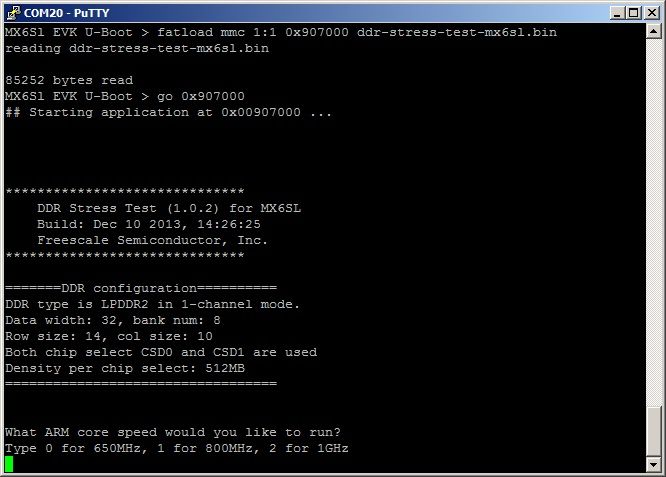
You can check whether the UART of customer board is same as 6SL EVK board.
/* UART1 TXD */
writel(ALT0, IOMUXC_SW_MUX_CTL_PAD_UART1_TXD);
/* UART1 RXD */
writel(ALT0, IOMUXC_SW_MUX_CTL_PAD_UART1_RXD);
// daisy chain setup
writel(0x0, IOMUXC_UART1_IPP_UART_RXD_MUX_SELECT_INPUT);
Grace
You can check whether the UART of customer board is same as 6SL EVK board.
/* UART1 TXD */
writel(ALT0, IOMUXC_SW_MUX_CTL_PAD_UART1_TXD);
/* UART1 RXD */
writel(ALT0, IOMUXC_SW_MUX_CTL_PAD_UART1_RXD);
// daisy chain setup
writel(0x0, IOMUXC_UART1_IPP_UART_RXD_MUX_SELECT_INPUT);
Grace
Hello Grace,
I used the bin files included in "DDR_Stress_Tester_V1.0.1_UART1_for_SDboot&JTAG.zip" for calibrate and test the DDR3 memories on my custom mx6 board.
For my board with quad-core, I fixed 0x907000 as entry-point and the program was executed correctly.
For my board with single-core, I fixed the same entry-point but the program don't run...
Please, can you help me?
Thank you very much.
Regards
Andrea
Hello Grace,
I used the bin files included in "DDR_Stress_Tester_V1.0.1_UART1_for_SDboot&JTAG.zip" for calibrate and test the DDR3 memories on my custom mx6 board.
For my board with quad-core, I fixed 0x907000 as entry-point and the program was executed correctly.
For my board with single-core, I fixed the same entry-point but the program don't run...
Please, can you help me?
Thank you very much.
Regards
Andrea
Hi Tim
In Reference Manual of i.MX 6Dual/6Quad, chapter 2 memory map, you can see the valid MMDC range is from 0x021B0000 to 0x021B7FFF. So your address 0x020bc000 is out of range.
021B_0000 021B_3FFF MMDC (port 0) 16 KB
021B_4000 021B_7FFF MMDC (port 1) 16 KB
You can contact your FAE or marketing to get the source code.
Regards,
Grace
Hi Tim
In Reference Manual of i.MX 6Dual/6Quad, chapter 2 memory map, you can see the valid MMDC range is from 0x021B0000 to 0x021B7FFF. So your address 0x020bc000 is out of range.
021B_0000 021B_3FFF MMDC (port 0) 16 KB
021B_4000 021B_7FFF MMDC (port 1) 16 KB
You can contact your FAE or marketing to get the source code.
Regards,
Grace
That may be caused by the hardware layout.
Grace
That may be caused by the hardware layout.
Grace
Hi Grace,
Thank you for your reply.
Unfortunately, I have set WALAT on MMDCx_MDMISC register to "1" as following.
setmem /32 0x021b0018 = 0x00011740 // MMDC0_MDMISC
Is there any other point I have to check?
Or is this issue hardware layout?
Best Regards,
Mar 17, 2014,
Satoshi Shimoda
Please set the WALAT value on MMDCx_MDMISC register to 1 in the initialization script and re-run the DDR_Stress_Tester.
Grace
Please set the WALAT value on MMDCx_MDMISC register to 1 in the initialization script and re-run the DDR_Stress_Tester.
Grace
Grace,
I am not having much luck using v1.02 of this tool. The test script generated by the spreadsheet here i.Mx6DQSDL DDR3 Script Aid starts off with a 'setmem /16 0x020bc000 = 0x30' to disable the watchdog, which the stress tool complains about:
.\DDR_Stress_Tester_V1.0.2\Binary>DDR_Stress_Tester.exe -t mx6x -df mt41k128m16-125_1066mhz_4x128x16.inc
MX6DQ opened.
dcd address 0x020bc000 out of valid range.
the addr out of valid range.
I see that this specific write is commented out in some of the provided sample scripts so I comment it out in my script and the tool does indeed continue on but it seems like the tool locks up within 30 seconds which to me feels an awful lot like the board perhaps resetting from a watchdog timeout? The tool doesn't hang at a specific spot... it just seems to hang within 30 seconds. I can't type fast enough to get past entering in MR1 for the write-leveling test.
Any ideas?
Is there source for this tool available somewhere? This seems like a great tool but its horrible that it isn't distributed with sourcecode so people could work around some of the above issues.
Thanks,
Tim
partner
i.mx6
gateworks
Grace,
I am not having much luck using v1.02 of this tool. The test script generated by the spreadsheet here i.Mx6DQSDL DDR3 Script Aid starts off with a 'setmem /16 0x020bc000 = 0x30' to disable the watchdog, which the stress tool complains about:
.\DDR_Stress_Tester_V1.0.2\Binary>DDR_Stress_Tester.exe -t mx6x -df mt41k128m16-125_1066mhz_4x128x16.inc
MX6DQ opened.
dcd address 0x020bc000 out of valid range.
the addr out of valid range.
I see that this specific write is commented out in some of the provided sample scripts so I comment it out in my script and the tool does indeed continue on but it seems like the tool locks up within 30 seconds which to me feels an awful lot like the board perhaps resetting from a watchdog timeout? The tool doesn't hang at a specific spot... it just seems to hang within 30 seconds. I can't type fast enough to get past entering in MR1 for the write-leveling test.
Any ideas?
Is there source for this tool available somewhere? This seems like a great tool but its horrible that it isn't distributed with sourcecode so people could work around some of the above issues.
Thanks,
Tim
partner
i.mx6
gateworks
Hi
I used this stress test with our custom board.
However, the following error log was output.
=====
Would you like to run the DQS gating, read/write delay calibration? (y/n)
Starting DQS gating calibration...
. . . . . . . . . . . . . . ERROR FOUND, we can't get suitable value !!!!
dram test fails for all values.
=====
Could you let me know what is wrong in this case?
(e.g. Circuit pattern is too bad, setting value in .inc file is incorrect, etc...)
Best Regards,
Mar 14, 2014
Satoshi Shimoda
Hi
I used this stress test with our custom board.
However, the following error log was output.
=====
Would you like to run the DQS gating, read/write delay calibration? (y/n)
Starting DQS gating calibration...
. . . . . . . . . . . . . . ERROR FOUND, we can't get suitable value !!!!
dram test fails for all values.
=====
Could you let me know what is wrong in this case?
(e.g. Circuit pattern is too bad, setting value in .inc file is incorrect, etc...)
Best Regards,
Mar 14, 2014
Satoshi Shimoda
Grace - can you let me know where the source code for version 1.0.2 is located internally? The link we were given previously goes to version 1.0 and not further. Thanks!
Grace - can you let me know where the source code for version 1.0.2 is located internally? The link we were given previously goes to version 1.0 and not further. Thanks!
Great tool that works well on my Nitrogen6! I am wondering if it is possible (for a future version) to read the temperature of the cpu during the stress test for instance?
Great tool that works well on my Nitrogen6! I am wondering if it is possible (for a future version) to read the temperature of the cpu during the stress test for instance?
Hi,
does the Host USB driver now support a 64Bit version Windows?
Greetings
Andreas
Hi,
does the Host USB driver now support a 64Bit version Windows?
Greetings
Andreas
Hi.
I am trying to run the tool on SabreSD Board.
Once I start the tool it is getting stuck on "Downloading image to IRAM ok"
At that point HID device in device manager is disappeared and Usb Input device with "Failed to start (code 10)" appears.
After a while Stress Tool times out and extits.
I am using 64-bit Windows 7 SP1
Any ideas?
Thanks.
Hi.
I am trying to run the tool on SabreSD Board.
Once I start the tool it is getting stuck on "Downloading image to IRAM ok"
At that point HID device in device manager is disappeared and Usb Input device with "Failed to start (code 10)" appears.
After a while Stress Tool times out and extits.
I am using 64-bit Windows 7 SP1
Any ideas?
Thanks.
To run ddr stress test from u-boot, CONFIG_SPLASH_SCREEN must be disabled in u-boot.
Because when enter self refresh mode in ddr stress test, DRAM access will be blocked. If splash screen in u-boot is enabled, IPU will continuously access DRAM, so the system will hang up.
Grace
To run ddr stress test from u-boot, CONFIG_SPLASH_SCREEN must be disabled in u-boot.
Because when enter self refresh mode in ddr stress test, DRAM access will be blocked. If splash screen in u-boot is enabled, IPU will continuously access DRAM, so the system will hang up.
Grace
Hi Thierry,
We don't want to release the binary for specific customer here. Please contact your FAE and send your request to FSL.
Grace
Hi Thierry,
We don't want to release the binary for specific customer here. Please contact your FAE and send your request to FSL.
Grace
Hi, the board I am working on does not have USB OTG either, and doesn't use UART port 1 but ports 3&4 instead.
Is there a way to access the sources or get elf files where other uart ports would be used ?
Thanks
Thanks Grace.
It is my lucky day since I was using DAT10/11 for SPI2 but I have test-points on those two pads so I tested them them temporarily for UART.
It works (o; Not FSL CRM request is required.
Thanks very much!
Brent
Thanks Grace.
It is my lucky day since I was using DAT10/11 for SPI2 but I have test-points on those two pads so I tested them them temporarily for UART.
It works (o; Not FSL CRM request is required.
Thanks very much!
Brent
Hi Brent, the tx/rx PIN of MX6Q SabraSD board is CSI0_DAT10 and CSI0_DAT11.
/* UART1 TXD */
writel(ALT3, IOMUXC_SW_MUX_CTL_PAD_CSI0_DAT10);
/* UART1 RXD */
writel(ALT3, IOMUXC_SW_MUX_CTL_PAD_CSI0_DAT11);
We understand the customer may use different rx/tx pin for UART, that is the reason we only release DDR stress tool which uses USB port for user input and output for general release.
Please submit your request to FSL CRM system.
Grace
Hi Brent, the tx/rx PIN of MX6Q SabraSD board is CSI0_DAT10 and CSI0_DAT11.
/* UART1 TXD */
writel(ALT3, IOMUXC_SW_MUX_CTL_PAD_CSI0_DAT10);
/* UART1 RXD */
writel(ALT3, IOMUXC_SW_MUX_CTL_PAD_CSI0_DAT11);
We understand the customer may use different rx/tx pin for UART, that is the reason we only release DDR stress tool which uses USB port for user input and output for general release.
Please submit your request to FSL CRM system.
Grace
Hi Grace...
It loads well, and I can interact with u-boot of course, but I cannot interact with this application.
My rx/tx in u-boot are :
/* UART1 TXD */
mxc_iomux_v3_setup_pad(MX6Q_PAD_SD3_DAT6__UART1_RXD);
/* UART1 RXD */
mxc_iomux_v3_setup_pad(MX6Q_PAD_SD3_DAT7__UART1_TXD);
Is this stress test tool open source?
******************************
DDR Stress Test (1.0.1) for MX6DQ
Build: Oct 21 2013, 14:05:09
Freescale Semiconductor, Inc.
*****************************
=======DDR configuration==========
BOOT_CFG3[5-4]: 0x00, Single DDR channel.
DDR type is DDR3
Data width: 64, bank num: 8
Row size: 15, col size: 10
Chip select CSD0 is used
Density per chip select: 2048MB
==================================
What ARM core speed would you like to run?
Type 0 for 650MHz, 1 for 800MHz, 2 for 1GHz, 3 for 1.2GHz
--> System does not respond to my input here.
Thanks
Brent
Hi Grace...
It loads well, and I can interact with u-boot of course, but I cannot interact with this application.
My rx/tx in u-boot are :
/* UART1 TXD */
mxc_iomux_v3_setup_pad(MX6Q_PAD_SD3_DAT6__UART1_RXD);
/* UART1 RXD */
mxc_iomux_v3_setup_pad(MX6Q_PAD_SD3_DAT7__UART1_TXD);
Is this stress test tool open source?
******************************
DDR Stress Test (1.0.1) for MX6DQ
Build: Oct 21 2013, 14:05:09
Freescale Semiconductor, Inc.
*****************************
=======DDR configuration==========
BOOT_CFG3[5-4]: 0x00, Single DDR channel.
DDR type is DDR3
Data width: 64, bank num: 8
Row size: 15, col size: 10
Chip select CSD0 is used
Density per chip select: 2048MB
==================================
What ARM core speed would you like to run?
Type 0 for 650MHz, 1 for 800MHz, 2 for 1GHz, 3 for 1.2GHz
--> System does not respond to my input here.
Thanks
Brent
The entry point is 0x907000 if anyone needs it.
(o:
The entry point is 0x907000 if anyone needs it.
(o:
Thank you Grace, that is excellent! Thanks very much for your help! I will update on how it works.
Regards
Brent
Thank you Grace, that is excellent! Thanks very much for your help! I will update on how it works.
Regards
Brent
Hi Brent,
The image in DDR_Stress_Tester_V1.0.1.zip can't be loaded through sd card. I just attached image DDR_Stress_Tester_V1.0.1_UART1_for_SDboot&JTAG.zip. The bin files in the packages can be loaded by uboot and elf files are used by JTAG load. Please note when the image is loaded by u-boot, the DDR is initialized by u-boot.
Regards,
Grace
Hi Brent,
The image in DDR_Stress_Tester_V1.0.1.zip can't be loaded through sd card. I just attached image DDR_Stress_Tester_V1.0.1_UART1_for_SDboot&JTAG.zip. The bin files in the packages can be loaded by uboot and elf files are used by JTAG load. Please note when the image is loaded by u-boot, the DDR is initialized by u-boot.
Regards,
Grace
Hello,
I do not have the USB OTG port available on my custom board, is it possible to load this stress tester application directly via sd card and u-boot?
Thanks
Brent
Hello,
I do not have the USB OTG port available on my custom board, is it possible to load this stress tester application directly via sd card and u-boot?
Thanks
Brent
We got the Stress Tester running. The tool doesn't like when you give it the wrong input file 
We got the Stress Tester running. The tool doesn't like when you give it the wrong input file
Hello,
I tried to run the DDR3 Stress Tester but the application crashes after printing a single line:
MX6DQ opened.
We are using an i.MX6D7CVT08AC (Industrial, 800MHz) and the PC is running Windows 7 Home Premium SP1 64bit.
From Linux I'm able to run the imx_usb_loader application and download an image which toggles an LED connected to GPIO2[4].
Regards
Matthias Mann
Hello,
I tried to run the DDR3 Stress Tester but the application crashes after printing a single line:
MX6DQ opened.
We are using an i.MX6D7CVT08AC (Industrial, 800MHz) and the PC is running Windows 7 Home Premium SP1 64bit.
From Linux I'm able to run the imx_usb_loader application and download an image which toggles an LED connected to GPIO2[4].
Regards
Matthias Mann
Got the program working now, thank you very much!
Hi Emil Myhrman,
Please use version 1.0.1. For i.MX6DQ, the DDR mapping start address is configured as chapter "2.3 DDR mapping to MMDC controller ports" in i.MX 6Dual/6Quad Applications Reference Manual.
Grace
Hi Emil Myhrman,
Please use version 1.0.1. For i.MX6DQ, the DDR mapping start address is configured as chapter "2.3 DDR mapping to MMDC controller ports" in i.MX 6Dual/6Quad Applications Reference Manual.
Grace
We're using i.Mx6DL and LPDDR2 single channel, starting at 0x10000000 (DDR Memory Map Config = '00'). Does this version select the correct address (i.e. not 0x80000000) for our setup?
I'm asking because it automatically says "CHANNEL0 is selected." and for previous version 0.042 we had to manually select channel1 to "trick" stress test into using start address 0x10000000.
We're using i.Mx6DL and LPDDR2 single channel, starting at 0x10000000 (DDR Memory Map Config = '00'). Does this version select the correct address (i.e. not 0x80000000) for our setup?
I'm asking because it automatically says "CHANNEL0 is selected." and for previous version 0.042 we had to manually select channel1 to "trick" stress test into using start address 0x10000000.