
- Forums
- Product Forums
- General Purpose MicrocontrollersGeneral Purpose Microcontrollers
- i.MX Forumsi.MX Forums
- QorIQ Processing PlatformsQorIQ Processing Platforms
- Identification and SecurityIdentification and Security
- Power ManagementPower Management
- Wireless ConnectivityWireless Connectivity
- RFID / NFCRFID / NFC
- Advanced AnalogAdvanced Analog
- Neural Processing UnitsNeural Processing Units
- MCX Microcontrollers
- S32G
- S32K
- S32V
- MPC5xxx
- Other NXP Products
- S12 / MagniV Microcontrollers
- Powertrain and Electrification Analog Drivers
- Sensors
- Vybrid Processors
- Digital Signal Controllers
- 8-bit Microcontrollers
- ColdFire/68K Microcontrollers and Processors
- PowerQUICC Processors
- OSBDM and TBDML
- S32M
- S32Z/E
-
- Solution Forums
- Software Forums
- MCUXpresso Software and ToolsMCUXpresso Software and Tools
- CodeWarriorCodeWarrior
- MQX Software SolutionsMQX Software Solutions
- Model-Based Design Toolbox (MBDT)Model-Based Design Toolbox (MBDT)
- FreeMASTER
- eIQ Machine Learning Software
- Embedded Software and Tools Clinic
- S32 SDK
- S32 Design Studio
- GUI Guider
- Zephyr Project
- Voice Technology
- Application Software Packs
- Secure Provisioning SDK (SPSDK)
- Processor Expert Software
- Generative AI & LLMs
-
- Topics
- Mobile Robotics - Drones and RoversMobile Robotics - Drones and Rovers
- NXP Training ContentNXP Training Content
- University ProgramsUniversity Programs
- Rapid IoT
- NXP Designs
- SafeAssure-Community
- OSS Security & Maintenance
- Using Our Community
-
- Cloud Lab Forums
-
- Knowledge Bases
- ARM Microcontrollers
- i.MX Processors
- Identification and Security
- Model-Based Design Toolbox (MBDT)
- QorIQ Processing Platforms
- S32 Automotive Processing Platform
- Wireless Connectivity
- CodeWarrior
- MCUXpresso Suite of Software and Tools
- MQX Software Solutions
- RFID / NFC
- Advanced Analog
- Neural Processing Units
-
- NXP Tech Blogs
- Home
- :
- Model-Based Design Toolbox (MBDT)
- :
- Model-Based Design Toolbox (MBDT)
- :
- Re: fcan_s32k_receive - Unrecognized function or variable 'mbd_s32k_fcan_receive_init'
fcan_s32k_receive - Unrecognized function or variable 'mbd_s32k_fcan_receive_init'
- Subscribe to RSS Feed
- Mark Topic as New
- Mark Topic as Read
- Float this Topic for Current User
- Bookmark
- Subscribe
- Mute
- Printer Friendly Page
fcan_s32k_receive - Unrecognized function or variable 'mbd_s32k_fcan_receive_init'

- Mark as New
- Bookmark
- Subscribe
- Mute
- Subscribe to RSS Feed
- Permalink
- Report Inappropriate Content
I have been successfully using the MBDB S32K1 4.3.0 add on, but it has now broke since I installed dSpace Configuration Desk (Release 2022-B) which integrates with MATLAB SImulink.
For some reason, the FCAN Receive blocks now show question marks...


If I try to do an update (CTRL-D) or a build, I now get the following error...

If I view the Mask Base of the block, the initialization tab seems to call the function 'mbd_s32k_fcan_receive_init'...

I have tried reinstalling MBDB S32K1 4.3.0 and also tried running mbd_s32k_path.m, but the problem still occurs.
If I run "which mbd_s32k_fcan_receive_init" from the MATLAB prompt it says it cannot be found.
Note: I am using the patch from this post which fixed a bug with the CAN extended ID...
https://community.nxp.com/t5/Model-Based-Design-Toolbox-MBDT/Extended-CAN-ID-not-working-UCANS32K146...M8460
The blocks appear to display correctly in the library browser...

However, if I add the block from the library browser to the simulink model, it displays the question marks and I get the same error.
How can I fix this ?

 mariuslucianand
- Mark as New
- Bookmark
- Subscribe
- Mute
- Subscribe to RSS Feed
- Permalink
- Report Inappropriate Content
Hello @johngreenjets
Could you please let us know if the patch applied from this thread solved the reported issue as well?
Regards,
Marius
- Mark as New
- Bookmark
- Subscribe
- Mute
- Subscribe to RSS Feed
- Permalink
- Report Inappropriate Content
Hi Marius
The patch fixed the extended CAN ID bug (I marked the post as solved).
But there is this new issue with the FCAN receive blocks i.e. Unrecognized function or variable 'mbd_s32k_fcan_receive_init'.
I'm not sure yet whether the patch has cause this new issue, I'm going to play around with uninstalling and installing etc
I did notice that before the patch, the mask initialization calls the function 'mbd_s32k_fcan_receive'...

Whereas after the patch, the mask initialization calls the function 'mbd_s32k_fcan_receive_init'...

This seems to work after the patch has been installed, but it appears that when MATLAB is restarted the blocks then show the 3 question marks and generates the error 'Unrecognized function or variable 'mbd_s32k_fcan_receive_init'
So that might be a clue ?
- Mark as New
- Bookmark
- Subscribe
- Mute
- Subscribe to RSS Feed
- Permalink
- Report Inappropriate Content
I managed to find a work around.
In the following folder...
C:\MATLABAddOns\Toolboxes\NXP_MBDToolbox_S32K1xx\mbdtbx_s32k\mscripts\fcan
I made a copy of 'mbd_s32k_fcan_receive.p' and renamed the copy to 'mbd_s32k_fcan_receive_init.p' as shown in the screenshot below...
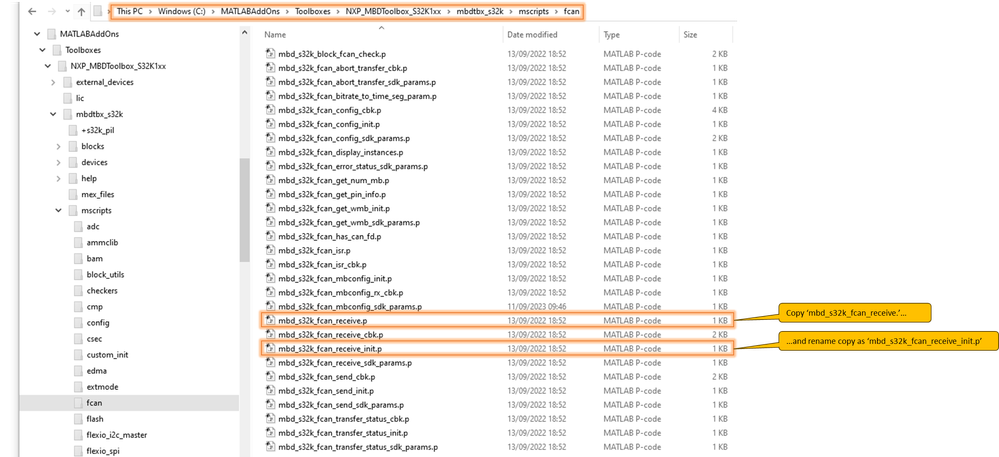
This appears to have fixed the problem, including the the bug with the extended CAN ID.
The patch to fix the extended CAN ID seems to change the function call in the the mask base of the FCAN receive block.
Before the patch, the initialization tab calls the function 'mbd_s32k_fcan_receive'.
After the patch, the initialization tab calls the function 'mbd_s32k_fcan_receive_init' (when MATLAB has been restarted after installing the patch).
What I dont know is if there is a difference between the two functions ''mbd_s32k_fcan_receive' and 'mbd_s32k_fcan_receive_init' ?
Because the 'mbd_s32k_fcan_receive_init' file is not included in the patch.
