
- Forums
- Product Forums
- General Purpose MicrocontrollersGeneral Purpose Microcontrollers
- i.MX Forumsi.MX Forums
- QorIQ Processing PlatformsQorIQ Processing Platforms
- Identification and SecurityIdentification and Security
- Power ManagementPower Management
- Wireless ConnectivityWireless Connectivity
- RFID / NFCRFID / NFC
- Advanced AnalogAdvanced Analog
- Neural Processing UnitsNeural Processing Units
- MCX Microcontrollers
- S32G
- S32K
- S32V
- MPC5xxx
- Other NXP Products
- S12 / MagniV Microcontrollers
- Powertrain and Electrification Analog Drivers
- Sensors
- Vybrid Processors
- Digital Signal Controllers
- 8-bit Microcontrollers
- ColdFire/68K Microcontrollers and Processors
- PowerQUICC Processors
- OSBDM and TBDML
- S32M
- S32Z/E
-
- Solution Forums
- Software Forums
- MCUXpresso Software and ToolsMCUXpresso Software and Tools
- CodeWarriorCodeWarrior
- MQX Software SolutionsMQX Software Solutions
- Model-Based Design Toolbox (MBDT)Model-Based Design Toolbox (MBDT)
- FreeMASTER
- eIQ Machine Learning Software
- Embedded Software and Tools Clinic
- S32 SDK
- S32 Design Studio
- GUI Guider
- Zephyr Project
- Voice Technology
- Application Software Packs
- Secure Provisioning SDK (SPSDK)
- Processor Expert Software
- Generative AI & LLMs
-
- Topics
- Mobile Robotics - Drones and RoversMobile Robotics - Drones and Rovers
- NXP Training ContentNXP Training Content
- University ProgramsUniversity Programs
- Rapid IoT
- NXP Designs
- SafeAssure-Community
- OSS Security & Maintenance
- Using Our Community
-
- Cloud Lab Forums
-
- Knowledge Bases
- ARM Microcontrollers
- i.MX Processors
- Identification and Security
- Model-Based Design Toolbox (MBDT)
- QorIQ Processing Platforms
- S32 Automotive Processing Platform
- Wireless Connectivity
- CodeWarrior
- MCUXpresso Suite of Software and Tools
- MQX Software Solutions
- RFID / NFC
- Advanced Analog
- Neural Processing Units
-
- NXP Tech Blogs
- Home
- :
- Model-Based Design Toolbox (MBDT)
- :
- Model-Based Design Toolbox (MBDT)
- :
- Re: Simulink Example Code problem running on S32K144 EVB
Simulink Example Code problem running on S32K144 EVB
- Subscribe to RSS Feed
- Mark Topic as New
- Mark Topic as Read
- Float this Topic for Current User
- Bookmark
- Subscribe
- Mute
- Printer Friendly Page

- Mark as New
- Bookmark
- Subscribe
- Mute
- Subscribe to RSS Feed
- Permalink
- Report Inappropriate Content
Hello All,
I have tried to configure and run the ADC, LED code following the tutorial series-
However, My code seems to generate and downloaded to the board but I cannot see any changes in led status.
Then I tried to build sample code in Simulink and tried to upload here is the build generation report- (Attached)
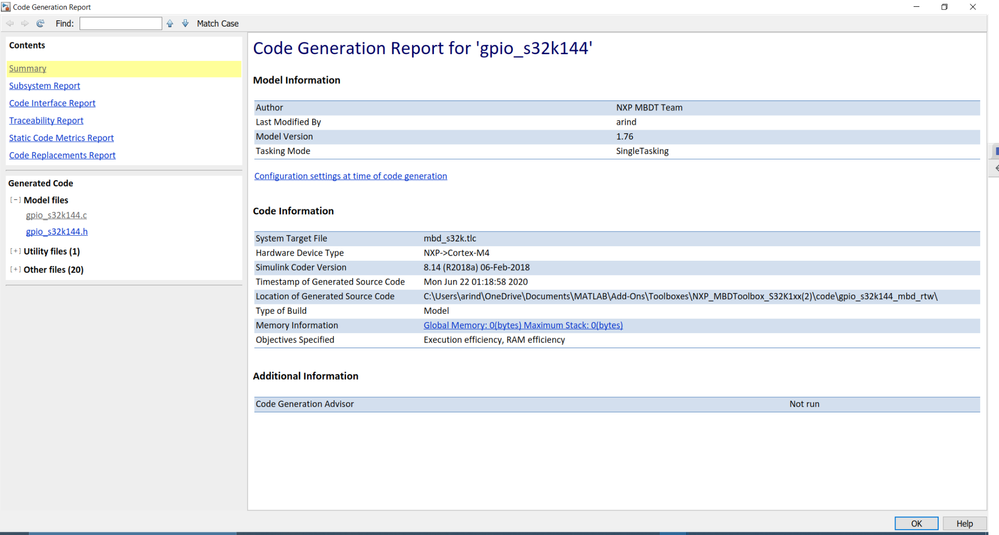
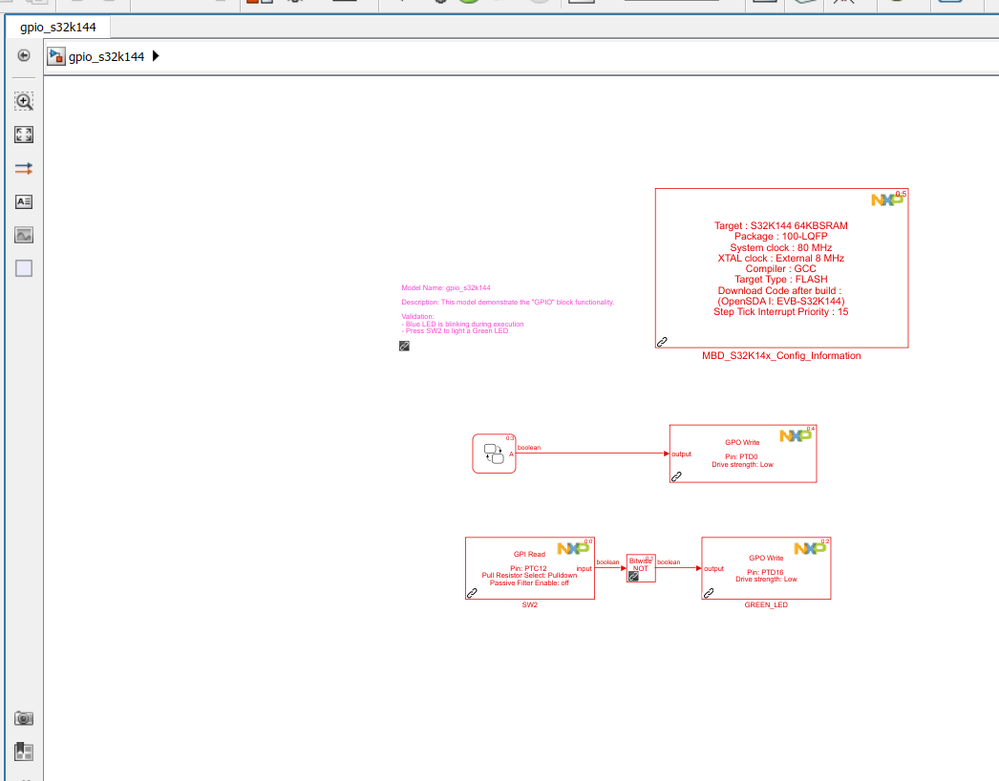
I have tried several times but I cannot see any blinking led or anything at all.
What I am doing wrong. Please help.
Thanks.
Solved! Go to Solution.

 mariuslucianand
- Mark as New
- Bookmark
- Subscribe
- Mute
- Subscribe to RSS Feed
- Permalink
- Report Inappropriate Content
Hello [email protected],
I have tested the generated code you have sent me and it works on my board.
So, I am not 100% sure, but think you have a faulty OpenSDA on the board.
So let's summarize a bit. The board works, but only if it is flashed using the S32DS via Jtag. I have just validated that your Simulink setup is generating valid firmware so here you have two options to continue using this board:
1. You can flash the board using the S32DS every time the code has been generated, but this is time-consuming.
2. You can try the other flashing method that MBDT provides: RappId bootloader. Basically you flash the bootloader using the S32DS once, and then you select from the Config block, deploying automatically the generated code using the UART communication.
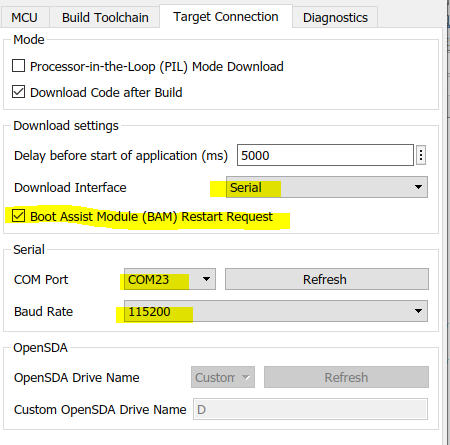
I am sorry for this inconvenience. Usually, a firmware update on the OpenSDA solves the flashing problem, but please try the RappId Bootloader option and please reply if it worked.
Hoep this helps,
Marius
mariuslucianand
- Mark as New
- Bookmark
- Subscribe
- Mute
- Subscribe to RSS Feed
- Permalink
- Report Inappropriate Content
Hello [email protected],
Impressive work!
The reason for which the OpenSDA is not displayed in step 6 is that you did not close the Recovery Utility after the processor was halted as I have mentioned in my latest reply.
2. Open the program, select the OpenSDAUSB, and press start. If you get the "Success. Processor halted" message, then you are the right path, close the Recovery Utility and go to the next step.
Anyway, you are on the right path :smileygrin:. Closing the Recovering Utility will keep the processor in halt, so you can flash the new code using the S32DS.
Now, at step 13, I would try with another model, the gpio example from our toolbox, and then you can try your model too. Try with the gpio just to be sure that the board will not act the same, entering reset.
You can also send me your ADC model to try it on one of my boards. The model and the generated .mot file.
Hope this helps,
Marius
- Mark as New
- Bookmark
- Subscribe
- Mute
- Subscribe to RSS Feed
- Permalink
- Report Inappropriate Content
Hello mariuslucianandrei,
I have tried but once I build and upload from Simulink the red led remains blinking and nothing happens.
One thing to mention is that this board is part of ISLED kit. Maybe this one has some different firmware or something different than normal?
Thank you for helping.
mariuslucianand
- Mark as New
- Bookmark
- Subscribe
- Mute
- Subscribe to RSS Feed
- Permalink
- Report Inappropriate Content
Hello [email protected],
Please send me the model and the generated .mot file :smileygrin: to check on one of my boards.
Marius
- Mark as New
- Bookmark
- Subscribe
- Mute
- Subscribe to RSS Feed
- Permalink
- Report Inappropriate Content
Hello mariuslucianandrei,
Here it is.
gpio_s32k144.slx - Google Drive
gpio_s32k144.mot - Google Drive
Thanks.
mariuslucianand
- Mark as New
- Bookmark
- Subscribe
- Mute
- Subscribe to RSS Feed
- Permalink
- Report Inappropriate Content
Hello [email protected],
I have tested the generated code you have sent me and it works on my board.
So, I am not 100% sure, but think you have a faulty OpenSDA on the board.
So let's summarize a bit. The board works, but only if it is flashed using the S32DS via Jtag. I have just validated that your Simulink setup is generating valid firmware so here you have two options to continue using this board:
1. You can flash the board using the S32DS every time the code has been generated, but this is time-consuming.
2. You can try the other flashing method that MBDT provides: RappId bootloader. Basically you flash the bootloader using the S32DS once, and then you select from the Config block, deploying automatically the generated code using the UART communication.
I am sorry for this inconvenience. Usually, a firmware update on the OpenSDA solves the flashing problem, but please try the RappId Bootloader option and please reply if it worked.
Hoep this helps,
Marius
mariuslucianand
- Mark as New
- Bookmark
- Subscribe
- Mute
- Subscribe to RSS Feed
- Permalink
- Report Inappropriate Content
Hello [email protected],
You have marked this answer as the correct answer. Is this working for you now?
Marius
- Mark as New
- Bookmark
- Subscribe
- Mute
- Subscribe to RSS Feed
- Permalink
- Report Inappropriate Content
Hi mariuslucianandrei,
Not actually, It didn't work.
However, since we reached the conclusion that it won't work until we have an update on openSDA. I just wanted to appreciate your effort and marked correct.
Thanks for helping me out.
- Mark as New
- Bookmark
- Subscribe
- Mute
- Subscribe to RSS Feed
- Permalink
- Report Inappropriate Content
Hello mariuslucianandrei,
First I want to appreciate your effort to help me out in this project.
Here are the updates. Manually coding with S32DS works.
Second, I downloaded the bootloader GUI, I uploaded the bootloader to the MCU as well as with S32DS.
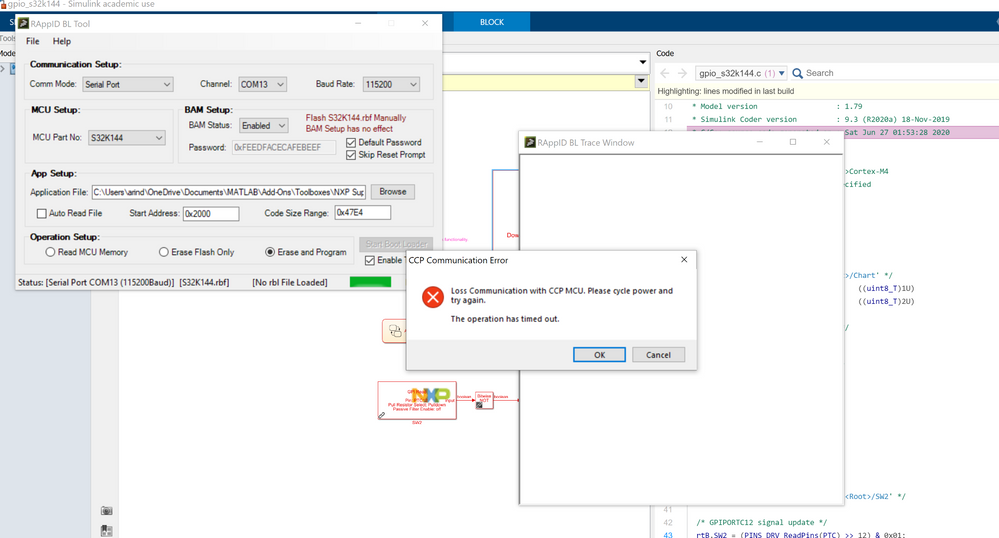
Afterward, Once I attempted programming It (The gpio .mot file generated by Simulink) showed me this message.
Next, I unplugged and plugged again the board. This time once powered I observed the red light of death again ( just trying to find some fun out of this unfortunate situation :smileygrin:).
Earlier, the S32DS took the red light off, and now it's on again.
Now it just asks me to cycle through power again and again.
So I thought okay maybe the problem with the GUI lets try Simulink.
I flashed the board using S32DS again to take the red led off.
Then I configured Simulink.
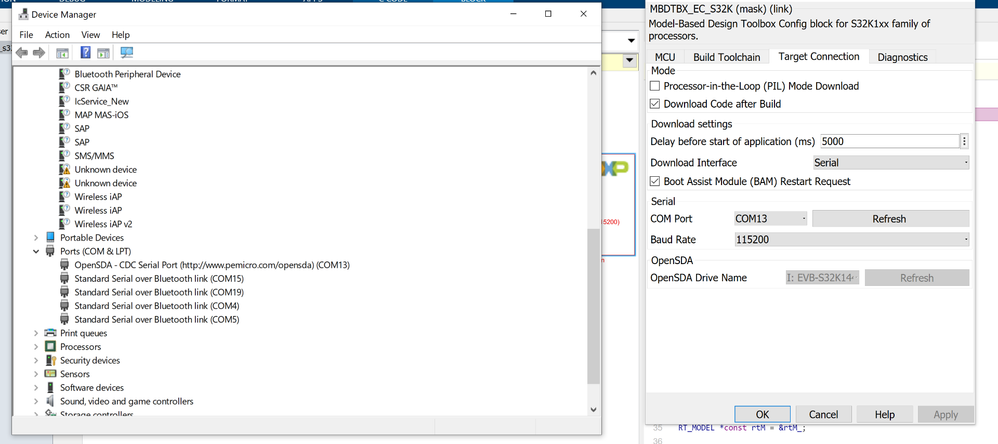
Now I hit build-
and here we go again-
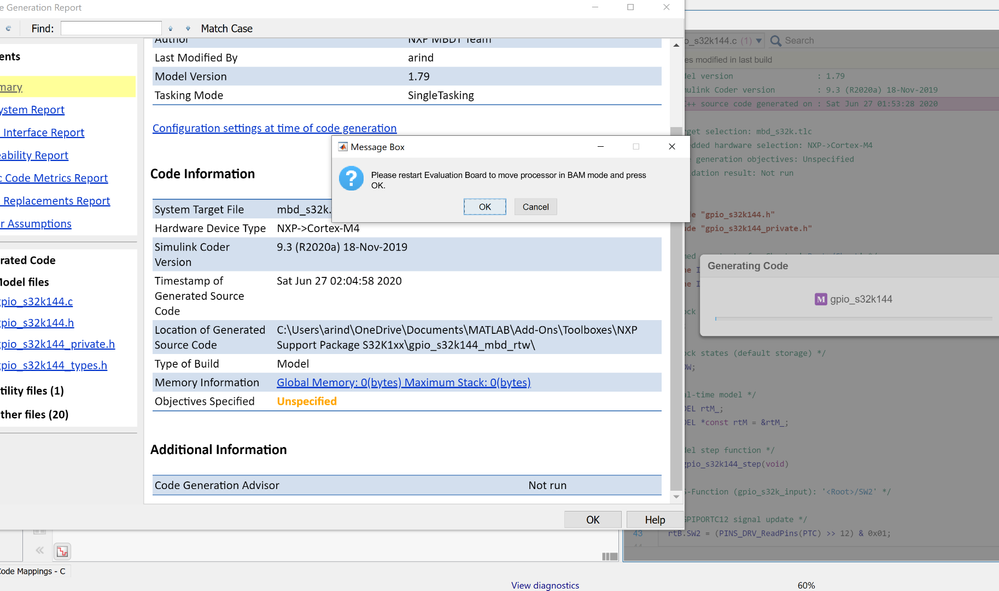
So I clicked reset.
Now we have the red light of death again.
It is now asking to cycle through power again and again. The only way to revive the board is to program it with S32DS.
I was really excited about this since I have experience with eclipse based coding (code composer studio from TI) but not model-based which makes things a lot easier. However, the resources are very scarce as I tried to find a solution to this. I would really love to have this board work as it was shown in the tutorial series.
Looking for a solution soon.
Thanks for helping again.
mariuslucianand
- Mark as New
- Bookmark
- Subscribe
- Mute
- Subscribe to RSS Feed
- Permalink
- Report Inappropriate Content
Hello [email protected],
Because the code report in the .txt file looks good, can you please send us the led status on the S32K144 EVB board?
I am interested in the D1 LED ( the one next to the RESET button)
D2 LED (next to the Open SDA - if it blinking or always on)
D3 LED (next to the oscillator, in the middle of the board).
Also please be sure the two jumpers are in the right position as in the QSG
https://www.nxp.com/docs/en/quick-reference-guide/S32K144EVB-QSG.pdf
Hope this helps,
Marius
- Mark as New
- Bookmark
- Subscribe
- Mute
- Subscribe to RSS Feed
- Permalink
- Report Inappropriate Content
Hello mariuslucianandrei,
Thank you for your reply.
Here are the led status-
1. D1 (It's always on but flickers during code upload from Simulink)
2. D2 is always on but flickers during code upload.
3. D3 is always on.
Jumpers-
Both the jumper J104 and J107 is in 2-3 position
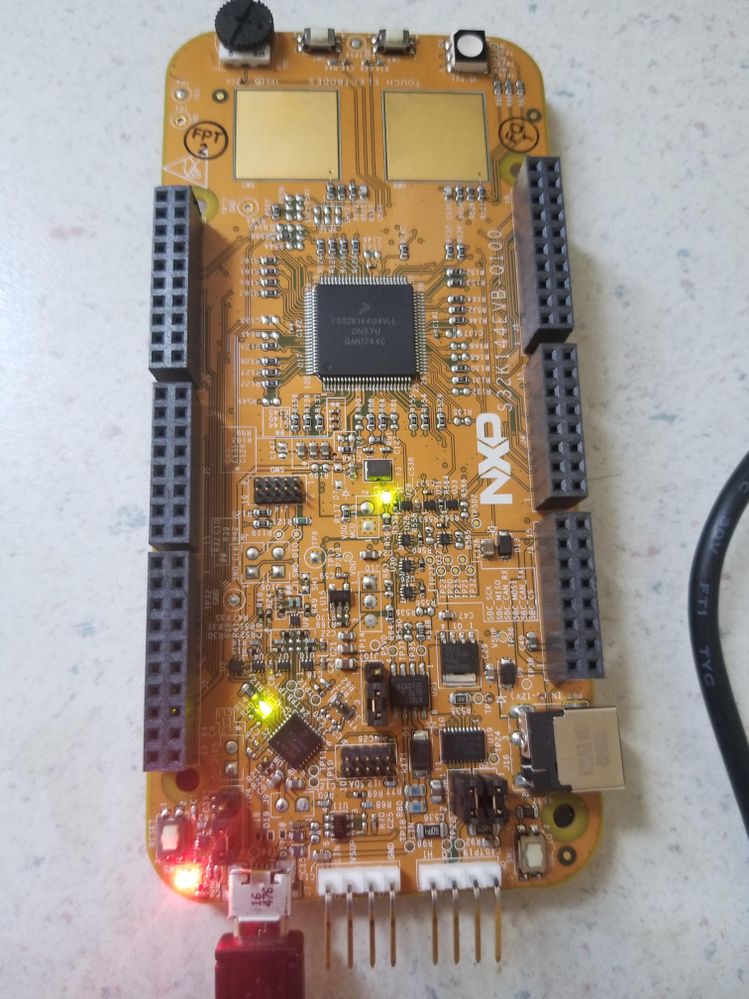
For your convenience, here is a video of the operation.
The code generation report
=== Build (Elapsed: 25 sec) ===
### Starting build procedure for model: ADC_my
### Using Model-Based Design Toolbox for S32K1xx Series 4.1.0 (R2017b-R2019a) 22-Jul-2019
### Generating code and artifacts to 'Model specific' folder structure
### Generating code into build folder: C:\Users\arind\OneDrive\Documents\MATLAB\Add-Ons\Toolboxes\NXP_MBDToolbox_S32K1xx\ADC_my_mbd_rtw
Warning:Supporting floating point numbers (!PurelyIntegerCode) is required in order to properly support non-inlined S-function (SupportNonInlinedSFcns).
Warning:Supporting non-finite numbers (SupportNonFinite) is required in order to properly support non-inlined S-function (SupportNonInlinedSFcns).
### Invoking Target Language Compiler on ADC_my.rtw
### Using System Target File: C:\Users\arind\OneDrive\Documents\MATLAB\Add-Ons\Toolboxes\NXP_MBDToolbox_S32K1xx(2)\code\mbdtbx_s32k\mbd_s32k.tlc
### Using Model-Based Design Toolbox for S32K1xx Series 4.1.0 (R2017b-R2019a) 22-Jul-2019
### Loading TLC function libraries
### Generating TLC interface API for custom data
### Initial pass through model to cache user defined code
### Caching model source code
### Writing header file ADC_my.h
### Writing header file rtwtypes.h
### Writing source file ADC_my.c
### Writing source file mbd_main.c
.
### TLC code generation complete.
### Creating HTML report file ADC_my_codegen_rpt.html
Warning:Warning: Directory already exists.
Warning:Warning: Directory already exists.
Warning:Warning: Directory already exists.
Warning:Warning: Directory already exists.
Warning:Warning: Directory already exists.
.
### Processing Template Makefile: C:\Users\arind\OneDrive\Documents\MATLAB\Add-Ons\Toolboxes\NXP_MBDToolbox_S32K1xx(2)\code\mbdtbx_s32k\mbd_s32k.tmf
### ADC_my.mk which is generated from C:\Users\arind\OneDrive\Documents\MATLAB\Add-Ons\Toolboxes\NXP_MBDToolbox_S32K1xx(2)\code\mbdtbx_s32k\mbd_s32k.tmf is up to date
### Building ADC_my: .\ADC_my.bat
C:\Users\arind\OneDrive\Documents\MATLAB\Add-Ons\Toolboxes\NXP_MBDToolbox_S32K1xx\ADC_my_mbd_rtw>set MATLAB=C:\Program Files\MATLAB\R2018a
C:\Users\arind\OneDrive\Documents\MATLAB\Add-Ons\Toolboxes\NXP_MBDToolbox_S32K1xx\ADC_my_mbd_rtw>"C:\Program Files\MATLAB\R2018a\bin\win64\gmake" -f ADC_my.mk COPY_MDLREF_INCLUDES=0 GENERATE_ERT_S_FUNCTION=0 INCLUDE_MDL_TERMINATE_FCN=0 COMBINE_OUTPUT_UPDATE_FCNS=1 MULTI_INSTANCE_CODE=0 INTEGER_CODE=1 ISPROTECTINGMODEL=NOTPROTECTING
Cleaning...
RELATIVE_PATH_TO_ANCHOR is ..
==== Removing object files from build directory ====
Compiler details : "C:\Users\arind\OneDrive\Documents\MATLAB\Add-Ons\Toolboxes\NXP_MBDToolbox_S32K1xx(2)\code\tools\gcc-6.3-arm32-eabi/bin/arm-none-eabi-gcc" -c -mthumb -mfloat-abi=hard -mfpu=fpv4-sp-d16 -O1 -g -gstrict-dwarf -mcpu=cortex-m4 -mfpu=fpv4-sp-d16 -mfloat-abi=hard -D__FPU_PRESENT=1 -DSTART_FROM_FLASH -D__FPU_USED=1 -D__NVIC_PRIO_BITS=FEATURE_NVIC_PRIO_BITS -DERRATA_E9527 -o SetupFiles -DCPU_S32K144HFT0VLLT -I. -I.. -I.. -I"C:\Program Files\MATLAB\R2018a\simulink\include" -I"C:\Program Files\MATLAB\R2018a\extern\include" -I"C:\Program Files\MATLAB\R2018a\rtw\c\src" -I"C:\Program Files\MATLAB\R2018a\rtw\c\libsrc" -I"C:\Program Files\MATLAB\R2018a\rtw\c\src\ext_mode\common" -I"C:\Program Files\MATLAB\R2018a\rtw\c\src\ext_mode\tcpip" -I"C:\Program Files\MATLAB\R2018a\rtw\c\src\ext_mode\serial" -I"C:\Program Files\MATLAB\R2018a\rtw\c\src\ext_mode\custom" -IC:\Users\arind\OneDrive\Documents\MATLAB\Add-Ons\Toolboxes\NXP_MBDToolbox_S32K1xx -IC:\Users\arind\OneDrive\Documents\MATLAB\Add-Ons\Toolboxes\NXP_MBDToolbox_S32K1xx\ADC_my_mbd_rtw -IF:\matlab\NXP -I"C:\Users\arind\OneDrive\Documents\MATLAB\Add-Ons\Toolboxes\NXP_MBDToolbox_S32K1xx(2)\code\tools\gcc-6.3-arm32-eabi/arm-none-eabi/include" -I"./common" -I"./inc" -I"./src/clock/S32K1xx" -I"./src/sim/S32K144" -I"./src/power/S32K1xx" -I"./S32K144/include" -I"../common" -I"../inc" -I"../src/clock/S32K1xx" -I"../src/sim/S32K144" -I"../src/power/S32K1xx" -I"../S32K144/include" -I"../instrumented/common" -I"../instrumented/inc" -I"../instrumented/src/clock/S32K1xx" -I"../instrumented/src/sim/S32K144" -I"../instrumented/src/power/S32K1xx" -I"../instrumented/S32K144/include"
Assembler details : "C:\Users\arind\OneDrive\Documents\MATLAB\Add-Ons\Toolboxes\NXP_MBDToolbox_S32K1xx(2)\code\tools\gcc-6.3-arm32-eabi/bin/arm-none-eabi-gcc" -c -mthumb -mfloat-abi=hard -mfpu=fpv4-sp-d16 -g -mcpu=cortex-m4 -mfpu=fpv4-sp-d16 -mfloat-abi=hard -x assembler-with-cpp -DSTART_FROM_FLASH -o SetupFiles
Product: ADC_my.mot
Build product type: executable
Building file startup_S32K144.o...
"C:\Users\arind\OneDrive\Documents\MATLAB\Add-Ons\Toolboxes\NXP_MBDToolbox_S32K1xx(2)\code\tools\gcc-6.3-arm32-eabi/bin/arm-none-eabi-gcc" -c -mthumb -mfloat-abi=hard -mfpu=fpv4-sp-d16 -g -mcpu=cortex-m4 -mfpu=fpv4-sp-d16 -mfloat-abi=hard -x assembler-with-cpp -DSTART_FROM_FLASH -o startup_S32K144.o startup_S32K144.s
Building file ADC_my.o...
"C:\Users\arind\OneDrive\Documents\MATLAB\Add-Ons\Toolboxes\NXP_MBDToolbox_S32K1xx(2)\code\tools\gcc-6.3-arm32-eabi/bin/arm-none-eabi-gcc" -c -mthumb -mfloat-abi=hard -mfpu=fpv4-sp-d16 -O1 -g -gstrict-dwarf -mcpu=cortex-m4 -mfpu=fpv4-sp-d16 -mfloat-abi=hard -D__FPU_PRESENT=1 -DSTART_FROM_FLASH -D__FPU_USED=1 -D__NVIC_PRIO_BITS=FEATURE_NVIC_PRIO_BITS -DERRATA_E9527 -o ADC_my.o -DCPU_S32K144HFT0VLLT -I. -I.. -I.. -I"C:\Program Files\MATLAB\R2018a\simulink\include" -I"C:\Program Files\MATLAB\R2018a\extern\include" -I"C:\Program Files\MATLAB\R2018a\rtw\c\src" -I"C:\Program Files\MATLAB\R2018a\rtw\c\libsrc" -I"C:\Program Files\MATLAB\R2018a\rtw\c\src\ext_mode\common" -I"C:\Program Files\MATLAB\R2018a\rtw\c\src\ext_mode\tcpip" -I"C:\Program Files\MATLAB\R2018a\rtw\c\src\ext_mode\serial" -I"C:\Program Files\MATLAB\R2018a\rtw\c\src\ext_mode\custom" -IC:\Users\arind\OneDrive\Documents\MATLAB\Add-Ons\Toolboxes\NXP_MBDToolbox_S32K1xx -IC:\Users\arind\OneDrive\Documents\MATLAB\Add-Ons\Toolboxes\NXP_MBDToolbox_S32K1xx\ADC_my_mbd_rtw -IF:\matlab\NXP -I"C:\Users\arind\OneDrive\Documents\MATLAB\Add-Ons\Toolboxes\NXP_MBDToolbox_S32K1xx(2)\code\tools\gcc-6.3-arm32-eabi/arm-none-eabi/include" -I"./common" -I"./inc" -I"./src/clock/S32K1xx" -I"./src/sim/S32K144" -I"./src/power/S32K1xx" -I"./S32K144/include" -I"../common" -I"../inc" -I"../src/clock/S32K1xx" -I"../src/sim/S32K144" -I"../src/power/S32K1xx" -I"../S32K144/include" -I"../instrumented/common" -I"../instrumented/inc" -I"../instrumented/src/clock/S32K1xx" -I"../instrumented/src/sim/S32K144" -I"../instrumented/src/power/S32K1xx" -I"../instrumented/S32K144/include" ADC_my.c
Building file adc_driver.o...
"C:\Users\arind\OneDrive\Documents\MATLAB\Add-Ons\Toolboxes\NXP_MBDToolbox_S32K1xx(2)\code\tools\gcc-6.3-arm32-eabi/bin/arm-none-eabi-gcc" -c -mthumb -mfloat-abi=hard -mfpu=fpv4-sp-d16 -O1 -g -gstrict-dwarf -mcpu=cortex-m4 -mfpu=fpv4-sp-d16 -mfloat-abi=hard -D__FPU_PRESENT=1 -DSTART_FROM_FLASH -D__FPU_USED=1 -D__NVIC_PRIO_BITS=FEATURE_NVIC_PRIO_BITS -DERRATA_E9527 -o adc_driver.o -DCPU_S32K144HFT0VLLT -I. -I.. -I.. -I"C:\Program Files\MATLAB\R2018a\simulink\include" -I"C:\Program Files\MATLAB\R2018a\extern\include" -I"C:\Program Files\MATLAB\R2018a\rtw\c\src" -I"C:\Program Files\MATLAB\R2018a\rtw\c\libsrc" -I"C:\Program Files\MATLAB\R2018a\rtw\c\src\ext_mode\common" -I"C:\Program Files\MATLAB\R2018a\rtw\c\src\ext_mode\tcpip" -I"C:\Program Files\MATLAB\R2018a\rtw\c\src\ext_mode\serial" -I"C:\Program Files\MATLAB\R2018a\rtw\c\src\ext_mode\custom" -IC:\Users\arind\OneDrive\Documents\MATLAB\Add-Ons\Toolboxes\NXP_MBDToolbox_S32K1xx -IC:\Users\arind\OneDrive\Documents\MATLAB\Add-Ons\Toolboxes\NXP_MBDToolbox_S32K1xx\ADC_my_mbd_rtw -IF:\matlab\NXP -I"C:\Users\arind\OneDrive\Documents\MATLAB\Add-Ons\Toolboxes\NXP_MBDToolbox_S32K1xx(2)\code\tools\gcc-6.3-arm32-eabi/arm-none-eabi/include" -I"./common" -I"./inc" -I"./src/clock/S32K1xx" -I"./src/sim/S32K144" -I"./src/power/S32K1xx" -I"./S32K144/include" -I"../common" -I"../inc" -I"../src/clock/S32K1xx" -I"../src/sim/S32K144" -I"../src/power/S32K1xx" -I"../S32K144/include" -I"../instrumented/common" -I"../instrumented/inc" -I"../instrumented/src/clock/S32K1xx" -I"../instrumented/src/sim/S32K144" -I"../instrumented/src/power/S32K1xx" -I"../instrumented/S32K144/include" adc_driver.c
Building file clock_S32K1xx.o...
"C:\Users\arind\OneDrive\Documents\MATLAB\Add-Ons\Toolboxes\NXP_MBDToolbox_S32K1xx(2)\code\tools\gcc-6.3-arm32-eabi/bin/arm-none-eabi-gcc" -c -mthumb -mfloat-abi=hard -mfpu=fpv4-sp-d16 -O1 -g -gstrict-dwarf -mcpu=cortex-m4 -mfpu=fpv4-sp-d16 -mfloat-abi=hard -D__FPU_PRESENT=1 -DSTART_FROM_FLASH -D__FPU_USED=1 -D__NVIC_PRIO_BITS=FEATURE_NVIC_PRIO_BITS -DERRATA_E9527 -o clock_S32K1xx.o -DCPU_S32K144HFT0VLLT -I. -I.. -I.. -I"C:\Program Files\MATLAB\R2018a\simulink\include" -I"C:\Program Files\MATLAB\R2018a\extern\include" -I"C:\Program Files\MATLAB\R2018a\rtw\c\src" -I"C:\Program Files\MATLAB\R2018a\rtw\c\libsrc" -I"C:\Program Files\MATLAB\R2018a\rtw\c\src\ext_mode\common" -I"C:\Program Files\MATLAB\R2018a\rtw\c\src\ext_mode\tcpip" -I"C:\Program Files\MATLAB\R2018a\rtw\c\src\ext_mode\serial" -I"C:\Program Files\MATLAB\R2018a\rtw\c\src\ext_mode\custom" -IC:\Users\arind\OneDrive\Documents\MATLAB\Add-Ons\Toolboxes\NXP_MBDToolbox_S32K1xx -IC:\Users\arind\OneDrive\Documents\MATLAB\Add-Ons\Toolboxes\NXP_MBDToolbox_S32K1xx\ADC_my_mbd_rtw -IF:\matlab\NXP -I"C:\Users\arind\OneDrive\Documents\MATLAB\Add-Ons\Toolboxes\NXP_MBDToolbox_S32K1xx(2)\code\tools\gcc-6.3-arm32-eabi/arm-none-eabi/include" -I"./common" -I"./inc" -I"./src/clock/S32K1xx" -I"./src/sim/S32K144" -I"./src/power/S32K1xx" -I"./S32K144/include" -I"../common" -I"../inc" -I"../src/clock/S32K1xx" -I"../src/sim/S32K144" -I"../src/power/S32K1xx" -I"../S32K144/include" -I"../instrumented/common" -I"../instrumented/inc" -I"../instrumented/src/clock/S32K1xx" -I"../instrumented/src/sim/S32K144" -I"../instrumented/src/power/S32K1xx" -I"../instrumented/S32K144/include" clock_S32K1xx.c
Building file interrupt_manager.o...
"C:\Users\arind\OneDrive\Documents\MATLAB\Add-Ons\Toolboxes\NXP_MBDToolbox_S32K1xx(2)\code\tools\gcc-6.3-arm32-eabi/bin/arm-none-eabi-gcc" -c -mthumb -mfloat-abi=hard -mfpu=fpv4-sp-d16 -O1 -g -gstrict-dwarf -mcpu=cortex-m4 -mfpu=fpv4-sp-d16 -mfloat-abi=hard -D__FPU_PRESENT=1 -DSTART_FROM_FLASH -D__FPU_USED=1 -D__NVIC_PRIO_BITS=FEATURE_NVIC_PRIO_BITS -DERRATA_E9527 -o interrupt_manager.o -DCPU_S32K144HFT0VLLT -I. -I.. -I.. -I"C:\Program Files\MATLAB\R2018a\simulink\include" -I"C:\Program Files\MATLAB\R2018a\extern\include" -I"C:\Program Files\MATLAB\R2018a\rtw\c\src" -I"C:\Program Files\MATLAB\R2018a\rtw\c\libsrc" -I"C:\Program Files\MATLAB\R2018a\rtw\c\src\ext_mode\common" -I"C:\Program Files\MATLAB\R2018a\rtw\c\src\ext_mode\tcpip" -I"C:\Program Files\MATLAB\R2018a\rtw\c\src\ext_mode\serial" -I"C:\Program Files\MATLAB\R2018a\rtw\c\src\ext_mode\custom" -IC:\Users\arind\OneDrive\Documents\MATLAB\Add-Ons\Toolboxes\NXP_MBDToolbox_S32K1xx -IC:\Users\arind\OneDrive\Documents\MATLAB\Add-Ons\Toolboxes\NXP_MBDToolbox_S32K1xx\ADC_my_mbd_rtw -IF:\matlab\NXP -I"C:\Users\arind\OneDrive\Documents\MATLAB\Add-Ons\Toolboxes\NXP_MBDToolbox_S32K1xx(2)\code\tools\gcc-6.3-arm32-eabi/arm-none-eabi/include" -I"./common" -I"./inc" -I"./src/clock/S32K1xx" -I"./src/sim/S32K144" -I"./src/power/S32K1xx" -I"./S32K144/include" -I"../common" -I"../inc" -I"../src/clock/S32K1xx" -I"../src/sim/S32K144" -I"../src/power/S32K1xx" -I"../S32K144/include" -I"../instrumented/common" -I"../instrumented/inc" -I"../instrumented/src/clock/S32K1xx" -I"../instrumented/src/sim/S32K144" -I"../instrumented/src/power/S32K1xx" -I"../instrumented/S32K144/include" interrupt_manager.c
Building file lpit_driver.o...
"C:\Users\arind\OneDrive\Documents\MATLAB\Add-Ons\Toolboxes\NXP_MBDToolbox_S32K1xx(2)\code\tools\gcc-6.3-arm32-eabi/bin/arm-none-eabi-gcc" -c -mthumb -mfloat-abi=hard -mfpu=fpv4-sp-d16 -O1 -g -gstrict-dwarf -mcpu=cortex-m4 -mfpu=fpv4-sp-d16 -mfloat-abi=hard -D__FPU_PRESENT=1 -DSTART_FROM_FLASH -D__FPU_USED=1 -D__NVIC_PRIO_BITS=FEATURE_NVIC_PRIO_BITS -DERRATA_E9527 -o lpit_driver.o -DCPU_S32K144HFT0VLLT -I. -I.. -I.. -I"C:\Program Files\MATLAB\R2018a\simulink\include" -I"C:\Program Files\MATLAB\R2018a\extern\include" -I"C:\Program Files\MATLAB\R2018a\rtw\c\src" -I"C:\Program Files\MATLAB\R2018a\rtw\c\libsrc" -I"C:\Program Files\MATLAB\R2018a\rtw\c\src\ext_mode\common" -I"C:\Program Files\MATLAB\R2018a\rtw\c\src\ext_mode\tcpip" -I"C:\Program Files\MATLAB\R2018a\rtw\c\src\ext_mode\serial" -I"C:\Program Files\MATLAB\R2018a\rtw\c\src\ext_mode\custom" -IC:\Users\arind\OneDrive\Documents\MATLAB\Add-Ons\Toolboxes\NXP_MBDToolbox_S32K1xx -IC:\Users\arind\OneDrive\Documents\MATLAB\Add-Ons\Toolboxes\NXP_MBDToolbox_S32K1xx\ADC_my_mbd_rtw -IF:\matlab\NXP -I"C:\Users\arind\OneDrive\Documents\MATLAB\Add-Ons\Toolboxes\NXP_MBDToolbox_S32K1xx(2)\code\tools\gcc-6.3-arm32-eabi/arm-none-eabi/include" -I"./common" -I"./inc" -I"./src/clock/S32K1xx" -I"./src/sim/S32K144" -I"./src/power/S32K1xx" -I"./S32K144/include" -I"../common" -I"../inc" -I"../src/clock/S32K1xx" -I"../src/sim/S32K144" -I"../src/power/S32K1xx" -I"../S32K144/include" -I"../instrumented/common" -I"../instrumented/inc" -I"../instrumented/src/clock/S32K1xx" -I"../instrumented/src/sim/S32K144" -I"../instrumented/src/power/S32K1xx" -I"../instrumented/S32K144/include" lpit_driver.c
Building file mbd_adc_irq.o...
"C:\Users\arind\OneDrive\Documents\MATLAB\Add-Ons\Toolboxes\NXP_MBDToolbox_S32K1xx(2)\code\tools\gcc-6.3-arm32-eabi/bin/arm-none-eabi-gcc" -c -mthumb -mfloat-abi=hard -mfpu=fpv4-sp-d16 -O1 -g -gstrict-dwarf -mcpu=cortex-m4 -mfpu=fpv4-sp-d16 -mfloat-abi=hard -D__FPU_PRESENT=1 -DSTART_FROM_FLASH -D__FPU_USED=1 -D__NVIC_PRIO_BITS=FEATURE_NVIC_PRIO_BITS -DERRATA_E9527 -o mbd_adc_irq.o -DCPU_S32K144HFT0VLLT -I. -I.. -I.. -I"C:\Program Files\MATLAB\R2018a\simulink\include" -I"C:\Program Files\MATLAB\R2018a\extern\include" -I"C:\Program Files\MATLAB\R2018a\rtw\c\src" -I"C:\Program Files\MATLAB\R2018a\rtw\c\libsrc" -I"C:\Program Files\MATLAB\R2018a\rtw\c\src\ext_mode\common" -I"C:\Program Files\MATLAB\R2018a\rtw\c\src\ext_mode\tcpip" -I"C:\Program Files\MATLAB\R2018a\rtw\c\src\ext_mode\serial" -I"C:\Program Files\MATLAB\R2018a\rtw\c\src\ext_mode\custom" -IC:\Users\arind\OneDrive\Documents\MATLAB\Add-Ons\Toolboxes\NXP_MBDToolbox_S32K1xx -IC:\Users\arind\OneDrive\Documents\MATLAB\Add-Ons\Toolboxes\NXP_MBDToolbox_S32K1xx\ADC_my_mbd_rtw -IF:\matlab\NXP -I"C:\Users\arind\OneDrive\Documents\MATLAB\Add-Ons\Toolboxes\NXP_MBDToolbox_S32K1xx(2)\code\tools\gcc-6.3-arm32-eabi/arm-none-eabi/include" -I"./common" -I"./inc" -I"./src/clock/S32K1xx" -I"./src/sim/S32K144" -I"./src/power/S32K1xx" -I"./S32K144/include" -I"../common" -I"../inc" -I"../src/clock/S32K1xx" -I"../src/sim/S32K144" -I"../src/power/S32K1xx" -I"../S32K144/include" -I"../instrumented/common" -I"../instrumented/inc" -I"../instrumented/src/clock/S32K1xx" -I"../instrumented/src/sim/S32K144" -I"../instrumented/src/power/S32K1xx" -I"../instrumented/S32K144/include" mbd_adc_irq.c
Building file mbd_main.o...
"C:\Users\arind\OneDrive\Documents\MATLAB\Add-Ons\Toolboxes\NXP_MBDToolbox_S32K1xx(2)\code\tools\gcc-6.3-arm32-eabi/bin/arm-none-eabi-gcc" -c -mthumb -mfloat-abi=hard -mfpu=fpv4-sp-d16 -O1 -g -gstrict-dwarf -mcpu=cortex-m4 -mfpu=fpv4-sp-d16 -mfloat-abi=hard -D__FPU_PRESENT=1 -DSTART_FROM_FLASH -D__FPU_USED=1 -D__NVIC_PRIO_BITS=FEATURE_NVIC_PRIO_BITS -DERRATA_E9527 -o mbd_main.o -DCPU_S32K144HFT0VLLT -I. -I.. -I.. -I"C:\Program Files\MATLAB\R2018a\simulink\include" -I"C:\Program Files\MATLAB\R2018a\extern\include" -I"C:\Program Files\MATLAB\R2018a\rtw\c\src" -I"C:\Program Files\MATLAB\R2018a\rtw\c\libsrc" -I"C:\Program Files\MATLAB\R2018a\rtw\c\src\ext_mode\common" -I"C:\Program Files\MATLAB\R2018a\rtw\c\src\ext_mode\tcpip" -I"C:\Program Files\MATLAB\R2018a\rtw\c\src\ext_mode\serial" -I"C:\Program Files\MATLAB\R2018a\rtw\c\src\ext_mode\custom" -IC:\Users\arind\OneDrive\Documents\MATLAB\Add-Ons\Toolboxes\NXP_MBDToolbox_S32K1xx -IC:\Users\arind\OneDrive\Documents\MATLAB\Add-Ons\Toolboxes\NXP_MBDToolbox_S32K1xx\ADC_my_mbd_rtw -IF:\matlab\NXP -I"C:\Users\arind\OneDrive\Documents\MATLAB\Add-Ons\Toolboxes\NXP_MBDToolbox_S32K1xx(2)\code\tools\gcc-6.3-arm32-eabi/arm-none-eabi/include" -I"./common" -I"./inc" -I"./src/clock/S32K1xx" -I"./src/sim/S32K144" -I"./src/power/S32K1xx" -I"./S32K144/include" -I"../common" -I"../inc" -I"../src/clock/S32K1xx" -I"../src/sim/S32K144" -I"../src/power/S32K1xx" -I"../S32K144/include" -I"../instrumented/common" -I"../instrumented/inc" -I"../instrumented/src/clock/S32K1xx" -I"../instrumented/src/sim/S32K144" -I"../instrumented/src/power/S32K1xx" -I"../instrumented/S32K144/include" mbd_main.c
Building file pins_driver.o...
"C:\Users\arind\OneDrive\Documents\MATLAB\Add-Ons\Toolboxes\NXP_MBDToolbox_S32K1xx(2)\code\tools\gcc-6.3-arm32-eabi/bin/arm-none-eabi-gcc" -c -mthumb -mfloat-abi=hard -mfpu=fpv4-sp-d16 -O1 -g -gstrict-dwarf -mcpu=cortex-m4 -mfpu=fpv4-sp-d16 -mfloat-abi=hard -D__FPU_PRESENT=1 -DSTART_FROM_FLASH -D__FPU_USED=1 -D__NVIC_PRIO_BITS=FEATURE_NVIC_PRIO_BITS -DERRATA_E9527 -o pins_driver.o -DCPU_S32K144HFT0VLLT -I. -I.. -I.. -I"C:\Program Files\MATLAB\R2018a\simulink\include" -I"C:\Program Files\MATLAB\R2018a\extern\include" -I"C:\Program Files\MATLAB\R2018a\rtw\c\src" -I"C:\Program Files\MATLAB\R2018a\rtw\c\libsrc" -I"C:\Program Files\MATLAB\R2018a\rtw\c\src\ext_mode\common" -I"C:\Program Files\MATLAB\R2018a\rtw\c\src\ext_mode\tcpip" -I"C:\Program Files\MATLAB\R2018a\rtw\c\src\ext_mode\serial" -I"C:\Program Files\MATLAB\R2018a\rtw\c\src\ext_mode\custom" -IC:\Users\arind\OneDrive\Documents\MATLAB\Add-Ons\Toolboxes\NXP_MBDToolbox_S32K1xx -IC:\Users\arind\OneDrive\Documents\MATLAB\Add-Ons\Toolboxes\NXP_MBDToolbox_S32K1xx\ADC_my_mbd_rtw -IF:\matlab\NXP -I"C:\Users\arind\OneDrive\Documents\MATLAB\Add-Ons\Toolboxes\NXP_MBDToolbox_S32K1xx(2)\code\tools\gcc-6.3-arm32-eabi/arm-none-eabi/include" -I"./common" -I"./inc" -I"./src/clock/S32K1xx" -I"./src/sim/S32K144" -I"./src/power/S32K1xx" -I"./S32K144/include" -I"../common" -I"../inc" -I"../src/clock/S32K1xx" -I"../src/sim/S32K144" -I"../src/power/S32K1xx" -I"../S32K144/include" -I"../instrumented/common" -I"../instrumented/inc" -I"../instrumented/src/clock/S32K1xx" -I"../instrumented/src/sim/S32K144" -I"../instrumented/src/power/S32K1xx" -I"../instrumented/S32K144/include" pins_driver.c
Building file pins_port_hw_access.o...
"C:\Users\arind\OneDrive\Documents\MATLAB\Add-Ons\Toolboxes\NXP_MBDToolbox_S32K1xx(2)\code\tools\gcc-6.3-arm32-eabi/bin/arm-none-eabi-gcc" -c -mthumb -mfloat-abi=hard -mfpu=fpv4-sp-d16 -O1 -g -gstrict-dwarf -mcpu=cortex-m4 -mfpu=fpv4-sp-d16 -mfloat-abi=hard -D__FPU_PRESENT=1 -DSTART_FROM_FLASH -D__FPU_USED=1 -D__NVIC_PRIO_BITS=FEATURE_NVIC_PRIO_BITS -DERRATA_E9527 -o pins_port_hw_access.o -DCPU_S32K144HFT0VLLT -I. -I.. -I.. -I"C:\Program Files\MATLAB\R2018a\simulink\include" -I"C:\Program Files\MATLAB\R2018a\extern\include" -I"C:\Program Files\MATLAB\R2018a\rtw\c\src" -I"C:\Program Files\MATLAB\R2018a\rtw\c\libsrc" -I"C:\Program Files\MATLAB\R2018a\rtw\c\src\ext_mode\common" -I"C:\Program Files\MATLAB\R2018a\rtw\c\src\ext_mode\tcpip" -I"C:\Program Files\MATLAB\R2018a\rtw\c\src\ext_mode\serial" -I"C:\Program Files\MATLAB\R2018a\rtw\c\src\ext_mode\custom" -IC:\Users\arind\OneDrive\Documents\MATLAB\Add-Ons\Toolboxes\NXP_MBDToolbox_S32K1xx -IC:\Users\arind\OneDrive\Documents\MATLAB\Add-Ons\Toolboxes\NXP_MBDToolbox_S32K1xx\ADC_my_mbd_rtw -IF:\matlab\NXP -I"C:\Users\arind\OneDrive\Documents\MATLAB\Add-Ons\Toolboxes\NXP_MBDToolbox_S32K1xx(2)\code\tools\gcc-6.3-arm32-eabi/arm-none-eabi/include" -I"./common" -I"./inc" -I"./src/clock/S32K1xx" -I"./src/sim/S32K144" -I"./src/power/S32K1xx" -I"./S32K144/include" -I"../common" -I"../inc" -I"../src/clock/S32K1xx" -I"../src/sim/S32K144" -I"../src/power/S32K1xx" -I"../S32K144/include" -I"../instrumented/common" -I"../instrumented/inc" -I"../instrumented/src/clock/S32K1xx" -I"../instrumented/src/sim/S32K144" -I"../instrumented/src/power/S32K1xx" -I"../instrumented/S32K144/include" pins_port_hw_access.c
Building file power_manager.o...
"C:\Users\arind\OneDrive\Documents\MATLAB\Add-Ons\Toolboxes\NXP_MBDToolbox_S32K1xx(2)\code\tools\gcc-6.3-arm32-eabi/bin/arm-none-eabi-gcc" -c -mthumb -mfloat-abi=hard -mfpu=fpv4-sp-d16 -O1 -g -gstrict-dwarf -mcpu=cortex-m4 -mfpu=fpv4-sp-d16 -mfloat-abi=hard -D__FPU_PRESENT=1 -DSTART_FROM_FLASH -D__FPU_USED=1 -D__NVIC_PRIO_BITS=FEATURE_NVIC_PRIO_BITS -DERRATA_E9527 -o power_manager.o -DCPU_S32K144HFT0VLLT -I. -I.. -I.. -I"C:\Program Files\MATLAB\R2018a\simulink\include" -I"C:\Program Files\MATLAB\R2018a\extern\include" -I"C:\Program Files\MATLAB\R2018a\rtw\c\src" -I"C:\Program Files\MATLAB\R2018a\rtw\c\libsrc" -I"C:\Program Files\MATLAB\R2018a\rtw\c\src\ext_mode\common" -I"C:\Program Files\MATLAB\R2018a\rtw\c\src\ext_mode\tcpip" -I"C:\Program Files\MATLAB\R2018a\rtw\c\src\ext_mode\serial" -I"C:\Program Files\MATLAB\R2018a\rtw\c\src\ext_mode\custom" -IC:\Users\arind\OneDrive\Documents\MATLAB\Add-Ons\Toolboxes\NXP_MBDToolbox_S32K1xx -IC:\Users\arind\OneDrive\Documents\MATLAB\Add-Ons\Toolboxes\NXP_MBDToolbox_S32K1xx\ADC_my_mbd_rtw -IF:\matlab\NXP -I"C:\Users\arind\OneDrive\Documents\MATLAB\Add-Ons\Toolboxes\NXP_MBDToolbox_S32K1xx(2)\code\tools\gcc-6.3-arm32-eabi/arm-none-eabi/include" -I"./common" -I"./inc" -I"./src/clock/S32K1xx" -I"./src/sim/S32K144" -I"./src/power/S32K1xx" -I"./S32K144/include" -I"../common" -I"../inc" -I"../src/clock/S32K1xx" -I"../src/sim/S32K144" -I"../src/power/S32K1xx" -I"../S32K144/include" -I"../instrumented/common" -I"../instrumented/inc" -I"../instrumented/src/clock/S32K1xx" -I"../instrumented/src/sim/S32K144" -I"../instrumented/src/power/S32K1xx" -I"../instrumented/S32K144/include" power_manager.c
Building file power_manager_S32K1xx.o...
"C:\Users\arind\OneDrive\Documents\MATLAB\Add-Ons\Toolboxes\NXP_MBDToolbox_S32K1xx(2)\code\tools\gcc-6.3-arm32-eabi/bin/arm-none-eabi-gcc" -c -mthumb -mfloat-abi=hard -mfpu=fpv4-sp-d16 -O1 -g -gstrict-dwarf -mcpu=cortex-m4 -mfpu=fpv4-sp-d16 -mfloat-abi=hard -D__FPU_PRESENT=1 -DSTART_FROM_FLASH -D__FPU_USED=1 -D__NVIC_PRIO_BITS=FEATURE_NVIC_PRIO_BITS -DERRATA_E9527 -o power_manager_S32K1xx.o -DCPU_S32K144HFT0VLLT -I. -I.. -I.. -I"C:\Program Files\MATLAB\R2018a\simulink\include" -I"C:\Program Files\MATLAB\R2018a\extern\include" -I"C:\Program Files\MATLAB\R2018a\rtw\c\src" -I"C:\Program Files\MATLAB\R2018a\rtw\c\libsrc" -I"C:\Program Files\MATLAB\R2018a\rtw\c\src\ext_mode\common" -I"C:\Program Files\MATLAB\R2018a\rtw\c\src\ext_mode\tcpip" -I"C:\Program Files\MATLAB\R2018a\rtw\c\src\ext_mode\serial" -I"C:\Program Files\MATLAB\R2018a\rtw\c\src\ext_mode\custom" -IC:\Users\arind\OneDrive\Documents\MATLAB\Add-Ons\Toolboxes\NXP_MBDToolbox_S32K1xx -IC:\Users\arind\OneDrive\Documents\MATLAB\Add-Ons\Toolboxes\NXP_MBDToolbox_S32K1xx\ADC_my_mbd_rtw -IF:\matlab\NXP -I"C:\Users\arind\OneDrive\Documents\MATLAB\Add-Ons\Toolboxes\NXP_MBDToolbox_S32K1xx(2)\code\tools\gcc-6.3-arm32-eabi/arm-none-eabi/include" -I"./common" -I"./inc" -I"./src/clock/S32K1xx" -I"./src/sim/S32K144" -I"./src/power/S32K1xx" -I"./S32K144/include" -I"../common" -I"../inc" -I"../src/clock/S32K1xx" -I"../src/sim/S32K144" -I"../src/power/S32K1xx" -I"../S32K144/include" -I"../instrumented/common" -I"../instrumented/inc" -I"../instrumented/src/clock/S32K1xx" -I"../instrumented/src/sim/S32K144" -I"../instrumented/src/power/S32K1xx" -I"../instrumented/S32K144/include" power_manager_S32K1xx.c
Building file power_smc_hw_access.o...
"C:\Users\arind\OneDrive\Documents\MATLAB\Add-Ons\Toolboxes\NXP_MBDToolbox_S32K1xx(2)\code\tools\gcc-6.3-arm32-eabi/bin/arm-none-eabi-gcc" -c -mthumb -mfloat-abi=hard -mfpu=fpv4-sp-d16 -O1 -g -gstrict-dwarf -mcpu=cortex-m4 -mfpu=fpv4-sp-d16 -mfloat-abi=hard -D__FPU_PRESENT=1 -DSTART_FROM_FLASH -D__FPU_USED=1 -D__NVIC_PRIO_BITS=FEATURE_NVIC_PRIO_BITS -DERRATA_E9527 -o power_smc_hw_access.o -DCPU_S32K144HFT0VLLT -I. -I.. -I.. -I"C:\Program Files\MATLAB\R2018a\simulink\include" -I"C:\Program Files\MATLAB\R2018a\extern\include" -I"C:\Program Files\MATLAB\R2018a\rtw\c\src" -I"C:\Program Files\MATLAB\R2018a\rtw\c\libsrc" -I"C:\Program Files\MATLAB\R2018a\rtw\c\src\ext_mode\common" -I"C:\Program Files\MATLAB\R2018a\rtw\c\src\ext_mode\tcpip" -I"C:\Program Files\MATLAB\R2018a\rtw\c\src\ext_mode\serial" -I"C:\Program Files\MATLAB\R2018a\rtw\c\src\ext_mode\custom" -IC:\Users\arind\OneDrive\Documents\MATLAB\Add-Ons\Toolboxes\NXP_MBDToolbox_S32K1xx -IC:\Users\arind\OneDrive\Documents\MATLAB\Add-Ons\Toolboxes\NXP_MBDToolbox_S32K1xx\ADC_my_mbd_rtw -IF:\matlab\NXP -I"C:\Users\arind\OneDrive\Documents\MATLAB\Add-Ons\Toolboxes\NXP_MBDToolbox_S32K1xx(2)\code\tools\gcc-6.3-arm32-eabi/arm-none-eabi/include" -I"./common" -I"./inc" -I"./src/clock/S32K1xx" -I"./src/sim/S32K144" -I"./src/power/S32K1xx" -I"./S32K144/include" -I"../common" -I"../inc" -I"../src/clock/S32K1xx" -I"../src/sim/S32K144" -I"../src/power/S32K1xx" -I"../S32K144/include" -I"../instrumented/common" -I"../instrumented/inc" -I"../instrumented/src/clock/S32K1xx" -I"../instrumented/src/sim/S32K144" -I"../instrumented/src/power/S32K1xx" -I"../instrumented/S32K144/include" power_smc_hw_access.c
Building file s32k_clock_init.o...
"C:\Users\arind\OneDrive\Documents\MATLAB\Add-Ons\Toolboxes\NXP_MBDToolbox_S32K1xx(2)\code\tools\gcc-6.3-arm32-eabi/bin/arm-none-eabi-gcc" -c -mthumb -mfloat-abi=hard -mfpu=fpv4-sp-d16 -O1 -g -gstrict-dwarf -mcpu=cortex-m4 -mfpu=fpv4-sp-d16 -mfloat-abi=hard -D__FPU_PRESENT=1 -DSTART_FROM_FLASH -D__FPU_USED=1 -D__NVIC_PRIO_BITS=FEATURE_NVIC_PRIO_BITS -DERRATA_E9527 -o s32k_clock_init.o -DCPU_S32K144HFT0VLLT -I. -I.. -I.. -I"C:\Program Files\MATLAB\R2018a\simulink\include" -I"C:\Program Files\MATLAB\R2018a\extern\include" -I"C:\Program Files\MATLAB\R2018a\rtw\c\src" -I"C:\Program Files\MATLAB\R2018a\rtw\c\libsrc" -I"C:\Program Files\MATLAB\R2018a\rtw\c\src\ext_mode\common" -I"C:\Program Files\MATLAB\R2018a\rtw\c\src\ext_mode\tcpip" -I"C:\Program Files\MATLAB\R2018a\rtw\c\src\ext_mode\serial" -I"C:\Program Files\MATLAB\R2018a\rtw\c\src\ext_mode\custom" -IC:\Users\arind\OneDrive\Documents\MATLAB\Add-Ons\Toolboxes\NXP_MBDToolbox_S32K1xx -IC:\Users\arind\OneDrive\Documents\MATLAB\Add-Ons\Toolboxes\NXP_MBDToolbox_S32K1xx\ADC_my_mbd_rtw -IF:\matlab\NXP -I"C:\Users\arind\OneDrive\Documents\MATLAB\Add-Ons\Toolboxes\NXP_MBDToolbox_S32K1xx(2)\code\tools\gcc-6.3-arm32-eabi/arm-none-eabi/include" -I"./common" -I"./inc" -I"./src/clock/S32K1xx" -I"./src/sim/S32K144" -I"./src/power/S32K1xx" -I"./S32K144/include" -I"../common" -I"../inc" -I"../src/clock/S32K1xx" -I"../src/sim/S32K144" -I"../src/power/S32K1xx" -I"../S32K144/include" -I"../instrumented/common" -I"../instrumented/inc" -I"../instrumented/src/clock/S32K1xx" -I"../instrumented/src/sim/S32K144" -I"../instrumented/src/power/S32K1xx" -I"../instrumented/S32K144/include" s32k_clock_init.c
Building file startup.o...
"C:\Users\arind\OneDrive\Documents\MATLAB\Add-Ons\Toolboxes\NXP_MBDToolbox_S32K1xx(2)\code\tools\gcc-6.3-arm32-eabi/bin/arm-none-eabi-gcc" -c -mthumb -mfloat-abi=hard -mfpu=fpv4-sp-d16 -O1 -g -gstrict-dwarf -mcpu=cortex-m4 -mfpu=fpv4-sp-d16 -mfloat-abi=hard -D__FPU_PRESENT=1 -DSTART_FROM_FLASH -D__FPU_USED=1 -D__NVIC_PRIO_BITS=FEATURE_NVIC_PRIO_BITS -DERRATA_E9527 -o startup.o -DCPU_S32K144HFT0VLLT -I. -I.. -I.. -I"C:\Program Files\MATLAB\R2018a\simulink\include" -I"C:\Program Files\MATLAB\R2018a\extern\include" -I"C:\Program Files\MATLAB\R2018a\rtw\c\src" -I"C:\Program Files\MATLAB\R2018a\rtw\c\libsrc" -I"C:\Program Files\MATLAB\R2018a\rtw\c\src\ext_mode\common" -I"C:\Program Files\MATLAB\R2018a\rtw\c\src\ext_mode\tcpip" -I"C:\Program Files\MATLAB\R2018a\rtw\c\src\ext_mode\serial" -I"C:\Program Files\MATLAB\R2018a\rtw\c\src\ext_mode\custom" -IC:\Users\arind\OneDrive\Documents\MATLAB\Add-Ons\Toolboxes\NXP_MBDToolbox_S32K1xx -IC:\Users\arind\OneDrive\Documents\MATLAB\Add-Ons\Toolboxes\NXP_MBDToolbox_S32K1xx\ADC_my_mbd_rtw -IF:\matlab\NXP -I"C:\Users\arind\OneDrive\Documents\MATLAB\Add-Ons\Toolboxes\NXP_MBDToolbox_S32K1xx(2)\code\tools\gcc-6.3-arm32-eabi/arm-none-eabi/include" -I"./common" -I"./inc" -I"./src/clock/S32K1xx" -I"./src/sim/S32K144" -I"./src/power/S32K1xx" -I"./S32K144/include" -I"../common" -I"../inc" -I"../src/clock/S32K1xx" -I"../src/sim/S32K144" -I"../src/power/S32K1xx" -I"../S32K144/include" -I"../instrumented/common" -I"../instrumented/inc" -I"../instrumented/src/clock/S32K1xx" -I"../instrumented/src/sim/S32K144" -I"../instrumented/src/power/S32K1xx" -I"../instrumented/S32K144/include" startup.c
Building file system_S32K144.o...
"C:\Users\arind\OneDrive\Documents\MATLAB\Add-Ons\Toolboxes\NXP_MBDToolbox_S32K1xx(2)\code\tools\gcc-6.3-arm32-eabi/bin/arm-none-eabi-gcc" -c -mthumb -mfloat-abi=hard -mfpu=fpv4-sp-d16 -O1 -g -gstrict-dwarf -mcpu=cortex-m4 -mfpu=fpv4-sp-d16 -mfloat-abi=hard -D__FPU_PRESENT=1 -DSTART_FROM_FLASH -D__FPU_USED=1 -D__NVIC_PRIO_BITS=FEATURE_NVIC_PRIO_BITS -DERRATA_E9527 -o system_S32K144.o -DCPU_S32K144HFT0VLLT -I. -I.. -I.. -I"C:\Program Files\MATLAB\R2018a\simulink\include" -I"C:\Program Files\MATLAB\R2018a\extern\include" -I"C:\Program Files\MATLAB\R2018a\rtw\c\src" -I"C:\Program Files\MATLAB\R2018a\rtw\c\libsrc" -I"C:\Program Files\MATLAB\R2018a\rtw\c\src\ext_mode\common" -I"C:\Program Files\MATLAB\R2018a\rtw\c\src\ext_mode\tcpip" -I"C:\Program Files\MATLAB\R2018a\rtw\c\src\ext_mode\serial" -I"C:\Program Files\MATLAB\R2018a\rtw\c\src\ext_mode\custom" -IC:\Users\arind\OneDrive\Documents\MATLAB\Add-Ons\Toolboxes\NXP_MBDToolbox_S32K1xx -IC:\Users\arind\OneDrive\Documents\MATLAB\Add-Ons\Toolboxes\NXP_MBDToolbox_S32K1xx\ADC_my_mbd_rtw -IF:\matlab\NXP -I"C:\Users\arind\OneDrive\Documents\MATLAB\Add-Ons\Toolboxes\NXP_MBDToolbox_S32K1xx(2)\code\tools\gcc-6.3-arm32-eabi/arm-none-eabi/include" -I"./common" -I"./inc" -I"./src/clock/S32K1xx" -I"./src/sim/S32K144" -I"./src/power/S32K1xx" -I"./S32K144/include" -I"../common" -I"../inc" -I"../src/clock/S32K1xx" -I"../src/sim/S32K144" -I"../src/power/S32K1xx" -I"../S32K144/include" -I"../instrumented/common" -I"../instrumented/inc" -I"../instrumented/src/clock/S32K1xx" -I"../instrumented/src/sim/S32K144" -I"../instrumented/src/power/S32K1xx" -I"../instrumented/S32K144/include" system_S32K144.c
"C:\Users\arind\OneDrive\Documents\MATLAB\Add-Ons\Toolboxes\NXP_MBDToolbox_S32K1xx(2)\code\tools\gcc-6.3-arm32-eabi/bin/arm-none-eabi-gcc" -mthumb -mfloat-abi=hard -mfpu=fpv4-sp-d16 -mcpu=cortex-m4 -mfpu=fpv4-sp-d16 -mfloat-abi=hard -Xlinker --gc-sections -Xlinker --defsym=__ram_vector_table__=1 -TS32K14x.ld startup_S32K144.o ADC_my.o adc_driver.o clock_S32K1xx.o interrupt_manager.o lpit_driver.o mbd_adc_irq.o mbd_main.o pins_driver.o pins_port_hw_access.o power_manager.o power_manager_S32K1xx.o power_smc_hw_access.o s32k_clock_init.o startup.o system_S32K144.o -specs=nosys.specs --sysroot="C:\Users\arind\OneDrive\Documents\MATLAB\Add-Ons\Toolboxes\NXP_MBDToolbox_S32K1xx(2)\code\tools\gcc-6.3-arm32-eabi/arm-none-eabi/newlib" -lm "S32K14x_AMMCLIB.a" -Wl,-Map,ADC_my.map -o ADC_my.elf
### Created executable: ADC_my.mot
Generating S-record...
"C:\Users\arind\OneDrive\Documents\MATLAB\Add-Ons\Toolboxes\NXP_MBDToolbox_S32K1xx(2)\code\tools\gcc-6.3-arm32-eabi/bin/arm-none-eabi-objcopy" -O srec ADC_my.elf ADC_my.mot
Created S-record: ADC_my.mot
Building target all
*** Created executable: ADC_my.mot
### Successful completion of build procedure for model: ADC_my
Thank you.
mariuslucianand
- Mark as New
- Bookmark
- Subscribe
- Mute
- Subscribe to RSS Feed
- Permalink
- Report Inappropriate Content
Hello [email protected],
Thank you for this detailed explanation of the issue!
The problem you are facing is not related to the generated code. The issue is related to the board.
1. D1 (It's always on but flickers during code upload from Simulink)
The D1 LED is continuously turned on, which means that the MCU is in the reset state all the time. In other words, it is bricked and cannot be recovered from the reset state by the usual flashing procedure. So in order to bring the processor back to like a program called Kinetis_recovery has to be downloaded from PEMicro's website. Please get this application that will help you to recover the MCU.
More details can also be found on this website with a large description of the issue: Bricking and Recovering FRDM-KL25Z Boards: Reset, SWD Clock and Low Power | MCU on Eclipse .
This happens some times, so I will try to guide you through the steps I am usually performing, especially that the link above is for the Kinetis platform, not S32K, but both platforms are similar.
1. Download the Kinetis_recovery.
2. Open the program, select the OpenSDAUSB, and press start. If you get the "Success. Processor halted" message, then you are the right path, close the Recovery Utility and go to the next step. Otherwise, you should start power cycling the board until the message appears. If you can't halt the processor than an external probe might be required, but let's hope it will work with the OpenSDA.
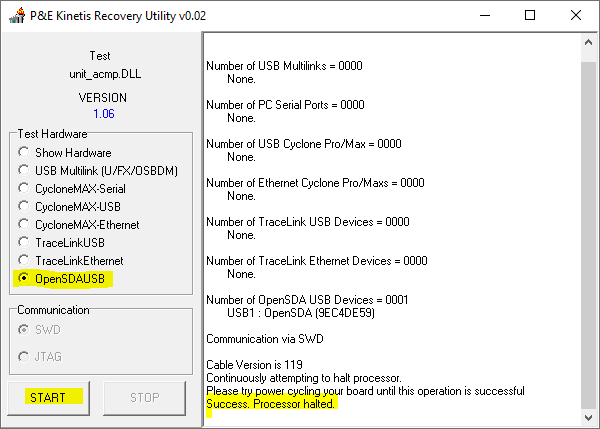
3. Now, I usually flash the program with the S32 Design Studio IDE for Arm® based MCUs | NXP. So, Open S32 Design Studio for ARM, File -> New -> S32DS Project from Example, Import the hello_world_s32k144.
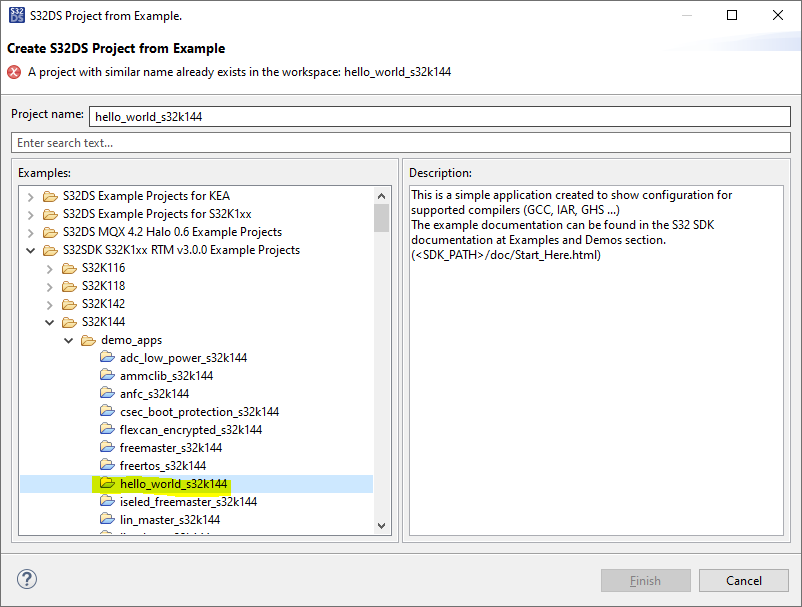
Go to Debug Configurations, select the hello_world_s32k144_debug_flash_pemicro and press Debug. After the process is complete, it will enter the main loop of the hello_eorld program. If you exit the Debug, the RGB LED will start blinking. So the board is now back to life.
4. Now you can regenerate and reprogram the board from Simulink.
I hope this helps you,
Marius
- Mark as New
- Bookmark
- Subscribe
- Mute
- Subscribe to RSS Feed
- Permalink
- Report Inappropriate Content
Hello mariuslucianandrei
Thank you for your help. Here are the steps that I tried-
1. Halted the processor.
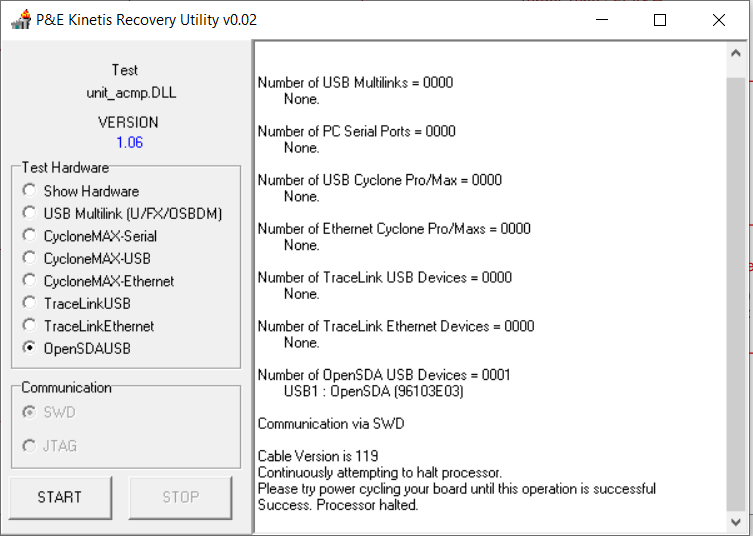
2. Opened S32 Design Studio for ARM.
3. Imported the hello world code for S32K144.
4. Clicked debug configuration.
5. It showed failed to connect.
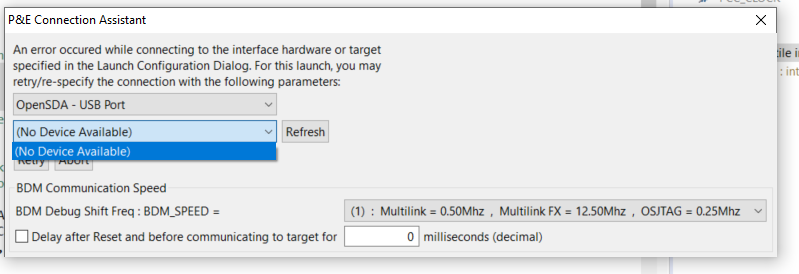
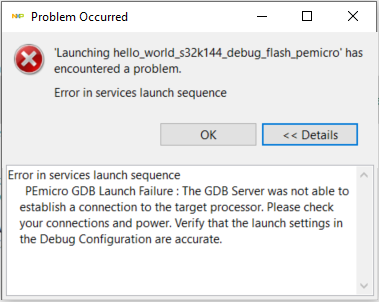
6. Then I went to the debug configuration menu to select the debugger. It couldn't find the debugger.
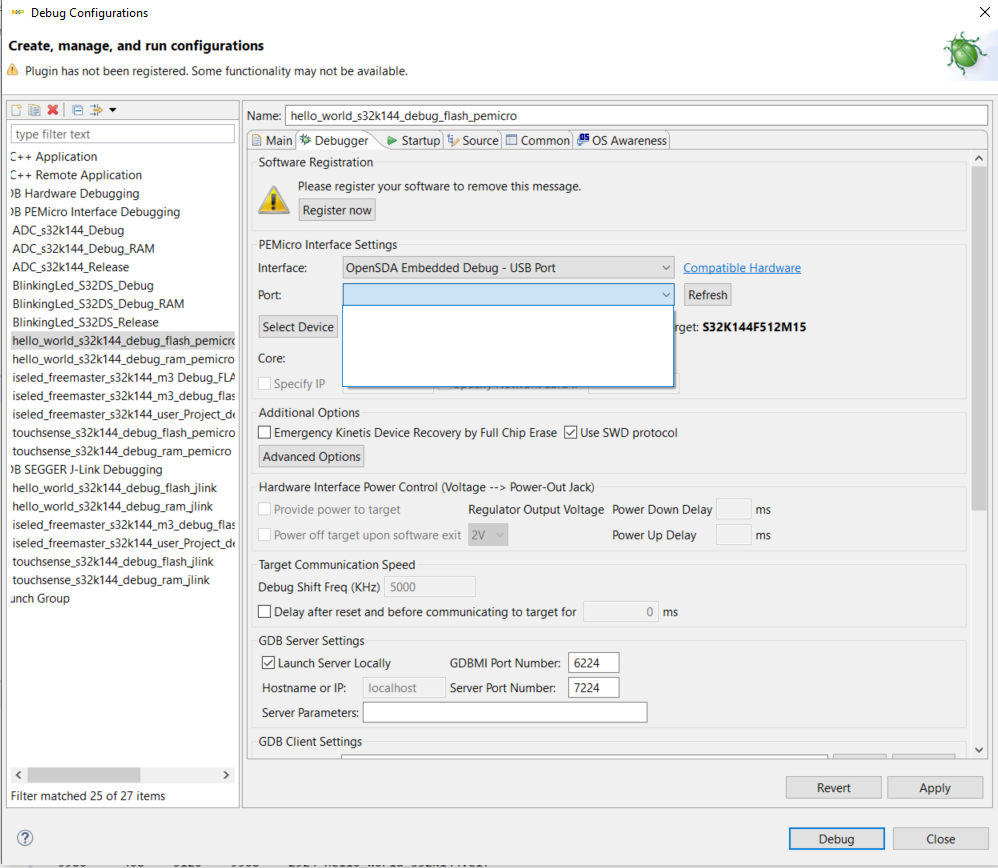
7. I unplugged and plugged again the board. It still didn't find the debugger. Out of frustration, I tried uploading the Simulink code again. It uploaded.
8. Now in S32 Design suite debug configuration it found the debugger.
9. I uploaded the code and run the debug.
10. Now I can see the flashing LED.
11. I terminated the debug session however it didn't return to its normal operation (flashing the led) instead it was stopped at one led blinking (probably halted, no reset on termination happening).
12. I clicked the reset pin. It started flashing again. (Phewww).
13. Then I went to Simulink and uploaded the code.
14. But it's still the same. The red led beside the reset button still blinking with no other changes if I change the potentiometer.
15. I tried to click the reset pin.. nothing changed.
My assumption- when the Simulink uploads the program the upload sequence doesn't provide a reset or start command. At this point, the reset pin is also disabled somehow.
What should I do next? I really appreciate your effort.
Thanks.
