
- Forums
- Product Forums
- General Purpose MicrocontrollersGeneral Purpose Microcontrollers
- i.MX Forumsi.MX Forums
- QorIQ Processing PlatformsQorIQ Processing Platforms
- Identification and SecurityIdentification and Security
- Power ManagementPower Management
- Wireless ConnectivityWireless Connectivity
- RFID / NFCRFID / NFC
- Advanced AnalogAdvanced Analog
- Neural Processing UnitsNeural Processing Units
- MCX Microcontrollers
- S32G
- S32K
- S32V
- MPC5xxx
- Other NXP Products
- S12 / MagniV Microcontrollers
- Powertrain and Electrification Analog Drivers
- Sensors
- Vybrid Processors
- Digital Signal Controllers
- 8-bit Microcontrollers
- ColdFire/68K Microcontrollers and Processors
- PowerQUICC Processors
- OSBDM and TBDML
- S32M
- S32Z/E
-
- Solution Forums
- Software Forums
- MCUXpresso Software and ToolsMCUXpresso Software and Tools
- CodeWarriorCodeWarrior
- MQX Software SolutionsMQX Software Solutions
- Model-Based Design Toolbox (MBDT)Model-Based Design Toolbox (MBDT)
- FreeMASTER
- eIQ Machine Learning Software
- Embedded Software and Tools Clinic
- S32 SDK
- S32 Design Studio
- GUI Guider
- Zephyr Project
- Voice Technology
- Application Software Packs
- Secure Provisioning SDK (SPSDK)
- Processor Expert Software
- Generative AI & LLMs
-
- Topics
- Mobile Robotics - Drones and RoversMobile Robotics - Drones and Rovers
- NXP Training ContentNXP Training Content
- University ProgramsUniversity Programs
- Rapid IoT
- NXP Designs
- SafeAssure-Community
- OSS Security & Maintenance
- Using Our Community
-
- Cloud Lab Forums
-
- Knowledge Bases
- ARM Microcontrollers
- i.MX Processors
- Identification and Security
- Model-Based Design Toolbox (MBDT)
- QorIQ Processing Platforms
- S32 Automotive Processing Platform
- Wireless Connectivity
- CodeWarrior
- MCUXpresso Suite of Software and Tools
- MQX Software Solutions
- RFID / NFC
- Advanced Analog
- Neural Processing Units
-
- NXP Tech Blogs
- Home
- :
- Model-Based Design Toolbox (MBDT)
- :
- Model-Based Design Toolbox (MBDT)
- :
- [S32K312 External Mode Issue] Monitor & Tune Fails to Connect
[S32K312 External Mode Issue] Monitor & Tune Fails to Connect
- Subscribe to RSS Feed
- Mark Topic as New
- Mark Topic as Read
- Float this Topic for Current User
- Bookmark
- Subscribe
- Mute
- Printer Friendly Page

- Mark as New
- Bookmark
- Subscribe
- Mute
- Subscribe to RSS Feed
- Permalink
- Report Inappropriate Content
Hello,
I am working with an S32K312 Evaluation Board and the NXP Model-Based Design Toolbox for MATLAB/Simulink. I can successfully build and deploy my application to the board—my code runs as expected, and I can see the results. However, when I try to use external mode example project and click the “Monitor & Tune” button, I consistently receive an error stating that Simulink cannot connect to the target.
I have already checked the following:
- The correct COM port is selected under Model Configuration Parameters > Hardware Implementation > Target Hardware Resources > External Mode.
- The correct configuration project template is selected under Model Configuration Parameters > Hardware Implementation > Target Hardware Resources > Hardware
- Drivers for OpenSDA/PEmicro appear to be installed correctly (no errors in Device Manager).
- The board is powered.
Could anyone suggest additional steps, configuration details, or known workarounds for getting External Mode to function on the S32K312? Any guidance would be appreciated.
Thank you.
Solved! Go to Solution.
 stefanvlad
- Mark as New
- Bookmark
- Subscribe
- Mute
- Subscribe to RSS Feed
- Permalink
- Report Inappropriate Content
Hi @Berke_E ,
I have tried to replicate the steps in s32k3xx_extmode_ebt_example_readme.html, please follow along:
1. Open the s32k3xx_extmode_ebt model and go to Hardware Settings -> Target hardware resources -> Select Configuration Project Template to be S32K312-Q172 EB Tresos:

2. Then this Warning Dialog will appear on screen and click OK:

3. Then go to External Mode and select the Serial port of your board, press Refresh:
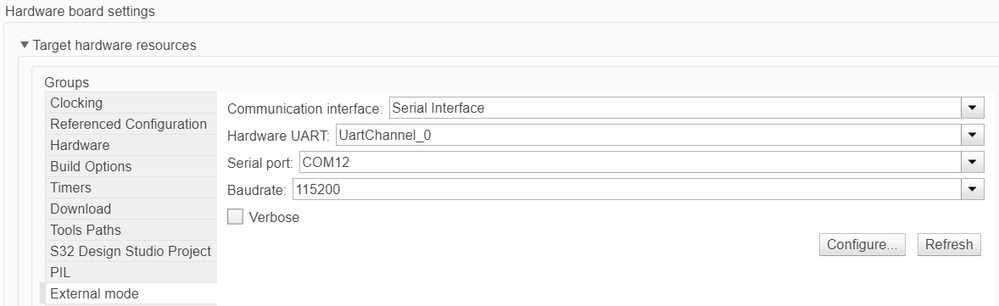
4. The serial com port must match the K312 boards OpenSDA as in Device Manager, in my case is COM12:

5. Click on Apply and OK, to close Configuration Parameters.
6. Press Monitor & Tune in Simulink, wait 1-2 minutes, then the Blue LED will toggle on the K312 board.
7. Open the Scope output and see the sinusoidal shape:
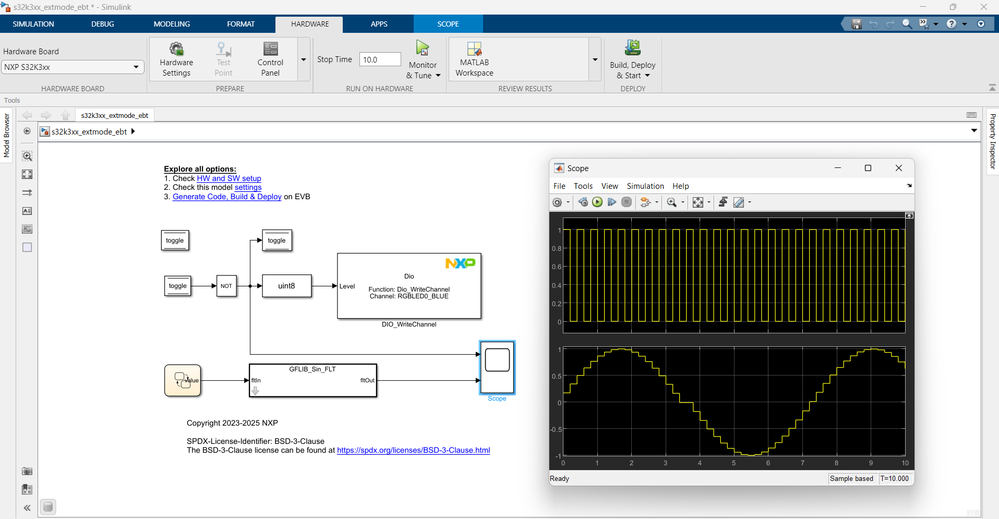


These steps are from the s32k3xx_extmode_ebt_example_readme.html , that my colleague @Irina_Costachescu mentioned above,
Hope this helps,
Stefan V.
stefanvlad
- Mark as New
- Bookmark
- Subscribe
- Mute
- Subscribe to RSS Feed
- Permalink
- Report Inappropriate Content
Hi @Berke_E ,
I have tried to replicate the steps in s32k3xx_extmode_ebt_example_readme.html, please follow along:
1. Open the s32k3xx_extmode_ebt model and go to Hardware Settings -> Target hardware resources -> Select Configuration Project Template to be S32K312-Q172 EB Tresos:
2. Then this Warning Dialog will appear on screen and click OK:
3. Then go to External Mode and select the Serial port of your board, press Refresh:
4. The serial com port must match the K312 boards OpenSDA as in Device Manager, in my case is COM12:
5. Click on Apply and OK, to close Configuration Parameters.
6. Press Monitor & Tune in Simulink, wait 1-2 minutes, then the Blue LED will toggle on the K312 board.
7. Open the Scope output and see the sinusoidal shape:
These steps are from the s32k3xx_extmode_ebt_example_readme.html , that my colleague @Irina_Costachescu mentioned above,
Hope this helps,
Stefan V.
 Irina_Costaches
- Mark as New
- Bookmark
- Subscribe
- Mute
- Subscribe to RSS Feed
- Permalink
- Report Inappropriate Content
Hi @Berke_E
All the steps required to run External Mode are described in the readme file associated to the model, under the Prepare the Demo section.
For being able to provide more guidance, could you please share with us the hardware setup that you are using? For External Mode you need to enable a Serial Connection via the USB port specified in the application model help file. Based on your point 1. I understand that this connection is established already.
Also, based on point 2. I understand that your model is already configured to address an S32K312 processor?
Thanks,
Irina
