
- Forums
- Product Forums
- General Purpose MicrocontrollersGeneral Purpose Microcontrollers
- i.MX Forumsi.MX Forums
- QorIQ Processing PlatformsQorIQ Processing Platforms
- Identification and SecurityIdentification and Security
- Power ManagementPower Management
- Wireless ConnectivityWireless Connectivity
- RFID / NFCRFID / NFC
- Advanced AnalogAdvanced Analog
- Neural Processing UnitsNeural Processing Units
- MCX Microcontrollers
- S32G
- S32K
- S32V
- MPC5xxx
- Other NXP Products
- S12 / MagniV Microcontrollers
- Powertrain and Electrification Analog Drivers
- Sensors
- Vybrid Processors
- Digital Signal Controllers
- 8-bit Microcontrollers
- ColdFire/68K Microcontrollers and Processors
- PowerQUICC Processors
- OSBDM and TBDML
- S32M
- S32Z/E
-
- Solution Forums
- Software Forums
- MCUXpresso Software and ToolsMCUXpresso Software and Tools
- CodeWarriorCodeWarrior
- MQX Software SolutionsMQX Software Solutions
- Model-Based Design Toolbox (MBDT)Model-Based Design Toolbox (MBDT)
- FreeMASTER
- eIQ Machine Learning Software
- Embedded Software and Tools Clinic
- S32 SDK
- S32 Design Studio
- GUI Guider
- Zephyr Project
- Voice Technology
- Application Software Packs
- Secure Provisioning SDK (SPSDK)
- Processor Expert Software
- Generative AI & LLMs
-
- Topics
- Mobile Robotics - Drones and RoversMobile Robotics - Drones and Rovers
- NXP Training ContentNXP Training Content
- University ProgramsUniversity Programs
- Rapid IoT
- NXP Designs
- SafeAssure-Community
- OSS Security & Maintenance
- Using Our Community
-
- Cloud Lab Forums
-
- Knowledge Bases
- ARM Microcontrollers
- i.MX Processors
- Identification and Security
- Model-Based Design Toolbox (MBDT)
- QorIQ Processing Platforms
- S32 Automotive Processing Platform
- Wireless Connectivity
- CodeWarrior
- MCUXpresso Suite of Software and Tools
- MQX Software Solutions
- RFID / NFC
- Advanced Analog
- Neural Processing Units
-
- NXP Tech Blogs
- Home
- :
- モデルベース・デザイン・ツールボックス(MBDT)
- :
- モデルベース・デザイン・ツールボックス(MBDT)
- :
- Re: S32K312 CAN configuration
S32K312 CAN configuration
- RSS フィードを購読する
- トピックを新着としてマーク
- トピックを既読としてマーク
- このトピックを現在のユーザーにフロートします
- ブックマーク
- 購読
- ミュート
- 印刷用ページ

- 新着としてマーク
- ブックマーク
- 購読
- ミュート
- RSS フィードを購読する
- ハイライト
- 印刷
- 不適切なコンテンツを報告
Hello, I have developed a code using Matlab/Simulink MBDT to echo CAN messages (the echoed message has a CAN ID equal to the received message CAN ID + 1).
I use PCAN-View to send to and receive from the board. This is S32K312-Q172.
This works OK for messages with extended CAN IDs, but not for standard IDs.
To receive CAN messages on the board, I use CanIf_RxIndication.
To send CAN messages from the board, I use CanHardwareObject_Can0_Tx_Interrupt with the following configuration:
- Can Implementation Type: FULL
- Can ID Message Type: MIXED
- In the simulink mask of the Can_Write block, the "Extended ID CAN Message" option is unchecked
I also use a CanIf_TxConfirmation block.
Could you please provide some guidance to make my code work for both types of CAN Messages IDs?
解決済! 解決策の投稿を見る。
 robertv
- 新着としてマーク
- ブックマーク
- 購読
- ミュート
- RSS フィードを購読する
- ハイライト
- 印刷
- 不適切なコンテンツを報告
Hello Pablo,
I looked at your model and I think I found a solution for your issue.
What I ultimately had to do was to set Can ID Message Type either to STANDARD or EXTENDED, for the RECEIVE objects. By keeping one of them as a polling hardware object, the MainFunction_Read is still necessary.
I chose STANDARD for CanHardwareObject_Can0_Rx_Std_Polling (id=1) and EXTENDED CanHardwareObject_Can0_Rx_Ext_Interrupt (id=2) (instead of MIXED).

With these changes alone I got the model to work in the following way:
- Sent EXTENDED frame from Can Analyzer - > started receiving EXTENDED frame messages with the ID incremented by 1 from the board
- Sent STANDARD frame from Can Analyzer - > started receiving EXTENDED frame messages with the ID incremented by 1 from the board
In case you are looking to also reply with the same message type, then you would need to implement a workflow that includes 2 Can_Write blocks (one with the checkbox for Extended enabled and one without), and based on the received frame, you redirect to the content to the appropriate Can_Write.
A few ideas on how you could differentiate between the frames:
- By received ID length, but this might be tricky depending on how this is stored
- By Hardware Object ID: going back to the configuration referenced above, CanHardwareObject with the ID 1 was set to receive STANDARD messages, so if your received CAN message comes from the object with the ID 1, you know it's a STANDARD message; otherwise if it's ID 2, then you know it was captured by the can hardware object with ID 2, configured to receive EXTENDED frames.
Please let me know if this fixes the issue you were encountering.
Regards,
Robert V
 Irina_Costaches
- 新着としてマーク
- ブックマーク
- 購読
- ミュート
- RSS フィードを購読する
- ハイライト
- 印刷
- 不適切なコンテンツを報告
Hi @paul_14
As a first step, could you please try and set the CAN ID Message Type for the Receive Hardware Object on MIXED?

After this setting is performed, as illustrated above, could you please try and rebuild the model and check if you are able to receive messages with both EXTENDED and STANDARD IDs?
Thank you,
Irina
- 新着としてマーク
- ブックマーク
- 購読
- ミュート
- RSS フィードを購読する
- ハイライト
- 印刷
- 不適切なコンテンツを報告
Yes, I already had this CAN Hw Object with message type as MIXED.
I have all these CAN Objects:
0. CanHardwareObject_Can0_Rx_FIFO: FULL/MIXED/RECEIVE
1. CanHardwareObject_Can0_Rx_Std_Polling: BASIC/MIXED/RECEIVE
2. CanHardwareObject_Can0_Rx_Ext_Interrupt: BASIC/MIXED/RECEIVE
3. CanHardwareObject_Can0_Tx_Polling: BASIC/MIXED/TRANSMIT
4. CanHardwareObject_Can0_Tx_Interrupt: BASIC/MIXED/TRANSMIT
And this is how my model looks like:

Thanks,
Pablo
robertv
- 新着としてマーク
- ブックマーク
- 購読
- ミュート
- RSS フィードを購読する
- ハイライト
- 印刷
- 不適切なコンテンツを報告
Hello @paul_14 ,
I tried to replicate a scenario similar to what you have here.
First of all, using the default configuration (no changes) that comes with the Toolbox for the S32K312-Q172, i managed to send both EXTENDED and STANDARD frames simply by checking and unchecking the "Extended ID Can Message" property inside the CAN_Write block. Additionally, I tried using the same Can Hardware Object (CanHardwareObject_Can0_Tx_Interrupt) to send EXTENDED and STANDARD frames on alternate execution steps.
Where I think I noticed a possible inconvenient was when trying to receive both STANDARD and EXTENDED frames, where it seemed like only the EXTENDED frames were being received. That happens because of the way the hardware objects are configured:
- CanHardwareObject_Can0_Rx_Ext_Interrupt is able to receive EXTENDED frames, and it's configured to work based on interrupts, meaning there is nothing else you have to do in order for the message to be captured by the Hardware Interrupt Callback set to CanIf_RxIndication.
- CanHardwareObject_Can0_Rx_Std_Polling is able to receive STANDARD frames, and it's configured to work based on the polling mechanism, meaning that in order for this to trigger the Hardware Interrupt Callback, an additional block is needed, that being the Can Block set to Can_MainFunction_Read. This triggers the aforementioned Hardware Interrupt Callback when the hardware object set to polling is receiving messages.
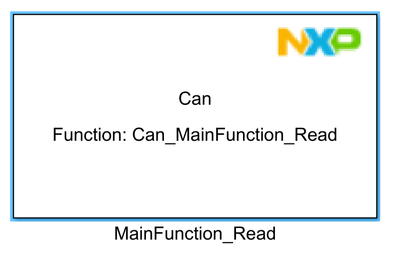
Setting the Can ID Message Type to MIXED might not lead to the desired results when using the RECEIVE objects because MIXED is treated as EXTENDED for this case.
I see the following options, to be able to RECEIVE both EXTENDED and STANDARD frames:
- use the configuration provided by default and also add a Can_MainFunction_Read block into your model, triggering the interrupt for the polling can hardware object
- modify the polling hardware object to work on interrupts instead:
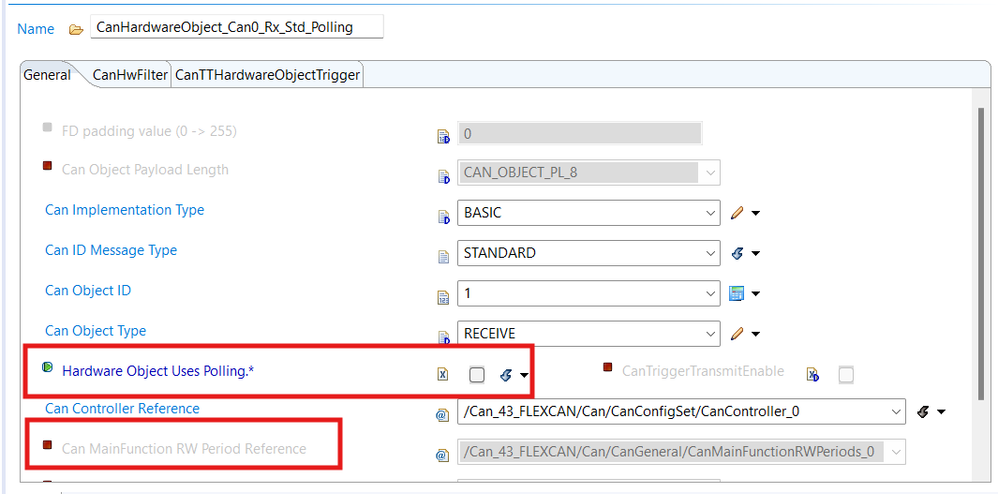
Let me know if these explanations help you and if you manage to get the model to work as expected.
Regards,
Robert V
- 新着としてマーク
- ブックマーク
- 購読
- ミュート
- RSS フィードを購読する
- ハイライト
- 印刷
- 不適切なコンテンツを報告
Hi @robertv ,
I'm afraid I've tried both options and none of the get my code to work with standard IDs.
I'm attaching my model so hopefully you can have a look at it.
Many thanks,
Pablo
robertv
- 新着としてマーク
- ブックマーク
- 購読
- ミュート
- RSS フィードを購読する
- ハイライト
- 印刷
- 不適切なコンテンツを報告
Hello Pablo,
I looked at your model and I think I found a solution for your issue.
What I ultimately had to do was to set Can ID Message Type either to STANDARD or EXTENDED, for the RECEIVE objects. By keeping one of them as a polling hardware object, the MainFunction_Read is still necessary.
I chose STANDARD for CanHardwareObject_Can0_Rx_Std_Polling (id=1) and EXTENDED CanHardwareObject_Can0_Rx_Ext_Interrupt (id=2) (instead of MIXED).
With these changes alone I got the model to work in the following way:
- Sent EXTENDED frame from Can Analyzer - > started receiving EXTENDED frame messages with the ID incremented by 1 from the board
- Sent STANDARD frame from Can Analyzer - > started receiving EXTENDED frame messages with the ID incremented by 1 from the board
In case you are looking to also reply with the same message type, then you would need to implement a workflow that includes 2 Can_Write blocks (one with the checkbox for Extended enabled and one without), and based on the received frame, you redirect to the content to the appropriate Can_Write.
A few ideas on how you could differentiate between the frames:
- By received ID length, but this might be tricky depending on how this is stored
- By Hardware Object ID: going back to the configuration referenced above, CanHardwareObject with the ID 1 was set to receive STANDARD messages, so if your received CAN message comes from the object with the ID 1, you know it's a STANDARD message; otherwise if it's ID 2, then you know it was captured by the can hardware object with ID 2, configured to receive EXTENDED frames.
Please let me know if this fixes the issue you were encountering.
Regards,
Robert V
- 新着としてマーク
- ブックマーク
- 購読
- ミュート
- RSS フィードを購読する
- ハイライト
- 印刷
- 不適切なコンテンツを報告
Hi Robert,
I managed to get my model working with your suggestions, receiving and echoing both standard and extended ID CAN messages.
Thank you!!
Pablo
robertv
- 新着としてマーク
- ブックマーク
- 購読
- ミュート
- RSS フィードを購読する
- ハイライト
- 印刷
- 不適切なコンテンツを報告
Hello Pablo,
I'm glad to hear it worked.
And thank you for confirming the solution was successful!
Regards,
Robert V
