
- Forums
- Product Forums
- General Purpose MicrocontrollersGeneral Purpose Microcontrollers
- i.MX Forumsi.MX Forums
- QorIQ Processing PlatformsQorIQ Processing Platforms
- Identification and SecurityIdentification and Security
- Power ManagementPower Management
- Wireless ConnectivityWireless Connectivity
- RFID / NFCRFID / NFC
- Advanced AnalogAdvanced Analog
- Neural Processing UnitsNeural Processing Units
- MCX Microcontrollers
- S32G
- S32K
- S32V
- MPC5xxx
- Other NXP Products
- S12 / MagniV Microcontrollers
- Powertrain and Electrification Analog Drivers
- Sensors
- Vybrid Processors
- Digital Signal Controllers
- 8-bit Microcontrollers
- ColdFire/68K Microcontrollers and Processors
- PowerQUICC Processors
- OSBDM and TBDML
- S32M
- S32Z/E
-
- Solution Forums
- Software Forums
- MCUXpresso Software and ToolsMCUXpresso Software and Tools
- CodeWarriorCodeWarrior
- MQX Software SolutionsMQX Software Solutions
- Model-Based Design Toolbox (MBDT)Model-Based Design Toolbox (MBDT)
- FreeMASTER
- eIQ Machine Learning Software
- Embedded Software and Tools Clinic
- S32 SDK
- S32 Design Studio
- GUI Guider
- Zephyr Project
- Voice Technology
- Application Software Packs
- Secure Provisioning SDK (SPSDK)
- Processor Expert Software
- Generative AI & LLMs
-
- Topics
- Mobile Robotics - Drones and RoversMobile Robotics - Drones and Rovers
- NXP Training ContentNXP Training Content
- University ProgramsUniversity Programs
- Rapid IoT
- NXP Designs
- SafeAssure-Community
- OSS Security & Maintenance
- Using Our Community
-
- Cloud Lab Forums
-
- Knowledge Bases
- ARM Microcontrollers
- i.MX Processors
- Identification and Security
- Model-Based Design Toolbox (MBDT)
- QorIQ Processing Platforms
- S32 Automotive Processing Platform
- Wireless Connectivity
- CodeWarrior
- MCUXpresso Suite of Software and Tools
- MQX Software Solutions
- RFID / NFC
- Advanced Analog
- Neural Processing Units
-
- NXP Tech Blogs
- Home
- :
- モデルベース・デザイン・ツールボックス(MBDT)
- :
- モデルベース・デザイン・ツールボックス(MBDT)
- :
- Re: Motor Control Class: Lecture 1 - Introduction
Motor Control Class: Lecture 1 - Introduction
- RSS フィードを購読する
- トピックを新着としてマーク
- トピックを既読としてマーク
- このトピックを現在のユーザーにフロートします
- ブックマーク
- 購読
- ミュート
- 印刷用ページ
Motor Control Class: Lecture 1 - Introduction

 Daniel_Popa
- 新着としてマーク
- ブックマーク
- 購読
- ミュート
- RSS フィードを購読する
- ハイライト
- 印刷
- 不適切なコンテンツを報告
We start this course with this introduction video that present the hardware we will work with throughout this series.
Main topics:
- MPC5744P DevKit main hardware features;
- MotorGD DevKit main hardware features;
- How to install the Model Based Design Toolbox for MPC5744P revision 2.0.0;
- How to generate a license;
- How to setup a compiler toolchain using S32 Design Studio for Power Architecture;
- How to add the Model Based Design Toolbox for MPC5744P into the Simulink Standard Libraries;
- How to validate the software installation by generation C code for the first time;
Objectives:
- Understand the hardware setup;
- Download and Install the Model Based Design Toolbox for MPC5744P;
- Generate a license for the toolbox;
- Configure the toolbox and generate code for the first time;
Watch the introduction video and leave your comments and questions below.
Additional information:
- Model Based Design Toolbox for MPC5744P Installer: here
- MPC5744P DevKit – Product Home Page: here
- MotorGD DevKit – Product Home Page: here
- MPC5744P DevKit – Quick Start Guide: here
- MPC5744P – Product Home Page: here
- MPC5744P – Reference Manual: here
- MPC5744P – Fact Sheet: here
- MPC5744P – Data Sheet: here
- MC34GD3000 – Data Sheet: here
- BUK7K52-60E – Data Sheet: here
- S32DS for PA (e200 core) – Download Link: here
- PDF attached with main peripherals that we are going to use for motor control
NOTE: Chinese viewers can watch the video on YOUKU using this link.
注意:中国观众可以使用此链接观看YOUKU上的视频

- 新着としてマーク
- ブックマーク
- 購読
- ミュート
- RSS フィードを購読する
- ハイライト
- 印刷
- 不適切なコンテンツを報告
Daniel
sorry,even there is one button for download by your provided link,after clicking download button,
the file could be only saved as text format and finally downloading is failed.
if the file can be downloaded,then everything will be fine.
Best regards
david
Daniel_Popa
- 新着としてマーク
- ブックマーク
- 購読
- ミュート
- RSS フィードを購読する
- ハイライト
- 印刷
- 不適切なコンテンツを報告
David,
It might be something specific to your PC setup. We checked with other PCs from intranet and extranet and the site works OK. Also, i checked the logs and looks like other peoples can see it. Could it be something from your internet service provider ?
Best regards,
Daniel
- 新着としてマーク
- ブックマーク
- 購読
- ミュート
- RSS フィードを購読する
- ハイライト
- 印刷
- 不適切なコンテンツを報告
Daniel,
I can't see the video too. The situation likes David :smileycry:. could you offer a link that i can download the video, because i can download the class's attachmet like the PDF.
 Daniel_Popa
- 新着としてマーク
- ブックマーク
- 購読
- ミュート
- RSS フィードを購読する
- ハイライト
- 印刷
- 不適切なコンテンツを報告
Hi Sun et .all with video issues,
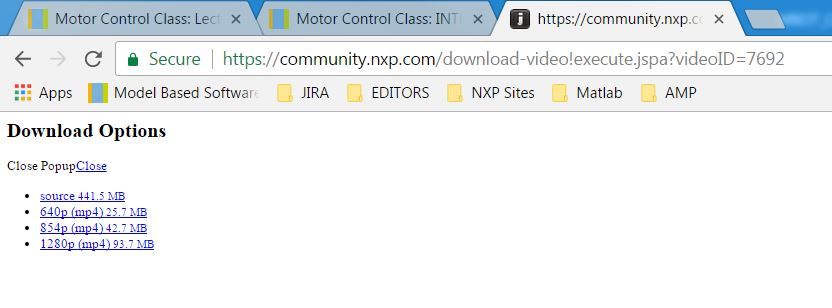
Can you try this link please: https://community.nxp.com/download-video!execute.jspa?videoID=7692
You should see this page that allows you to download the video and see it offline.
If the issue will persists we will consider moving the video to YOUTUBE
Thanks for your understanding!
Best regards,
Daniel

- 新着としてマーク
- ブックマーク
- 購読
- ミュート
- RSS フィードを購読する
- ハイライト
- 印刷
- 不適切なコンテンツを報告
Hi Daniel,
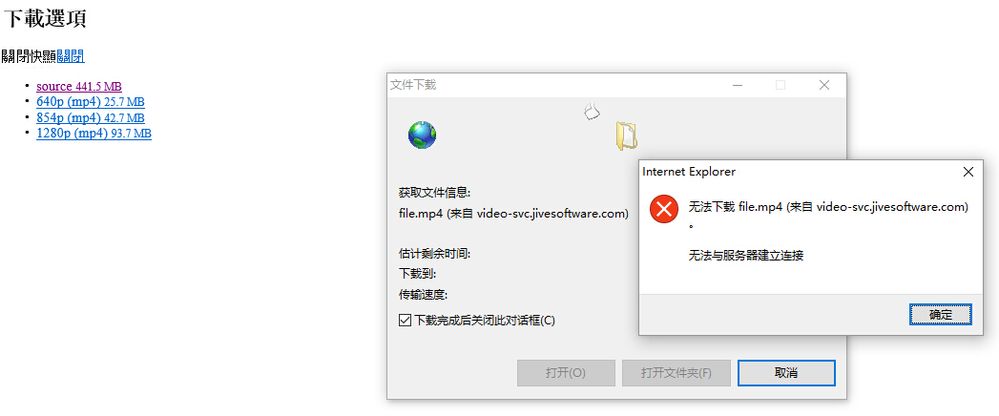
I tried all the download link you have provided. It seems doesn`t work. As you know we can`t see the video on the YouTube without VPN, So it`s not convenient in China.
If there is a way to share more related training data for download like PPT, so we can join the class in this way.
Thanks for your support!
Paul Xu
Daniel_Popa
- 新着としてマーク
- ブックマーク
- 購読
- ミュート
- RSS フィードを購読する
- ハイライト
- 印刷
- 不適切なコンテンツを報告
Hi Paul,
Thanks for your feedback. For the next videos i'm going to add more power point slides and will make them available for download.
Anyhow, at the end of the series a full PDF will all the slides will become available as well.
Best regards,
Daniel
- 新着としてマーク
- ブックマーク
- 購読
- ミュート
- RSS フィードを購読する
- ハイライト
- 印刷
- 不適切なコンテンツを報告
Hi Daniel,
It is okay to download the video from your link but really slowly ,it seems that it will take me more than 10 hours.
Best regards
Bruce
- 新着としてマーク
- ブックマーク
- 購読
- ミュート
- RSS フィードを購読する
- ハイライト
- 印刷
- 不適切なコンテンツを報告
Hello ,
Somehow I cannot watch this video , does anyone has the same problem as I do ? Do I need to use some particular browsers?
Thank you
Bruce
Daniel_Popa
- 新着としてマーク
- ブックマーク
- 購読
- ミュート
- RSS フィードを購読する
- ハイライト
- 印刷
- 不適切なコンテンツを報告
Hi lezhou ye,
I'm sorry to hear that. It works fine with Chrome and IE. What kind of browser are you using?
Best regards,
Daniel
- 新着としてマーク
- ブックマーク
- 購読
- ミュート
- RSS フィードを購読する
- ハイライト
- 印刷
- 不適切なコンテンツを報告
Hi dumitru-daniel.popa,
You series of tutorials have documentation more than just video?Just like the MPC5744P data sheet
Best regards,
Robin
Daniel_Popa
- 新着としてマーク
- ブックマーク
- 購読
- ミュート
- RSS フィードを購読する
- ハイライト
- 印刷
- 不適切なコンテンツを報告
Hi Robin,
Each section has the PDF document and Simulink Models (whenever is the case). Apart of that, we are using only NXP official documentation that could be found on the MPC5744P Documentation Official Page: MPC574xP|32-bit MCU|Chassis-Safety|NXP
Let me know if there is something in particular about this processor that you look for and can't be found on the www.nxp.com
Thank you!
Daniel
- 新着としてマーク
- ブックマーク
- 購読
- ミュート
- RSS フィードを購読する
- ハイライト
- 印刷
- 不適切なコンテンツを報告
HI Daniel ,
I tried Chrome and IE but with no help .The screen turned out to be like this :
Thank you for your reply.
Bruce
Daniel_Popa
- 新着としてマーク
- ブックマーク
- 購読
- ミュート
- RSS フィードを購読する
- ハイライト
- 印刷
- 不適切なコンテンツを報告
Hi Bruce,
Can you try with this link: Video Link : 7692
Just in case it does not work, you have the option to download the video and watch it offline with any video viewer.
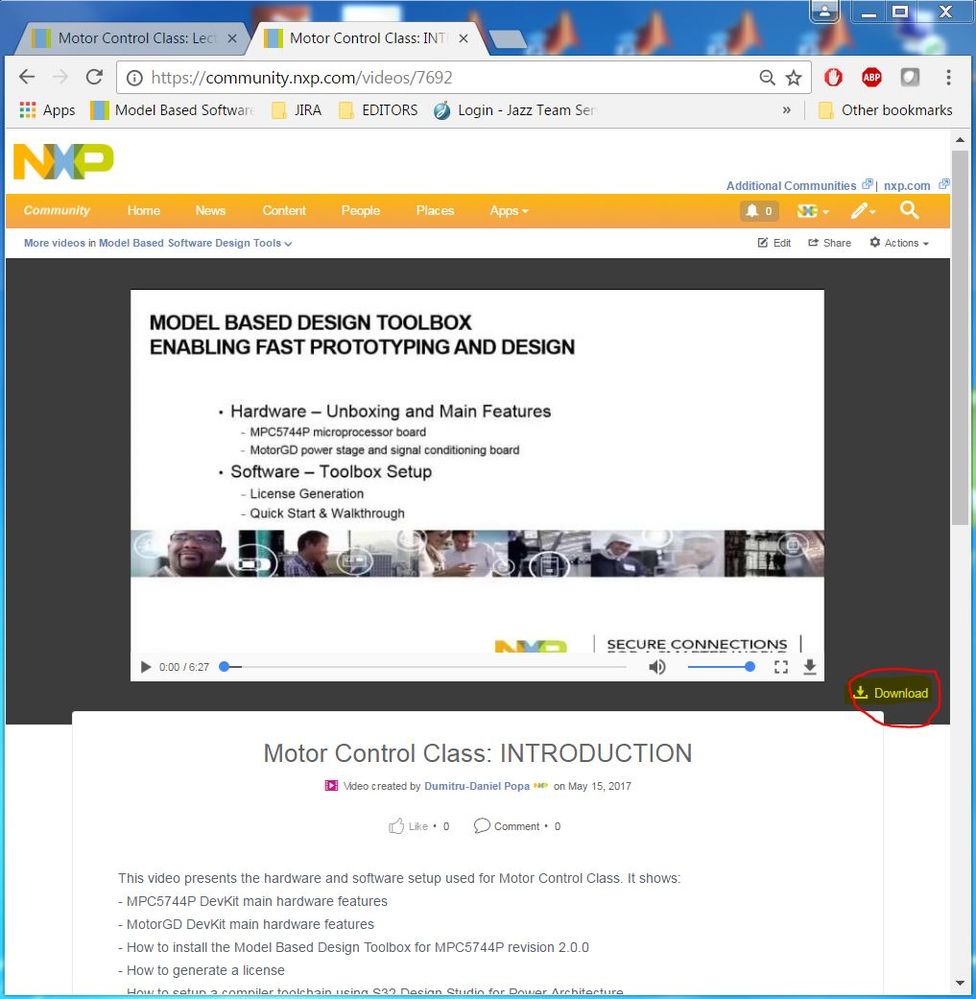
Hope this will resolver your issue.
Best regards,
Daniel
