
- Forums
- Product Forums
- General Purpose MicrocontrollersGeneral Purpose Microcontrollers
- i.MX Forumsi.MX Forums
- QorIQ Processing PlatformsQorIQ Processing Platforms
- Identification and SecurityIdentification and Security
- Power ManagementPower Management
- Wireless ConnectivityWireless Connectivity
- RFID / NFCRFID / NFC
- Advanced AnalogAdvanced Analog
- Neural Processing UnitsNeural Processing Units
- MCX Microcontrollers
- S32G
- S32K
- S32V
- MPC5xxx
- Other NXP Products
- S12 / MagniV Microcontrollers
- Powertrain and Electrification Analog Drivers
- Sensors
- Vybrid Processors
- Digital Signal Controllers
- 8-bit Microcontrollers
- ColdFire/68K Microcontrollers and Processors
- PowerQUICC Processors
- OSBDM and TBDML
- S32M
- S32Z/E
-
- Solution Forums
- Software Forums
- MCUXpresso Software and ToolsMCUXpresso Software and Tools
- CodeWarriorCodeWarrior
- MQX Software SolutionsMQX Software Solutions
- Model-Based Design Toolbox (MBDT)Model-Based Design Toolbox (MBDT)
- FreeMASTER
- eIQ Machine Learning Software
- Embedded Software and Tools Clinic
- S32 SDK
- S32 Design Studio
- GUI Guider
- Zephyr Project
- Voice Technology
- Application Software Packs
- Secure Provisioning SDK (SPSDK)
- Processor Expert Software
- Generative AI & LLMs
-
- Topics
- Mobile Robotics - Drones and RoversMobile Robotics - Drones and Rovers
- NXP Training ContentNXP Training Content
- University ProgramsUniversity Programs
- Rapid IoT
- NXP Designs
- SafeAssure-Community
- OSS Security & Maintenance
- Using Our Community
-
- Cloud Lab Forums
-
- Knowledge Bases
- ARM Microcontrollers
- i.MX Processors
- Identification and Security
- Model-Based Design Toolbox (MBDT)
- QorIQ Processing Platforms
- S32 Automotive Processing Platform
- Wireless Connectivity
- CodeWarrior
- MCUXpresso Suite of Software and Tools
- MQX Software Solutions
- RFID / NFC
- Advanced Analog
- Neural Processing Units
-
- NXP Tech Blogs
- Home
- :
- Model-Based Design Toolbox (MBDT)
- :
- Model-Based Design Toolbox (MBDT)
- :
- Re: MBDToolbox for S12ZVM
MBDToolbox for S12ZVM
- Subscribe to RSS Feed
- Mark Topic as New
- Mark Topic as Read
- Float this Topic for Current User
- Bookmark
- Subscribe
- Mute
- Printer Friendly Page
MBDToolbox for S12ZVM

- Mark as New
- Bookmark
- Subscribe
- Mute
- Subscribe to RSS Feed
- Permalink
- Report Inappropriate Content
Hello,
For some time I have been trying to add MBDToolbox for S12 ZVM to Matlab unsuccessfully.
I was able to add MBDToolbox for S12 ZVC to Matlab; however, I need to have a toolbox for S12ZVM in Simulink.
In addition, there is a setup file for S12ZVC toolbox, and it worked fine, but no setup file for S12ZVM.
The script (m file) that comes with NXP_Support_Package_S12ZVMx_20200907 does nothing.
Basically, it runs and at the end it says that the toolbox was added, but it is not added- No MBDToolbox in Simulink.
I tried with Matlab 2020b and Matlab 2020a and it doesn't work for neither.
Please advise !
Almin

 constantinrazva
- Mark as New
- Bookmark
- Subscribe
- Mute
- Subscribe to RSS Feed
- Permalink
- Report Inappropriate Content
Hello @almin_svraka ,
Can you try do the following and see if this works on your end?
1) Go to https://www.nxp.com/design/automotive-software-and-tools/nxp-model-based-design-toolbox-mbdt:MBDT link
2) Click on Download button (at this step you will be prompted to log into your nxp.com account)
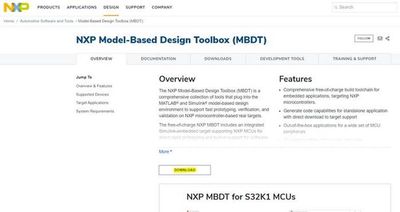
3) After you logged in, select the following from the list: Model-Based Design Toolbox for S12ZVMx Automotive Microprocessors Family
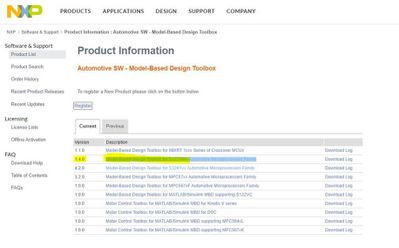
4) Click on “I Agree”
5) download the MBDToolbox_S12ZVMx_1.4.0_20200909.mltbx file
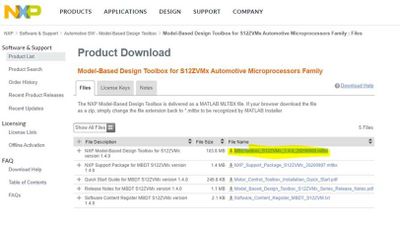
6) The file will be automatically saved as .zip – just rename the file to .mltbx [from MBDToolbox_S12ZVMx_1.4.0_20200909.zip to MBDToolbox_S12ZVMx_1.4.0_20200909.mltbx]
7) Open MATLAB – run the MBDToolbox_S12ZVMx_1.4.0_20200909.mltbx file
After you finish the installation process from MATLAB, you should be able to see the ZVM toolbox installed.
There is a big difference between the older ZVC toolbox and the updated ZVM one when it comes to installation - we switched to this mltbx as it is a Mathworks installation technology and we try to achieve a deeper integration within MATLAB/Simulink.
Kind regards,
Razvan.
- Mark as New
- Bookmark
- Subscribe
- Mute
- Subscribe to RSS Feed
- Permalink
- Report Inappropriate Content
Hi,I have the same questions,the MBD toolbox for SZ12ZVMx can not install successfully although I try any ways,My matlab version is R2021a,I want to know if this toolbox support the newer version than R2020a?
- Mark as New
- Bookmark
- Subscribe
- Mute
- Subscribe to RSS Feed
- Permalink
- Report Inappropriate Content
Hello,
I did it as you said to do it - followed the steps - it doesn't work
Basically, Matlab 2020a says the toolbox is added - when I run command "ver"
MATLAB Version 9.8 (R2020a)
Simulink Version 10.1 (R2020a)
Embedded Coder Version 7.4 (R2020a)
IEC Certification Kit Version 3.15 (R2020a)
MATLAB Coder Version 5.0 (R2020a)
Model-Based Design Toolbox for S12ZVMx Series Version 1.4.0 (R2015a-R2020a)
Simulink Coder Version 9.3 (R2020a)
Stateflow
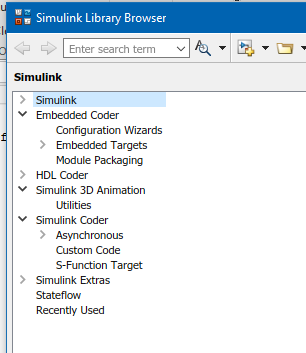
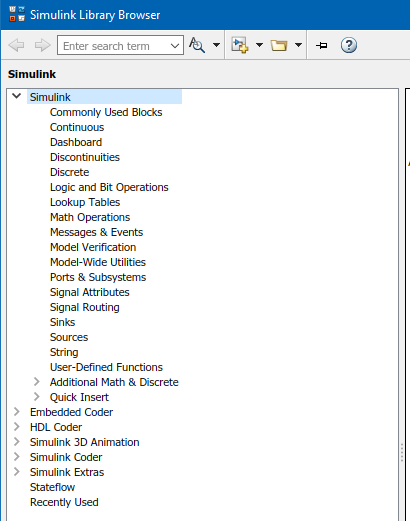
When I open Simulink browser - nothing is there (empty)
Please advise !
constantinrazva
- Mark as New
- Bookmark
- Subscribe
- Mute
- Subscribe to RSS Feed
- Permalink
- Report Inappropriate Content
Hello @almin_svraka ,
If you open the Simulink library browser (see MATLAB command below), you do not see the NXP Model-Based Design Toolbox for S12ZVMx ?
slLibraryBrowser
Note that it should be the first one and not alphabetically ordered.
Kind regards,
Razvan.
- Mark as New
- Bookmark
- Subscribe
- Mute
- Subscribe to RSS Feed
- Permalink
- Report Inappropriate Content
constantinrazva
- Mark as New
- Bookmark
- Subscribe
- Mute
- Subscribe to RSS Feed
- Permalink
- Report Inappropriate Content
Hello @almin_svraka ,
Can you let me know if you can see it in the Add-on Manager?
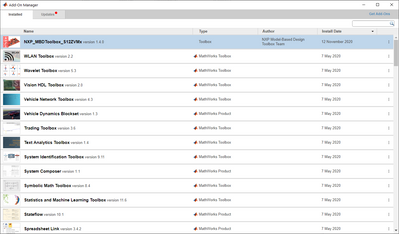
If that exists, can you run the following command in MATLAB terminal:
mbd_find_s12z_root
If that returns a path, please go to that path and open an example from S12ZVM_Examples folder.
One more thing - after you open slLibraryBrowser, can you refresh it? You can press F5 for that. Maybe that will do the trick.
Kind regards,
Razvan.
- Mark as New
- Bookmark
- Subscribe
- Mute
- Subscribe to RSS Feed
- Permalink
- Report Inappropriate Content
Hello,
Yes, I can see it it in Add-On Manager - image attached
Yes, there is a return path after mbd_find_s12z_root is ran and it is:
'C:\Users\almin.svraka\AppData\Roaming\MathWorks\MATLAB Add-Ons\Toolboxes\NXP_MBDToolbox_S12ZVMx'
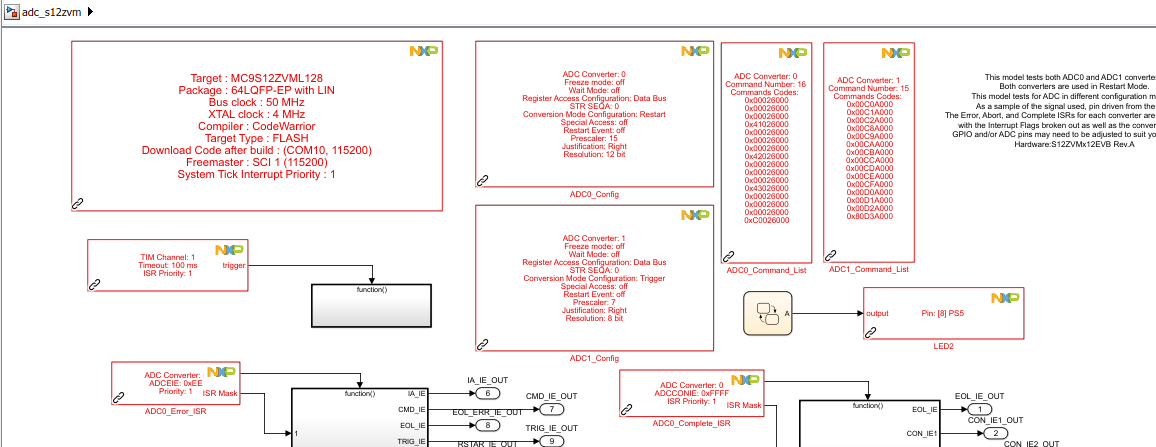
Yes, I can open an example; however, all S12ZVM blocks are in red (not recognized) - image attached
Refreshing Simulink Library doesn't help - image attached
Restarting Matlab doesn't help !
Restarting Windows doesn't help !
Please Advise !
Almin
constantinrazva
- Mark as New
- Bookmark
- Subscribe
- Mute
- Subscribe to RSS Feed
- Permalink
- Report Inappropriate Content
Hello @almin_svraka ,
Unfortunately I can only see your first image - I must mention that the blocks are indeed recognized, as if they were not, you would have not been able to see information displayed on NXP blocks. You should try and build any example to make sure it all works out. If you haven't yet setup your license, you can read the documentation and follow the steps from there or from various community posts about it.
Regarding the other issue with the library not being visible in the browser, I'm not yet sure why this is happening - I'm trying to reproduce your issue on various setups, but to no avail. I can see it on every setup I've tried so far. Will get back to you on this aspect, but in the meanwhile test out examples and let me know if those build or not.
Kind regards,
Razvan.
- Mark as New
- Bookmark
- Subscribe
- Mute
- Subscribe to RSS Feed
- Permalink
- Report Inappropriate Content
Hello,
Would you please show me (take a screenshot and post it here) the MBDToolboox for S12ZVM in your Matlab2020a/Simulink browser ?
Best Regards,
Almin
constantinrazva
- Mark as New
- Bookmark
- Subscribe
- Mute
- Subscribe to RSS Feed
- Permalink
- Report Inappropriate Content
Hello @almin_svraka ,
As you can see in the image below, on whatever setup I ran the installer on, I got it visible in the Simulink library browser.
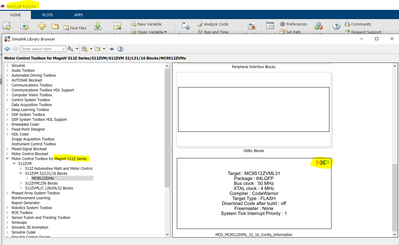

Can you show us what errors you are getting when trying to build an example?
Kind regards,
Razvan.
- Mark as New
- Bookmark
- Subscribe
- Mute
- Subscribe to RSS Feed
- Permalink
- Report Inappropriate Content
 constantinrazva
- Mark as New
- Bookmark
- Subscribe
- Mute
- Subscribe to RSS Feed
- Permalink
- Report Inappropriate Content
- Mark as New
- Bookmark
- Subscribe
- Mute
- Subscribe to RSS Feed
- Permalink
- Report Inappropriate Content
Hello,
I installed then uninstalled then installed (many times) MBDToolboox - just trying to see if something is skipped during the installation.
Anyways, the error message for that particular example this time (just ran a few minutes ago) is attached to this message.
The directory path is: C:\Users\almin.svraka\AppData\Roaming\MathWorks\MATLAB Add-Ons\Toolboxes\NXP_MBDToolbox_S12ZVMx\S12ZVM_Examples\s12zvm\adc
Best Regards,
Almin

- Mark as New
- Bookmark
- Subscribe
- Mute
- Subscribe to RSS Feed
- Permalink
- Report Inappropriate Content
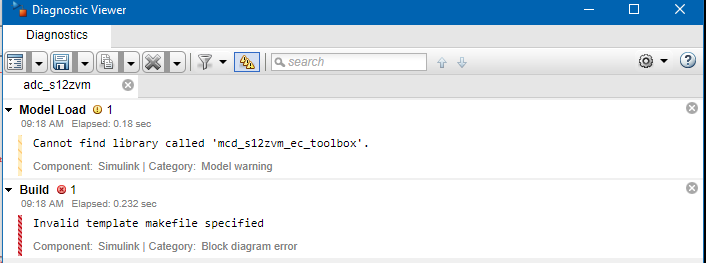
 paulvlase
- Mark as New
- Bookmark
- Subscribe
- Mute
- Subscribe to RSS Feed
- Permalink
- Report Inappropriate Content
Hi @almin_svraka ,
Can you run the following commands:
1. cd(mbd_find_s12z_root())
2. mbd_s12z_path()
3. sl_refresh_customization()
4. build the adc_s12zvm example
and post any warning or error you get.
- Mark as New
- Bookmark
- Subscribe
- Mute
- Subscribe to RSS Feed
- Permalink
- Report Inappropriate Content
It builds now.
- Mark as New
- Bookmark
- Subscribe
- Mute
- Subscribe to RSS Feed
- Permalink
- Report Inappropriate Content
Hello,
Actually, this is the output:
>> cd(mbd_find_s12z_root())
>> mbd_s12z_path()
Treating 'C:\Users\almin.svraka\AppData\Roaming\MathWorks\MATLAB Add-Ons\Toolboxes\NXP_MBDToolbox_S12ZVMx' as MBD Toolbox installation root.
MBD Toolbox path prepended.
Successful.
>> sl_refresh_customization()
Unrecognized function or variable 'sl_refresh_customization'.
Did you mean:
>> sl_refresh_customizations()
Yes, it build with some warnings.
### Created executable: adc_s12zvm.elf Building target all *** Created executable: adc_s12zvm.elf ### Successful completion of build procedure for: adc_s12zvm ### Simulink cache artifacts for 'adc_s12zvm' were created in 'C:\Users\almin.svraka\AppData\Roaming\MathWorks\MATLAB Add-Ons\Toolboxes\NXP_MBDToolbox_S12ZVMx\S12ZVM_Examples\adc_s12zvm.slxc'.
paulvlase
- Mark as New
- Bookmark
- Subscribe
- Mute
- Subscribe to RSS Feed
- Permalink
- Report Inappropriate Content
Yeah, it is sl_refresh_customizations(), with an 's' at the end. But you don't need to run it anymore, now that it works to build the adc_s12zvm model.
That message is a confirmation that the elf executable was build successfully.
- Mark as New
- Bookmark
- Subscribe
- Mute
- Subscribe to RSS Feed
- Permalink
- Report Inappropriate Content
Yes, the example, adc_12zvm, builds from the Examples directory.
However, that is not the solution to the problem - MBDToolbox for S12ZVM is not visible in Simulink library
Best Regards,
Almin
constantinrazva
- Mark as New
- Bookmark
- Subscribe
- Mute
- Subscribe to RSS Feed
- Permalink
- Report Inappropriate Content
One thing I want to clarify - when I'm talking about license, I am talking about the license for our toolbox - the license that can be accessed from the nxp.com website. This license is different from the MATLAB/Simulink license.
Kind regards,
Razvan.
