
- Forums
- Product Forums
- General Purpose MicrocontrollersGeneral Purpose Microcontrollers
- i.MX Forumsi.MX Forums
- QorIQ Processing PlatformsQorIQ Processing Platforms
- Identification and SecurityIdentification and Security
- Power ManagementPower Management
- Wireless ConnectivityWireless Connectivity
- RFID / NFCRFID / NFC
- Advanced AnalogAdvanced Analog
- Neural Processing UnitsNeural Processing Units
- MCX Microcontrollers
- S32G
- S32K
- S32V
- MPC5xxx
- Other NXP Products
- S12 / MagniV Microcontrollers
- Powertrain and Electrification Analog Drivers
- Sensors
- Vybrid Processors
- Digital Signal Controllers
- 8-bit Microcontrollers
- ColdFire/68K Microcontrollers and Processors
- PowerQUICC Processors
- OSBDM and TBDML
- S32M
- S32Z/E
-
- Solution Forums
- Software Forums
- MCUXpresso Software and ToolsMCUXpresso Software and Tools
- CodeWarriorCodeWarrior
- MQX Software SolutionsMQX Software Solutions
- Model-Based Design Toolbox (MBDT)Model-Based Design Toolbox (MBDT)
- FreeMASTER
- eIQ Machine Learning Software
- Embedded Software and Tools Clinic
- S32 SDK
- S32 Design Studio
- GUI Guider
- Zephyr Project
- Voice Technology
- Application Software Packs
- Secure Provisioning SDK (SPSDK)
- Processor Expert Software
- Generative AI & LLMs
-
- Topics
- Mobile Robotics - Drones and RoversMobile Robotics - Drones and Rovers
- NXP Training ContentNXP Training Content
- University ProgramsUniversity Programs
- Rapid IoT
- NXP Designs
- SafeAssure-Community
- OSS Security & Maintenance
- Using Our Community
-
- Cloud Lab Forums
-
- Knowledge Bases
- ARM Microcontrollers
- i.MX Processors
- Identification and Security
- Model-Based Design Toolbox (MBDT)
- QorIQ Processing Platforms
- S32 Automotive Processing Platform
- Wireless Connectivity
- CodeWarrior
- MCUXpresso Suite of Software and Tools
- MQX Software Solutions
- RFID / NFC
- Advanced Analog
- Neural Processing Units
-
- NXP Tech Blogs
- Home
- :
- Model-Based Design Toolbox (MBDT)
- :
- Model-Based Design Toolbox (MBDT)
- :
- Re: MBDT BMS issues of wrong SOC estimation values using MC33772B SPI + 6battemulator
MBDT BMS issues of wrong SOC estimation values using MC33772B SPI + 6battemulator
- Subscribe to RSS Feed
- Mark Topic as New
- Mark Topic as Read
- Float this Topic for Current User
- Bookmark
- Subscribe
- Mute
- Printer Friendly Page

- Mark as New
- Bookmark
- Subscribe
- Mute
- Subscribe to RSS Feed
- Permalink
- Report Inappropriate Content
Hi @mariuslucianand ,
Thanks for your previous guiding and supporting. I have learned and practical tested all the relevant of Simulink MBDT examples that you created either on FRDM33771/FRDM33772 (SPI OR TPL). This ensures that all the BMS hardware kits that I purchased has no issues, can obtain all the parameters including (PackVoltage, Pack Current, Temperature and more etc).
However, I was trying to implement one of the BMS example which consisting of SOC estimation, state-machine and balancing logic. I believe this version is created by NXP team in 2019 which can be found from the Mathworks MBDT folder paths and the Simulink layout (see attachment: BMS_NXP_Simulink).
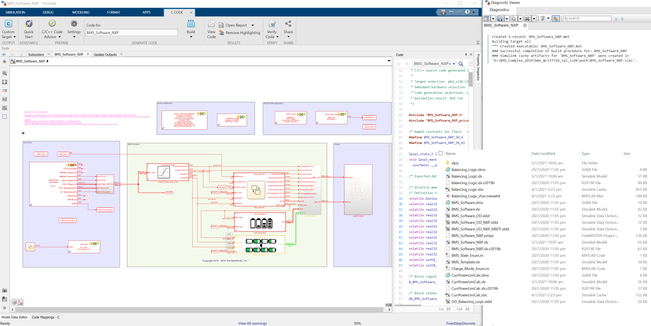
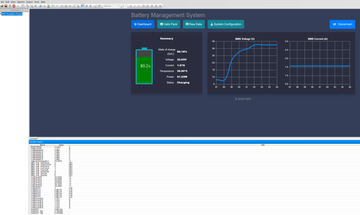
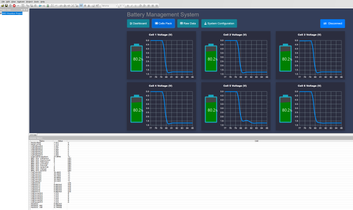
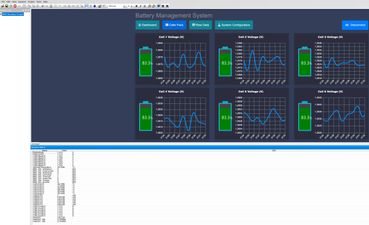
I figured that the SOC does not display a correct value on Freemaster even I slide the (6) potentiometers to adjust the cell voltage either low or high. Initially, the SOC is predefined at 80%, SOC will keep updating but it was very slight change at the 0.01% in every second. I realized that the updating speed is very slow. The SOC value is slowly ramp up to 84% when all my cell voltage was low or high. I think is wrong and it should be immediately update the SOC value when the cell voltage is changed. Please see the attachments to observe my cell voltage level ( FM_01, FM_02, FM_03, FM_04). In addition, UKF and EKF for the SOC value is not updated on Freemaster datalog. only the coulomb counting is worked.
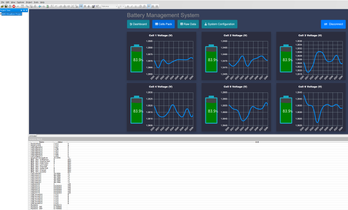
I hope this issue can be solved. Would you be able to validate the results on your BMS kits?
Thanks, @mariuslucianand. I looking forward to hearing from you soon.
Best Regards.
Solved! Go to Solution.

 mariuslucianand
- Mark as New
- Bookmark
- Subscribe
- Mute
- Subscribe to RSS Feed
- Permalink
- Report Inappropriate Content
Hi @NPXLONG ,
There are actually three types of blocks that allow you to access the memory :D. Let me explain:
1. DataMemWrite + DataMemRead With this type of block you can access any region that you need with no restrictions from the software. Just type the address and offset.
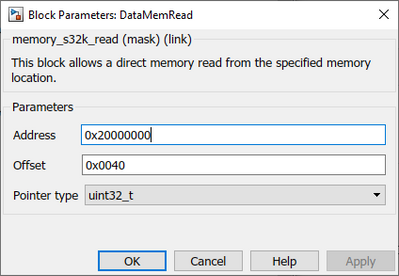
2. Write_Register + Read Register With this type of block you can access the registers of the peripherals, but MBDT helps you select the peripheral and register and the block computes the actual memory location. It is, if you want, an upper layer over the DataReadMem and DataWriteMem blocks.
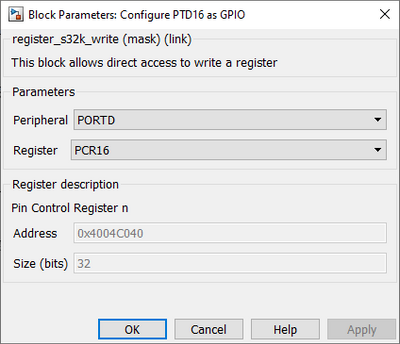
3. FlashEEERead and FlashEEEWrite This type of block let you access the FlexNVM memory configured as EEPROM. This block requires to have the FlashConfig block in your model (this partitions the FlexNVM and FlexRAM). These blocks help you if you need to store data in a non-volatile area because it manages all the additional commands for you. You can not just write bytes in some area to achieve non-volatile behavior. The Base is already set, you need to specify the Offset and data type. The only requirement comes from the OpenSDA only on the S32K144 part, because you need to use the RappId bootloader for flashing the generated code.

For all these blocks there are examples in our toolbox that show how to use the blocks.
Hope this helps,
Marius
- Mark as New
- Bookmark
- Subscribe
- Mute
- Subscribe to RSS Feed
- Permalink
- Report Inappropriate Content
Thanks for sharing the information.
mariuslucianand
- Mark as New
- Bookmark
- Subscribe
- Mute
- Subscribe to RSS Feed
- Permalink
- Report Inappropriate Content
Hello @NPXLONG
Thank you for your post!
The purpose of this model and for the Webinar that presented this model is to show that if you design, test and validate a BMS model in Simulink (in particular you can do this under safe conditions only simulation and not use lithium from the beginning), running it on real hardware is just some clicks away under MathWorks environment.
The model has been designed, developed, and validated by the engineers from MathWorks and you can find the model page right here https://www.mathworks.com/matlabcentral/fileexchange/72865-design-and-test-lithium-ion-battery-manag... And if you have questions related to the algorithm, I am sure that MathWorks will help you with all the necessary information for the request. NXP provides the hardware and blocks that generate the code that accesses the hardware.
This model is just a startup point and shows you how you can link together the model and hardware. Of course, there are a lot of tweaks that have to be made in order to get a final solution for your project. Just to give you an example, indeed the model assumes every time that the SOC is 80%. In practice, you have to store the last computed SOC in the nonvolatile memory of the S32K. Each boot time you have to start with the SOC from the last stored value, a technique that MBDT supports for the S32K boards through the EEPROM blocs. Same approach for balancing. If you define and validate through simulation the Balancing logic, NXP provides blocks through which the outputs from the Balancing logic stateflow can be sent to the analog front end.
Hope this helps,
Marius
- Mark as New
- Bookmark
- Subscribe
- Mute
- Subscribe to RSS Feed
- Permalink
- Report Inappropriate Content
Hi @mariuslucianand,
I realized that there are two type blocksets can perform the memory stored for the last computed ADC values.
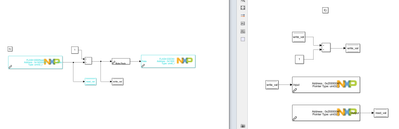
May I know, either of these two methods can worked the same functionality EEERead/Write or DatamemRead/Write? If I apply the memory stored for the last value and sum the current value to perform the SOC coulomb counting?
Regards
mariuslucianand
- Mark as New
- Bookmark
- Subscribe
- Mute
- Subscribe to RSS Feed
- Permalink
- Report Inappropriate Content
Hi @NPXLONG ,
There are actually three types of blocks that allow you to access the memory :D. Let me explain:
1. DataMemWrite + DataMemRead With this type of block you can access any region that you need with no restrictions from the software. Just type the address and offset.
2. Write_Register + Read Register With this type of block you can access the registers of the peripherals, but MBDT helps you select the peripheral and register and the block computes the actual memory location. It is, if you want, an upper layer over the DataReadMem and DataWriteMem blocks.
3. FlashEEERead and FlashEEEWrite This type of block let you access the FlexNVM memory configured as EEPROM. This block requires to have the FlashConfig block in your model (this partitions the FlexNVM and FlexRAM). These blocks help you if you need to store data in a non-volatile area because it manages all the additional commands for you. You can not just write bytes in some area to achieve non-volatile behavior. The Base is already set, you need to specify the Offset and data type. The only requirement comes from the OpenSDA only on the S32K144 part, because you need to use the RappId bootloader for flashing the generated code.
For all these blocks there are examples in our toolbox that show how to use the blocks.
Hope this helps,
Marius
- Mark as New
- Bookmark
- Subscribe
- Mute
- Subscribe to RSS Feed
- Permalink
- Report Inappropriate Content
Hi @mariuslucianand,
Thanks for your patience help. I think my problem should be solved now.
Regards
- Mark as New
- Bookmark
- Subscribe
- Mute
- Subscribe to RSS Feed
- Permalink
- Report Inappropriate Content
Thanks for explaining the memory blocksets and remind me to use the memory stored for the SOC value. I will look into details for the given examples .
Apart from that, I have one more question that I am struggling for so many days. The previous BMS example is established in 2019. I have tried to implement this and import the elf on freemaster. The freemaster on the top of HTML user interface and the bottom part of spreadsheet data-log is working properly as expected in this version.
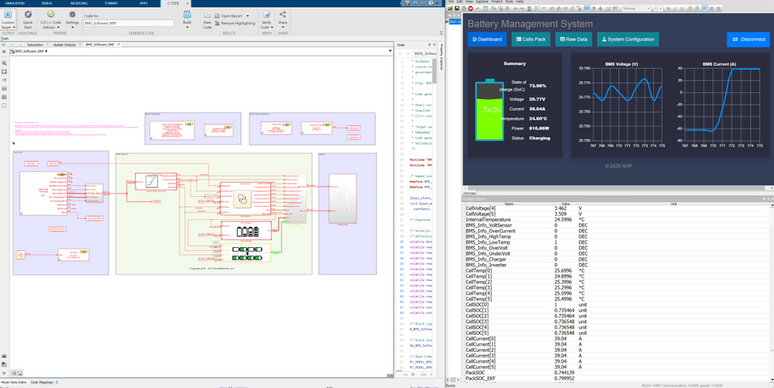
However,I realized that there's other latest version of BMS example which published in 2020. As can be seen that, there's an additional fault status on the dashboard for this freemaster version. The freemaster at the bottom part of the spreadsheet datalog can display all the data values and working properly. Unfortunately, on the top of HTML interface which is not be able to connect the GUI interface for this version. I tried number of way to configure all the com port and localhost. It always failed to connect, please see the figure below. Initially, I used the default settings on the system configuration to connect.
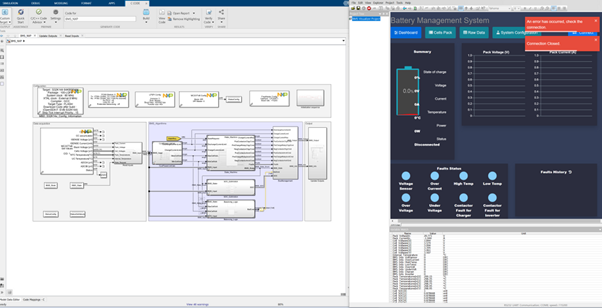
After I settings the "freemaster url" = localhost: 41000, RS232;port=COM8;speed=115200; and ELF path based on the code generation BMS_NXP.elf. I tried this either both mode: "Desktop" or "Lite" modes.
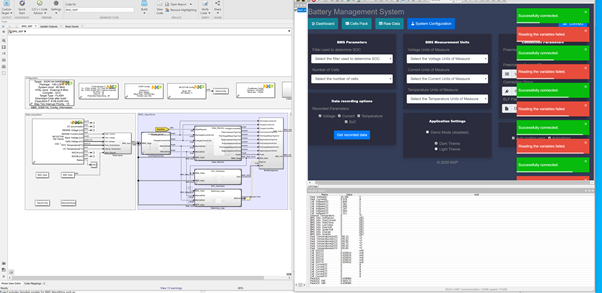


I believe you tested this newer version of BMS simulink and the freemaster before. I hope you can help me to investigate this issue. Thanks, Marius.
Best Regards
- Mark as New
- Bookmark
- Subscribe
- Mute
- Subscribe to RSS Feed
- Permalink
- Report Inappropriate Content
@NPXLONG what I remember that mathworks example is just taking one cell voltage to calculate soc for ekf. That is probably made for just demo. Also every data type in model is default which is double (64 bit) and mcu might not finish the calculation in the timestep that you write. Either change data types (at least single) or use bigger timestep.
Apart from this, which FreeMaster version are you using for that fency battery SOC and plot GUI. Is it free?
