
- Forums
- Product Forums
- General Purpose MicrocontrollersGeneral Purpose Microcontrollers
- i.MX Forumsi.MX Forums
- QorIQ Processing PlatformsQorIQ Processing Platforms
- Identification and SecurityIdentification and Security
- Power ManagementPower Management
- Wireless ConnectivityWireless Connectivity
- RFID / NFCRFID / NFC
- Advanced AnalogAdvanced Analog
- Neural Processing UnitsNeural Processing Units
- MCX Microcontrollers
- S32G
- S32K
- S32V
- MPC5xxx
- Other NXP Products
- S12 / MagniV Microcontrollers
- Powertrain and Electrification Analog Drivers
- Sensors
- Vybrid Processors
- Digital Signal Controllers
- 8-bit Microcontrollers
- ColdFire/68K Microcontrollers and Processors
- PowerQUICC Processors
- OSBDM and TBDML
- S32M
- S32Z/E
-
- Solution Forums
- Software Forums
- MCUXpresso Software and ToolsMCUXpresso Software and Tools
- CodeWarriorCodeWarrior
- MQX Software SolutionsMQX Software Solutions
- Model-Based Design Toolbox (MBDT)Model-Based Design Toolbox (MBDT)
- FreeMASTER
- eIQ Machine Learning Software
- Embedded Software and Tools Clinic
- S32 SDK
- S32 Design Studio
- GUI Guider
- Zephyr Project
- Voice Technology
- Application Software Packs
- Secure Provisioning SDK (SPSDK)
- Processor Expert Software
- Generative AI & LLMs
-
- Topics
- Mobile Robotics - Drones and RoversMobile Robotics - Drones and Rovers
- NXP Training ContentNXP Training Content
- University ProgramsUniversity Programs
- Rapid IoT
- NXP Designs
- SafeAssure-Community
- OSS Security & Maintenance
- Using Our Community
-
- Cloud Lab Forums
-
- Knowledge Bases
- ARM Microcontrollers
- i.MX Processors
- Identification and Security
- Model-Based Design Toolbox (MBDT)
- QorIQ Processing Platforms
- S32 Automotive Processing Platform
- Wireless Connectivity
- CodeWarrior
- MCUXpresso Suite of Software and Tools
- MQX Software Solutions
- RFID / NFC
- Advanced Analog
- Neural Processing Units
-
- NXP Tech Blogs
- Home
- :
- モデルベース・デザイン・ツールボックス(MBDT)
- :
- モデルベース・デザイン・ツールボックス(MBDT)
- :
- Re: How to transmit data using SPI in simulink? (S32K148EVB)
How to transmit data using SPI in simulink? (S32K148EVB)
- RSS フィードを購読する
- トピックを新着としてマーク
- トピックを既読としてマーク
- このトピックを現在のユーザーにフロートします
- ブックマーク
- 購読
- ミュート
- 印刷用ページ
How to transmit data using SPI in simulink? (S32K148EVB)

- 新着としてマーク
- ブックマーク
- 購読
- ミュート
- RSS フィードを購読する
- ハイライト
- 印刷
- 不適切なコンテンツを報告
Hi,
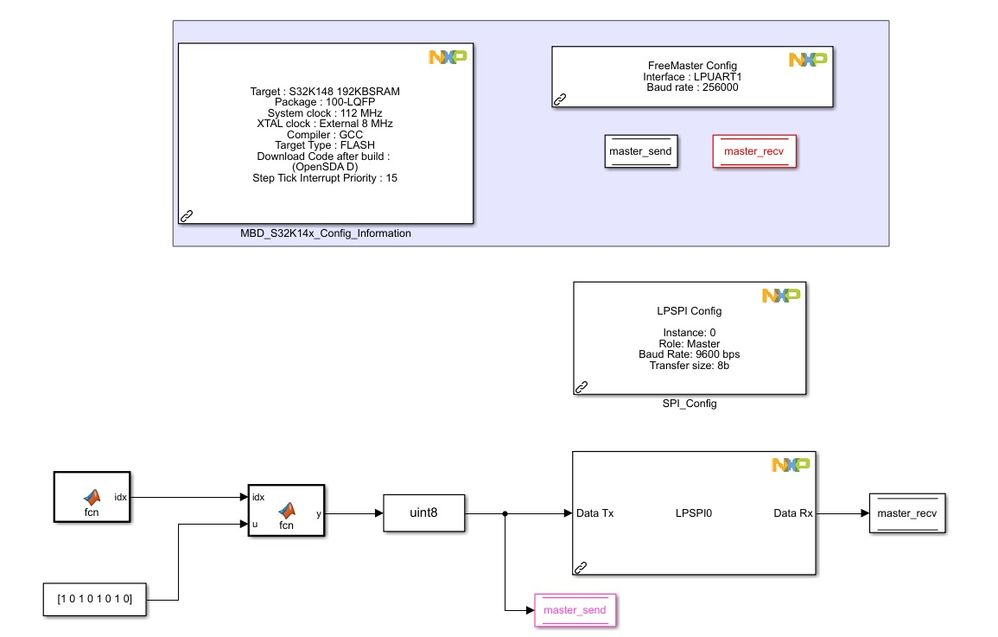
I am very new to NXP model-based design toolbox. I am trying to communicate with an accelerometer which has an SPI interface; however I have a hard time to send a signal to the slave. I created the attached model, but when I checked the MOSI signal on a Logic Analyzer, the signal is not what I am trying to send.
My other question is about the step size of the model. If I want to send the signal at 1MHZ to the salve, does it mean that I should reduce the step size of the Simulink model to 1e-6?

 constantinrazva
- 新着としてマーク
- ブックマーク
- 購読
- ミュート
- RSS フィードを購読する
- ハイライト
- 印刷
- 不適切なコンテンツを報告
Hello [email protected],
All the blocks that you add generate code for one / more of the following:
- initialization - code that is ran 1 time, at the beginning
- step - code that is ran continuously, at every step period - you can control this for every model - so to answer your question, as long as you have code that is generated inside the step function, if you want it to be called at frequency f you should set the step size to 1/f, so 1e-6 would be right [Note: this step function is controlled via a LPIT channel]
- interrupts - ISR blocks generate functions that are called on certain events, and only then -- so event-driven code here [Note: code generated for the subsystem that is triggered by the ISR block goes inside these functions]
As for why it does not seem to work, I'll take a look and get back to you tomorrow as I'm working through my queue - but I decided to give a very short description to know what to expect from our toolbox.
Please let us know if you have other questions regarding the toolbox functionality.
Kind regards,
Razvan.
