
- Forums
- Product Forums
- General Purpose MicrocontrollersGeneral Purpose Microcontrollers
- i.MX Forumsi.MX Forums
- QorIQ Processing PlatformsQorIQ Processing Platforms
- Identification and SecurityIdentification and Security
- Power ManagementPower Management
- Wireless ConnectivityWireless Connectivity
- RFID / NFCRFID / NFC
- Advanced AnalogAdvanced Analog
- Neural Processing UnitsNeural Processing Units
- MCX Microcontrollers
- S32G
- S32K
- S32V
- MPC5xxx
- Other NXP Products
- S12 / MagniV Microcontrollers
- Powertrain and Electrification Analog Drivers
- Sensors
- Vybrid Processors
- Digital Signal Controllers
- 8-bit Microcontrollers
- ColdFire/68K Microcontrollers and Processors
- PowerQUICC Processors
- OSBDM and TBDML
- S32M
- S32Z/E
-
- Solution Forums
- Software Forums
- MCUXpresso Software and ToolsMCUXpresso Software and Tools
- CodeWarriorCodeWarrior
- MQX Software SolutionsMQX Software Solutions
- Model-Based Design Toolbox (MBDT)Model-Based Design Toolbox (MBDT)
- FreeMASTER
- eIQ Machine Learning Software
- Embedded Software and Tools Clinic
- S32 SDK
- S32 Design Studio
- GUI Guider
- Zephyr Project
- Voice Technology
- Application Software Packs
- Secure Provisioning SDK (SPSDK)
- Processor Expert Software
- Generative AI & LLMs
-
- Topics
- Mobile Robotics - Drones and RoversMobile Robotics - Drones and Rovers
- NXP Training ContentNXP Training Content
- University ProgramsUniversity Programs
- Rapid IoT
- NXP Designs
- SafeAssure-Community
- OSS Security & Maintenance
- Using Our Community
-
- Cloud Lab Forums
-
- Knowledge Bases
- ARM Microcontrollers
- i.MX Processors
- Identification and Security
- Model-Based Design Toolbox (MBDT)
- QorIQ Processing Platforms
- S32 Automotive Processing Platform
- Wireless Connectivity
- CodeWarrior
- MCUXpresso Suite of Software and Tools
- MQX Software Solutions
- RFID / NFC
- Advanced Analog
- Neural Processing Units
-
- NXP Tech Blogs
- Home
- :
- Product Forums
- :
- MPC5xxx
- :
- Re: Serial bootloader example for MPC5634M
Serial bootloader example for MPC5634M
- Subscribe to RSS Feed
- Mark Topic as New
- Mark Topic as Read
- Float this Topic for Current User
- Bookmark
- Subscribe
- Mute
- Printer Friendly Page
Serial bootloader example for MPC5634M

- Mark as New
- Bookmark
- Subscribe
- Mute
- Subscribe to RSS Feed
- Permalink
- Report Inappropriate Content
Hi everyone,
I recently bought a MPC563xM StarterTRAK Development Kit. MPC5634M is not supported by RAppID, that's the reason why I want to code my own bootloader for reading, erasing, and writing data on flasH.
Is there a documentation with simple examples of serial bootloader for MPC56xx or MPC55xx which are similar. It will be very helpful for me, this is the first bootloader I have to code.

 lukaszadrapa
- Mark as New
- Bookmark
- Subscribe
- Mute
- Subscribe to RSS Feed
- Permalink
- Report Inappropriate Content
Hello Aleksandar,
I do not have such project for MPC5748G.
The principle is still the same but rework is necessary, of course. What has changed is the memory map, the flash sits at another addresses. There's LINFlex module instead of eSCI, so the functions for serial communication must be changed. (FYI: I will share simple project which includes simple UART communication this or next week). The flash module is different. If it helps, I already shared these two examples for flash programming:
Lukas

- Mark as New
- Bookmark
- Subscribe
- Mute
- Subscribe to RSS Feed
- Permalink
- Report Inappropriate Content
Hi Lukas,
I really appreciate your guidance. The two projects for Flash R/W will help of course.
Flash partitioning is bothering me more, this was the reason to ask for example. There are quite much different flash regions and sizes, from where I should pick some part, but which exactly... If you can say few words regarding this, will be very helpful.
Regarding the UART, I've already ported ChibiOS RTOS with CAN & UART drivers (based on AN4830 examples) on MPC5748G, so there is no need to hurry (for me), I think I'll handle UART communication by myself.
Regards,
Aleksandar
lukaszadrapa
- Mark as New
- Bookmark
- Subscribe
- Mute
- Subscribe to RSS Feed
- Permalink
- Report Inappropriate Content
In case of MPC5634M, there were following options where to put boot header (RCHW):

In the example project, I allocated first 64KB for bootloader and the rest of flash for application. That means the RCHW for bootloader is at address 0x0000_0000, for application at 0x0001_0000.
In case of MPC5748G, we can put boot header at:
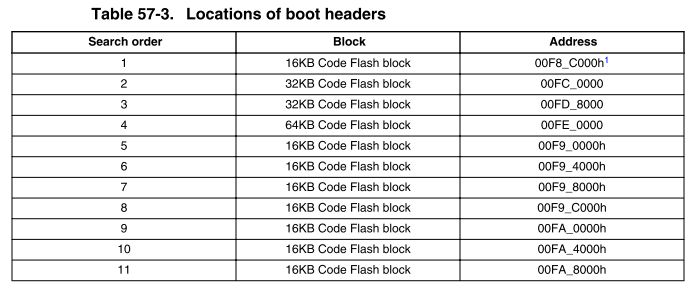
So, boot header for bootloader can be placed at 0x00F8_C000. If 80Kb is enough for your bootloader, you can place boot header for application at 0x00FE_0000 (or any other, depends on you). Then you have to change the linker files accordingly.
Next point is the Read-While-Write (RWW) partitioning on flash. As you know, we can't access the flash partition which is currently being programmed or erased. The code must run from another partition or from RAM. Here is the partitioning of MPC5748G flash:

The disadvantage is that the partitions do not create continuous space (for example, partition 0 is split to four non-continuous sections), so we have to be careful where to run the code from to avoid RWW issues.
If you need anything else, just let me know...
Lukas
- Mark as New
- Bookmark
- Subscribe
- Mute
- Subscribe to RSS Feed
- Permalink
- Report Inappropriate Content
Thank you very much Lukas!
Very helpful advice (again)!
I think I'll sacrifice 0x74000 bytes till 0x01000000 for bootloader and the rest will be for application. This way I'll have no worries regarding RWW issues, because my application will always reside in partitions 6-9 and never touch partitions 0-3.
Does this sounds like a good idea to you?
In case I want to debug application without bootloader, I will use dedicated link file, which will place the boot record in the search area of BAF.
Aleksandar
lukaszadrapa
- Mark as New
- Bookmark
- Subscribe
- Mute
- Subscribe to RSS Feed
- Permalink
- Report Inappropriate Content
Yes, that's a good idea. If you don't have memory constraints, this is the best option.
Lukas
- Mark as New
- Bookmark
- Subscribe
- Mute
- Subscribe to RSS Feed
- Permalink
- Report Inappropriate Content
Thanks Lukas. I try to understand this project but I have a question.
There are outstring generate by the main program like this example :
OutStr("\f\r\n**********************************************\r\n");
OutStr("\r\nMPC55xx/56xx Bootloader v1.0\r\n");
OutStr("\r\n**********************************************\r\n");
Where can I get this outstr on my PC ? And how can I answer to swich menu choice ? When I execute the program I have no control window.
Thanks
lukaszadrapa
- Mark as New
- Bookmark
- Subscribe
- Mute
- Subscribe to RSS Feed
- Permalink
- Report Inappropriate Content
Hi,
you need some kind of terminal emulation program like Microsoft HyperTerminal or similar. For example, I use this one (it is freeware):
https://sites.google.com/site/terminalbpp/Terminal20141030.zip
Then you need serial COM port on your PC or USB to serial bridge.
"And how can I answer to swich menu choice ?" - Just send a character from terminal to microcontroller...
Regards,
Lukas
