
- Forums
- Product Forums
- General Purpose MicrocontrollersGeneral Purpose Microcontrollers
- i.MX Forumsi.MX Forums
- QorIQ Processing PlatformsQorIQ Processing Platforms
- Identification and SecurityIdentification and Security
- Power ManagementPower Management
- Wireless ConnectivityWireless Connectivity
- RFID / NFCRFID / NFC
- Advanced AnalogAdvanced Analog
- Neural Processing UnitsNeural Processing Units
- MCX Microcontrollers
- S32G
- S32K
- S32V
- MPC5xxx
- Other NXP Products
- S12 / MagniV Microcontrollers
- Powertrain and Electrification Analog Drivers
- Sensors
- Vybrid Processors
- Digital Signal Controllers
- 8-bit Microcontrollers
- ColdFire/68K Microcontrollers and Processors
- PowerQUICC Processors
- OSBDM and TBDML
- S32M
- S32Z/E
-
- Solution Forums
- Software Forums
- MCUXpresso Software and ToolsMCUXpresso Software and Tools
- CodeWarriorCodeWarrior
- MQX Software SolutionsMQX Software Solutions
- Model-Based Design Toolbox (MBDT)Model-Based Design Toolbox (MBDT)
- FreeMASTER
- eIQ Machine Learning Software
- Embedded Software and Tools Clinic
- S32 SDK
- S32 Design Studio
- GUI Guider
- Zephyr Project
- Voice Technology
- Application Software Packs
- Secure Provisioning SDK (SPSDK)
- Processor Expert Software
- Generative AI & LLMs
-
- Topics
- Mobile Robotics - Drones and RoversMobile Robotics - Drones and Rovers
- NXP Training ContentNXP Training Content
- University ProgramsUniversity Programs
- Rapid IoT
- NXP Designs
- SafeAssure-Community
- OSS Security & Maintenance
- Using Our Community
-
- Cloud Lab Forums
-
- Knowledge Bases
- ARM Microcontrollers
- i.MX Processors
- Identification and Security
- Model-Based Design Toolbox (MBDT)
- QorIQ Processing Platforms
- S32 Automotive Processing Platform
- Wireless Connectivity
- CodeWarrior
- MCUXpresso Suite of Software and Tools
- MQX Software Solutions
- RFID / NFC
- Advanced Analog
- Neural Processing Units
-
- NXP Tech Blogs
- RSS フィードを購読する
- トピックを新着としてマーク
- トピックを既読としてマーク
- このトピックを現在のユーザーにフロートします
- ブックマーク
- 購読
- ミュート
- 印刷用ページ

- 新着としてマーク
- ブックマーク
- 購読
- ミュート
- RSS フィードを購読する
- ハイライト
- 印刷
- 不適切なコンテンツを報告
Hi,
based in XPC567X, my custom board test BAM CAN App, not run,
loader code length sucess ok, not start App.
pleace you my code resume, see,
Project, CW-5.9, Target-RAM, CPU-5674/5676
LCF: MEMORY{
init: org = 0x40000000, len = 0x00001000
exception_handlers_p0: org = 0x40001000, len = 0x00001000
exception_handlers_p1: org = 0x40002000, len = 0x00001000 //not start
pseudo_rom: org = 0x40003000, len = 0x00005000
internal_ram: org = 0x40008000, len = 0x00008000
heap : org = 0x4002C000, len = 0x00002000
stack : org = 0x4002E000, len = 0x00002000
internal_ram_p1: org = 0x40031000, len = 0x0002B000
heap_p1 : org = 0x4005C000, len = 0x00002000
stack_p1 : org = 0x4005E000, len = 0x00002000
}SECTIONS
{GROUP : {
.init_vle (VLECODE) : {
*(.init)
*(.init_vle)
}
.init : {}
} > init
//----------------------------------
int main(void) {
volatile int i = 0, can_ena=1;
HW_init();
for (;;) {
Delay(500000);
SIU.GPDO[LED1_pin].R ^= 1;
SIU.GPDO[LED2_pin].R ^= 1;
TransmitMsg ();
}} //------------------------------------
void InitSysclk (void) { // sysclock = 180 , xtal 20mhz
FMPLL.ESYNCR2.R = 0x00000002;
FMPLL.ESYNCR1.R = 0x70020026;
while (FMPLL.SYNSR.B.LOCK != 1) {}; /* Wait for FMPLL to LOCK */
FMPLL.ESYNCR2.R = 0x00000001; /* Fsys =180Mhz */
SIU.SYSDIV.R = 0x00002010; /* select PLL for sys clock, bypass clock divider */
}
//-----------------------
void initCAN_A (void) { //--- AF19/AE19
uint8_t i;
CAN_A.MCR.R = 0x5000003F; /* Put in Freeze Mode & enable all 64 message buffers */
CAN_A.CR.R = 0x02810014; // xtal 20mhz
for (i=0; i<64; i++) { CAN_A.BUF[i].CS.B.CODE = 0; }
CAN_A.BUF[0].CS.B.CODE = 8; /* Message Buffer 0 set to TX INACTIVE */
SIU.PCR[83].R = 0x062f; /* MPC5674F: Configure pad as CNTXA, open drain, pull-up */
SIU.PCR[84].R = 0x0500; /* MPC5674F: Configure pad as CNRXA */
CAN_A.MCR.R = 0x0000003F; /* Negate FlexCAN A halt state for 64 MB, AEN=1 */
} //------------------------
convert ram.mot to bin,
send password number ok
send 0x40000000 + (VLE or not)+ Length ok
send 0x13+ data and receiver 03 ok....all file length.
thnkas,
Carlos.
解決済! 解決策の投稿を見る。
- 新着としてマーク
- ブックマーク
- 購読
- ミュート
- RSS フィードを購読する
- ハイライト
- 印刷
- 不適切なコンテンツを報告

 lukaszadrapa
- 新着としてマーク
- ブックマーク
- 購読
- ミュート
- RSS フィードを購読する
- ハイライト
- 印刷
- 不適切なコンテンツを報告
Hi Carlos,
I'm not sure if I can understand the description but have you followed procedure I described here?
https://community.nxp.com/thread/320166#comment-384300
Regards,
Lukas
- 新着としてマーク
- ブックマーク
- 購読
- ミュート
- RSS フィードを購読する
- ハイライト
- 印刷
- 不適切なコンテンツを報告
Hi Lukas,
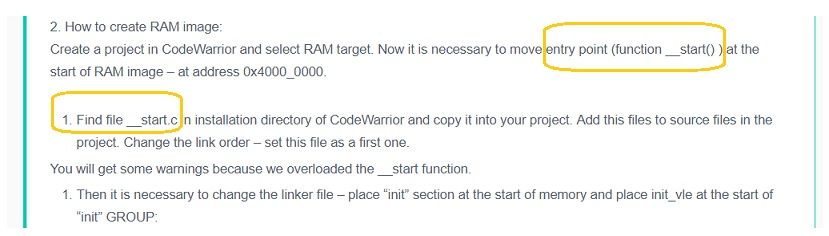
yes, I follow the example, but there is a difference, from one core to two core, I imagine.
https://community.nxp.com/thread/320166#comment-384300
my case MPC67x BAM, donloader code ok, not start my App test.
Project, CW-5.9, Target-RAM, CPU-5674/5676,LCF ok.
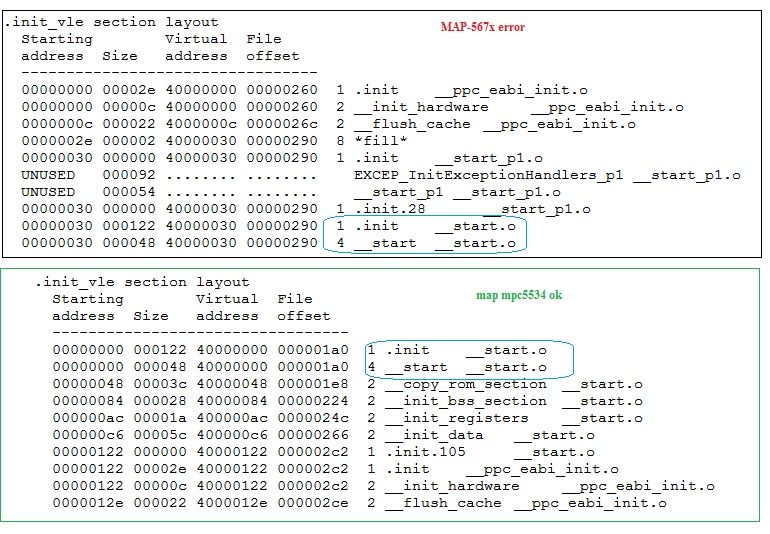
see difference:
compare maps: with _start.c
questions:
CPU init mode BAM with core0 or core1 ?
simple code init one GPIO to simple led blinks run ?
for bam, the best CORE use, 0/1 ?
thanks,
Carlos.
lukaszadrapa
- 新着としてマーク
- ブックマーク
- 購読
- ミュート
- RSS フィードを購読する
- ハイライト
- 印刷
- 不適切なコンテンツを報告
Hi Carlos,
use core 0. BAM is executed by core 0 and then it jumps to downloaded application, so it is also executed by core 0. Core 1 needs to be started by your application if needed.
CodeWarrior project creates file for both projects, by default. If you use S32 Design Studio, you can select if you want to use one (boot) core only or both cores.
So, always start with core 0 only.
Regards,
Lukas
- 新着としてマーク
- ブックマーク
- 購読
- ミュート
- RSS フィードを購読する
- ハイライト
- 印刷
- 不適切なコンテンツを報告
hi Lukas and others,
i really need help:smileylaugh:
first I tested the cw, then I decided to switch to S32.
BAM-CAN for MPC5674 with CW no run, then I decided to switch to S32 IDE.
I decided to change the processor to MPC5604C, BAM-Serial my App loader code.
S32 led blinks in flash and debug ok
led blinks on Debug RAM code 0x40000100 ok (LCF = RAM)
Bootloader serial all code, not run led blinks.
TX:FEEDFACECAFEBEEF40000100800044B8
RX:015A0000
RX:40001000
RX:00000000
......
......
RX:40006004
RX:4000E020
RX:40006020
RX:40006020
RX:4000E020
RX:40006020
RX:40006020
thanks,
Carlos.
- 新着としてマーク
- ブックマーク
- 購読
- ミュート
- RSS フィードを購読する
- ハイライト
- 印刷
- 不適切なコンテンツを報告
Hi, thanks !
Solved !
problems LCF.
thanks,
Carlos.
