
- Forums
- Product Forums
- General Purpose MicrocontrollersGeneral Purpose Microcontrollers
- i.MX Forumsi.MX Forums
- QorIQ Processing PlatformsQorIQ Processing Platforms
- Identification and SecurityIdentification and Security
- Power ManagementPower Management
- Wireless ConnectivityWireless Connectivity
- RFID / NFCRFID / NFC
- Advanced AnalogAdvanced Analog
- Neural Processing UnitsNeural Processing Units
- MCX Microcontrollers
- S32G
- S32K
- S32V
- MPC5xxx
- Other NXP Products
- S12 / MagniV Microcontrollers
- Powertrain and Electrification Analog Drivers
- Sensors
- Vybrid Processors
- Digital Signal Controllers
- 8-bit Microcontrollers
- ColdFire/68K Microcontrollers and Processors
- PowerQUICC Processors
- OSBDM and TBDML
- S32M
- S32Z/E
-
- Solution Forums
- Software Forums
- MCUXpresso Software and ToolsMCUXpresso Software and Tools
- CodeWarriorCodeWarrior
- MQX Software SolutionsMQX Software Solutions
- Model-Based Design Toolbox (MBDT)Model-Based Design Toolbox (MBDT)
- FreeMASTER
- eIQ Machine Learning Software
- Embedded Software and Tools Clinic
- S32 SDK
- S32 Design Studio
- GUI Guider
- Zephyr Project
- Voice Technology
- Application Software Packs
- Secure Provisioning SDK (SPSDK)
- Processor Expert Software
- Generative AI & LLMs
-
- Topics
- Mobile Robotics - Drones and RoversMobile Robotics - Drones and Rovers
- NXP Training ContentNXP Training Content
- University ProgramsUniversity Programs
- Rapid IoT
- NXP Designs
- SafeAssure-Community
- OSS Security & Maintenance
- Using Our Community
-
- Cloud Lab Forums
-
- Knowledge Bases
- ARM Microcontrollers
- i.MX Processors
- Identification and Security
- Model-Based Design Toolbox (MBDT)
- QorIQ Processing Platforms
- S32 Automotive Processing Platform
- Wireless Connectivity
- CodeWarrior
- MCUXpresso Suite of Software and Tools
- MQX Software Solutions
- RFID / NFC
- Advanced Analog
- Neural Processing Units
-
- NXP Tech Blogs
- Home
- :
- 产品论坛
- :
- MCX Microcontrollers
- :
- MXCW71 NBU firmware update
MXCW71 NBU firmware update

I am not using the FRDM-MCXW71 board, but a homemade board with a brand new MCU.
After entering ISP mode and using the command, the obtained serial port properties are the same, but uploading the firmware is unsuccessful. It might be an issue with the SB file.

May I ask if there is a pre-burned file on the development board? Or how to create a Custom SB file?
where can the required certBlock certificate and signer Image files be found, and could you provide detailed methods or files?
Operate according to the information provided:
- Open a workspace for with the custom keys that were provisioned to the deviceKW45xx/K32W1xx/MCXW71xx/KW47xx/MCXW72xx
- Copy NBU firmware into workspace as source_images\nbu_firmware.xip
Change the file name to nbu_firmware。
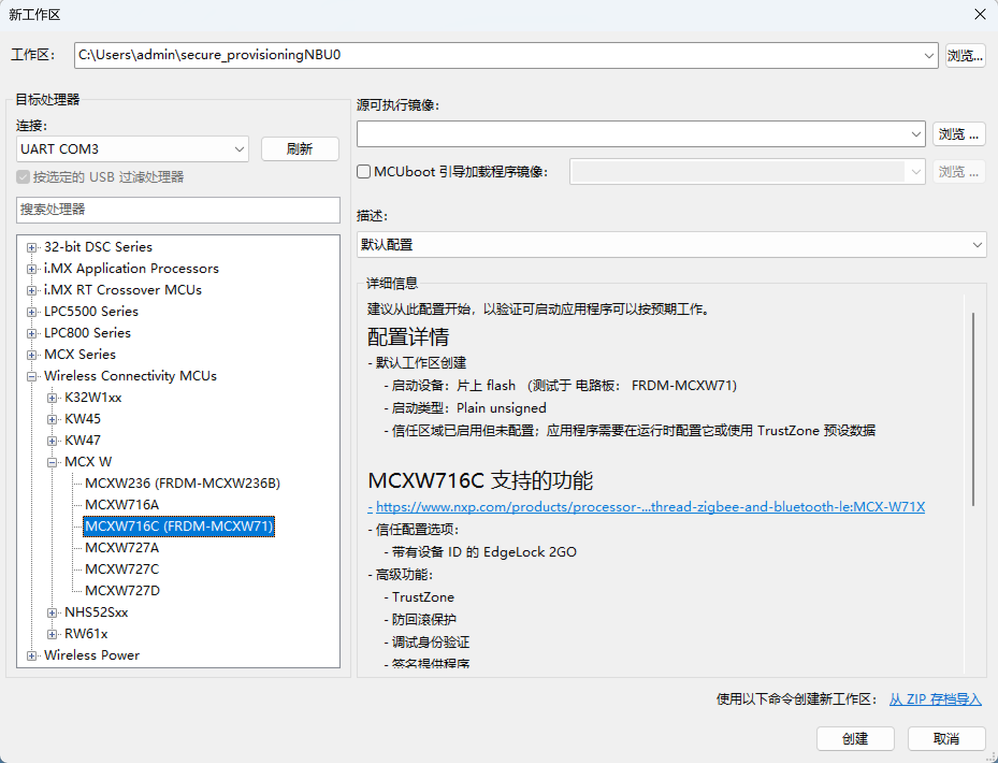

3. In the menu bar, select Tools > SB Editor
4. Fill the Properties tab or import a setting from the SB file created on the Build tab

Where can the nbu_firmware.xip and certBlock files be obtained? To implement wireless communication functions such as Bluetooth and ZigBee.
已解决! 转到解答。


 marek-trmac
Hi @MrShen
The FW for development board is distributed withing MCUXpresso SDK and you can use either version signed with keys burned on development board or create SB file signed with custom keys. The process is described in the documentation:
Processor-specific workflows — Secure Provisioning Tool 25.09
Marek
NOTE: If you find the answer useful, kindly click on [ACCEPT AS SOLUTION] button


 Christine_Li
Hi, @MrShen
Have you resolved this issue?
I saw you mentioned that you already can do NBU firmware update in another post:
If this issue is already resolved, would you mind share your resolution here and also mark it as a resolution? So that our other customers can refer it.
Thanks for your contributions in our community!
Best regards,
Christine.
