
- Forums
- Product Forums
- General Purpose MicrocontrollersGeneral Purpose Microcontrollers
- i.MX Forumsi.MX Forums
- QorIQ Processing PlatformsQorIQ Processing Platforms
- Identification and SecurityIdentification and Security
- Power ManagementPower Management
- Wireless ConnectivityWireless Connectivity
- RFID / NFCRFID / NFC
- Advanced AnalogAdvanced Analog
- MCX Microcontrollers
- S32G
- S32K
- S32V
- MPC5xxx
- Other NXP Products
- S12 / MagniV Microcontrollers
- Powertrain and Electrification Analog Drivers
- Sensors
- Vybrid Processors
- Digital Signal Controllers
- 8-bit Microcontrollers
- ColdFire/68K Microcontrollers and Processors
- PowerQUICC Processors
- OSBDM and TBDML
- S32M
- S32Z/E
-
- Solution Forums
- Software Forums
- MCUXpresso Software and ToolsMCUXpresso Software and Tools
- CodeWarriorCodeWarrior
- MQX Software SolutionsMQX Software Solutions
- Model-Based Design Toolbox (MBDT)Model-Based Design Toolbox (MBDT)
- FreeMASTER
- eIQ Machine Learning Software
- Embedded Software and Tools Clinic
- S32 SDK
- S32 Design Studio
- GUI Guider
- Zephyr Project
- Voice Technology
- Application Software Packs
- Secure Provisioning SDK (SPSDK)
- Processor Expert Software
- Generative AI & LLMs
-
- Topics
- Mobile Robotics - Drones and RoversMobile Robotics - Drones and Rovers
- NXP Training ContentNXP Training Content
- University ProgramsUniversity Programs
- Rapid IoT
- NXP Designs
- SafeAssure-Community
- OSS Security & Maintenance
- Using Our Community
-
- Cloud Lab Forums
-
- Knowledge Bases
- ARM Microcontrollers
- i.MX Processors
- Identification and Security
- Model-Based Design Toolbox (MBDT)
- QorIQ Processing Platforms
- S32 Automotive Processing Platform
- Wireless Connectivity
- CodeWarrior
- MCUXpresso Suite of Software and Tools
- MQX Software Solutions
- RFID / NFC
- Advanced Analog
-
- NXP Tech Blogs
- Home
- :
- MCUXpresso Software and Tools
- :
- MCUXpresso IDE
- :
- Re: "file format not recognized" when trying to debug
"file format not recognized" when trying to debug
- Subscribe to RSS Feed
- Mark Topic as New
- Mark Topic as Read
- Float this Topic for Current User
- Bookmark
- Subscribe
- Mute
- Printer Friendly Page

- Mark as New
- Bookmark
- Subscribe
- Mute
- Subscribe to RSS Feed
- Permalink
- Report Inappropriate Content
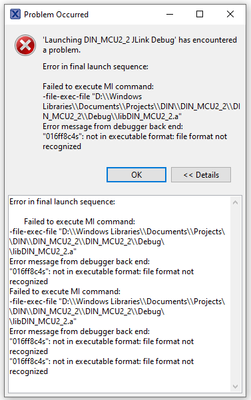
I was unable to get a project of mine to debug on an MKL02Z32CAF4 via a J-link Ultra+ debug adapter using MCUXpresso 11.7.0 b9198. It was throwing errors I didn't understand so I tried to push the code to another board I have that uses the same processor, and that was known to work (but was developed back in the Kinetis Studio days). I got the same errors so that leads me to believe that the problem I am having is a toolchain issue and not one with the chip or the board.
So, I reinstalled MCUXpresso and made a blank project targeting the same MCU and tried to upload it ang all I get is:
Error in final launch sequence:

Failed to execute MI command:
-file-exec-file "D:\\Windows Libraries\\Documents\\Projects\\DIN\\DIN_MCU2_2\\DIN_MCU2_2\\Debug\\libDIN_MCU2_2.a"
Error message from debugger back end:
"016ff8c4s": not in executable format: file format not recognized
Failed to execute MI command:
-file-exec-file "D:\\Windows Libraries\\Documents\\Projects\\DIN\\DIN_MCU2_2\\DIN_MCU2_2\\Debug\\libDIN_MCU2_2.a"
Error message from debugger back end:
"016ff8c4s": not in executable format: file format not recognized
"016ff8c4s": not in executable format: file format not recognized
This is the same error I was getting when I tried to debug my actual project with real code in it, so now I think I've ruled out a hardware issue or a code problem... it's just the toolchain's configuration. I'm not sure how to proceed at this point. This is an empty default-configuration project created within MCUXpresso.
Anyone have a hint as to where I should start looking?
Solved! Go to Solution.

- Mark as New
- Bookmark
- Subscribe
- Mute
- Subscribe to RSS Feed
- Permalink
- Report Inappropriate Content
Did you build the project? If you build a library project, then you get a library (you will not be able to debug the library). You need to build an executable (maybe link with the library) and debug that output.
- Mark as New
- Bookmark
- Subscribe
- Mute
- Subscribe to RSS Feed
- Permalink
- Report Inappropriate Content
Your file
libDIN_MCU2_2.a
is an archive (.a) library file, and not an executable (ELF/Dwarf, e.g. .elf or .axf).
The file extension does not really matter, but .a is usually used for that file types, see https://mcuoneclipse.com/2017/07/23/how-to-use-custom-library-names-with-gnu-linker-and-eclipse/
- Mark as New
- Bookmark
- Subscribe
- Mute
- Subscribe to RSS Feed
- Permalink
- Report Inappropriate Content
Agreed, but I didn't ask it to make that file. This is literally a fresh project out of the box with whatever configuration was default. There are no files in the project that weren't auto-generated by the IDE (and a main.c that just increments an integer forever).
- Mark as New
- Bookmark
- Subscribe
- Mute
- Subscribe to RSS Feed
- Permalink
- Report Inappropriate Content
Did you build the project? If you build a library project, then you get a library (you will not be able to debug the library). You need to build an executable (maybe link with the library) and debug that output.
- Mark as New
- Bookmark
- Subscribe
- Mute
- Subscribe to RSS Feed
- Permalink
- Report Inappropriate Content
Yep, looks like I had somehow created a library project. <facepalm> thanks for the assist.
