
- Forums
- Product Forums
- General Purpose MicrocontrollersGeneral Purpose Microcontrollers
- i.MX Forumsi.MX Forums
- QorIQ Processing PlatformsQorIQ Processing Platforms
- Identification and SecurityIdentification and Security
- Power ManagementPower Management
- Wireless ConnectivityWireless Connectivity
- RFID / NFCRFID / NFC
- Advanced AnalogAdvanced Analog
- Neural Processing UnitsNeural Processing Units
- MCX Microcontrollers
- S32G
- S32K
- S32V
- MPC5xxx
- Other NXP Products
- S12 / MagniV Microcontrollers
- Powertrain and Electrification Analog Drivers
- Sensors
- Vybrid Processors
- Digital Signal Controllers
- 8-bit Microcontrollers
- ColdFire/68K Microcontrollers and Processors
- PowerQUICC Processors
- OSBDM and TBDML
- S32M
- S32Z/E
-
- Solution Forums
- Software Forums
- MCUXpresso Software and ToolsMCUXpresso Software and Tools
- CodeWarriorCodeWarrior
- MQX Software SolutionsMQX Software Solutions
- Model-Based Design Toolbox (MBDT)Model-Based Design Toolbox (MBDT)
- FreeMASTER
- eIQ Machine Learning Software
- Embedded Software and Tools Clinic
- S32 SDK
- S32 Design Studio
- GUI Guider
- Zephyr Project
- Voice Technology
- Application Software Packs
- Secure Provisioning SDK (SPSDK)
- Processor Expert Software
- Generative AI & LLMs
-
- Topics
- Mobile Robotics - Drones and RoversMobile Robotics - Drones and Rovers
- NXP Training ContentNXP Training Content
- University ProgramsUniversity Programs
- Rapid IoT
- NXP Designs
- SafeAssure-Community
- OSS Security & Maintenance
- Using Our Community
-
- Cloud Lab Forums
-
- Knowledge Bases
- ARM Microcontrollers
- i.MX Processors
- Identification and Security
- Model-Based Design Toolbox (MBDT)
- QorIQ Processing Platforms
- S32 Automotive Processing Platform
- Wireless Connectivity
- CodeWarrior
- MCUXpresso Suite of Software and Tools
- MQX Software Solutions
- RFID / NFC
- Advanced Analog
- Neural Processing Units
-
- NXP Tech Blogs
- Home
- :
- MCUXpresso Software and Tools
- :
- MCUXpresso IDE
- :
- MCUXpresso, Segger Debug, and Select RTOS Plugin
MCUXpresso, Segger Debug, and Select RTOS Plugin
- Subscribe to RSS Feed
- Mark Topic as New
- Mark Topic as Read
- Float this Topic for Current User
- Bookmark
- Subscribe
- Mute
- Printer Friendly Page
MCUXpresso, Segger Debug, and Select RTOS Plugin

- Mark as New
- Bookmark
- Subscribe
- Mute
- Subscribe to RSS Feed
- Permalink
- Report Inappropriate Content
I am using MCUXpresso 11.2 with Segger J-Link 6.80d.
In the Debug dialogue/J-Link Debugger, there is a check box 'Select RTOS Plugin'. This enables the GDB FreeRTOS plugin.
The problem is that this check box does not stay 'checked'.
After one debug session, the next debug session the check box is 'unchecked'. One has to constantly check this box with each debug session.
Even a close workspace and reopen does not save the checked box setting.
Other members of my team are having the same issue.
- Mark as New
- Bookmark
- Subscribe
- Mute
- Subscribe to RSS Feed
- Permalink
- Report Inappropriate Content
I have figured out the problem and a possible solution.
My development environment consists of two J-Link devices connected to two MCUs
The code running on each MCU is the same. I debug one MCU at a time using the MCUxpresso 'Debug your project' Debug icon.
Below is the RTOS setting before starting the debug session
<stringAttribute key="com.nxp.mcuxpresso.segger.rtos" value="true;GDBServer/RTOSPlugin_FreeRTOS"/>
<stringAttribute key="com.nxp.mcuxpresso.segger.select" value="USB=174506020"/>
After the debug session is over the RTOS setting is
<stringAttribute key="com.nxp.mcuxpresso.segger.rtos" value="false;GDBServer/RTOSPlugin_FreeRTOS"/>
<stringAttribute key="com.nxp.mcuxpresso.segger.select" value="USB=174506019"/>
Note that the USB ID has changed.
Thus the USB ID for the J-Link and the RTOS plugin setting are paired.
I only had one debug session for both J-Link devices.
My 'fix' is the following:
I create two different Debug configurations, DebugA and DebugB, each specifying a different USB ID
and checking the RTOS plugin setting.
I can then select the specific debug session. I use the Eclipse 'debug' icon to select the debug session,
not using the MCUxpresso 'Debug your project' Debug icon.
The confusion was the 'Debug your project' Debug icon provides a select J-Link dialogue, but does not
maintain the RTOS plugin.
So...The solution to the original problem is to create two separate debug sessions and select
the appropriate one.
I should also change the port addresses as per https://mcuoneclipse.com/2016/04/12/debugging-multiple-nxp-boards-with-gdb-and-pe/
and https://mcuoneclipse.com/2014/01/07/debugging-the-same-project-multiple-times-in-parallel-with-eclip...
so I could have two GDB sessions.

- Mark as New
- Bookmark
- Subscribe
- Mute
- Subscribe to RSS Feed
- Permalink
- Report Inappropriate Content
Hi Keith,
thanks for sharing the details.
I tried to reproduce the same on my side. I have this:
MCUXpresso IDE 10.2.1 with SEGGER J-Link GDB Server V6.46k
I have two different J-Link (EDU mini) with different USB IDs, on different USB ports (if this matters)
Two boards (same firmware, hardware). Debugging one board with one board with one J-Link. Commit .launch file. Then debugging the other board with the different J-Link. Here is what gets changed on my side:
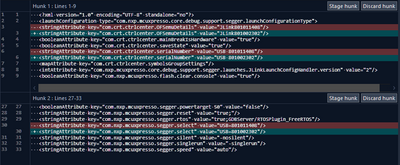
So the USB ID gets changed for me in three places. But the RTOS plugin setting does not get touched for me. As a reference I have attached my .launch.
This is how it looks in the UI:
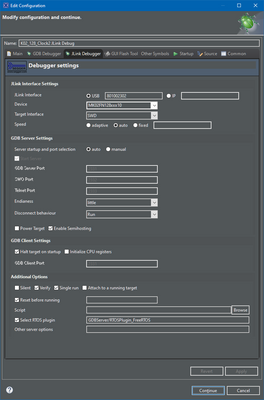
I hope this helps,
Erich
- Mark as New
- Bookmark
- Subscribe
- Mute
- Subscribe to RSS Feed
- Permalink
- Report Inappropriate Content
That's strange: can you compare the .launch files (before, after) if this really gets removed somehow?
I don't think it is related by the J-Link 6.80d version (I'm using the IDE 10.2.0 with J-Link V6.86 on Windows 10 64bit) and do not see this?
The setting is controlled by following entry in the launch file:
<stringAttribute key="com.nxp.mcuxpresso.segger.rtos" value="true;GDBServer/RTOSPlugin_FreeRTOS"/>
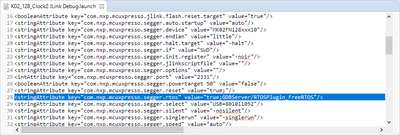
I hope this helps,
Erich
