
- Forums
- Product Forums
- General Purpose MicrocontrollersGeneral Purpose Microcontrollers
- i.MX Forumsi.MX Forums
- QorIQ Processing PlatformsQorIQ Processing Platforms
- Identification and SecurityIdentification and Security
- Power ManagementPower Management
- Wireless ConnectivityWireless Connectivity
- RFID / NFCRFID / NFC
- Advanced AnalogAdvanced Analog
- Neural Processing UnitsNeural Processing Units
- MCX Microcontrollers
- S32G
- S32K
- S32V
- MPC5xxx
- Other NXP Products
- S12 / MagniV Microcontrollers
- Powertrain and Electrification Analog Drivers
- Sensors
- Vybrid Processors
- Digital Signal Controllers
- 8-bit Microcontrollers
- ColdFire/68K Microcontrollers and Processors
- PowerQUICC Processors
- OSBDM and TBDML
- S32M
- S32Z/E
-
- Solution Forums
- Software Forums
- MCUXpresso Software and ToolsMCUXpresso Software and Tools
- CodeWarriorCodeWarrior
- MQX Software SolutionsMQX Software Solutions
- Model-Based Design Toolbox (MBDT)Model-Based Design Toolbox (MBDT)
- FreeMASTER
- eIQ Machine Learning Software
- Embedded Software and Tools Clinic
- S32 SDK
- S32 Design Studio
- GUI Guider
- Zephyr Project
- Voice Technology
- Application Software Packs
- Secure Provisioning SDK (SPSDK)
- Processor Expert Software
- Generative AI & LLMs
-
- Topics
- Mobile Robotics - Drones and RoversMobile Robotics - Drones and Rovers
- NXP Training ContentNXP Training Content
- University ProgramsUniversity Programs
- Rapid IoT
- NXP Designs
- SafeAssure-Community
- OSS Security & Maintenance
- Using Our Community
-
- Cloud Lab Forums
-
- Knowledge Bases
- ARM Microcontrollers
- i.MX Processors
- Identification and Security
- Model-Based Design Toolbox (MBDT)
- QorIQ Processing Platforms
- S32 Automotive Processing Platform
- Wireless Connectivity
- CodeWarrior
- MCUXpresso Suite of Software and Tools
- MQX Software Solutions
- RFID / NFC
- Advanced Analog
- Neural Processing Units
-
- NXP Tech Blogs
- Home
- :
- MCUXpresso Software and Tools
- :
- MCUXpresso IDE
- :
- Re: Debugger differences between LPCXpresso 7.7.2 vs MCUXpresso 10.1.1.
Debugger differences between LPCXpresso 7.7.2 vs MCUXpresso 10.1.1.
- Subscribe to RSS Feed
- Mark Topic as New
- Mark Topic as Read
- Float this Topic for Current User
- Bookmark
- Subscribe
- Mute
- Printer Friendly Page
Debugger differences between LPCXpresso 7.7.2 vs MCUXpresso 10.1.1.

- Mark as New
- Bookmark
- Subscribe
- Mute
- Subscribe to RSS Feed
- Permalink
- Report Inappropriate Content
Hello,
I'm having issues with the LPC-Link2 debugger on a LPC4078 using MCUXpresso 10.1.1...
When I debug it hangs at this line: NVIC_EnableIRQ(TIMER1_IRQn);
I can't step over this, can't restart, or terminate..
The code runs perfectly when I use the flash function.
A coworker suggested I downgrade to LPCXpresso 7.7.2... Done and it works.
Why?
I've been looking for differences in settings - there's a few..
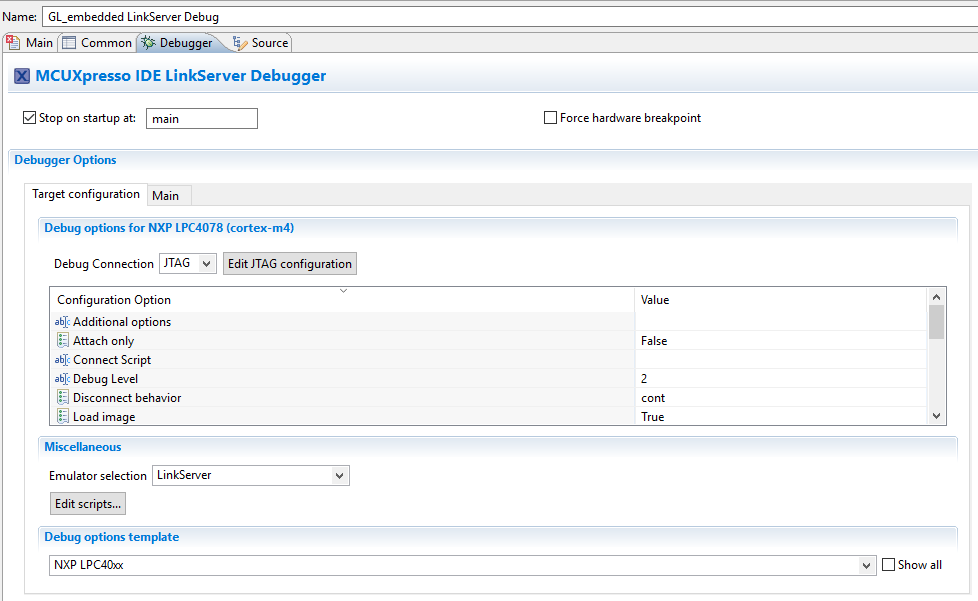
Picture above is MCUXpresso (broken).
Emulator selection shows only link server.. The debug options template has different wording..
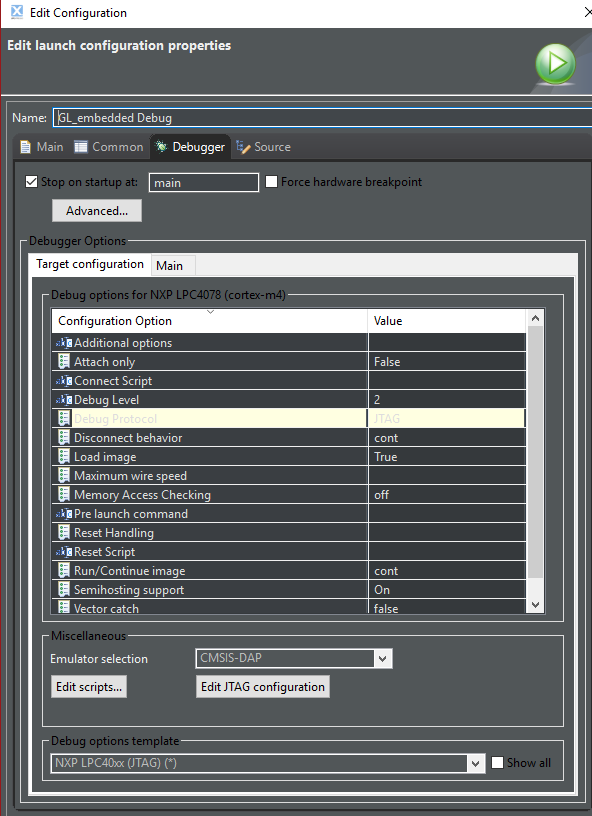
Emulator selection defaults to CMSIS-DAP
Debug options template is NXP LPC40xx (JTAG)..
Any ideas? I searched all over for documentation but couldn't find any.
Can someone point me in a direction? I don't want to use old 7.7.2 LPCXpresso.
Thanks,
Stephen

 lpcxpresso_supp
- Mark as New
- Bookmark
- Subscribe
- Mute
- Subscribe to RSS Feed
- Permalink
- Report Inappropriate Content
Hi Stephen,
Please today's announcement MCUXpresso IDE v10.2.0 Now Available
We did observe some debug issues using version 10.1.1 but believe these have been addressed in this new version. Our local testing showed up no problems, but we would also appreciate your confirmation.
Yours,
MCUXpresso IDE Support
lpcxpresso_supp
- Mark as New
- Bookmark
- Subscribe
- Mute
- Subscribe to RSS Feed
- Permalink
- Report Inappropriate Content
Thank you for this additional information - we will look further into this and respond on this thread.
Yours,
MCUXpresso IDE Support
- Mark as New
- Bookmark
- Subscribe
- Mute
- Subscribe to RSS Feed
- Permalink
- Report Inappropriate Content
I've already ruled out GUI - restored all to defaults. Even deleted my .metadata file.
There is no text in the Variables table.
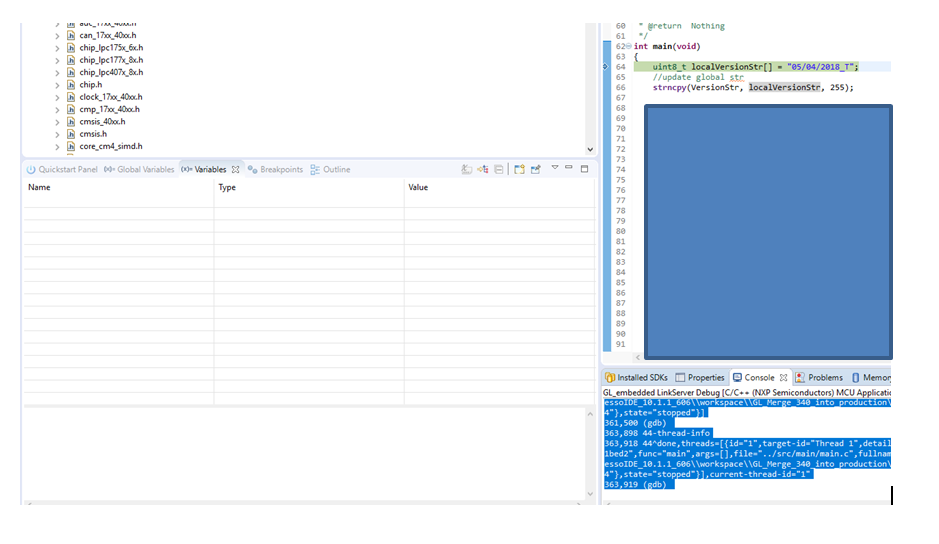
I do see an error - when I first begin debugging, I get this error:
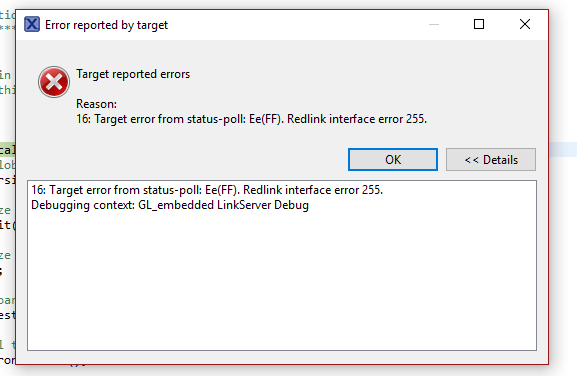
This only began happening when I switched to SYSRESETREQ.
I click OK, and the debugger appears to be running "normally" - I can step and set breakpoints.
Thanks,
Stephen
lpcxpresso_supp
- Mark as New
- Bookmark
- Subscribe
- Mute
- Subscribe to RSS Feed
- Permalink
- Report Inappropriate Content
SYSRESETREQ basically pulls system reset, which will typically reset the whole chip, whereas corereset typically will just trigger a reset of the cpu within the chip. Generally you do want to pull SYSRESETREQ at some point during the connection sequence, but this can trigger problems with some parts in some circumstances (which is why it was changed at some point after the old LPCXpresso IDE release you had tried).
With regards to your local variable issue, we have not seen anything similar ourselves or had any other reports of the Variables view failing to disable local variables. But I certainly can't see how this would be related to reset issues above. Anyway we'll see if we can find a way to replicate. But it might be useful to know what you actually see. Is the view just blank, or do you see any errors - either directly in the IDE GUI, or perhaps in the gdb-traces log in the Console View.
Regards,
MCUXpresso IDE Support
lpcxpresso_supp
- Mark as New
- Bookmark
- Subscribe
- Mute
- Subscribe to RSS Feed
- Permalink
- Report Inappropriate Content
Thanks for the logs. Two things to try (I suggest only changing one of them at a time)...
- In the launch configuration for your project - change the value of the "Vector catch" option to "True".
- In the launch configuration for your project - change the value of the "Reset Handling" option to "SYSRESETREQ".
IIRC at one point we had to change the default way we trigger reset when connecting to LPC407x_8x parts, due to issues with another (non-LPC-Link2) CMSIS-DAP based debug probe built into a 3rd party board. And I suspect that you are seeing a corner-case consequence of this because of something in your application which is executing before the debug tools can take control.
Anyway, let us know if changing either of these options helps.
Regards,
MCUXpresso IDE Support
- Mark as New
- Bookmark
- Subscribe
- Mute
- Subscribe to RSS Feed
- Permalink
- Report Inappropriate Content
Hey - I'm still having issues seeing local variables. I've tried using SYSRESETREQ it with different code and I can still view them. I've also messed with many other settings..
Any suggestions?
Thanks,
Stephen
- Mark as New
- Bookmark
- Subscribe
- Mute
- Subscribe to RSS Feed
- Permalink
- Report Inappropriate Content
Changing Reset Handling to SYSRESETREQ did it. Modifying the debug.launch files the way I posted earlier accomplished the same thing.
I'd like to understand what these values mean - is there documentation anywhere?
Also, I seem to have lost the ability to view local variable values. Not sure if this is something I changed trying to fix the debugger. Any suggestions?
Thanks!
Stephen
lpcxpresso_supp
- Mark as New
- Bookmark
- Subscribe
- Mute
- Subscribe to RSS Feed
- Permalink
- Report Inappropriate Content
The underlying "LinkServer" debug interface (used for CMSIS-DAP debug connections) has been considerably changed since the days of LPCXpresso IDE v7.7.2 (released back in March 2015). And the fact that you see CMSIS-DAP in one launch config, and LinkServer in the other doesn't actually tell you anything.
I would suggest doing the following:
- Start up MCUXpresso IDE with your project loaded into the workspace.
- Ensure that JP1 header on your LPC-Link2 is not fitted. This will allow the IDE to soft-load the latest probe firmware supplied with the IDE itself.
- Delete any launch configurations in your project directory.
- Power down your board and debug probe, then power them up again.
- Ensure your project is selected in the Project Explorer View, then click on the Debug button in the Quickstart Panel.
The IDE should now boot your LPC-Link2, allow you to select it, and start a debug session.
Now run to the line that is triggering your problem. Try stepping over it.
If you still see problems, then please send us the text from the Debug Log (messages) and the gdb traces from the Console view. See the MCUXpresso IDE v10.1.1 User Guide, section 16.8, "The Console View", for more details of how to do this.
It would also be useful to know if the problem is actually specific to this specific project. For instance, if you mass erase the flash, then program in a simple test project (for instance one of the LPCOpen examples for LPC407x_8x), do you still see issues.
Also, can you please provide more details of the board you are using, in particular related to how debug/reset signals are connected up (as per - Design Considerations for Debug )
Regards,
MCUXpresso IDE Support.
- Mark as New
- Bookmark
- Subscribe
- Mute
- Subscribe to RSS Feed
- Permalink
- Report Inappropriate Content
Hey there,
Thanks for quick response.
I had already tried deleting old launch configurations running to and stepping over etc. I did it again for your records.
Unfortunately, there isn't much to see. The 4078 gets to that line of code and gets halted.
If I use Mass Flash Erase and program, other code (for example our test code, or your example code) works, and even the code I'm currently having problems with works.
As for Debug, Reset, circuitry, they are all configured according to design considerations. This is a very mature/stable/tested design. TDIO's are pulled up to 10k, reset circuit has been tested extensively, and clock is correct.
It's purely an issue with the debugger between the two different versions of MCU/LPC Xpresso. Nobody had this issue till I tried upgrading to MCUXpresso
Thanks,
Stephen
- Mark as New
- Bookmark
- Subscribe
- Mute
- Subscribe to RSS Feed
- Permalink
- Report Inappropriate Content
