
- Forums
- Product Forums
- General Purpose MicrocontrollersGeneral Purpose Microcontrollers
- i.MX Forumsi.MX Forums
- QorIQ Processing PlatformsQorIQ Processing Platforms
- Identification and SecurityIdentification and Security
- Power ManagementPower Management
- Wireless ConnectivityWireless Connectivity
- RFID / NFCRFID / NFC
- Advanced AnalogAdvanced Analog
- Neural Processing UnitsNeural Processing Units
- MCX Microcontrollers
- S32G
- S32K
- S32V
- MPC5xxx
- Other NXP Products
- S12 / MagniV Microcontrollers
- Powertrain and Electrification Analog Drivers
- Sensors
- Vybrid Processors
- Digital Signal Controllers
- 8-bit Microcontrollers
- ColdFire/68K Microcontrollers and Processors
- PowerQUICC Processors
- OSBDM and TBDML
- S32M
- S32Z/E
-
- Solution Forums
- Software Forums
- MCUXpresso Software and ToolsMCUXpresso Software and Tools
- CodeWarriorCodeWarrior
- MQX Software SolutionsMQX Software Solutions
- Model-Based Design Toolbox (MBDT)Model-Based Design Toolbox (MBDT)
- FreeMASTER
- eIQ Machine Learning Software
- Embedded Software and Tools Clinic
- S32 SDK
- S32 Design Studio
- GUI Guider
- Zephyr Project
- Voice Technology
- Application Software Packs
- Secure Provisioning SDK (SPSDK)
- Processor Expert Software
- Generative AI & LLMs
-
- Topics
- Mobile Robotics - Drones and RoversMobile Robotics - Drones and Rovers
- NXP Training ContentNXP Training Content
- University ProgramsUniversity Programs
- Rapid IoT
- NXP Designs
- SafeAssure-Community
- OSS Security & Maintenance
- Using Our Community
-
- Cloud Lab Forums
-
- Knowledge Bases
- ARM Microcontrollers
- i.MX Processors
- Identification and Security
- Model-Based Design Toolbox (MBDT)
- QorIQ Processing Platforms
- S32 Automotive Processing Platform
- Wireless Connectivity
- CodeWarrior
- MCUXpresso Suite of Software and Tools
- MQX Software Solutions
- RFID / NFC
- Advanced Analog
- Neural Processing Units
-
- NXP Tech Blogs
- Home
- :
- MCUXpresso Software and Tools
- :
- MCUXpresso Config Tools
- :
- SDK 2.8.0 missing Linux Host in Getting Started
SDK 2.8.0 missing Linux Host in Getting Started
- Subscribe to RSS Feed
- Mark Topic as New
- Mark Topic as Read
- Float this Topic for Current User
- Bookmark
- Subscribe
- Mute
- Printer Friendly Page
SDK 2.8.0 missing Linux Host in Getting Started

 CurtisWald
- Mark as New
- Bookmark
- Subscribe
- Mute
- Subscribe to RSS Feed
- Permalink
- Report Inappropriate Content
SDK 2.8.0
SoC: i.MX 7ULP
Host: Linux
Tools: ARM GCC
Customer: Rockwell
Defect: Documentation missing Arm Tool chain and running on Linux host.
Step 1: SDK Builder, selected GCC ARM Toolchain and Host OS: Linux
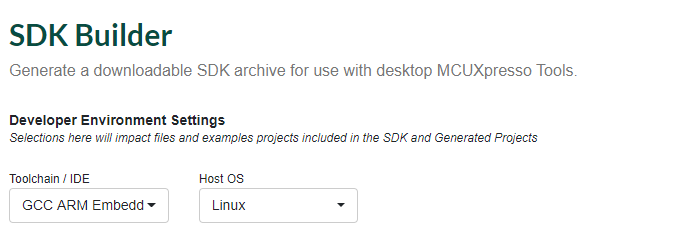
Step 2: Downloaded: SDK_2.8.0_EVK-MCIMX7ULP.tar.gz and extracted archive.
The docs directory contains these files:
├── Getting Started with MCUXpresso SDK for EVK-MCIMX7ULP.pdf
└── MCUXpresso SDK Release Notes for EVK-MCIMX7ULP.pdf
Opening 'Getting Started with MCUXpresso SDK for EVK-MCIMX7ULP.pdf'
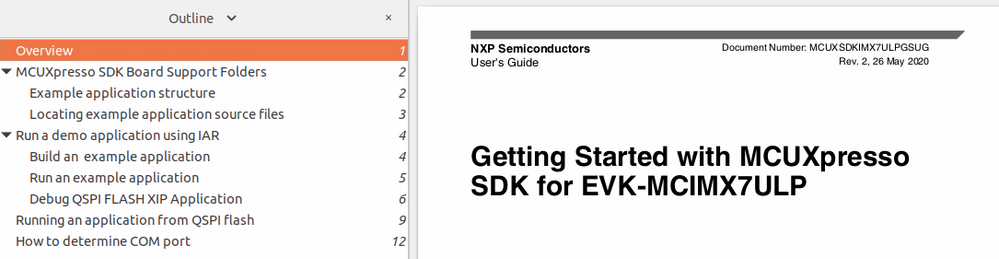
Previous SDK releases provided chapter for using ARM GCC on Linux OS Host, where are the instructions for SDK 2.8.0?
SDK 2.7.0 does have missing sections.
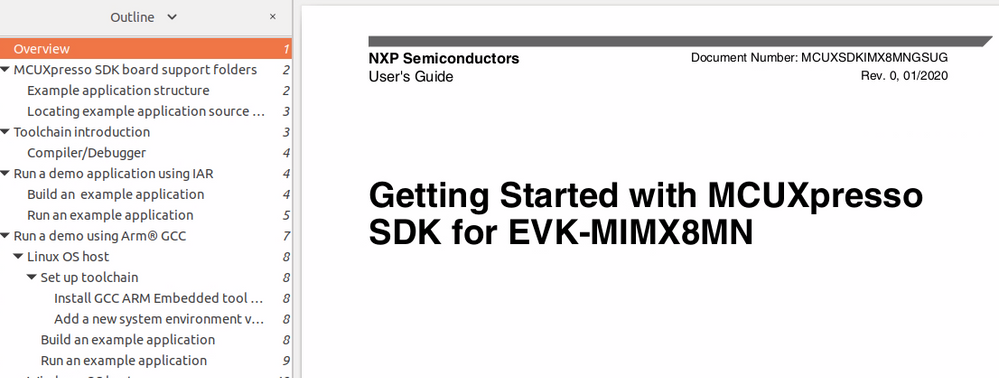
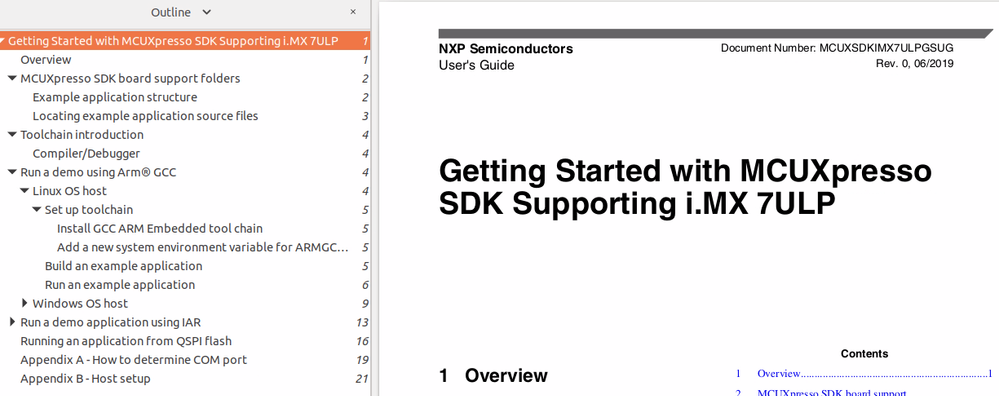
SDK 2.6.0 Getting Started outline showing Arm GCC and Linux host are shown:

- Mark as New
- Bookmark
- Subscribe
- Mute
- Subscribe to RSS Feed
- Permalink
- Report Inappropriate Content
Downloading the examples from the SDK (tried with SDK_2_12_0_LPC845BREAKOUT, this board, you can download it here select LPC845 and then select board LPC845BREAKOUT, then click on Build MCUxpressoSDK and 2.12.0, in the subsequent page select linux as system and GCC as compiler).
Download and extract in a workspace directory (for example home/workspace/lpc845brk).
Then "cd home/workspace/lpc845brk/SDK_2_12_0_LPC845BREAKOUT/board/lpc845breakout/demo_apps/led_blinky/armgcc".
Then "export ARMGCC_DIR='~/toolchains/gcc-arm-11.2-2022.02-x86_64-arm-none-eabi/"
finally to compile the demo "./build_all.sh"
two versions of the code should be compiled "debug" and "release" these should be in the respective directories in the armgcc directory.
- Mark as New
- Bookmark
- Subscribe
- Mute
- Subscribe to RSS Feed
- Permalink
- Report Inappropriate Content
Update to my post above (1.8.2022).
Re point 1 - ARM has changed their pages now it is available here. For a x86_64 linux installation you should download gcc-arm-11.2-2022.02-x86_64-arm-none-eabi.tar.xz for cross compiling to a Cortex M0 (for ARM with FPU use the gcc-arm-11.2-2022.02-x86_64-arm-none-eabi.tar.xz).
Re point 3 - just do "ln -s ~/toolchains/gcc-arm-11.2-2022.02-x86_64-arm-none-eabi/bin/* ~/bin/" this creates all the symlinks in your local bin. your linux installation should already have that in your path. In your home folder try "arm-none-eabi-gcc -v" you should get at the end "gcc version 11.2.1 20220111 (GNU Toolchain for the Arm Architecture 11.2-2022.02 (arm-11.14))"
arm-none-eabi-gdb need ncurses5 library (this part is linux system dependent but it should be easy to find how to install.
That's it the toolchain is installed. In the next few days I will try to run again the LPC845BRK examples and I'll post it here.
- Mark as New
- Bookmark
- Subscribe
- Mute
- Subscribe to RSS Feed
- Permalink
- Report Inappropriate Content
Hi,
I installed the recent ARM GCC toolchain in a linux machine (x86_64) in the following way.
1. downloaded the ARM GCC toolchain from here. (gcc-arm-none-eabi-9-2020-q2-update-x86_64-linux.tar.bz2)
2. created a folder /toolchain in the home folder and extracted it in there.
3. created symlinks from the important programs in the toolchain to the /usr/local/bin directory (ln -s ~/toolchain/gcc-arm-none-eabi-9-2020-q2-update/bin/arm-none-eabi-gcc /usr/local/bin/arm-none-eabi-gcc). This ensures that when make or other commands try to run they will find the programs (/usr/local/bin is in the search path of most distributions). Did this for arm-none-eabi-g++, ar, gcc, gdb, ld, nm, objcopy, objdump, size.
After that if you type anywere arm-none-eabi-gcc -v you should get at the end of the screen
gcc version 9.3.1 20200408 (release) (GNU Arm Embedded Toolchain 9-2020-q2-update) (...or something like that)...
That's it, you've set up the toolchain!
4. If you have a demo board, download the SDK for the board, selecting operating system linux and toolchain arm-gcc
5. extract that, to run the demos you need to go into the armgcc directory inside the demo you want to run and type ./build_all.sh.
It uses CMAKE (which should be installed in you system, this is probably the only requirement, maybe gdb also needs an old ncurses library, can't remember). You will need to set the export path to the location of the toolchain, but the script will complain about it (build_all.sh)
Good luck, hope it helps (I am also new to this, but I can compile the demos and run them... just without semihosting)...
JCS
danielchen
- Mark as New
- Bookmark
- Subscribe
- Mute
- Subscribe to RSS Feed
- Permalink
- Report Inappropriate Content
Hi Curtis:
You can download latest SDK documentation from here, Welcome | MCUXpresso SDK Builder , as below picture shows.
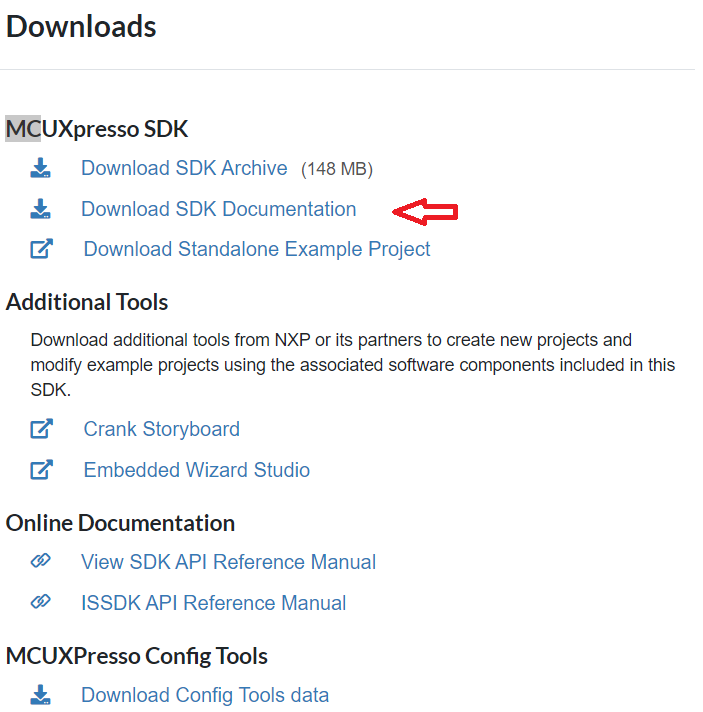
Regards
Daniel
CurtisWald
- Mark as New
- Bookmark
- Subscribe
- Mute
- Subscribe to RSS Feed
- Permalink
- Report Inappropriate Content
Hi Daniel,
Followed your instruction to download SDK Documentation and this also has the defect of no instructions for running on Linux host and setting up the Arm tool chain.
Both the "Download SDK Archive" and "Download SDK Documentation" fail to provide the Linux steps.
Attached is the "Getting Started with MCUXpresso SDK for EVK-MCIMX7ULP.pdf", that only has section "Run a demo application using IAR", which is Windows host only.
Where are the Linux host and tool chain getting started steps?
danielchen
- Mark as New
- Bookmark
- Subscribe
- Mute
- Subscribe to RSS Feed
- Permalink
- Report Inappropriate Content
Thank you Curtis. I reported this to doc team.
Regards
Daniel
