
- Forums
- Product Forums
- General Purpose MicrocontrollersGeneral Purpose Microcontrollers
- i.MX Forumsi.MX Forums
- QorIQ Processing PlatformsQorIQ Processing Platforms
- Identification and SecurityIdentification and Security
- Power ManagementPower Management
- Wireless ConnectivityWireless Connectivity
- RFID / NFCRFID / NFC
- Advanced AnalogAdvanced Analog
- Neural Processing UnitsNeural Processing Units
- MCX Microcontrollers
- S32G
- S32K
- S32V
- MPC5xxx
- Other NXP Products
- S12 / MagniV Microcontrollers
- Powertrain and Electrification Analog Drivers
- Sensors
- Vybrid Processors
- Digital Signal Controllers
- 8-bit Microcontrollers
- ColdFire/68K Microcontrollers and Processors
- PowerQUICC Processors
- OSBDM and TBDML
- S32M
- S32Z/E
-
- Solution Forums
- Software Forums
- MCUXpresso Software and ToolsMCUXpresso Software and Tools
- CodeWarriorCodeWarrior
- MQX Software SolutionsMQX Software Solutions
- Model-Based Design Toolbox (MBDT)Model-Based Design Toolbox (MBDT)
- FreeMASTER
- eIQ Machine Learning Software
- Embedded Software and Tools Clinic
- S32 SDK
- S32 Design Studio
- GUI Guider
- Zephyr Project
- Voice Technology
- Application Software Packs
- Secure Provisioning SDK (SPSDK)
- Processor Expert Software
- Generative AI & LLMs
-
- Topics
- Mobile Robotics - Drones and RoversMobile Robotics - Drones and Rovers
- NXP Training ContentNXP Training Content
- University ProgramsUniversity Programs
- Rapid IoT
- NXP Designs
- SafeAssure-Community
- OSS Security & Maintenance
- Using Our Community
-
- Cloud Lab Forums
-
- Knowledge Bases
- ARM Microcontrollers
- i.MX Processors
- Identification and Security
- Model-Based Design Toolbox (MBDT)
- QorIQ Processing Platforms
- S32 Automotive Processing Platform
- Wireless Connectivity
- CodeWarrior
- MCUXpresso Suite of Software and Tools
- MQX Software Solutions
- RFID / NFC
- Advanced Analog
- Neural Processing Units
-
- NXP Tech Blogs
- Home
- :
- MCUXpresso Software and Tools
- :
- MCUXpresso Config Tools
- :
- Re: LPC55s69 Config Tools SPI driver problem
LPC55s69 Config Tools SPI driver problem
- Subscribe to RSS Feed
- Mark Topic as New
- Mark Topic as Read
- Float this Topic for Current User
- Bookmark
- Subscribe
- Mute
- Printer Friendly Page

- Mark as New
- Bookmark
- Subscribe
- Mute
- Subscribe to RSS Feed
- Permalink
- Report Inappropriate Content
Hello,
I'm using LPC55s69 and MCUXpresso 11.3.0 with SDK 2.9.0 and in Config Tools I have a warning about the SPI driver:
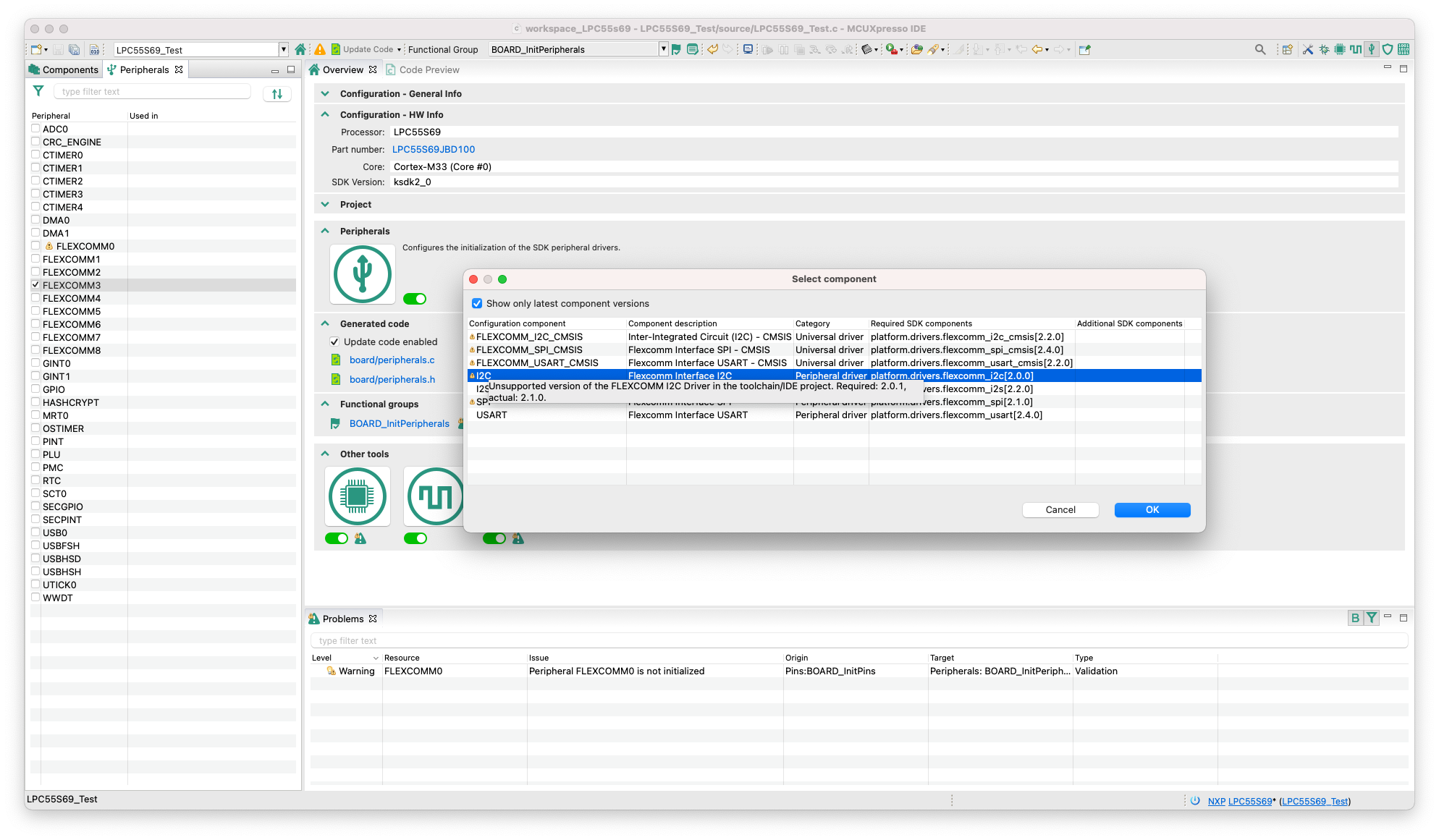
Issue: Unsupported version of the FLEXCOMM SPI Driver in the toolchain/IDE project. Required: 2.1.0, actual: 2.2.1. Project might not compile correctly.
Level: Warning
Type: Validation
Tool: Toolchain/IDE project
Origin: Peripherals
Target: Toolchain/IDE project: cm33_core0
Resource: platform.drivers.flexcomm_spi
Regards,
Daniel
Solved! Go to Solution.

 Lukas_Heczko
- Mark as New
- Bookmark
- Subscribe
- Mute
- Subscribe to RSS Feed
- Permalink
- Report Inappropriate Content
Hi Daniel,
updated Peripherals tool components are now available for MCUXpresso IDE v11.3 and Config Tools v9. The update is downloaded automatically once the tool is restarted. After that, the warnings you observed are no longer showed. Also, the component is properly showed in Peripherals and Components tab.
Regards,
Lukas
Lukas_Heczko
- Mark as New
- Bookmark
- Subscribe
- Mute
- Subscribe to RSS Feed
- Permalink
- Report Inappropriate Content
Hi Daniel,
I'm able to reproduce the warning you are observing. In this particular case, you can ignore the warning for now, code generated by the flexcomm_spi Peripherals tool component available in MCUXpresso IDE 11.3 is compatible with the SDK driver from SDK 2.9.0. We are preparing update of the data used by Peripherals tool, it will be publicly available next week. The update will be then automatically downloaded and the warning will be no longer displayed.
Sorry for inconvenience and thank you for reporting the issues.
Regards,
Lukas
- Mark as New
- Bookmark
- Subscribe
- Mute
- Subscribe to RSS Feed
- Permalink
- Report Inappropriate Content
Hi,
I just noticed that the same problem is with I2C. Flexcomm drivers for USART and I2S are OK.
Regards,
Daniel
- Mark as New
- Bookmark
- Subscribe
- Mute
- Subscribe to RSS Feed
- Permalink
- Report Inappropriate Content
Hi,
Thank you so much for information. Please note that the SPI driver (added to the project) does not appear on the Components tab (like others without warning) in the Configuration Tools, but only on the Peripherals tab.
Regards,
Daniel
Lukas_Heczko
- Mark as New
- Bookmark
- Subscribe
- Mute
- Subscribe to RSS Feed
- Permalink
- Report Inappropriate Content
Hi Daniel,
updated Peripherals tool components are now available for MCUXpresso IDE v11.3 and Config Tools v9. The update is downloaded automatically once the tool is restarted. After that, the warnings you observed are no longer showed. Also, the component is properly showed in Peripherals and Components tab.
Regards,
Lukas
- Mark as New
- Bookmark
- Subscribe
- Mute
- Subscribe to RSS Feed
- Permalink
- Report Inappropriate Content
Hi Lukas,
Yes, now everything works great.
Thanks!
Regards,
Daniel
 Alice_Yang
- Mark as New
- Bookmark
- Subscribe
- Mute
- Subscribe to RSS Feed
- Permalink
- Report Inappropriate Content
Hello,
This is a warning, just ignore it, won't effect function, code can run well.
Regards,
Alice
- Mark as New
- Bookmark
- Subscribe
- Mute
- Subscribe to RSS Feed
- Permalink
- Report Inappropriate Content
Hello,
I know, I just want to report a bug (Config Tool?) because the SPI driver (added to the project ) does not appear in the Components tab of Config Tools but only in Peripherals tab with warning. The problem appeared in SDK version 2.9.0.
Regards,
Daniel
 Petr_H
- Mark as New
- Bookmark
- Subscribe
- Mute
- Subscribe to RSS Feed
- Permalink
- Report Inappropriate Content
Hi,
Could you please post more detail on the issue? Have you created a new project or re-opened a project created in previous version?
Regarding the components tab - is it like there is completely missing the component? Please note that the configuration component instance name is derived from the name of the peripheral so there would be something like "FLEXCOMM0" even if you are using SPI driver with it.
best regards
Petr Hradsky
Config Tools Team
- Mark as New
- Bookmark
- Subscribe
- Mute
- Subscribe to RSS Feed
- Permalink
- Report Inappropriate Content
Hi,
The problem occurs both in the new project and in the reopen. Regarding the components tab - Yes, it is like there is completely missing the component.
Regards,
Daniel
Petr_H
- Mark as New
- Bookmark
- Subscribe
- Mute
- Subscribe to RSS Feed
- Permalink
- Report Inappropriate Content
I'm sorry but I still cannot reproduce the issue. Could you please share with us the {project_name}.mex file with the configuration from your project folder? Also a screenshot of the components view would be useful.
- Mark as New
- Bookmark
- Subscribe
- Mute
- Subscribe to RSS Feed
- Permalink
- Report Inappropriate Content
Hi,
lukash wrote that they are already working on solving the issue:
"I'm able to reproduce the warning you are observing. In this particular case, you can ignore the warning for now, code generated by the flexcomm_spi Peripherals tool component available in MCUXpresso IDE 11.3 is compatible with the SDK driver from SDK 2.9.0. We are preparing update of the data used by Peripherals tool, it will be publicly available next week. The update will be then automatically downloaded and the warning will be no longer displayed."
Regards,
Daniel
Petr_H
- Mark as New
- Bookmark
- Subscribe
- Mute
- Subscribe to RSS Feed
- Permalink
- Report Inappropriate Content
Hi,
Lukas's post refers only to the warning reported for versions as they will add support for the latest driver version. However, the appearance in the Components tab is something that their fix will probably not influence, that's something my team can check and try to fix, but we need the configuration file for reproducing the issue.
Regards
Petr Hradsky
- Mark as New
- Bookmark
- Subscribe
- Mute
- Subscribe to RSS Feed
- Permalink
- Report Inappropriate Content
Hi,
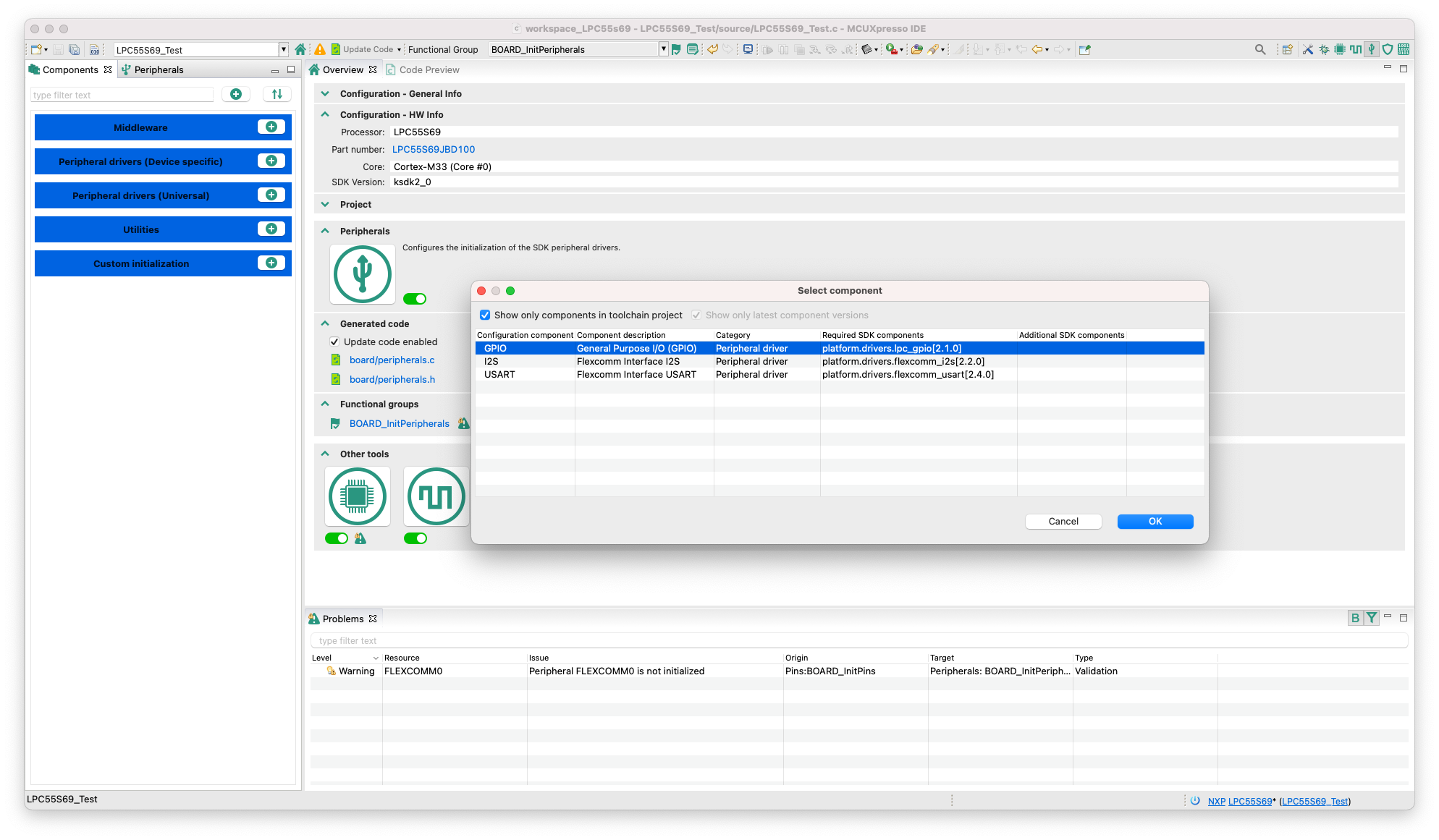
OK, I understand. So, I attach screenshots and a test project. I just noticed that the same problem is with I2C. SPI, I2C, USART and I2S drivers are added to the project. Only USART and I2S do not report a warning and are visible in the Components tab (scr1.png) while SPI and I2C have a warning in the Peripherals tab (scr2.png, scr3.png) and do not show in the Components tab.
I don't know if it matters but I'm using macOS version of MCUXpresso.
Regards,
Daniel
Petr_H
- Mark as New
- Bookmark
- Subscribe
- Mute
- Subscribe to RSS Feed
- Permalink
- Report Inappropriate Content
Thank you. Now I think I understand the origin of the issue. There is a check-box "Show only components in toolchain project" that is present only when you use the components view and which provides additional filtering that shows only SDK components that have already been added using the "Manage SDK components" in the IDE project explorer or during the project creation.
To achieve the same behavior, you can uncheck this checkbox and all available component should be offered.
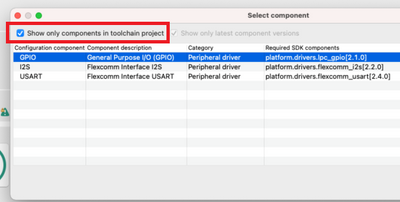
Does this resolve the issue for you ?
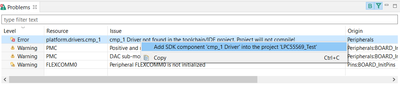
Just additional note - once you add a component that reports the error "driver not found in toolchain project" in problems, you can used context menu command "Add SDK component .... into the project" to quickly add the component instead of returning to project explorer and adding the SDK component there.
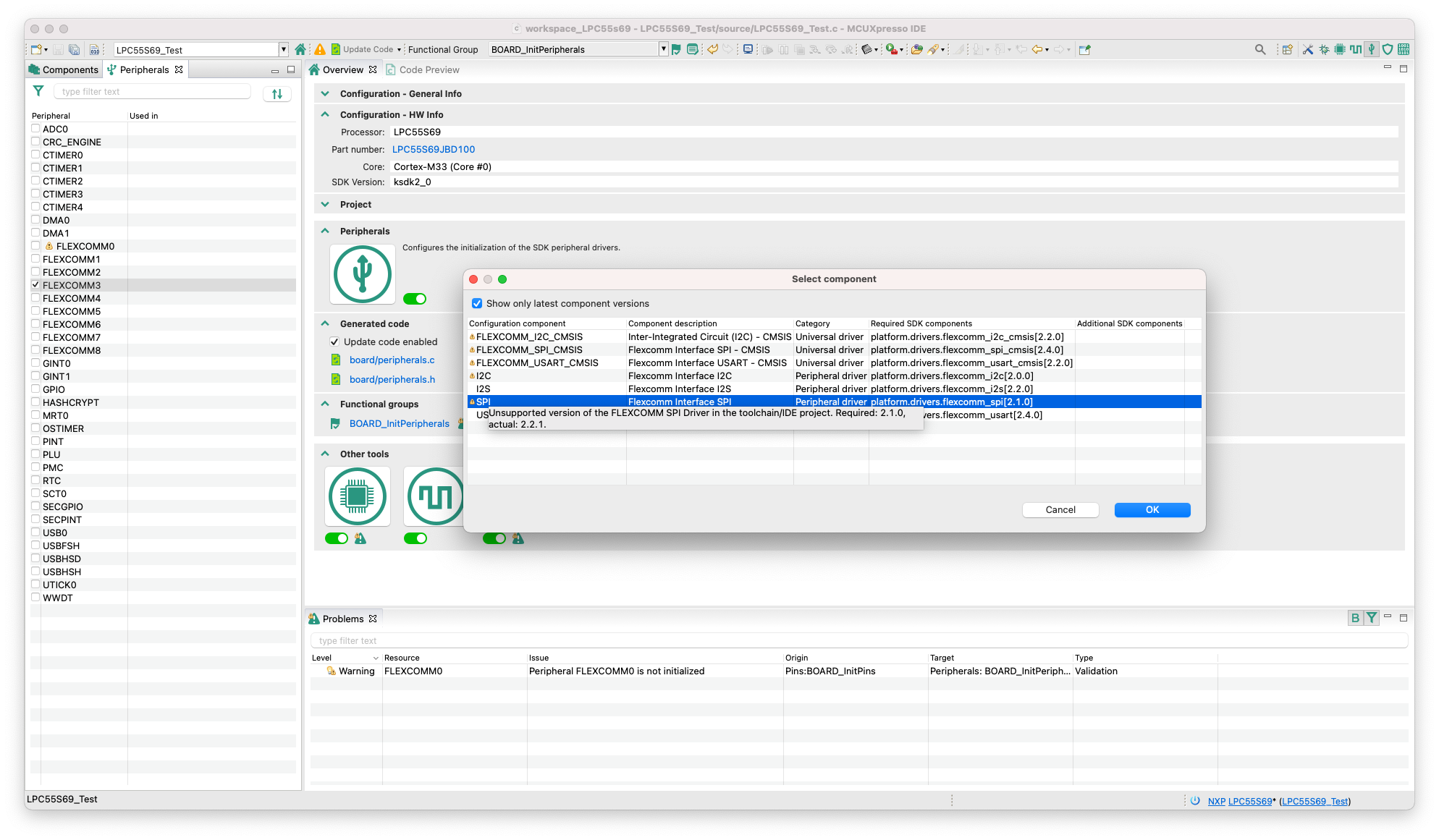
Regards
Petr Hradsky
- Mark as New
- Bookmark
- Subscribe
- Mute
- Subscribe to RSS Feed
- Permalink
- Report Inappropriate Content
Hi,
Yes, I know about it. However the problem is that when the "Show only components in toolchain project" box is checked, SPI and I2C drivers should be displayed because they are included in the project. This was the case in previous versions of the SDK. In my opinion, the problem is related to the aforementioned warning on these drivers
Generally, for me in my "production" projects it is not a big problem - because the drivers work. But I have classes of embedded systems at the University, on LPC55s69 and this bug does not look right;)
Regards,
Daniel
Petr_H
- Mark as New
- Bookmark
- Subscribe
- Mute
- Subscribe to RSS Feed
- Permalink
- Report Inappropriate Content
I see now
regards
Petr Hradsky
Config Tools Team
- Mark as New
- Bookmark
- Subscribe
- Mute
- Subscribe to RSS Feed
- Permalink
- Report Inappropriate Content
OK, thanks for the information.
Regards,
Daniel
