- Forums
- Product Forums
- General Purpose MicrocontrollersGeneral Purpose Microcontrollers
- i.MX Forumsi.MX Forums
- QorIQ Processing PlatformsQorIQ Processing Platforms
- Identification and SecurityIdentification and Security
- Power ManagementPower Management
- Wireless ConnectivityWireless Connectivity
- RFID / NFCRFID / NFC
- Advanced AnalogAdvanced Analog
- MCX Microcontrollers
- S32G
- S32K
- S32V
- MPC5xxx
- Other NXP Products
- S12 / MagniV Microcontrollers
- Powertrain and Electrification Analog Drivers
- Sensors
- Vybrid Processors
- Digital Signal Controllers
- 8-bit Microcontrollers
- ColdFire/68K Microcontrollers and Processors
- PowerQUICC Processors
- OSBDM and TBDML
- S32M
- S32Z/E
-
- Solution Forums
- Software Forums
- MCUXpresso Software and ToolsMCUXpresso Software and Tools
- CodeWarriorCodeWarrior
- MQX Software SolutionsMQX Software Solutions
- Model-Based Design Toolbox (MBDT)Model-Based Design Toolbox (MBDT)
- FreeMASTER
- eIQ Machine Learning Software
- Embedded Software and Tools Clinic
- S32 SDK
- S32 Design Studio
- GUI Guider
- Zephyr Project
- Voice Technology
- Application Software Packs
- Secure Provisioning SDK (SPSDK)
- Processor Expert Software
- Generative AI & LLMs
-
- Topics
- Mobile Robotics - Drones and RoversMobile Robotics - Drones and Rovers
- NXP Training ContentNXP Training Content
- University ProgramsUniversity Programs
- Rapid IoT
- NXP Designs
- SafeAssure-Community
- OSS Security & Maintenance
- Using Our Community
-
- Cloud Lab Forums
-
- Knowledge Bases
- ARM Microcontrollers
- i.MX Processors
- Identification and Security
- Model-Based Design Toolbox (MBDT)
- QorIQ Processing Platforms
- S32 Automotive Processing Platform
- Wireless Connectivity
- CodeWarrior
- MCUXpresso Suite of Software and Tools
- MQX Software Solutions
- RFID / NFC
- Advanced Analog
-
- NXP Tech Blogs
- Home
- :
- MCUXpresso软件和工具
- :
- MCUXpresso配置工具
- :
- How to add missing driver from Config Tool?
How to add missing driver from Config Tool?
How to add missing driver from Config Tool?

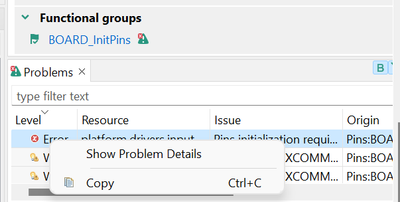
I am using Config Tools v12.0. I have a working base configuration .mex. Now I want to configure a PIN as interrupt, so I went to 'Pint' tab, click selected pin and ticked one of the PINT option. However immediately I have following error seem to complain missing driver:
"
Issue: Pins initialization requires the INPUTMUX Driver in the project.
Level: Error
Type: Validation
Tool: Toolchain/IDE project
Origin: Pins:BOARD_InitPins
Target: Toolchain/IDE project: cm4
Resource: platform.drivers.inputmux
"
And when I right click the error, I did not see any option to download automatically the missing driver.
I am using GNU GCC toolchain.
How should I resolve this?

I have not used the standalone config tools for years, so I cannot really tell.
But a quick search (https://community.nxp.com/t5/MCUXpresso-Config-Tools/Where-is-the-driver-selection-in-Config-Tools-v...) showed that previously it was automatically adding missing drivers, but not any more after V3.
Depending on your build system, you should be able to add the driver manually from the SDK?
That is a pity, that would be a wonderful feature to retain. Users would love to use the config tools as stand alone rather than relying on XPresso IDE to add missing driver. Many users still prefer other IDE/toolchains.
But having said so, how to add this missing driver manually? I could not find the official instruction either. I still want to use my own toolchains instead of switching to Xpresso IDE just to resolve this.
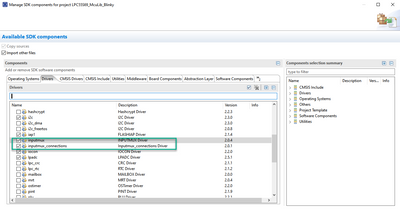
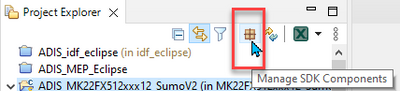
In the IDE, there is a checkbox to have the drivers added: