
- Forums
- Product Forums
- General Purpose MicrocontrollersGeneral Purpose Microcontrollers
- i.MX Forumsi.MX Forums
- QorIQ Processing PlatformsQorIQ Processing Platforms
- Identification and SecurityIdentification and Security
- Power ManagementPower Management
- Wireless ConnectivityWireless Connectivity
- RFID / NFCRFID / NFC
- Advanced AnalogAdvanced Analog
- Neural Processing UnitsNeural Processing Units
- MCX Microcontrollers
- S32G
- S32K
- S32V
- MPC5xxx
- Other NXP Products
- S12 / MagniV Microcontrollers
- Powertrain and Electrification Analog Drivers
- Sensors
- Vybrid Processors
- Digital Signal Controllers
- 8-bit Microcontrollers
- ColdFire/68K Microcontrollers and Processors
- PowerQUICC Processors
- OSBDM and TBDML
- S32M
- S32Z/E
-
- Solution Forums
- Software Forums
- MCUXpresso Software and ToolsMCUXpresso Software and Tools
- CodeWarriorCodeWarrior
- MQX Software SolutionsMQX Software Solutions
- Model-Based Design Toolbox (MBDT)Model-Based Design Toolbox (MBDT)
- FreeMASTER
- eIQ Machine Learning Software
- Embedded Software and Tools Clinic
- S32 SDK
- S32 Design Studio
- GUI Guider
- Zephyr Project
- Voice Technology
- Application Software Packs
- Secure Provisioning SDK (SPSDK)
- Processor Expert Software
- Generative AI & LLMs
-
- Topics
- Mobile Robotics - Drones and RoversMobile Robotics - Drones and Rovers
- NXP Training ContentNXP Training Content
- University ProgramsUniversity Programs
- Rapid IoT
- NXP Designs
- SafeAssure-Community
- OSS Security & Maintenance
- Using Our Community
-
- Cloud Lab Forums
-
- Knowledge Bases
- ARM Microcontrollers
- i.MX Processors
- Identification and Security
- Model-Based Design Toolbox (MBDT)
- QorIQ Processing Platforms
- S32 Automotive Processing Platform
- Wireless Connectivity
- CodeWarrior
- MCUXpresso Suite of Software and Tools
- MQX Software Solutions
- RFID / NFC
- Advanced Analog
- Neural Processing Units
-
- NXP Tech Blogs
- Home
- :
- QorIQプロセッシングプラットフォーム
- :
- レイヤースケープ
- :
- Layerscape LS1046 FRWY Board GPIO Signals
Layerscape LS1046 FRWY Board GPIO Signals
- RSS フィードを購読する
- トピックを新着としてマーク
- トピックを既読としてマーク
- このトピックを現在のユーザーにフロートします
- ブックマーク
- 購読
- ミュート
- 印刷用ページ

- 新着としてマーク
- ブックマーク
- 購読
- ミュート
- RSS フィードを購読する
- ハイライト
- 印刷
- 不適切なコンテンツを報告
Hi,
I purchased the LS1046 FRWY board and I am trying to use the GPIO signals. It looks like I have been able to successfully enable them since I am seeing them on the J67 GPIO header. The problem I am having is the mapping of the GPIO signals to the J67 header.
Here is the mapping from the Reference Board Manual.
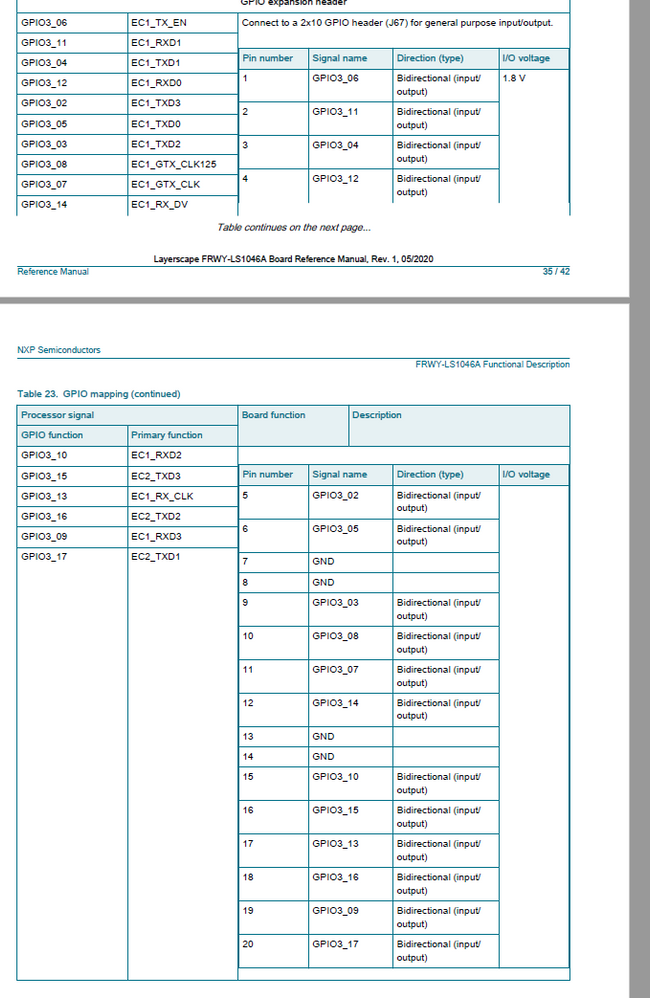
The problem is that when I write the data register to set a particular GPIO, it seems to be coming out on the wrong pin. For example:
I can write 0x200 to the GPIO3 data register (GPDAT), I then see the signal appear on J67-11 which corresponds to GPIO3_7. I expect that by writing a 0x200 to the GPDAT register, I would see the signal on GPIO3_9 or J67-19.
This happens for multiple GPIOs. Is the mapping to the J67 incorrect? Am I not writing to the GDAT register correctly?
Thanks!
解決済! 解決策の投稿を見る。
 Bulat
Bulat
- 新着としてマーク
- ブックマーク
- 購読
- ミュート
- RSS フィードを購読する
- ハイライト
- 印刷
- 不適切なコンテンツを報告
Ok, now I see the problem. In fact the board's silkscreen is correct, while description in the manual is wrong. Attached schematics with actual J67 routing, please use it as a reference.
The root of the problem is hystorical, J67 description in the manual corresponds to initial board revision that has been changed later. As a result schematics and layout around J67 were changed, while the table in the manual was somehow not fixed.
 Bulat
Bulat
- 新着としてマーク
- ブックマーク
- 購読
- ミュート
- RSS フィードを購読する
- ハイライト
- 印刷
- 不適切なコンテンツを報告
First of all, your understanding of GPDAT bit ordering is not correct. Take a look at the description in the manual, bit ordering is GPDAT[0:31], not GPDAT[31:0]. So to set bit 9 you need to write value 0x00400000. In turn, GPIO block is big-endian, accessing from little-endian ARM core requires to do byte swapping. So actually you need to write 0x4000 to set bit #9. Please try.
I would add that results of your test are really strange. Writing 0x200 to GPDAT should set bit #14, not #7. GPIO3 bit #14 is connected to pin 12 of the header, that is close to pin 11 but in different row. Please check once again.
- 新着としてマーク
- ブックマーク
- 購読
- ミュート
- RSS フィードを購読する
- ハイライト
- 印刷
- 不適切なコンテンツを報告
.JPG) Bulat
Bulat
- 新着としてマーク
- ブックマーク
- 購読
- ミュート
- RSS フィードを購読する
- ハイライト
- 印刷
- 不適切なコンテンツを報告
Can you clarify what is "contradictory between the spec and the silkscreen"? The spec does not illustrate pin topology of the header, simply lists connected signals.
- 新着としてマーク
- ブックマーク
- 購読
- ミュート
- RSS フィードを購読する
- ハイライト
- 印刷
- 不適切なコンテンツを報告
I agree that there is no topology listed in the spec, but it says for example:
GPIO3_6 goes to J67-1.
But for the board I have it actually goes to J67-2 according to the way it is labeled on my board.
My board has silkscreen labeled in this way:
1 2
3 4
5 6
7 8
etc.
But I believe the silkscreen is backwards for this board rev.
Thanks
Bulat
- 新着としてマーク
- ブックマーク
- 購読
- ミュート
- RSS フィードを購読する
- ハイライト
- 印刷
- 不適切なコンテンツを報告
Ok, now I see the problem. In fact the board's silkscreen is correct, while description in the manual is wrong. Attached schematics with actual J67 routing, please use it as a reference.
The root of the problem is hystorical, J67 description in the manual corresponds to initial board revision that has been changed later. As a result schematics and layout around J67 were changed, while the table in the manual was somehow not fixed.
- 新着としてマーク
- ブックマーク
- 購読
- ミュート
- RSS フィードを購読する
- ハイライト
- 印刷
- 不適切なコンテンツを報告
Thanks!
Will the manual be updated such that this doesn't affect other people as well?
Just curious
Bulat
- 新着としてマーク
- ブックマーク
- 購読
- ミュート
- RSS フィードを購読する
- ハイライト
- 印刷
- 不適切なコンテンツを報告
I will notify documentation team, hopefully they will fix the mistake soon.
