
- Forums
- Product Forums
- General Purpose MicrocontrollersGeneral Purpose Microcontrollers
- i.MX Forumsi.MX Forums
- QorIQ Processing PlatformsQorIQ Processing Platforms
- Identification and SecurityIdentification and Security
- Power ManagementPower Management
- Wireless ConnectivityWireless Connectivity
- RFID / NFCRFID / NFC
- Advanced AnalogAdvanced Analog
- Neural Processing UnitsNeural Processing Units
- MCX Microcontrollers
- S32G
- S32K
- S32V
- MPC5xxx
- Other NXP Products
- S12 / MagniV Microcontrollers
- Powertrain and Electrification Analog Drivers
- Sensors
- Vybrid Processors
- Digital Signal Controllers
- 8-bit Microcontrollers
- ColdFire/68K Microcontrollers and Processors
- PowerQUICC Processors
- OSBDM and TBDML
- S32M
- S32Z/E
-
- Solution Forums
- Software Forums
- MCUXpresso Software and ToolsMCUXpresso Software and Tools
- CodeWarriorCodeWarrior
- MQX Software SolutionsMQX Software Solutions
- Model-Based Design Toolbox (MBDT)Model-Based Design Toolbox (MBDT)
- FreeMASTER
- eIQ Machine Learning Software
- Embedded Software and Tools Clinic
- S32 SDK
- S32 Design Studio
- GUI Guider
- Zephyr Project
- Voice Technology
- Application Software Packs
- Secure Provisioning SDK (SPSDK)
- Processor Expert Software
- Generative AI & LLMs
-
- Topics
- Mobile Robotics - Drones and RoversMobile Robotics - Drones and Rovers
- NXP Training ContentNXP Training Content
- University ProgramsUniversity Programs
- Rapid IoT
- NXP Designs
- SafeAssure-Community
- OSS Security & Maintenance
- Using Our Community
-
- Cloud Lab Forums
-
- Knowledge Bases
- ARM Microcontrollers
- i.MX Processors
- Identification and Security
- Model-Based Design Toolbox (MBDT)
- QorIQ Processing Platforms
- S32 Automotive Processing Platform
- Wireless Connectivity
- CodeWarrior
- MCUXpresso Suite of Software and Tools
- MQX Software Solutions
- RFID / NFC
- Advanced Analog
- Neural Processing Units
-
- NXP Tech Blogs
- Home
- :
- QorIQ处理平台
- :
- Layerscape
- :
- Re: Layerscape LS1046 FRWY Board GPIO Signals
Layerscape LS1046 FRWY Board GPIO Signals

Hi,
I purchased the LS1046 FRWY board and I am trying to use the GPIO signals. It looks like I have been able to successfully enable them since I am seeing them on the J67 GPIO header. The problem I am having is the mapping of the GPIO signals to the J67 header.
Here is the mapping from the Reference Board Manual.
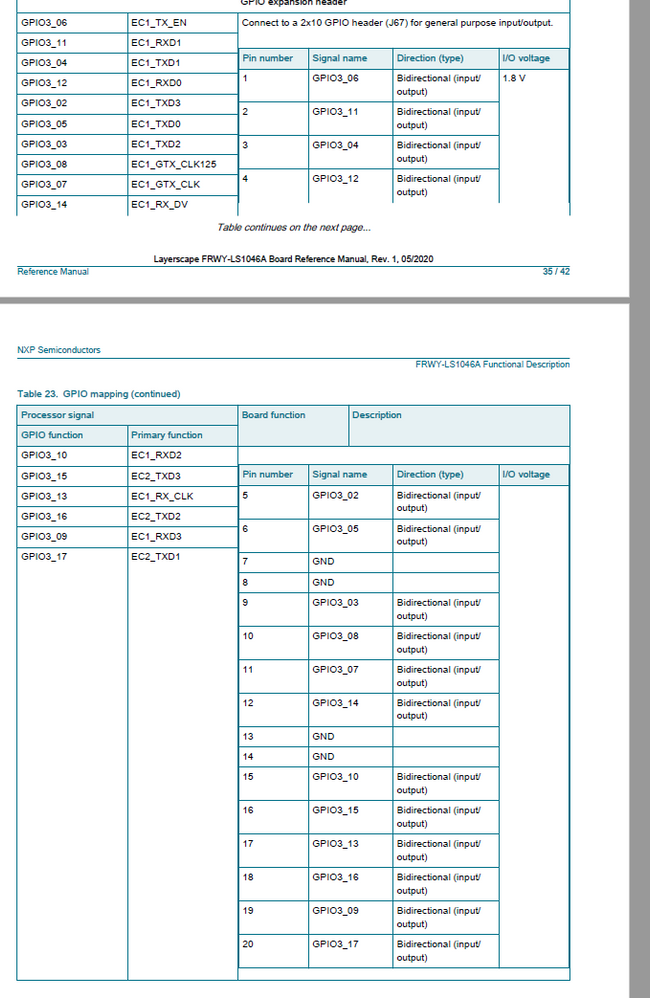
The problem is that when I write the data register to set a particular GPIO, it seems to be coming out on the wrong pin. For example:
I can write 0x200 to the GPIO3 data register (GPDAT), I then see the signal appear on J67-11 which corresponds to GPIO3_7. I expect that by writing a 0x200 to the GPDAT register, I would see the signal on GPIO3_9 or J67-19.
This happens for multiple GPIOs. Is the mapping to the J67 incorrect? Am I not writing to the GDAT register correctly?
Thanks!
已解决! 转到解答。

Ok, now I see the problem. In fact the board's silkscreen is correct, while description in the manual is wrong. Attached schematics with actual J67 routing, please use it as a reference.
The root of the problem is hystorical, J67 description in the manual corresponds to initial board revision that has been changed later. As a result schematics and layout around J67 were changed, while the table in the manual was somehow not fixed.

First of all, your understanding of GPDAT bit ordering is not correct. Take a look at the description in the manual, bit ordering is GPDAT[0:31], not GPDAT[31:0]. So to set bit 9 you need to write value 0x00400000. In turn, GPIO block is big-endian, accessing from little-endian ARM core requires to do byte swapping. So actually you need to write 0x4000 to set bit #9. Please try.
I would add that results of your test are really strange. Writing 0x200 to GPDAT should set bit #14, not #7. GPIO3 bit #14 is connected to pin 12 of the header, that is close to pin 11 but in different row. Please check once again.
.JPG)
I agree that there is no topology listed in the spec, but it says for example:
GPIO3_6 goes to J67-1.
But for the board I have it actually goes to J67-2 according to the way it is labeled on my board.
My board has silkscreen labeled in this way:
1 2
3 4
5 6
7 8
etc.
But I believe the silkscreen is backwards for this board rev.
Thanks
Ok, now I see the problem. In fact the board's silkscreen is correct, while description in the manual is wrong. Attached schematics with actual J67 routing, please use it as a reference.
The root of the problem is hystorical, J67 description in the manual corresponds to initial board revision that has been changed later. As a result schematics and layout around J67 were changed, while the table in the manual was somehow not fixed.
