
- Forums
- Product Forums
- General Purpose MicrocontrollersGeneral Purpose Microcontrollers
- i.MX Forumsi.MX Forums
- QorIQ Processing PlatformsQorIQ Processing Platforms
- Identification and SecurityIdentification and Security
- Power ManagementPower Management
- Wireless ConnectivityWireless Connectivity
- RFID / NFCRFID / NFC
- Advanced AnalogAdvanced Analog
- Neural Processing UnitsNeural Processing Units
- MCX Microcontrollers
- S32G
- S32K
- S32V
- MPC5xxx
- Other NXP Products
- S12 / MagniV Microcontrollers
- Powertrain and Electrification Analog Drivers
- Sensors
- Vybrid Processors
- Digital Signal Controllers
- 8-bit Microcontrollers
- ColdFire/68K Microcontrollers and Processors
- PowerQUICC Processors
- OSBDM and TBDML
- S32M
- S32Z/E
-
- Solution Forums
- Software Forums
- MCUXpresso Software and ToolsMCUXpresso Software and Tools
- CodeWarriorCodeWarrior
- MQX Software SolutionsMQX Software Solutions
- Model-Based Design Toolbox (MBDT)Model-Based Design Toolbox (MBDT)
- FreeMASTER
- eIQ Machine Learning Software
- Embedded Software and Tools Clinic
- S32 SDK
- S32 Design Studio
- GUI Guider
- Zephyr Project
- Voice Technology
- Application Software Packs
- Secure Provisioning SDK (SPSDK)
- Processor Expert Software
- Generative AI & LLMs
-
- Topics
- Mobile Robotics - Drones and RoversMobile Robotics - Drones and Rovers
- NXP Training ContentNXP Training Content
- University ProgramsUniversity Programs
- Rapid IoT
- NXP Designs
- SafeAssure-Community
- OSS Security & Maintenance
- Using Our Community
-
- Cloud Lab Forums
-
- Knowledge Bases
- ARM Microcontrollers
- i.MX Processors
- Identification and Security
- Model-Based Design Toolbox (MBDT)
- QorIQ Processing Platforms
- S32 Automotive Processing Platform
- Wireless Connectivity
- CodeWarrior
- MCUXpresso Suite of Software and Tools
- MQX Software Solutions
- RFID / NFC
- Advanced Analog
- Neural Processing Units
-
- NXP Tech Blogs
- Home
- :
- QorIQプロセッシングプラットフォーム
- :
- レイヤースケープ
- :
- Re: LS1046A RDB not booting: mbed problem?
LS1046A RDB not booting: mbed problem?
- RSS フィードを購読する
- トピックを新着としてマーク
- トピックを既読としてマーク
- このトピックを現在のユーザーにフロートします
- ブックマーク
- 購読
- ミュート
- 印刷用ページ

- 新着としてマーク
- ブックマーク
- 購読
- ミュート
- RSS フィードを購読する
- ハイライト
- 印刷
- 不適切なコンテンツを報告
I've just setup my LS1046A RDB kit and followed the Getting Started Guide:
Downloaded and installed the mbed serial port driver and installed Tera Term,
When connecting the USB cable between console port and PC, Windows shows an USB drive/folder for a short period, and then is disappears. This continues on and on. The green LED D8 periodically blinks (like the CMSIS-DAP controller is rebooting).
Sometimes it becomes stable, and the USB folder contains a file fail.txt with content: SWD ERROR.
Any suggestions (We have 2 kits with the same problem)?
解決済! 解決策の投稿を見る。
 ufedor
- 新着としてマーク
- ブックマーク
- 購読
- ミュート
- RSS フィードを購読する
- ハイライト
- 印刷
- 不適切なコンテンツを報告
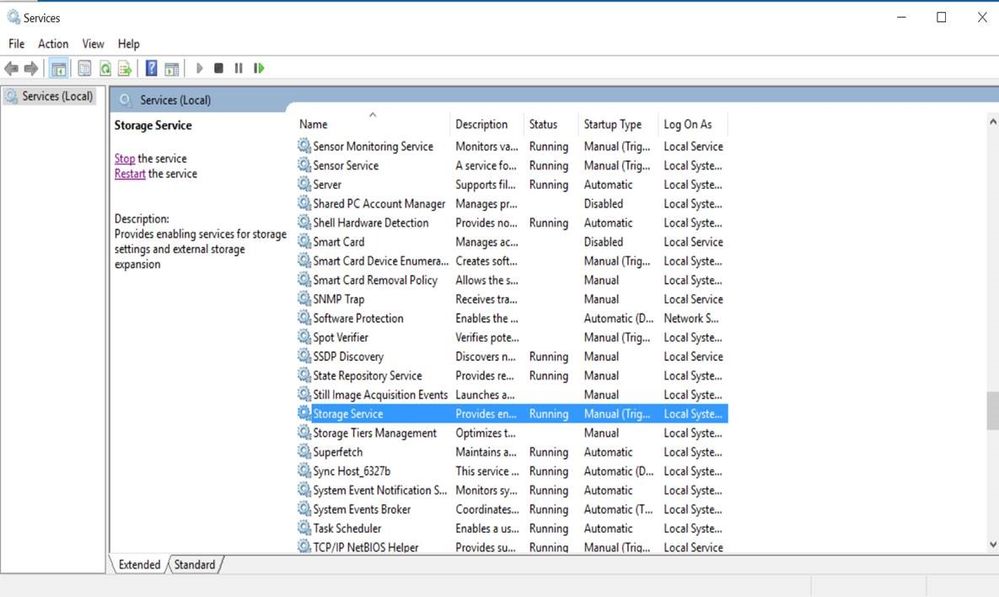
This is the workaround confirmed to fix the mbed issue on Win10 PC's
- Go to the “Start” option on the PC and type the command “ Services”
- Than you should see the following “Services” window open.
- Select the “Storage Service” and on the left-hand side of the window click the “Stop the service”

- 新着としてマーク
- ブックマーク
- 購読
- ミュート
- RSS フィードを購読する
- ハイライト
- 印刷
- 不適切なコンテンツを報告
I am facing a very similar problem. My first use of this board, out of the box, working with the Getting Started guide LS1046ARDBGSG. The guide states that the D8 LED should be on when the cable is connected, actually it blinks. Disabling the Storage Service has no effect. Moreover, when connecting the USB cable to a Linux machine, it also detects it as a mass storage device with the same files there.
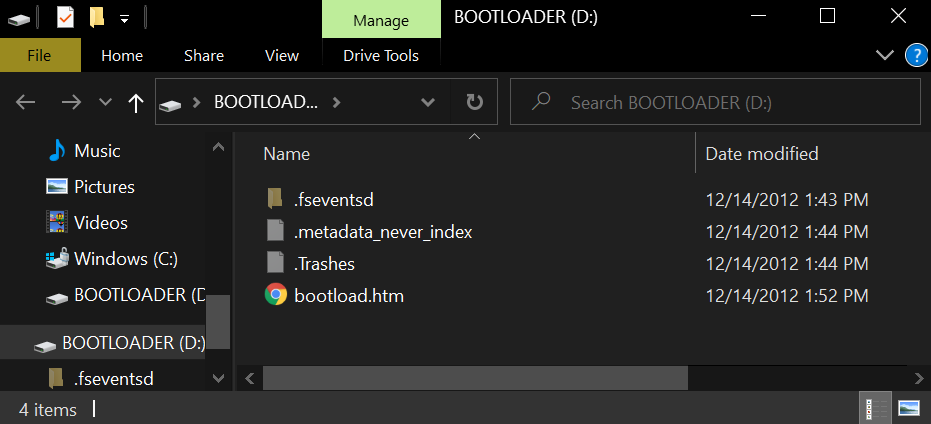
In my case, though, I can see several files in a disk labeled BOOTLOADER. It seems to me like a board configuration issue, I've verified that the switches and all are in default positions. When applying power with the switch, the USB connection is not present at all, and D8 does not switch on.
Edit:
Right, so I've read the relevant related post here: LS1043ARDB-PD USB console can't work, and followed it closely. I've entirely disabled the Storage Service in Windows, followed all instructions carefully. After copying the k22fx512 binary to the BOOTLOADER drive (the LED flashes quicker), and installing the mbed driver again, I've suddenly seen a new COM port in device manager! Connecting to it showed nothing on the terminal, though, so I've reconnected the cable, and got the BOOTLOADER again.
From this moment and on, I'm stuck with the BOOTLOADER - whenever I copy the k22fx512 binary on it, it does everything as in the manual, but then restarts in BOOTLOADER again. Stuck in a loop.
ufedor
- 新着としてマーク
- ブックマーク
- 購読
- ミュート
- RSS フィードを購読する
- ハイライト
- 印刷
- 不適切なコンテンツを報告
Please check that you have preformed the following steps.
Plug in power to the board.
Hold down Reset button while plugging the PC USB cable into the CSAM USB connector on the board.
On Windows, the board will be mapped as a Mass Storage Device under a volume labelled 'BOOTLOADER'.
LED for MBED status will blink in green on the board to acknowledge it is in bootloader mode.
1. Copy the CMSIS-DAP firmware binary, into this new volume, ‘BOOTLOADER’
2. Wait the binary copy to finish; LED for MBED status will blink with higher rate on finish;
3. Unplug the USB cable from the board, then plug it back in to power cycle the module
- 新着としてマーク
- ブックマーク
- 購読
- ミュート
- RSS フィードを購読する
- ハイライト
- 印刷
- 不適切なコンテンツを報告
Yes, this is the flow. If I continue your flow, I'm getting the BOOTLOADER flash drive again. The same happens if I don't apply power at all, just plug the USB to the CONSOLE input.
I got it up once only, but not sure how. I've removed the battery, the power, and the USB, and removed the MCU_RST jumper (J26 in this board). If I'm not mistaken, in this condition I've returned the battery and then plugged the USB (CONSOLE input), and it worked - the LED was on and slightly blinking as data is transferred, and I've seen a normal boot to Linux. There was a flash drive opened with mbed.htm file in it instead of bootload.htm. But when I switched it all off, it returned to the same bootload loop problem. Moreover, when the MCU_RST humper is disconnected, I can't connect at all, so maybe I don't remember exactly how I reached normal operation. Can't recreate it.
Any help would be highly appreciated.
ufedor
- 新着としてマーク
- ブックマーク
- 購読
- ミュート
- RSS フィードを購読する
- ハイライト
- 印刷
- 不適切なコンテンツを報告
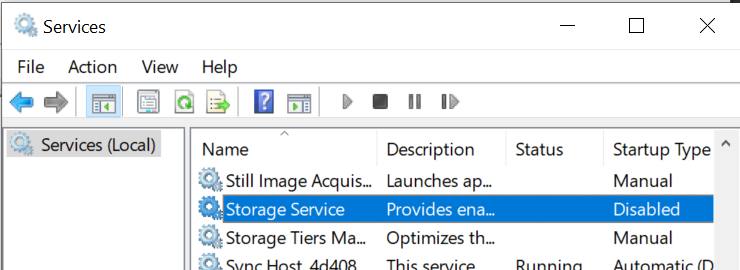
Please doublecheck that the Windows Storage Service really is disabled.
- 新着としてマーク
- ブックマーク
- 購読
- ミュート
- RSS フィードを購読する
- ハイライト
- 印刷
- 不適切なコンテンツを報告
Yes, it is fully disabled:
 ufedor
- 新着としてマーク
- ブックマーク
- 購読
- ミュート
- RSS フィードを購読する
- ハイライト
- 印刷
- 不適切なコンテンツを報告
May be you could set SW4[4]=OFF and connect UART console through the RG45 port (J4)?
- 新着としてマーク
- ブックマーク
- 購読
- ミュート
- RSS フィードを購読する
- ハイライト
- 印刷
- 不適切なコンテンツを報告
Yes, thank you, this works as expected. Guess I'll not be using the CONSOLE connection, and stick to a USB-to-Serial adaptor.
ufedor
- 新着としてマーク
- ブックマーク
- 購読
- ミュート
- RSS フィードを購読する
- ハイライト
- 印刷
- 不適切なコンテンツを報告
This is the workaround confirmed to fix the mbed issue on Win10 PC's
- Go to the “Start” option on the PC and type the command “ Services”
- Than you should see the following “Services” window open.
- Select the “Storage Service” and on the left-hand side of the window click the “Stop the service”
