- Forums
- Product Forums
- General Purpose MicrocontrollersGeneral Purpose Microcontrollers
- i.MX Forumsi.MX Forums
- QorIQ Processing PlatformsQorIQ Processing Platforms
- Identification and SecurityIdentification and Security
- Power ManagementPower Management
- Wireless ConnectivityWireless Connectivity
- RFID / NFCRFID / NFC
- Advanced AnalogAdvanced Analog
- Neural Processing UnitsNeural Processing Units
- MCX Microcontrollers
- S32G
- S32K
- S32V
- MPC5xxx
- Other NXP Products
- S12 / MagniV Microcontrollers
- Powertrain and Electrification Analog Drivers
- Sensors
- Vybrid Processors
- Digital Signal Controllers
- 8-bit Microcontrollers
- ColdFire/68K Microcontrollers and Processors
- PowerQUICC Processors
- OSBDM and TBDML
- S32M
- S32Z/E
-
- Solution Forums
- Software Forums
- MCUXpresso Software and ToolsMCUXpresso Software and Tools
- CodeWarriorCodeWarrior
- MQX Software SolutionsMQX Software Solutions
- Model-Based Design Toolbox (MBDT)Model-Based Design Toolbox (MBDT)
- FreeMASTER
- eIQ Machine Learning Software
- Embedded Software and Tools Clinic
- S32 SDK
- S32 Design Studio
- GUI Guider
- Zephyr Project
- Voice Technology
- Application Software Packs
- Secure Provisioning SDK (SPSDK)
- Processor Expert Software
- Generative AI & LLMs
-
- Topics
- Mobile Robotics - Drones and RoversMobile Robotics - Drones and Rovers
- NXP Training ContentNXP Training Content
- University ProgramsUniversity Programs
- Rapid IoT
- NXP Designs
- SafeAssure-Community
- OSS Security & Maintenance
- Using Our Community
-
- Cloud Lab Forums
-
- Knowledge Bases
- ARM Microcontrollers
- i.MX Processors
- Identification and Security
- Model-Based Design Toolbox (MBDT)
- QorIQ Processing Platforms
- S32 Automotive Processing Platform
- Wireless Connectivity
- CodeWarrior
- MCUXpresso Suite of Software and Tools
- MQX Software Solutions
- RFID / NFC
- Advanced Analog
- Neural Processing Units
-
- NXP Tech Blogs
- Home
- :
- QorIQ Processing Platforms
- :
- Layerscape
- :
- LS1043ARDB-PD USB console can't work
LS1043ARDB-PD USB console can't work
- Subscribe to RSS Feed
- Mark Topic as New
- Mark Topic as Read
- Float this Topic for Current User
- Bookmark
- Subscribe
- Mute
- Printer Friendly Page
LS1043ARDB-PD USB console can't work

- Mark as New
- Bookmark
- Subscribe
- Mute
- Subscribe to RSS Feed
- Permalink
- Report Inappropriate Content
Hi
i got LS1043ARDB-PD and start booting it. The USB console port can't work. it always keep in bootloader mode.
i download LS1043ARDB-PD design file and enter k22fx512_ls1020a_if_mbed.bin to bootloader disk. it still keep in bootloader mode after update. could you please help to check thanks?
- Mark as New
- Bookmark
- Subscribe
- Mute
- Subscribe to RSS Feed
- Permalink
- Report Inappropriate Content
I am seeing the same issue with a LS1043ADB .. It worked initially and I had USB console, but now all I ever see is the bootloader drive. I tried using the attached files, but when I removed/replaced the USB I got the bootloader back. This is there a newer version of the bootloader file?
 ufedor
- Mark as New
- Bookmark
- Subscribe
- Mute
- Subscribe to RSS Feed
- Permalink
- Report Inappropriate Content
Please confirm that the following steps were performed:
Plug in power to LS board. Hold down Reset button while plugging the PC USB cable into the CSAM USB connector on the board.
On Windows, the board will be mapped as a Mass Storage Device under a volume labelled 'BOOTLOADER'.
LED for MBED status will blink in green on the board to acknowledge it is in bootloader mode.
1. Copy the attached binary into the 'BOOTLOADER’
2. Wait the binary copy to finish; LED for MBED status will blink with higher rate on finish;
3. Unplug the USB cable from the board, then plug it back in to power cycle the module
4. The board should be ready to connect to CodeWarrior
Also, there is a known issue with MBED operation under Win10.
This is the work around we have confirmed to fix the mbed issue on Win10 PC's:
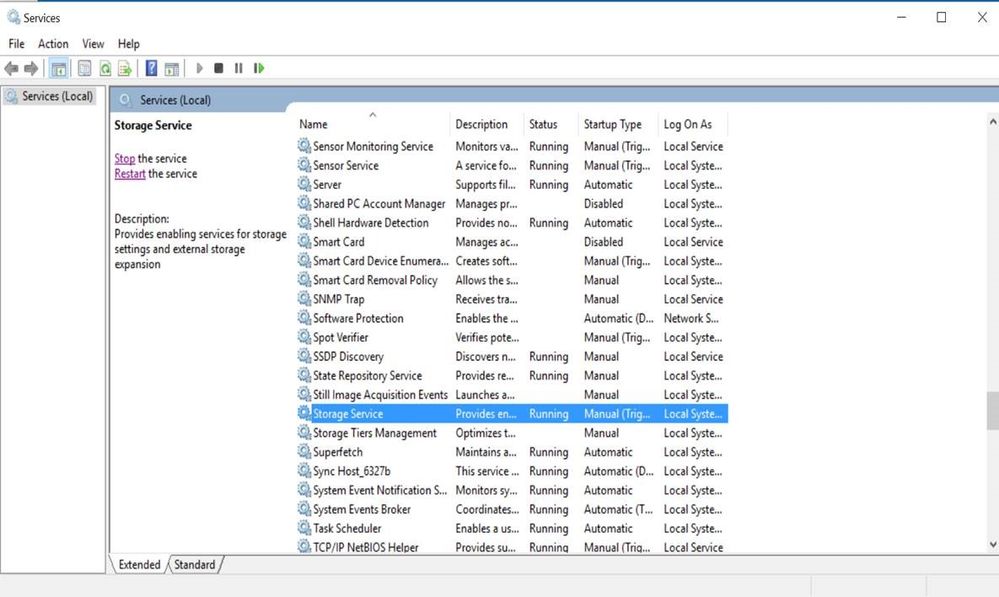
- Go to the "Start" option on the PC and type the command "Services"
- Than you should see the following "Services" window open
- Select the "Storage Services" and on the left-hand side of the window click the "Stop the service"