
- Forums
- Product Forums
- General Purpose MicrocontrollersGeneral Purpose Microcontrollers
- i.MX Forumsi.MX Forums
- QorIQ Processing PlatformsQorIQ Processing Platforms
- Identification and SecurityIdentification and Security
- Power ManagementPower Management
- Wireless ConnectivityWireless Connectivity
- RFID / NFCRFID / NFC
- Advanced AnalogAdvanced Analog
- MCX Microcontrollers
- S32G
- S32K
- S32V
- MPC5xxx
- Other NXP Products
- S12 / MagniV Microcontrollers
- Powertrain and Electrification Analog Drivers
- Sensors
- Vybrid Processors
- Digital Signal Controllers
- 8-bit Microcontrollers
- ColdFire/68K Microcontrollers and Processors
- PowerQUICC Processors
- OSBDM and TBDML
- S32M
- S32Z/E
-
- Solution Forums
- Software Forums
- MCUXpresso Software and ToolsMCUXpresso Software and Tools
- CodeWarriorCodeWarrior
- MQX Software SolutionsMQX Software Solutions
- Model-Based Design Toolbox (MBDT)Model-Based Design Toolbox (MBDT)
- FreeMASTER
- eIQ Machine Learning Software
- Embedded Software and Tools Clinic
- S32 SDK
- S32 Design Studio
- GUI Guider
- Zephyr Project
- Voice Technology
- Application Software Packs
- Secure Provisioning SDK (SPSDK)
- Processor Expert Software
- Generative AI & LLMs
-
- Topics
- Mobile Robotics - Drones and RoversMobile Robotics - Drones and Rovers
- NXP Training ContentNXP Training Content
- University ProgramsUniversity Programs
- Rapid IoT
- NXP Designs
- SafeAssure-Community
- OSS Security & Maintenance
- Using Our Community
-
- Cloud Lab Forums
-
- Knowledge Bases
- ARM Microcontrollers
- i.MX Processors
- Identification and Security
- Model-Based Design Toolbox (MBDT)
- QorIQ Processing Platforms
- S32 Automotive Processing Platform
- Wireless Connectivity
- CodeWarrior
- MCUXpresso Suite of Software and Tools
- MQX Software Solutions
- RFID / NFC
- Advanced Analog
-
- NXP Tech Blogs
- Home
- :
- QorIQプロセッシングプラットフォーム
- :
- レイヤースケープ
- :
- Re: Console port accessing issue with LS1021ATSN-PA from Windows 10
Console port accessing issue with LS1021ATSN-PA from Windows 10
- RSS フィードを購読する
- トピックを新着としてマーク
- トピックを既読としてマーク
- このトピックを現在のユーザーにフロートします
- ブックマーク
- 購読
- ミュート
- 印刷用ページ
Console port accessing issue with LS1021ATSN-PA from Windows 10

- 新着としてマーク
- ブックマーク
- 購読
- ミュート
- RSS フィードを購読する
- ハイライト
- 印刷
- 不適切なコンテンツを報告
Hi,
I'm working on a LS1021ATSN-PA development board. I'm facing an issue with its console port access from my Windows 10 PC. As mentioned in the quick start guide, I've connected the board's Micro USB console port to my PC using the Micro-B USB cable. The cable connection detected at the PC and appeared as a USB Mass Storage Device under the USB controllers of the Device Manager. But it does not appear as a COM port. I found a note from the MBED saying that Windows 10 does not require a specific serial driver to enable the COM port, however an older version of Windows 8 or lesser requires it. In my Windows 10 PC I cannot find the virtual COM port corresponding to this USB connection.
How do I resolve the issue? Kindly help me to proceed on it.
Thank You.
- 新着としてマーク
- ブックマーク
- 購読
- ミュート
- RSS フィードを購読する
- ハイライト
- 印刷
- 不適切なコンテンツを報告
Any solution to this problem?
 yipingwang
- 新着としてマーク
- ブックマーク
- 購読
- ミュート
- RSS フィードを購読する
- ハイライト
- 印刷
- 不適切なコンテンツを報告
- 新着としてマーク
- ブックマーク
- 購読
- ミュート
- RSS フィードを購読する
- ハイライト
- 印刷
- 不適切なコンテンツを報告
Thank you for the response.
I have followed the steps mentioned in the document to update CMSIS-DAP firmware on the board and it updated successfully. However I could not get the console port appeared as virtual COM port on my Windows10 PC. I have also tried the workaround suggested in one of the community question links (https://community.nxp.com/t5/Layerscape/LS1043ARDB-PD-USB-console-can-t-work/m-p/798002?commentID=10...) but it didn't help me either. On my PC I'm still getting it as USB Mass Storage Device only, and in the Teraterm application I cannot select the virtual COM port to connect with the board's console port.
yipingwang
- 新着としてマーク
- ブックマーク
- 購読
- ミュート
- RSS フィードを購読する
- ハイライト
- 印刷
- 不適切なコンテンツを報告
Please make sure that you used CMSIS-DAP firmware image k22fx512_if_mbed.bin.
Please refer to the section "5. Windows mbed USB driver" in the document to install mbed USB driver.
There is a known issue with MBED operation under Windows 10:
https://os.mbed.com/blog/entry/DAPLink-bootloader-update/
This is the workaround we have confirmed to fix the mbed issue on Windows 10 PC's:
- Go to the "Start" option on the PC and type the command " services.msc"
- Than you should see the following "Services" window open
- Select the "Storage Services" and on the left-hand side of the window click the "Stop the service"
- 新着としてマーク
- ブックマーク
- 購読
- ミュート
- RSS フィードを購読する
- ハイライト
- 印刷
- 不適切なコンテンツを報告
I've followed the same steps mentioned along with the Windows 10 workaround procedure. But it did not solve my issue.
After copying CMSIS-DAP firmware image "k22fx512_if_mbed.bin" into the "BOOTLOADER" named drive, the 'K22' marked status LED on the board blinks very fast. Then on unplugging and re-plugging of USB cable caused a drive named "MBED" appears on my PC. No virtual COM port is being created corresponding to the console port. I have re-enabled "Storage Services" in my PC and checked again. No difference observed (Only "MBED" drive appeared and no virtual COM port).
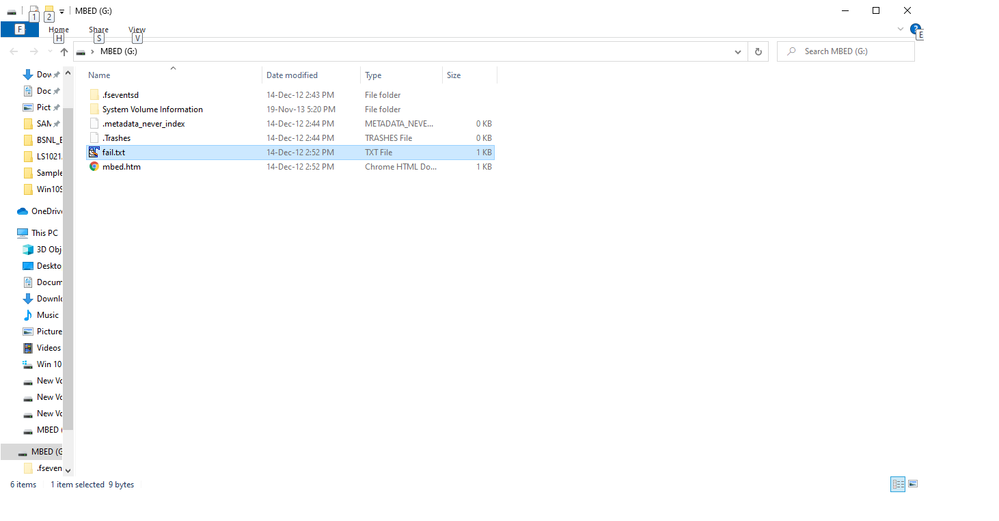
I have noticed a file named "fail.txt" in the "MBED" drive path as shown above. Content inside the text file is "SWD ERROR".
Am I right in the procedure that I followed? Is there any other image I've to use further to the above procedure?
yipingwang
- 新着としてマーク
- ブックマーク
- 購読
- ミュート
- RSS フィードを購読する
- ハイライト
- 印刷
- 不適切なコンテンツを報告
- 新着としてマーク
- ブックマーク
- 購読
- ミュート
- RSS フィードを購読する
- ハイライト
- 印刷
- 不適切なコンテンツを報告
I have tried this one but no difference in behavior observed.
- 新着としてマーク
- ブックマーク
- 購読
- ミュート
- RSS フィードを購読する
- ハイライト
- 印刷
- 不適切なコンテンツを報告
We are seeing the same issue. Installed the k22fx512_if_mbed.bin, turned off the service "Storage Service" (There is no Storage Services),
Still no com port showing up in Windows 10 as of Oct-2021
