Writing your first toggle LED application with FRMD-K64F + KDS 1.1.0 + KSDK 1.0.0 Non-Processor Expert

cancel
Showing results for 
Show  only  | Search instead for 
Did you mean: 

Writing your first toggle LED application with FRMD-K64F + KDS 1.1.0 + KSDK 1.0.0 Non-Processor Expert

Writing your first toggle LED application with FRMD-K64F + KDS 1.1.0 + KSDK 1.0.0 Non-Processor Expert

This document provides the guidelines to create a toggle LED application in the FRDM-K64F by using the KDS 1.1.0 + KSDK 1.0.0 and Non Processor Expert usage. This is helpful to understand how to create a project for KDS that uses the KSDK.


This document is assuming that KDS 1.1.0 and KSDK 1.0.0 are installed under a Windows OS system.


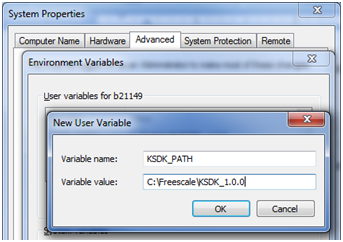
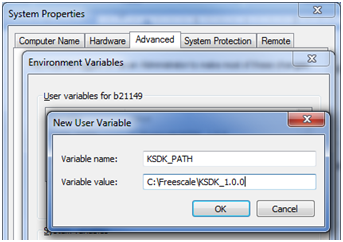
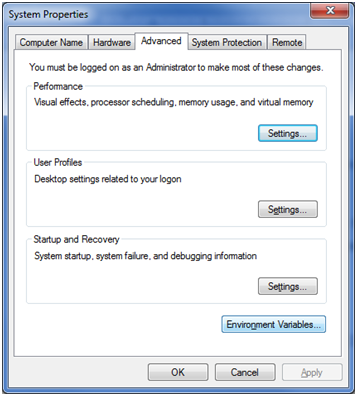
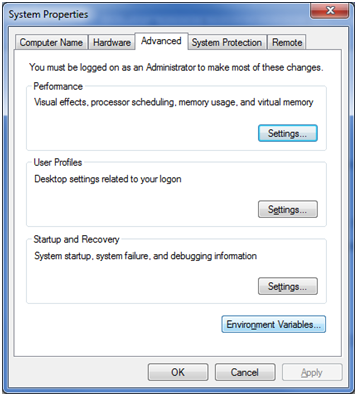
  • After the installation of KDS the environment variable “KSDK_PATH” must be defined. Under “System Properties” go to “Environment Variables…” located in the “Advance” tab.
    14154_14154.pngpastedImage_124.png
  • Add the new variable under “User variables…”. The name should be “KSDK_PATH”. The path is the same where by default the KSDK is installed. In this case the path is “C:\Freescale\KSDK_1.0.0”.
14155_14155.pngpastedImage_127.png

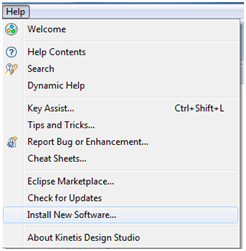
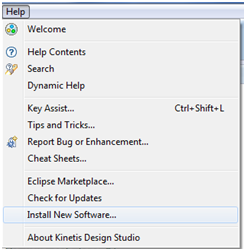
  • The KSDK patch must be installed before to proceed with any project creation. To do this click in “Help” menu and then “Install New Software…“ option.
    14156_14156.pngpastedImage_130.png
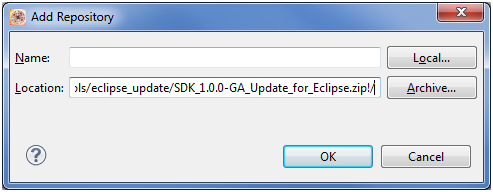
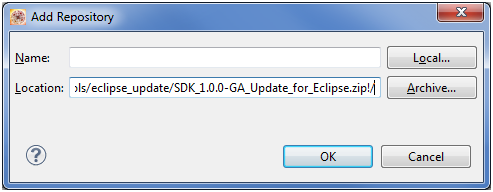
  • Click in the “Add…” button and then “Archive” button. Look for the file “C:\Freescale\KSDK_1.0.0\tools\eclipse_update\SDK_1.0.0-GA_Update_for_Eclipse.zip” and click “Ok” button.
    14157_14157.pngpastedImage_133.png
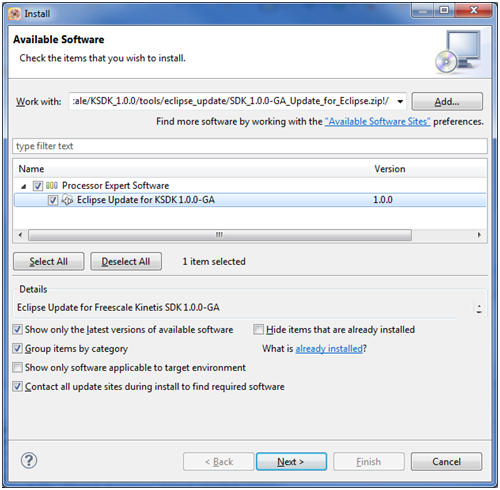
  • Select the “Eclipse Update for KSDK 1.0.0-GA” option from the options and then press the “Next” button.
    14158_14158.pngpastedImage_136.png
  • Next step is to create a new KDS project. Go to “File>New>Kinetis Design Studio Project” option
14160_14160.pngpastedImage_146.png

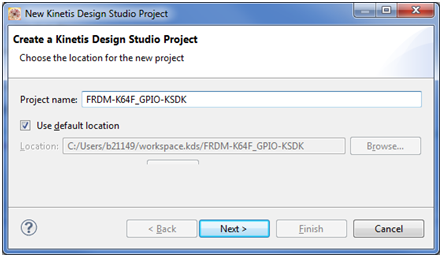
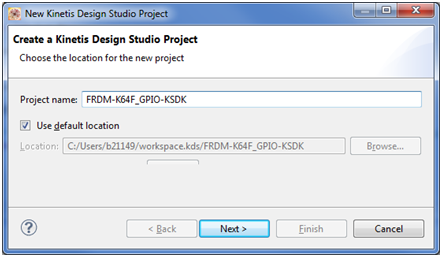
  • Then give a name; easy one, to remember what it does. Then press “Next”
    14161_14161.pngpastedImage_149.png
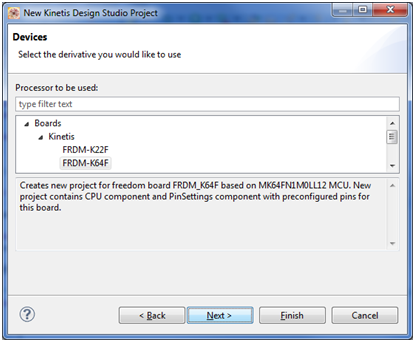
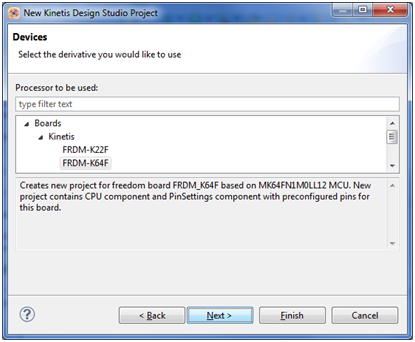
  • Chose the board to be used. In this case we are using the FRDM-K64F. Now press “Next”.
14162_14162.pngpastedImage_152.png

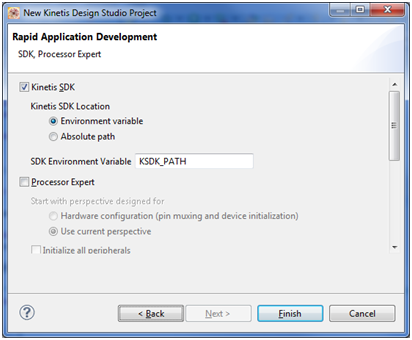
  • Check the "Kinetis SDK" check box. Make sure that "Processor Expert" is not checked.
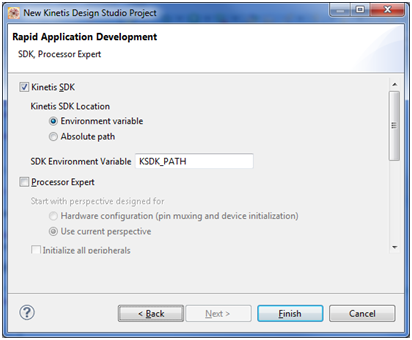
14163_14163.pngpastedImage_155.png

  • Project is now created and it is ready to include the source code.


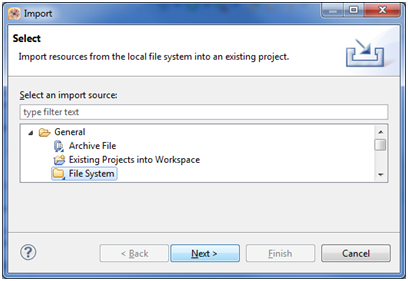
  • All the KSDK examples include the "board" folder. It is necessary to do the same for this new project. To add it just right click in the project just created and chose "Import".

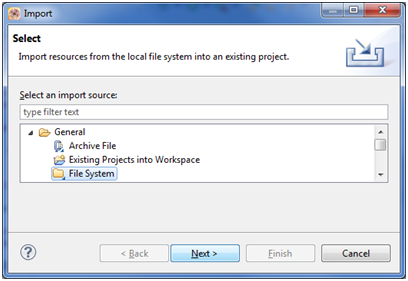
  • Select "File System".

14164_14164.pngpastedImage_158.png

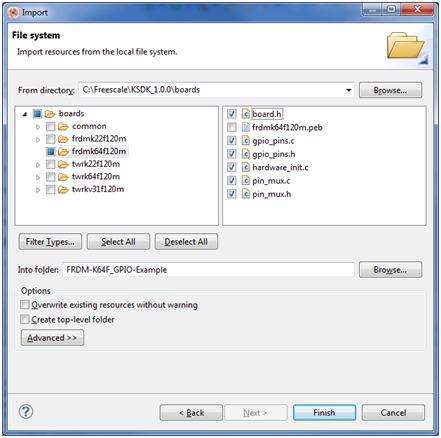
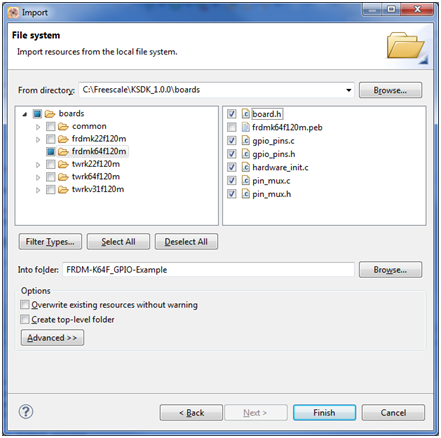
  • Look for the board folder in the following path: C:\Freescale\KSDK_1.0.0\boards\


  • Chose the C and H files only from the "frdmk64f120m" folder. Just like this:
14165_14165.pngpastedImage_161.png

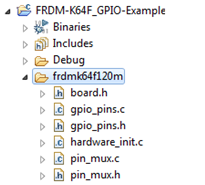
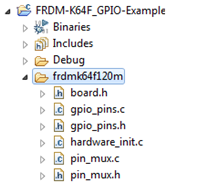
  • Then the folder "frdmk64f120m" is added to the project structure.
14166_14166.pngpastedImage_164.png

  • Following is to add the KSDK library in the compiler. To add it you need to give a right click in the project and click in "Properties". Under "C/C++ Build" menu go to "Settings". Then click in "Miscellaneous" under "Cross ARM C++ Linker". If you did it correctly then you will see this:
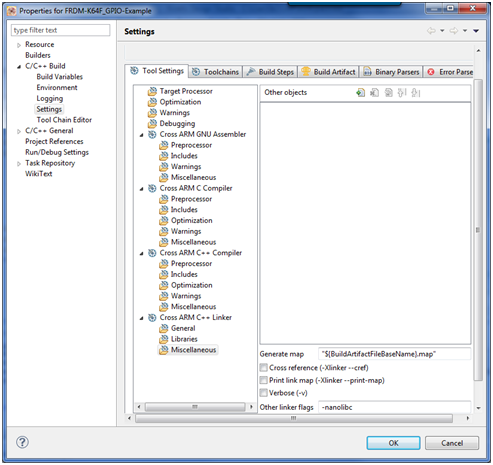
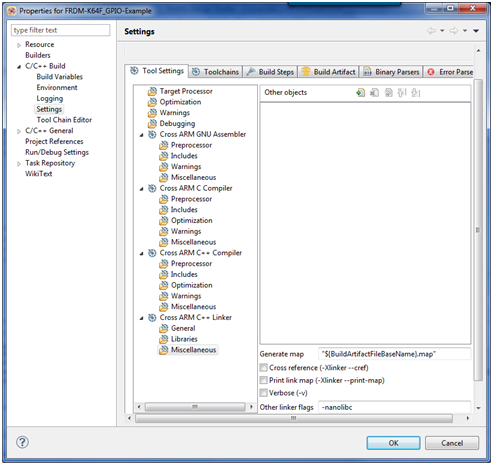
     14167_14167.pngpastedImage_167.png

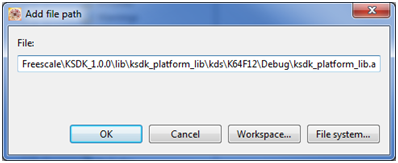
  • Click in add object button 14168_14168.pngpastedImage_170.png  and add the library here. The default path is "C:\Freescale\KSDK_1.0.0\lib\ksdk_platform_lib\kds\K64F12\Debug\ksdk_platform_lib.a".

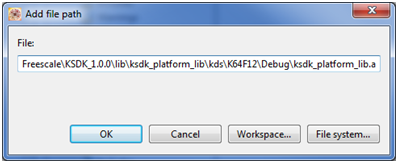
14169_14169.pngpastedImage_173.png

  • Now, let’s toggle an LED. It is necessary to include the boards.h file:

#include "board.h" 


  • A GPIO pins enum needs to be created. We are using the RGB connected to the PORTE, specifically the pin 26 (PTE26). The enum then should look like this:

enum _gpio_pins

{

kGpioLED4  = GPIO_MAKE_PIN(HW_PORTE, 0x1A),//PTE26

};


  • Make sure you are giving the pin 26 as hexadecimal value. In this case the 26 is 0x1A and that is the value we give as second parameter to the GPIO_MAKE_PIN macro.
  • Add the calling to the function hardware_init()a just after the variable definition in the main() function.
  • After this, now call the function that is necessary to configure the pin direction:

GPIO_DRV_SetPinDir(kGpioLED4, kGpioDigitalOutput); 


  • Finally, to write the desired value to the LED use this function:

GPIO_DRV_WritePinOutput(kGpioLED4, value); 


  • The entire should code looks like this:

#include "fsl_device_registers.h"

#include "board.h"


enum _gpio_pins

{

kGpioLED4  = GPIO_MAKE_PIN(HW_PORTE, 0x1A),//PTE26

};


static int i = 0;


int main(void)

{

short value = 1;    /* Write your code here */

hardware_init();


GPIO_DRV_SetPinDir(kGpioLED4, kGpioDigitalOutput);


/* This for loop should be replaced. By default this loop allows a single stepping. */

for (;;) {


for (i = 0; i<0xFFFFFF; i++)

{

}


value = value^1;

GPIO_DRV_WritePinOutput(kGpioLED4, value);


}

/* Never leave main */

return 0;

}


  • Compile and ready to test. See the green LED blinking in the FRDM-K64F board.
Labels (1)
Comments

Great work!

Hi Garabo,

I have a relatively clean install of KDS 1.1.0 GA and KSDK 1.0.0 GA.  When trying to add the library from location  "C:\Freescale\KSDK_1.0.0\lib\ksdk_platform_lib\kds\K64F12\Debug\ksdk_platform_lib.a", I don't have the library file or even the DEBUG folder.  Do I need to build a different project first?

Thanks and regards,

Norm

Hi Garabo,

I found my issue - I needed to build the KDS platform driver library per Appendix A of the Kinetis SDK K64 User's Guide.

Thanks for the great work!

Regards,

Norm

Hi Norman,

Right, the compilation of the library is missing in my document. I will try to update in the next revision of the document. Thanks for the heads up!

Best Regards,

Garabo

hello Garabo,

I do refer to your design ,

while ,when i build ,it errors  ,
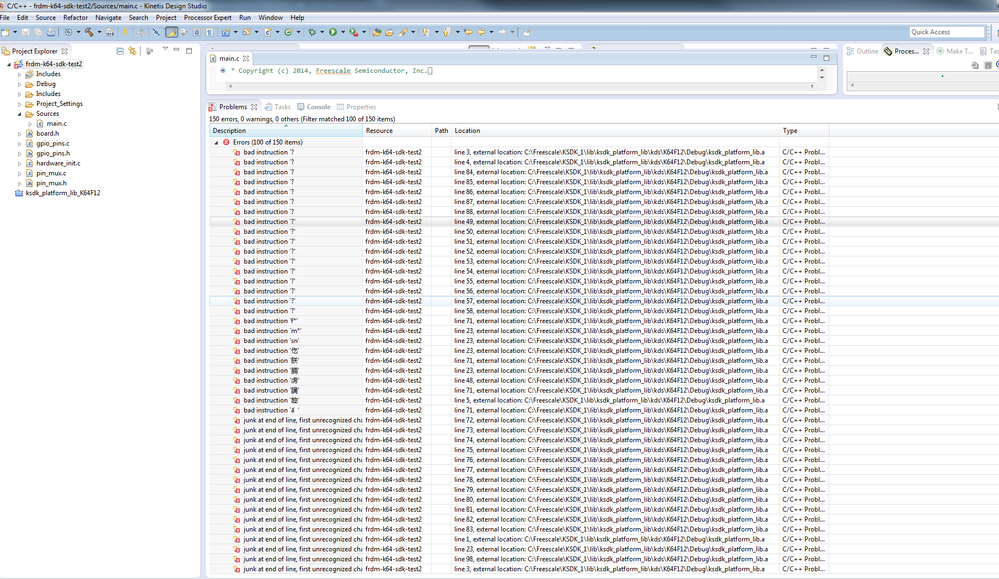
pastedImage_0.png

please help me

Waiting for your answer

Thank you !

Alice

Hi, Garabo,

My problem is resolved


Alice

Good to hear, What was the issue?

Regads,

Garabo

Great!!

Could you now write a tutorial about a new project GPIO with Processor Expert and/or MQX for KDS?

i have added the headers properly to inclues but still getting this errors everytime,

http://oi62.tinypic.com/n14ff7.jpg

plz help

Hi Kane,

Please try to compile the KSDK library. These errors are cause by two issues:

-KSDK lib is not compiled

-KSDK library is not added to the in the linker setting: 14167_14167.png
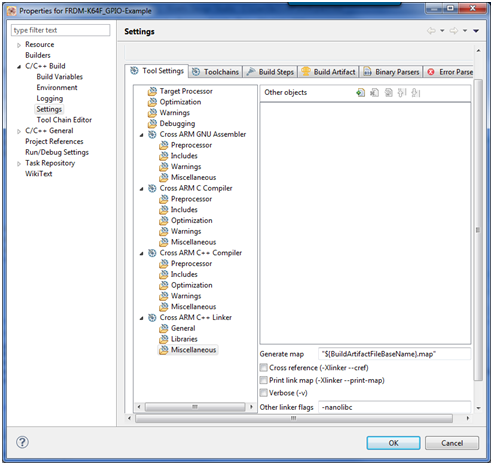
I hope this solved the problem

Best Regards,

Garabo

Hi Jose,

Let me work on that and hopefully have it ready in a few weeks.

Best Regards,

Garabo

%3CLINGO-SUB%20id%3D%22lingo-sub-1116153%22%20slang%3D%22en-US%22%20mode%3D%22CREATE%22%3EWriting%20your%20first%20toggle%20LED%20application%20with%20FRMD-K64F%20%2B%20KDS%201.1.0%20%2B%20KSDK%201.0.0%20Non-Processor%20Expert%3C%2FLINGO-SUB%3E%3CLINGO-BODY%20id%3D%22lingo-body-1116153%22%20slang%3D%22en-US%22%20mode%3D%22CREATE%22%3E%3CP%3EThis%20document%20provides%20the%20guidelines%20to%20create%20a%20toggle%20LED%20application%20in%20the%20FRDM-K64F%20by%20using%20the%20KDS%201.1.0%20%2B%20KSDK%201.0.0%20and%20Non%20Processor%20Expert%20usage.%20This%20is%20helpful%20to%20understand%20how%20to%20create%20a%20project%20for%20KDS%20that%20uses%20the%20KSDK.%3C%2FP%3E%3CP%20style%3D%22min-height%3A%208pt%3B%20padding%3A%200px%3B%22%3E%26nbsp%3B%3C%2FP%3E%3CP%3EThis%20document%20is%20assuming%20that%20KDS%201.1.0%20and%20KSDK%201.0.0%20are%20installed%20under%20a%20Windows%20OS%20system.%3C%2FP%3E%3CP%20style%3D%22min-height%3A%208pt%3B%20padding%3A%200px%3B%22%3E%26nbsp%3B%3C%2FP%3E%3CUL%3E%3CLI%3EAfter%20the%20installation%20of%20KDS%20the%20environment%20variable%20%E2%80%9CKSDK_PATH%E2%80%9D%20must%20be%20defined.%20Under%20%E2%80%9CSystem%20Properties%E2%80%9D%20go%20to%20%E2%80%9CEnvironment%20Variables%E2%80%A6%E2%80%9D%20located%20in%20the%20%E2%80%9CAdvance%E2%80%9D%20tab.%3CBR%20%2F%3E%20%3CSPAN%20class%3D%22lia-inline-image-display-wrapper%22%20image-alt%3D%2214154_14154.png%22%3E%3Cspan%20class%3D%22lia-inline-image-display-wrapper%22%20image-alt%3D%2214154_14154.png%22%20style%3D%22width%3A%20357px%3B%22%3E%3Cimg%20src%3D%22https%3A%2F%2Fcommunity.nxp.com%2Ft5%2Fimage%2Fserverpage%2Fimage-id%2F118265i4DA0DFFE4278C723%2Fimage-size%2Flarge%3Fv%3Dv2%26amp%3Bpx%3D999%22%20role%3D%22button%22%20title%3D%2214154_14154.png%22%20alt%3D%2214154_14154.png%22%20%2F%3E%3C%2Fspan%3E%3C%2FSPAN%3E%3CSPAN%20class%3D%22lia-inline-image-display-wrapper%22%20image-alt%3D%22pastedImage_124.png%22%3E%3Cspan%20class%3D%22lia-inline-image-display-wrapper%22%20image-alt%3D%22pastedImage_124.png%22%20style%3D%22width%3A%20357px%3B%22%3E%3Cimg%20src%3D%22https%3A%2F%2Fcommunity.nxp.com%2Ft5%2Fimage%2Fserverpage%2Fimage-id%2F42151iC1B24C5079B63956%2Fimage-size%2Flarge%3Fv%3Dv2%26amp%3Bpx%3D999%22%20role%3D%22button%22%20title%3D%22pastedImage_124.png%22%20alt%3D%22pastedImage_124.png%22%20%2F%3E%3C%2Fspan%3E%3C%2FSPAN%3E%3C%2FLI%3E%3CLI%3EAdd%20the%20new%20variable%20under%20%E2%80%9CUser%20variables%E2%80%A6%E2%80%9D.%20The%20name%20should%20be%20%E2%80%9CKSDK_PATH%E2%80%9D.%20The%20path%20is%20the%20same%20where%20by%20default%20the%20KSDK%20is%20installed.%20In%20this%20case%20the%20path%20is%20%E2%80%9CC%3A%5CFreescale%5CKSDK_1.0.0%E2%80%9D.%3C%2FLI%3E%3C%2FUL%3E%3CP%20style%3D%22margin-left%3A%200.25in%3B%22%3E%3CSPAN%20class%3D%22lia-inline-image-display-wrapper%22%20image-alt%3D%2214155_14155.png%22%3E%3Cspan%20class%3D%22lia-inline-image-display-wrapper%22%20image-alt%3D%2214155_14155.png%22%20style%3D%22width%3A%20343px%3B%22%3E%3Cimg%20src%3D%22https%3A%2F%2Fcommunity.nxp.com%2Ft5%2Fimage%2Fserverpage%2Fimage-id%2F118266i5A59271EDAAD3C7D%2Fimage-size%2Flarge%3Fv%3Dv2%26amp%3Bpx%3D999%22%20role%3D%22button%22%20title%3D%2214155_14155.png%22%20alt%3D%2214155_14155.png%22%20%2F%3E%3C%2Fspan%3E%3C%2FSPAN%3E%3CSPAN%20class%3D%22lia-inline-image-display-wrapper%22%20image-alt%3D%22pastedImage_127.png%22%3E%3Cspan%20class%3D%22lia-inline-image-display-wrapper%22%20image-alt%3D%22pastedImage_127.png%22%20style%3D%22width%3A%20343px%3B%22%3E%3Cimg%20src%3D%22https%3A%2F%2Fcommunity.nxp.com%2Ft5%2Fimage%2Fserverpage%2Fimage-id%2F14679iE62CEA82497666B8%2Fimage-size%2Flarge%3Fv%3Dv2%26amp%3Bpx%3D999%22%20role%3D%22button%22%20title%3D%22pastedImage_127.png%22%20alt%3D%22pastedImage_127.png%22%20%2F%3E%3C%2Fspan%3E%3C%2FSPAN%3E%3C%2FP%3E%3CUL%3E%3CLI%3EThe%20KSDK%20patch%20must%20be%20installed%20before%20to%20proceed%20with%20any%20project%20creation.%20To%20do%20this%20click%20in%20%E2%80%9CHelp%E2%80%9D%20menu%20and%20then%20%E2%80%9CInstall%20New%20Software%E2%80%A6%E2%80%9C%20option.%20%3CBR%20%2F%3E%3CSPAN%20class%3D%22lia-inline-image-display-wrapper%22%20image-alt%3D%2214156_14156.png%22%3E%3Cspan%20class%3D%22lia-inline-image-display-wrapper%22%20image-alt%3D%2214156_14156.png%22%20style%3D%22width%3A%20246px%3B%22%3E%3Cimg%20src%3D%22https%3A%2F%2Fcommunity.nxp.com%2Ft5%2Fimage%2Fserverpage%2Fimage-id%2F118267iD23A86F736EA6298%2Fimage-size%2Flarge%3Fv%3Dv2%26amp%3Bpx%3D999%22%20role%3D%22button%22%20title%3D%2214156_14156.png%22%20alt%3D%2214156_14156.png%22%20%2F%3E%3C%2Fspan%3E%3C%2FSPAN%3E%3CSPAN%20class%3D%22lia-inline-image-display-wrapper%22%20image-alt%3D%22pastedImage_130.png%22%3E%3Cspan%20class%3D%22lia-inline-image-display-wrapper%22%20image-alt%3D%22pastedImage_130.png%22%20style%3D%22width%3A%20246px%3B%22%3E%3Cimg%20src%3D%22https%3A%2F%2Fcommunity.nxp.com%2Ft5%2Fimage%2Fserverpage%2Fimage-id%2F42769i0ED0BD636E6E6BE8%2Fimage-size%2Flarge%3Fv%3Dv2%26amp%3Bpx%3D999%22%20role%3D%22button%22%20title%3D%22pastedImage_130.png%22%20alt%3D%22pastedImage_130.png%22%20%2F%3E%3C%2Fspan%3E%3C%2FSPAN%3E%3C%2FLI%3E%3CLI%3EClick%20in%20the%20%E2%80%9CAdd%E2%80%A6%E2%80%9D%20button%20and%20then%20%E2%80%9CArchive%E2%80%9D%20button.%20Look%20for%20the%20file%20%E2%80%9CC%3A%5CFreescale%5CKSDK_1.0.0%5Ctools%5Ceclipse_update%5CSDK_1.0.0-GA_Update_for_Eclipse.zip%E2%80%9D%20and%20click%20%E2%80%9COk%E2%80%9D%20button.%3CBR%20%2F%3E%3CSPAN%20class%3D%22lia-inline-image-display-wrapper%22%20image-alt%3D%2214157_14157.png%22%3E%3Cspan%20class%3D%22lia-inline-image-display-wrapper%22%20image-alt%3D%2214157_14157.png%22%20style%3D%22width%3A%20493px%3B%22%3E%3Cimg%20src%3D%22https%3A%2F%2Fcommunity.nxp.com%2Ft5%2Fimage%2Fserverpage%2Fimage-id%2F118268i56CD44C60E85774E%2Fimage-size%2Flarge%3Fv%3Dv2%26amp%3Bpx%3D999%22%20role%3D%22button%22%20title%3D%2214157_14157.png%22%20alt%3D%2214157_14157.png%22%20%2F%3E%3C%2Fspan%3E%3C%2FSPAN%3E%3CSPAN%20class%3D%22lia-inline-image-display-wrapper%22%20image-alt%3D%22pastedImage_133.png%22%3E%3Cspan%20class%3D%22lia-inline-image-display-wrapper%22%20image-alt%3D%22pastedImage_133.png%22%20style%3D%22width%3A%20493px%3B%22%3E%3Cimg%20src%3D%22https%3A%2F%2Fcommunity.nxp.com%2Ft5%2Fimage%2Fserverpage%2Fimage-id%2F42711iCC1445ADBD5A0C6E%2Fimage-size%2Flarge%3Fv%3Dv2%26amp%3Bpx%3D999%22%20role%3D%22button%22%20title%3D%22pastedImage_133.png%22%20alt%3D%22pastedImage_133.png%22%20%2F%3E%3C%2Fspan%3E%3C%2FSPAN%3E%3C%2FLI%3E%3CLI%3ESelect%20the%20%E2%80%9CEclipse%20Update%20for%20KSDK%201.0.0-GA%E2%80%9D%20option%20from%20the%20options%20and%20then%20press%20the%20%E2%80%9CNext%E2%80%9D%20button.%3CBR%20%2F%3E%3CSPAN%20class%3D%22lia-inline-image-display-wrapper%22%20image-alt%3D%2214158_14158.png%22%3E%3Cspan%20class%3D%22lia-inline-image-display-wrapper%22%20image-alt%3D%2214158_14158.png%22%20style%3D%22width%3A%20500px%3B%22%3E%3Cimg%20src%3D%22https%3A%2F%2Fcommunity.nxp.com%2Ft5%2Fimage%2Fserverpage%2Fimage-id%2F118269i316068B87F0F50E1%2Fimage-size%2Flarge%3Fv%3Dv2%26amp%3Bpx%3D999%22%20role%3D%22button%22%20title%3D%2214158_14158.png%22%20alt%3D%2214158_14158.png%22%20%2F%3E%3C%2Fspan%3E%3C%2FSPAN%3E%3CSPAN%20class%3D%22lia-inline-image-display-wrapper%22%20image-alt%3D%22pastedImage_136.png%22%3E%3Cspan%20class%3D%22lia-inline-image-display-wrapper%22%20image-alt%3D%22pastedImage_136.png%22%20style%3D%22width%3A%20500px%3B%22%3E%3Cimg%20src%3D%22https%3A%2F%2Fcommunity.nxp.com%2Ft5%2Fimage%2Fserverpage%2Fimage-id%2F42429i1E0F4C5267ECBA9C%2Fimage-size%2Flarge%3Fv%3Dv2%26amp%3Bpx%3D999%22%20role%3D%22button%22%20title%3D%22pastedImage_136.png%22%20alt%3D%22pastedImage_136.png%22%20%2F%3E%3C%2Fspan%3E%3C%2FSPAN%3E%3C%2FLI%3E%3CLI%3ENext%20step%20is%20to%20create%20a%20new%20KDS%20project.%20Go%20to%20%E2%80%9CFile%26gt%3BNew%26gt%3BKinetis%20Design%20Studio%20Project%E2%80%9D%20option%3C%2FLI%3E%3C%2FUL%3E%3CP%20style%3D%22padding-left%3A%2030px%3B%22%3E%3CSPAN%20class%3D%22lia-inline-image-display-wrapper%22%20image-alt%3D%2214160_14160.png%22%3E%3Cspan%20class%3D%22lia-inline-image-display-wrapper%22%20image-alt%3D%2214160_14160.png%22%20style%3D%22width%3A%20524px%3B%22%3E%3Cimg%20src%3D%22https%3A%2F%2Fcommunity.nxp.com%2Ft5%2Fimage%2Fserverpage%2Fimage-id%2F118270i48E9FD8264B7202D%2Fimage-size%2Flarge%3Fv%3Dv2%26amp%3Bpx%3D999%22%20role%3D%22button%22%20title%3D%2214160_14160.png%22%20alt%3D%2214160_14160.png%22%20%2F%3E%3C%2Fspan%3E%3C%2FSPAN%3E%3CSPAN%20class%3D%22lia-inline-image-display-wrapper%22%20image-alt%3D%22pastedImage_146.png%22%3E%3Cspan%20class%3D%22lia-inline-image-display-wrapper%22%20image-alt%3D%22pastedImage_146.png%22%20style%3D%22width%3A%20524px%3B%22%3E%3Cimg%20src%3D%22https%3A%2F%2Fcommunity.nxp.com%2Ft5%2Fimage%2Fserverpage%2Fimage-id%2F14680i5C75A97C46525A4C%2Fimage-size%2Flarge%3Fv%3Dv2%26amp%3Bpx%3D999%22%20role%3D%22button%22%20title%3D%22pastedImage_146.png%22%20alt%3D%22pastedImage_146.png%22%20%2F%3E%3C%2Fspan%3E%3C%2FSPAN%3E%3C%2FP%3E%3CUL%3E%3CLI%3EThen%20give%20a%20name%3B%20easy%20one%2C%20to%20remember%20what%20it%20does.%20Then%20press%20%E2%80%9CNext%E2%80%9D%3CBR%20%2F%3E%3CSPAN%20class%3D%22lia-inline-image-display-wrapper%22%20image-alt%3D%2214161_14161.png%22%3E%3Cspan%20class%3D%22lia-inline-image-display-wrapper%22%20image-alt%3D%2214161_14161.png%22%20style%3D%22width%3A%20442px%3B%22%3E%3Cimg%20src%3D%22https%3A%2F%2Fcommunity.nxp.com%2Ft5%2Fimage%2Fserverpage%2Fimage-id%2F118271iD8D7FCAC4C417B97%2Fimage-size%2Flarge%3Fv%3Dv2%26amp%3Bpx%3D999%22%20role%3D%22button%22%20title%3D%2214161_14161.png%22%20alt%3D%2214161_14161.png%22%20%2F%3E%3C%2Fspan%3E%3C%2FSPAN%3E%3CSPAN%20class%3D%22lia-inline-image-display-wrapper%22%20image-alt%3D%22pastedImage_149.png%22%3E%3Cspan%20class%3D%22lia-inline-image-display-wrapper%22%20image-alt%3D%22pastedImage_149.png%22%20style%3D%22width%3A%20442px%3B%22%3E%3Cimg%20src%3D%22https%3A%2F%2Fcommunity.nxp.com%2Ft5%2Fimage%2Fserverpage%2Fimage-id%2F14256i7EC3F6FE692D4410%2Fimage-size%2Flarge%3Fv%3Dv2%26amp%3Bpx%3D999%22%20role%3D%22button%22%20title%3D%22pastedImage_149.png%22%20alt%3D%22pastedImage_149.png%22%20%2F%3E%3C%2Fspan%3E%3C%2FSPAN%3E%3C%2FLI%3E%3CLI%3EChose%20the%20board%20to%20be%20used.%20In%20this%20case%20we%20are%20using%20the%20FRDM-K64F.%20Now%20press%20%E2%80%9CNext%E2%80%9D.%3C%2FLI%3E%3C%2FUL%3E%3CP%20style%3D%22padding-left%3A%2030px%3B%22%3E%3CSPAN%20class%3D%22lia-inline-image-display-wrapper%22%20image-alt%3D%2214162_14162.png%22%3E%3Cspan%20class%3D%22lia-inline-image-display-wrapper%22%20image-alt%3D%2214162_14162.png%22%20style%3D%22width%3A%20415px%3B%22%3E%3Cimg%20src%3D%22https%3A%2F%2Fcommunity.nxp.com%2Ft5%2Fimage%2Fserverpage%2Fimage-id%2F118272iDA2CD1555BD5158B%2Fimage-size%2Flarge%3Fv%3Dv2%26amp%3Bpx%3D999%22%20role%3D%22button%22%20title%3D%2214162_14162.png%22%20alt%3D%2214162_14162.png%22%20%2F%3E%3C%2Fspan%3E%3C%2FSPAN%3E%3CSPAN%20class%3D%22lia-inline-image-display-wrapper%22%20image-alt%3D%22pastedImage_152.png%22%3E%3Cspan%20class%3D%22lia-inline-image-display-wrapper%22%20image-alt%3D%22pastedImage_152.png%22%20style%3D%22width%3A%20415px%3B%22%3E%3Cimg%20src%3D%22https%3A%2F%2Fcommunity.nxp.com%2Ft5%2Fimage%2Fserverpage%2Fimage-id%2F41143iAF691ABB55E8CEBF%2Fimage-size%2Flarge%3Fv%3Dv2%26amp%3Bpx%3D999%22%20role%3D%22button%22%20title%3D%22pastedImage_152.png%22%20alt%3D%22pastedImage_152.png%22%20%2F%3E%3C%2Fspan%3E%3C%2FSPAN%3E%3C%2FP%3E%3CUL%3E%3CLI%3ECheck%20the%20%22Kinetis%20SDK%22%20check%20box.%20Make%20sure%20that%20%22Processor%20Expert%22%20is%20not%20checked.%3C%2FLI%3E%3C%2FUL%3E%3CP%20style%3D%22margin-left%3A%200.25in%3B%22%3E%3CSPAN%20class%3D%22lia-inline-image-display-wrapper%22%20image-alt%3D%2214163_14163.png%22%3E%3Cspan%20class%3D%22lia-inline-image-display-wrapper%22%20image-alt%3D%2214163_14163.png%22%20style%3D%22width%3A%20412px%3B%22%3E%3Cimg%20src%3D%22https%3A%2F%2Fcommunity.nxp.com%2Ft5%2Fimage%2Fserverpage%2Fimage-id%2F118273i30E93A6951466FF6%2Fimage-size%2Flarge%3Fv%3Dv2%26amp%3Bpx%3D999%22%20role%3D%22button%22%20title%3D%2214163_14163.png%22%20alt%3D%2214163_14163.png%22%20%2F%3E%3C%2Fspan%3E%3C%2FSPAN%3E%3CSPAN%20class%3D%22lia-inline-image-display-wrapper%22%20image-alt%3D%22pastedImage_155.png%22%3E%3Cspan%20class%3D%22lia-inline-image-display-wrapper%22%20image-alt%3D%22pastedImage_155.png%22%20style%3D%22width%3A%20412px%3B%22%3E%3Cimg%20src%3D%22https%3A%2F%2Fcommunity.nxp.com%2Ft5%2Fimage%2Fserverpage%2Fimage-id%2F42652iDE31C23F042DE1D3%2Fimage-size%2Flarge%3Fv%3Dv2%26amp%3Bpx%3D999%22%20role%3D%22button%22%20title%3D%22pastedImage_155.png%22%20alt%3D%22pastedImage_155.png%22%20%2F%3E%3C%2Fspan%3E%3C%2FSPAN%3E%3C%2FP%3E%3CUL%3E%3CLI%3EProject%20is%20now%20created%20and%20it%20is%20ready%20to%20include%20the%20source%20code.%3C%2FLI%3E%3C%2FUL%3E%3CP%20style%3D%22min-height%3A%208pt%3B%20padding%3A%200px%3B%22%3E%26nbsp%3B%3C%2FP%3E%3CUL%3E%3CLI%3EAll%20the%20KSDK%20examples%20include%20the%20%22board%22%20folder.%20It%20is%20necessary%20to%20do%20the%20same%20for%20this%20new%20project.%20To%20add%20it%20just%20right%20click%20in%20the%20project%20just%20created%20and%20chose%20%22Import%22.%3CBR%20%2F%3E%3CBR%20%2F%3E%3C%2FLI%3E%3CLI%3ESelect%20%22File%20System%22.%3C%2FLI%3E%3C%2FUL%3E%3CP%20style%3D%22padding-left%3A%2030px%3B%22%3E%3CSPAN%20class%3D%22lia-inline-image-display-wrapper%22%20image-alt%3D%2214164_14164.png%22%3E%3Cspan%20class%3D%22lia-inline-image-display-wrapper%22%20image-alt%3D%2214164_14164.png%22%20style%3D%22width%3A%20408px%3B%22%3E%3Cimg%20src%3D%22https%3A%2F%2Fcommunity.nxp.com%2Ft5%2Fimage%2Fserverpage%2Fimage-id%2F118274iF5F2B7F58AFD9A0A%2Fimage-size%2Flarge%3Fv%3Dv2%26amp%3Bpx%3D999%22%20role%3D%22button%22%20title%3D%2214164_14164.png%22%20alt%3D%2214164_14164.png%22%20%2F%3E%3C%2Fspan%3E%3C%2FSPAN%3E%3CSPAN%20class%3D%22lia-inline-image-display-wrapper%22%20image-alt%3D%22pastedImage_158.png%22%3E%3Cspan%20class%3D%22lia-inline-image-display-wrapper%22%20image-alt%3D%22pastedImage_158.png%22%20style%3D%22width%3A%20408px%3B%22%3E%3Cimg%20src%3D%22https%3A%2F%2Fcommunity.nxp.com%2Ft5%2Fimage%2Fserverpage%2Fimage-id%2F42596i8FD044F6F13766C9%2Fimage-size%2Flarge%3Fv%3Dv2%26amp%3Bpx%3D999%22%20role%3D%22button%22%20title%3D%22pastedImage_158.png%22%20alt%3D%22pastedImage_158.png%22%20%2F%3E%3C%2Fspan%3E%3C%2FSPAN%3E%3C%2FP%3E%3CUL%3E%3CLI%3ELook%20for%20the%20board%20folder%20in%20the%20following%20path%3A%20C%3A%5CFreescale%5CKSDK_1.0.0%5Cboards%5C%3C%2FLI%3E%3C%2FUL%3E%3CP%20style%3D%22min-height%3A%208pt%3B%20padding%3A%200px%3B%22%3E%26nbsp%3B%3C%2FP%3E%3CUL%3E%3CLI%3EChose%20the%20C%20and%20H%20files%20only%20from%20the%20%22frdmk64f120m%22%20folder.%20Just%20like%20this%3A%3C%2FLI%3E%3C%2FUL%3E%3CP%20style%3D%22padding-left%3A%2030px%3B%22%3E%3CSPAN%20class%3D%22lia-inline-image-display-wrapper%22%20image-alt%3D%2214165_14165.png%22%3E%3Cspan%20class%3D%22lia-inline-image-display-wrapper%22%20image-alt%3D%2214165_14165.png%22%20style%3D%22width%3A%20441px%3B%22%3E%3Cimg%20src%3D%22https%3A%2F%2Fcommunity.nxp.com%2Ft5%2Fimage%2Fserverpage%2Fimage-id%2F118275i89237D227345D62C%2Fimage-size%2Flarge%3Fv%3Dv2%26amp%3Bpx%3D999%22%20role%3D%22button%22%20title%3D%2214165_14165.png%22%20alt%3D%2214165_14165.png%22%20%2F%3E%3C%2Fspan%3E%3C%2FSPAN%3E%3CSPAN%20class%3D%22lia-inline-image-display-wrapper%22%20image-alt%3D%22pastedImage_161.png%22%3E%3Cspan%20class%3D%22lia-inline-image-display-wrapper%22%20image-alt%3D%22pastedImage_161.png%22%20style%3D%22width%3A%20441px%3B%22%3E%3Cimg%20src%3D%22https%3A%2F%2Fcommunity.nxp.com%2Ft5%2Fimage%2Fserverpage%2Fimage-id%2F42545i0A6467A04695BBE5%2Fimage-size%2Flarge%3Fv%3Dv2%26amp%3Bpx%3D999%22%20role%3D%22button%22%20title%3D%22pastedImage_161.png%22%20alt%3D%22pastedImage_161.png%22%20%2F%3E%3C%2Fspan%3E%3C%2FSPAN%3E%3C%2FP%3E%3CUL%3E%3CLI%3EThen%20the%20folder%20%22frdmk64f120m%22%20is%20added%20to%20the%20project%20structure.%3C%2FLI%3E%3C%2FUL%3E%3CP%20style%3D%22padding-left%3A%2030px%3B%22%3E%3CSPAN%20class%3D%22lia-inline-image-display-wrapper%22%20image-alt%3D%2214166_14166.png%22%3E%3Cspan%20class%3D%22lia-inline-image-display-wrapper%22%20image-alt%3D%2214166_14166.png%22%20style%3D%22width%3A%20205px%3B%22%3E%3Cimg%20src%3D%22https%3A%2F%2Fcommunity.nxp.com%2Ft5%2Fimage%2Fserverpage%2Fimage-id%2F118276iF47B4A2C577D6AE8%2Fimage-size%2Flarge%3Fv%3Dv2%26amp%3Bpx%3D999%22%20role%3D%22button%22%20title%3D%2214166_14166.png%22%20alt%3D%2214166_14166.png%22%20%2F%3E%3C%2Fspan%3E%3C%2FSPAN%3E%3CSPAN%20class%3D%22lia-inline-image-display-wrapper%22%20image-alt%3D%22pastedImage_164.png%22%3E%3Cspan%20class%3D%22lia-inline-image-display-wrapper%22%20image-alt%3D%22pastedImage_164.png%22%20style%3D%22width%3A%20205px%3B%22%3E%3Cimg%20src%3D%22https%3A%2F%2Fcommunity.nxp.com%2Ft5%2Fimage%2Fserverpage%2Fimage-id%2F40975i687B0986C02D8D49%2Fimage-size%2Flarge%3Fv%3Dv2%26amp%3Bpx%3D999%22%20role%3D%22button%22%20title%3D%22pastedImage_164.png%22%20alt%3D%22pastedImage_164.png%22%20%2F%3E%3C%2Fspan%3E%3C%2FSPAN%3E%3C%2FP%3E%3CUL%3E%3CLI%3EFollowing%20is%20to%20add%20the%20KSDK%20library%20in%20the%20compiler.%20To%20add%20it%20you%20need%20to%20give%20a%20right%20click%20in%20the%20project%20and%20click%20in%20%22Properties%22.%20Under%20%22C%2FC%2B%2B%20Build%22%20menu%20go%20to%20%22Settings%22.%20Then%20click%20in%20%22Miscellaneous%22%20under%20%22Cross%20ARM%20C%2B%2B%20Linker%22.%20If%20you%20did%20it%20correctly%20then%20you%20will%20see%20this%3A%3C%2FLI%3E%3C%2FUL%3E%3CP%3E%26nbsp%3B%26nbsp%3B%26nbsp%3B%26nbsp%3B%20%3CSPAN%20class%3D%22lia-inline-image-display-wrapper%22%20image-alt%3D%2214167_14167.png%22%3E%3Cspan%20class%3D%22lia-inline-image-display-wrapper%22%20image-alt%3D%2214167_14167.png%22%20style%3D%22width%3A%20493px%3B%22%3E%3Cimg%20src%3D%22https%3A%2F%2Fcommunity.nxp.com%2Ft5%2Fimage%2Fserverpage%2Fimage-id%2F118277i96DDBD1B49CA220D%2Fimage-size%2Flarge%3Fv%3Dv2%26amp%3Bpx%3D999%22%20role%3D%22button%22%20title%3D%2214167_14167.png%22%20alt%3D%2214167_14167.png%22%20%2F%3E%3C%2Fspan%3E%3C%2FSPAN%3E%3CSPAN%20class%3D%22lia-inline-image-display-wrapper%22%20image-alt%3D%22pastedImage_167.png%22%3E%3Cspan%20class%3D%22lia-inline-image-display-wrapper%22%20image-alt%3D%22pastedImage_167.png%22%20style%3D%22width%3A%20493px%3B%22%3E%3Cimg%20src%3D%22https%3A%2F%2Fcommunity.nxp.com%2Ft5%2Fimage%2Fserverpage%2Fimage-id%2F42547i6811FF4FEFAC3475%2Fimage-size%2Flarge%3Fv%3Dv2%26amp%3Bpx%3D999%22%20role%3D%22button%22%20title%3D%22pastedImage_167.png%22%20alt%3D%22pastedImage_167.png%22%20%2F%3E%3C%2Fspan%3E%3C%2FSPAN%3E%3C%2FP%3E%3CUL%3E%3CLI%3EClick%20in%20add%20object%20button%20%3CSPAN%20class%3D%22lia-inline-image-display-wrapper%22%20image-alt%3D%2214168_14168.png%22%3E%3Cspan%20class%3D%22lia-inline-image-display-wrapper%22%20image-alt%3D%2214168_14168.png%22%20style%3D%22width%3A%2018px%3B%22%3E%3Cimg%20src%3D%22https%3A%2F%2Fcommunity.nxp.com%2Ft5%2Fimage%2Fserverpage%2Fimage-id%2F118278iFA1DD60B2570937A%2Fimage-size%2Flarge%3Fv%3Dv2%26amp%3Bpx%3D999%22%20role%3D%22button%22%20title%3D%2214168_14168.png%22%20alt%3D%2214168_14168.png%22%20%2F%3E%3C%2Fspan%3E%3C%2FSPAN%3E%3CSPAN%20class%3D%22lia-inline-image-display-wrapper%22%20image-alt%3D%22pastedImage_170.png%22%3E%3Cspan%20class%3D%22lia-inline-image-display-wrapper%22%20image-alt%3D%22pastedImage_170.png%22%20style%3D%22width%3A%2018px%3B%22%3E%3Cimg%20src%3D%22https%3A%2F%2Fcommunity.nxp.com%2Ft5%2Fimage%2Fserverpage%2Fimage-id%2F42548i468E3F4C0396BBB1%2Fimage-size%2Flarge%3Fv%3Dv2%26amp%3Bpx%3D999%22%20role%3D%22button%22%20title%3D%22pastedImage_170.png%22%20alt%3D%22pastedImage_170.png%22%20%2F%3E%3C%2Fspan%3E%3C%2FSPAN%3E%26nbsp%3B%20and%20add%20the%20library%20here.%20The%20default%20path%20is%20%22C%3A%5CFreescale%5CKSDK_1.0.0%5Clib%5Cksdk_platform_lib%5Ckds%5CK64F12%5CDebug%5Cksdk_platform_lib.a%22.%20%3C%2FLI%3E%3C%2FUL%3E%3CP%20style%3D%22margin-top%3A%20auto%3B%20margin-bottom%3A%20auto%3B%20margin-left%3A%200.25in%3B%22%3E%3CSPAN%20class%3D%22lia-inline-image-display-wrapper%22%20image-alt%3D%2214169_14169.png%22%3E%3Cspan%20class%3D%22lia-inline-image-display-wrapper%22%20image-alt%3D%2214169_14169.png%22%20style%3D%22width%3A%20398px%3B%22%3E%3Cimg%20src%3D%22https%3A%2F%2Fcommunity.nxp.com%2Ft5%2Fimage%2Fserverpage%2Fimage-id%2F118279i88A3D7E628B0D6EC%2Fimage-size%2Flarge%3Fv%3Dv2%26amp%3Bpx%3D999%22%20role%3D%22button%22%20title%3D%2214169_14169.png%22%20alt%3D%2214169_14169.png%22%20%2F%3E%3C%2Fspan%3E%3C%2FSPAN%3E%3CSPAN%20class%3D%22lia-inline-image-display-wrapper%22%20image-alt%3D%22pastedImage_173.png%22%3E%3Cspan%20class%3D%22lia-inline-image-display-wrapper%22%20image-alt%3D%22pastedImage_173.png%22%20style%3D%22width%3A%20398px%3B%22%3E%3Cimg%20src%3D%22https%3A%2F%2Fcommunity.nxp.com%2Ft5%2Fimage%2Fserverpage%2Fimage-id%2F42569iC868F9FFDEC30E2C%2Fimage-size%2Flarge%3Fv%3Dv2%26amp%3Bpx%3D999%22%20role%3D%22button%22%20title%3D%22pastedImage_173.png%22%20alt%3D%22pastedImage_173.png%22%20%2F%3E%3C%2Fspan%3E%3C%2FSPAN%3E%3C%2FP%3E%3CUL%3E%3CLI%3ENow%2C%20let%E2%80%99s%20toggle%20an%20LED.%20It%20is%20necessary%20to%20include%20the%20boards.h%20file%3A%3C%2FLI%3E%3C%2FUL%3E%3CP%20style%3D%22margin-top%3A%20auto%3B%20margin-bottom%3A%20auto%3B%20margin-left%3A%200.75in%3B%22%3E%3CSPAN%20style%3D%22font-family%3A%20'Courier%20New'%3B%22%3E%23include%20%22board.h%22%26nbsp%3B%20%3C%2FSPAN%3E%3C%2FP%3E%3CP%20style%3D%22min-height%3A%208pt%3B%20padding%3A%200px%3B%22%3E%26nbsp%3B%3C%2FP%3E%3CUL%3E%3CLI%3EA%20GPIO%20pins%20enum%20needs%20to%20be%20created.%20We%20are%20using%20the%20RGB%20connected%20to%20the%20PORTE%2C%20specifically%20the%20pin%2026%20(PTE26).%20The%20enum%20then%20should%20look%20like%20this%3A%3C%2FLI%3E%3C%2FUL%3E%3CP%20style%3D%22margin-left%3A%200.75in%3B%20margin-bottom%3A%200.0001pt%3B%22%3E%3CSTRONG%20style%3D%22color%3A%20%237f0055%3B%20font-size%3A%2010.0pt%3B%20font-family%3A%20Consolas%3B%22%3Eenum%3C%2FSTRONG%3E%3CSPAN%20style%3D%22font-size%3A%2010.0pt%3B%20font-family%3A%20Consolas%3B%20color%3A%20black%3B%22%3E%20_gpio_pins%3C%2FSPAN%3E%3C%2FP%3E%3CP%20style%3D%22margin-left%3A%200.75in%3B%20margin-bottom%3A%200.0001pt%3B%22%3E%3CSPAN%20style%3D%22font-size%3A%2010.0pt%3B%20font-family%3A%20Consolas%3B%20color%3A%20black%3B%22%3E%7B%3C%2FSPAN%3E%3C%2FP%3E%3CP%20style%3D%22margin-left%3A%2099pt%3B%20margin-bottom%3A%200.0001pt%3B%22%3E%3CEM%20style%3D%22color%3A%20%230000c0%3B%20font-size%3A%2010.0pt%3B%20font-family%3A%20Consolas%3B%22%3EkGpioLED4%3C%2FEM%3E%3CSPAN%20style%3D%22font-size%3A%2010.0pt%3B%20font-family%3A%20Consolas%3B%20color%3A%20black%3B%22%3E%26nbsp%3B%20%3D%20GPIO_MAKE_PIN(HW_PORTE%2C%200x1A)%2C%3C%2FSPAN%3E%3CSPAN%20style%3D%22font-size%3A%2010.0pt%3B%20font-family%3A%20Consolas%3B%20color%3A%20%233f7f5f%3B%22%3E%2F%2FPTE26%3C%2FSPAN%3E%3C%2FP%3E%3CP%20style%3D%22margin-left%3A%200.75in%3B%20margin-bottom%3A%200.0001pt%3B%22%3E%3CSPAN%20style%3D%22font-size%3A%2010.0pt%3B%20font-family%3A%20Consolas%3B%20color%3A%20black%3B%22%3E%7D%3B%3C%2FSPAN%3E%3C%2FP%3E%3CP%20style%3D%22margin-left%3A%200.75in%3B%20margin-bottom%3A%200.0001pt%3B%22%3E%3CSPAN%20style%3D%22font-size%3A%2010.0pt%3B%20font-family%3A%20Consolas%3B%20color%3A%20black%3B%22%3E%3CBR%20%2F%3E%3C%2FSPAN%3E%3C%2FP%3E%3CUL%3E%3CLI%3EMake%20sure%20you%20are%20giving%20the%20pin%2026%20as%20hexadecimal%20value.%20In%20this%20case%20the%2026%20is%200x1A%20and%20that%20is%20the%20value%20we%20give%20as%20second%20parameter%20to%20the%20GPIO_MAKE_PIN%20macro.%3CBR%20%2F%3E%20%3C%2FLI%3E%3CLI%3EAdd%20the%20calling%20to%20the%20function%20%3CSPAN%20style%3D%22font-family%3A%20'Courier%20New'%3B%22%3Ehardware_init()%3C%2FSPAN%3Ea%20just%20after%20the%20variable%20definition%20in%20the%20%3CSPAN%20style%3D%22font-family%3A%20'Courier%20New'%3B%22%3Emain()%3C%2FSPAN%3E%20function.%20%3CBR%20%2F%3E%20%3C%2FLI%3E%3CLI%3EAfter%20this%2C%20now%20call%20the%20function%20that%20is%20necessary%20to%20configure%20the%20pin%20direction%3A%3C%2FLI%3E%3C%2FUL%3E%3CP%20style%3D%22margin-top%3A%20auto%3B%20margin-bottom%3A%20auto%3B%20margin-left%3A%200.75in%3B%22%3E%3CSPAN%20style%3D%22font-family%3A%20'Courier%20New'%3B%22%3EGPIO_DRV_SetPinDir(kGpioLED4%2C%20kGpioDigitalOutput)%3B%26nbsp%3B%20%3C%2FSPAN%3E%3C%2FP%3E%3CP%20style%3D%22min-height%3A%208pt%3B%20padding%3A%200px%3B%22%3E%26nbsp%3B%3C%2FP%3E%3CUL%3E%3CLI%3EFinally%2C%20to%20write%20the%20desired%20value%20to%20the%20LED%20use%20this%20function%3A%3C%2FLI%3E%3C%2FUL%3E%3CP%20style%3D%22margin-top%3A%20auto%3B%20margin-bottom%3A%20auto%3B%20margin-left%3A%200.75in%3B%22%3E%3CSPAN%20style%3D%22font-family%3A%20'Courier%20New'%3B%22%3EGPIO_DRV_WritePinOutput(kGpioLED4%2C%20value)%3B%26nbsp%3B%20%3C%2FSPAN%3E%3C%2FP%3E%3CP%20style%3D%22min-height%3A%208pt%3B%20padding%3A%200px%3B%22%3E%26nbsp%3B%3C%2FP%3E%3CUL%3E%3CLI%3EThe%20entire%20should%20code%20looks%20like%20this%3A%3C%2FLI%3E%3C%2FUL%3E%3CP%20style%3D%22margin-left%3A%200.25in%3B%20margin-bottom%3A%200.0001pt%3B%22%3E%3CSTRONG%20style%3D%22color%3A%20%237f0055%3B%20font-size%3A%2010.0pt%3B%20font-family%3A%20Consolas%3B%22%3E%23include%3C%2FSTRONG%3E%20%3CSPAN%20style%3D%22font-size%3A%2010.0pt%3B%20font-family%3A%20Consolas%3B%20color%3A%20%232a00ff%3B%22%3E%22fsl_device_registers.h%22%3C%2FSPAN%3E%3C%2FP%3E%3CP%20style%3D%22margin-left%3A%200.25in%3B%20margin-bottom%3A%200.0001pt%3B%22%3E%3CSTRONG%20style%3D%22color%3A%20%237f0055%3B%20font-size%3A%2010.0pt%3B%20font-family%3A%20Consolas%3B%22%3E%23include%3C%2FSTRONG%3E%20%3CSPAN%20style%3D%22font-size%3A%2010.0pt%3B%20font-family%3A%20Consolas%3B%20color%3A%20%232a00ff%3B%22%3E%22board.h%22%3C%2FSPAN%3E%3C%2FP%3E%3CP%20style%3D%22min-height%3A%208pt%3B%20padding%3A%200px%3B%22%3E%26nbsp%3B%3C%2FP%3E%3CP%20style%3D%22margin-left%3A%200.75in%3B%20margin-bottom%3A%200.0001pt%3B%22%3E%3CSTRONG%20style%3D%22color%3A%20%237f0055%3B%20font-size%3A%2010.0pt%3B%20font-family%3A%20Consolas%3B%22%3Eenum%3C%2FSTRONG%3E%3CSPAN%20style%3D%22font-size%3A%2010.0pt%3B%20font-family%3A%20Consolas%3B%20color%3A%20black%3B%22%3E%20_gpio_pins%3C%2FSPAN%3E%3C%2FP%3E%3CP%20style%3D%22margin-left%3A%200.75in%3B%20margin-bottom%3A%200.0001pt%3B%22%3E%3CSPAN%20style%3D%22font-size%3A%2010.0pt%3B%20font-family%3A%20Consolas%3B%20color%3A%20black%3B%22%3E%7B%3C%2FSPAN%3E%3C%2FP%3E%3CP%20style%3D%22margin-left%3A%2099pt%3B%20margin-bottom%3A%200.0001pt%3B%22%3E%3CEM%20style%3D%22color%3A%20%230000c0%3B%20font-size%3A%2010.0pt%3B%20font-family%3A%20Consolas%3B%22%3EkGpioLED4%3C%2FEM%3E%3CSPAN%20style%3D%22font-size%3A%2010.0pt%3B%20font-family%3A%20Consolas%3B%20color%3A%20black%3B%22%3E%26nbsp%3B%20%3D%20GPIO_MAKE_PIN(HW_PORTE%2C%200x1A)%2C%3C%2FSPAN%3E%3CSPAN%20style%3D%22font-size%3A%2010.0pt%3B%20font-family%3A%20Consolas%3B%20color%3A%20%233f7f5f%3B%22%3E%2F%2FPTE26%3C%2FSPAN%3E%3C%2FP%3E%3CP%20style%3D%22margin-left%3A%200.75in%3B%20margin-bottom%3A%200.0001pt%3B%22%3E%3CSPAN%20style%3D%22font-size%3A%2010.0pt%3B%20font-family%3A%20Consolas%3B%20color%3A%20black%3B%22%3E%7D%3B%3C%2FSPAN%3E%3C%2FP%3E%3CP%20style%3D%22min-height%3A%208pt%3B%20padding%3A%200px%3B%22%3E%26nbsp%3B%3C%2FP%3E%3CP%20style%3D%22margin-left%3A%200.25in%3B%20margin-bottom%3A%200.0001pt%3B%22%3E%3CSTRONG%20style%3D%22color%3A%20%237f0055%3B%20font-size%3A%2010.0pt%3B%20font-family%3A%20Consolas%3B%22%3Estatic%3C%2FSTRONG%3E%20%3CSTRONG%20style%3D%22color%3A%20%237f0055%3B%20font-size%3A%2010.0pt%3B%20font-family%3A%20Consolas%3B%22%3Eint%3C%2FSTRONG%3E%3CSPAN%20style%3D%22font-size%3A%2010.0pt%3B%20font-family%3A%20Consolas%3B%20color%3A%20black%3B%22%3E%20i%20%3D%200%3B%3C%2FSPAN%3E%3C%2FP%3E%3CP%20style%3D%22min-height%3A%208pt%3B%20padding%3A%200px%3B%22%3E%26nbsp%3B%3C%2FP%3E%3CP%20style%3D%22margin-left%3A%200.25in%3B%20margin-bottom%3A%200.0001pt%3B%22%3E%3CSTRONG%20style%3D%22color%3A%20%237f0055%3B%20font-size%3A%2010.0pt%3B%20font-family%3A%20Consolas%3B%22%3Eint%3C%2FSTRONG%3E%3CSPAN%20style%3D%22font-size%3A%2010.0pt%3B%20font-family%3A%20Consolas%3B%20color%3A%20black%3B%22%3E%20%3CSTRONG%3Emain%3C%2FSTRONG%3E(%3C%2FSPAN%3E%3CSTRONG%20style%3D%22color%3A%20%237f0055%3B%20font-size%3A%2010.0pt%3B%20font-family%3A%20Consolas%3B%22%3Evoid%3C%2FSTRONG%3E%3CSPAN%20style%3D%22font-size%3A%2010.0pt%3B%20font-family%3A%20Consolas%3B%20color%3A%20black%3B%22%3E)%3C%2FSPAN%3E%3C%2FP%3E%3CP%20style%3D%22margin-left%3A%200.25in%3B%20margin-bottom%3A%200.0001pt%3B%22%3E%3CSPAN%20style%3D%22font-size%3A%2010.0pt%3B%20font-family%3A%20Consolas%3B%20color%3A%20black%3B%22%3E%7B%3C%2FSPAN%3E%3C%2FP%3E%3CP%20style%3D%22margin-left%3A%200.75in%3B%20margin-bottom%3A%200.0001pt%3B%22%3E%3CSTRONG%20style%3D%22color%3A%20%237f0055%3B%20font-size%3A%2010.0pt%3B%20font-family%3A%20Consolas%3B%22%3Eshort%3C%2FSTRONG%3E%3CSPAN%20style%3D%22font-size%3A%2010.0pt%3B%20font-family%3A%20Consolas%3B%20color%3A%20black%3B%22%3E%20value%20%3D%201%3B%26nbsp%3B%26nbsp%3B%26nbsp%3B%20%3C%2FSPAN%3E%3CSPAN%20style%3D%22font-size%3A%2010.0pt%3B%20font-family%3A%20Consolas%3B%20color%3A%20%233f7f5f%3B%22%3E%2F*%20Write%20your%20code%20here%20*%2F%3C%2FSPAN%3E%3C%2FP%3E%3CP%20style%3D%22margin-left%3A%200.75in%3B%20margin-bottom%3A%200.0001pt%3B%22%3E%3CSPAN%20style%3D%22font-size%3A%2010.0pt%3B%20font-family%3A%20Consolas%3B%20color%3A%20black%3B%22%3Ehardware_init()%3B%3C%2FSPAN%3E%3C%2FP%3E%3CP%20style%3D%22min-height%3A%208pt%3B%20padding%3A%200px%3B%22%3E%26nbsp%3B%3C%2FP%3E%3CP%20style%3D%22margin-left%3A%200.75in%3B%20margin-bottom%3A%200.0001pt%3B%22%3E%3CSPAN%20style%3D%22font-size%3A%2010.0pt%3B%20font-family%3A%20Consolas%3B%20color%3A%20black%3B%20background%3A%20silver%3B%22%3EGPIO_DRV_SetPinDir%3C%2FSPAN%3E%3CSPAN%20style%3D%22font-size%3A%2010.0pt%3B%20font-family%3A%20Consolas%3B%20color%3A%20black%3B%22%3E(%3C%2FSPAN%3E%3CEM%20style%3D%22color%3A%20%230000c0%3B%20font-size%3A%2010.0pt%3B%20font-family%3A%20Consolas%3B%22%3EkGpioLED4%3C%2FEM%3E%3CSPAN%20style%3D%22font-size%3A%2010.0pt%3B%20font-family%3A%20Consolas%3B%20color%3A%20black%3B%22%3E%2C%20%3C%2FSPAN%3E%3CEM%20style%3D%22color%3A%20%230000c0%3B%20font-size%3A%2010.0pt%3B%20font-family%3A%20Consolas%3B%22%3EkGpioDigitalOutput%3C%2FEM%3E%3CSPAN%20style%3D%22font-size%3A%2010.0pt%3B%20font-family%3A%20Consolas%3B%20color%3A%20black%3B%22%3E)%3B%3C%2FSPAN%3E%3C%2FP%3E%3CP%20style%3D%22min-height%3A%208pt%3B%20padding%3A%200px%3B%22%3E%26nbsp%3B%3C%2FP%3E%3CP%20style%3D%22margin-left%3A%200.25in%3B%20margin-bottom%3A%200.0001pt%3B%22%3E%3CSPAN%20style%3D%22font-size%3A%2010.0pt%3B%20font-family%3A%20Consolas%3B%20color%3A%20%233f7f5f%3B%22%3E%2F*%20This%20for%20loop%20should%20be%20replaced.%20By%20default%20this%20loop%20allows%20a%20single%20stepping.%20*%2F%3C%2FSPAN%3E%3C%2FP%3E%3CP%20style%3D%22margin-left%3A%200.25in%3B%20margin-bottom%3A%200.0001pt%3B%22%3E%3CSTRONG%20style%3D%22color%3A%20%237f0055%3B%20font-size%3A%2010.0pt%3B%20font-family%3A%20Consolas%3B%22%3Efor%3C%2FSTRONG%3E%3CSPAN%20style%3D%22font-size%3A%2010.0pt%3B%20font-family%3A%20Consolas%3B%20color%3A%20black%3B%22%3E%20(%3B%3B)%20%7B%3C%2FSPAN%3E%3C%2FP%3E%3CP%20style%3D%22min-height%3A%208pt%3B%20padding%3A%200px%3B%22%3E%26nbsp%3B%3C%2FP%3E%3CP%20style%3D%22margin-left%3A%200.75in%3B%20margin-bottom%3A%200.0001pt%3B%22%3E%3CSTRONG%20style%3D%22color%3A%20%237f0055%3B%20font-size%3A%2010.0pt%3B%20font-family%3A%20Consolas%3B%22%3Efor%3C%2FSTRONG%3E%3CSPAN%20style%3D%22font-size%3A%2010.0pt%3B%20font-family%3A%20Consolas%3B%20color%3A%20black%3B%22%3E%20(i%20%3D%200%3B%20i%26lt%3B0xFFFFFF%3B%20i%2B%2B)%3C%2FSPAN%3E%3C%2FP%3E%3CP%20style%3D%22margin-left%3A%200.75in%3B%20margin-bottom%3A%200.0001pt%3B%22%3E%3CSPAN%20style%3D%22font-size%3A%2010.0pt%3B%20font-family%3A%20Consolas%3B%20color%3A%20black%3B%22%3E%7B%3C%2FSPAN%3E%3C%2FP%3E%3CP%20style%3D%22margin-left%3A%200.75in%3B%20margin-bottom%3A%200.0001pt%3B%22%3E%3CSPAN%20style%3D%22font-size%3A%2010.0pt%3B%20font-family%3A%20Consolas%3B%20color%3A%20black%3B%22%3E%7D%3C%2FSPAN%3E%3C%2FP%3E%3CP%20style%3D%22min-height%3A%208pt%3B%20padding%3A%200px%3B%22%3E%26nbsp%3B%3C%2FP%3E%3CP%20style%3D%22margin-left%3A%200.75in%3B%20margin-bottom%3A%200.0001pt%3B%22%3E%3CSPAN%20style%3D%22font-size%3A%2010.0pt%3B%20font-family%3A%20Consolas%3B%20color%3A%20black%3B%22%3Evalue%20%3D%20value%5E1%3B%3C%2FSPAN%3E%3C%2FP%3E%3CP%20style%3D%22margin-left%3A%200.75in%3B%20margin-bottom%3A%200.0001pt%3B%22%3E%3CSPAN%20style%3D%22font-size%3A%2010.0pt%3B%20font-family%3A%20Consolas%3B%20color%3A%20black%3B%22%3EGPIO_DRV_WritePinOutput(%3C%2FSPAN%3E%3CEM%20style%3D%22color%3A%20%230000c0%3B%20font-size%3A%2010.0pt%3B%20font-family%3A%20Consolas%3B%22%3EkGpioLED4%3C%2FEM%3E%3CSPAN%20style%3D%22font-size%3A%2010.0pt%3B%20font-family%3A%20Consolas%3B%20color%3A%20black%3B%22%3E%2C%20value)%3B%3C%2FSPAN%3E%3C%2FP%3E%3CP%20style%3D%22min-height%3A%208pt%3B%20padding%3A%200px%3B%20margin-bottom%3A%200.0001pt%3B%22%3E%26nbsp%3B%3C%2FP%3E%3CP%20style%3D%22margin-left%3A%200.25in%3B%20margin-bottom%3A%200.0001pt%3B%22%3E%3CSPAN%20style%3D%22font-size%3A%2010.0pt%3B%20font-family%3A%20Consolas%3B%20color%3A%20black%3B%22%3E%7D%3C%2FSPAN%3E%3C%2FP%3E%3CP%20style%3D%22margin-left%3A%200.25in%3B%20margin-bottom%3A%200.0001pt%3B%22%3E%3CSPAN%20style%3D%22font-size%3A%2010.0pt%3B%20font-family%3A%20Consolas%3B%20color%3A%20%233f7f5f%3B%22%3E%2F*%20Never%20leave%20main%20*%2F%3C%2FSPAN%3E%3C%2FP%3E%3CP%20style%3D%22margin-left%3A%200.25in%3B%20margin-bottom%3A%200.0001pt%3B%22%3E%3CSTRONG%20style%3D%22color%3A%20%237f0055%3B%20font-size%3A%2010.0pt%3B%20font-family%3A%20Consolas%3B%22%3Ereturn%3C%2FSTRONG%3E%3CSPAN%20style%3D%22font-size%3A%2010.0pt%3B%20font-family%3A%20Consolas%3B%20color%3A%20black%3B%22%3E%200%3B%3C%2FSPAN%3E%3C%2FP%3E%3CP%20style%3D%22margin-top%3A%20auto%3B%20margin-bottom%3A%20auto%3B%20margin-left%3A%200.25in%3B%22%3E%3CSPAN%20style%3D%22font-size%3A%2010.0pt%3B%20font-family%3A%20Consolas%3B%20color%3A%20black%3B%22%3E%7D%3C%2FSPAN%3E%20%3C%2FP%3E%3CP%20style%3D%22min-height%3A%208pt%3B%20padding%3A%200px%3B%20margin-top%3A%20auto%3B%20margin-bottom%3A%20auto%3B%20margin-left%3A%200.25in%3B%22%3E%26nbsp%3B%3C%2FP%3E%3CUL%3E%3CLI%3ECompile%20and%20ready%20to%20test.%20See%20the%20green%20LED%20blinking%20in%20the%20FRDM-K64F%20board.%3C%2FLI%3E%3C%2FUL%3E%3C%2FLINGO-BODY%3E%3CLINGO-LABS%20id%3D%22lingo-labs-1116153%22%20slang%3D%22en-US%22%20mode%3D%22CREATE%22%3E%3CLINGO-LABEL%3EGeneral%3C%2FLINGO-LABEL%3E%3C%2FLINGO-LABS%3E%3CLINGO-SUB%20id%3D%22lingo-sub-1116164%22%20slang%3D%22en-US%22%20mode%3D%22CREATE%22%3ERe%3A%20Writing%20your%20first%20toggle%20LED%20application%20with%20FRMD-K64F%20%2B%20KDS%201.1.0%20%2B%20KSDK%201.0.0%20Non-Processor%20Expert%3C%2FLINGO-SUB%3E%3CLINGO-BODY%20id%3D%22lingo-body-1116164%22%20slang%3D%22en-US%22%20mode%3D%22CREATE%22%3E%3CP%3EHi%20Jose%2C%3C%2FP%3E%3CP%3ELet%20me%20work%20on%20that%20and%20hopefully%20have%20it%20ready%20in%20a%20few%20weeks.%3C%2FP%3E%3CP%3EBest%20Regards%2C%3C%2FP%3E%3CP%3EGarabo%3C%2FP%3E%3C%2FLINGO-BODY%3E%3CLINGO-SUB%20id%3D%22lingo-sub-1116163%22%20slang%3D%22en-US%22%20mode%3D%22CREATE%22%3ERe%3A%20Writing%20your%20first%20toggle%20LED%20application%20with%20FRMD-K64F%20%2B%20KDS%201.1.0%20%2B%20KSDK%201.0.0%20Non-Processor%20Expert%3C%2FLINGO-SUB%3E%3CLINGO-BODY%20id%3D%22lingo-body-1116163%22%20slang%3D%22en-US%22%20mode%3D%22CREATE%22%3E%3CP%3EHi%20Kane%2C%3C%2FP%3E%3CP%3EPlease%20try%20to%20compile%20the%20KSDK%20library.%20These%20errors%20are%20cause%20by%20two%20issues%3A%3C%2FP%3E%3CP%3E-KSDK%20lib%20is%20not%20compiled%3C%2FP%3E%3CP%3E-KSDK%20library%20is%20not%20added%20to%20the%20in%20the%20linker%20setting%3A%20%3CSPAN%20class%3D%22lia-inline-image-display-wrapper%22%20image-alt%3D%2214167_14167.png%22%3E%3Cspan%20class%3D%22lia-inline-image-display-wrapper%22%20image-alt%3D%2214167_14167.png%22%20style%3D%22width%3A%20493px%3B%22%3E%3Cimg%20src%3D%22https%3A%2F%2Fcommunity.nxp.com%2Ft5%2Fimage%2Fserverpage%2Fimage-id%2F118264iF3CEBA4B2B13E16A%2Fimage-size%2Flarge%3Fv%3Dv2%26amp%3Bpx%3D999%22%20role%3D%22button%22%20title%3D%2214167_14167.png%22%20alt%3D%2214167_14167.png%22%20%2F%3E%3C%2Fspan%3E%3C%2FSPAN%3E%3C%2FP%3E%3CP%3EI%20hope%20this%20solved%20the%20problem%3C%2FP%3E%3CP%3EBest%20Regards%2C%3C%2FP%3E%3CP%3EGarabo%3C%2FP%3E%3C%2FLINGO-BODY%3E%3CLINGO-SUB%20id%3D%22lingo-sub-1116162%22%20slang%3D%22en-US%22%20mode%3D%22CREATE%22%3ERe%3A%20Writing%20your%20first%20toggle%20LED%20application%20with%20FRMD-K64F%20%2B%20KDS%201.1.0%20%2B%20KSDK%201.0.0%20Non-Processor%20Expert%3C%2FLINGO-SUB%3E%3CLINGO-BODY%20id%3D%22lingo-body-1116162%22%20slang%3D%22en-US%22%20mode%3D%22CREATE%22%3E%3CP%3Ei%20have%20added%20the%20headers%20properly%20to%20inclues%20but%20still%20getting%20this%20errors%20everytime%2C%3C%2FP%3E%3CP%3E%3CA%20href%3D%22http%3A%2F%2Foi62.tinypic.com%2Fn14ff7.jpg%22%20title%3D%22http%3A%2F%2Foi62.tinypic.com%2Fn14ff7.jpg%22%20rel%3D%22nofollow%20noopener%20noreferrer%22%20target%3D%22_blank%22%3Ehttp%3A%2F%2Foi62.tinypic.com%2Fn14ff7.jpg%3C%2FA%3E%3C%2FP%3E%3CP%3E%3C%2FP%3E%3CP%3E%3C%2FP%3E%3CP%3Eplz%20help%3C%2FP%3E%3C%2FLINGO-BODY%3E%3CLINGO-SUB%20id%3D%22lingo-sub-1116161%22%20slang%3D%22en-US%22%20mode%3D%22CREATE%22%3ERe%3A%20Writing%20your%20first%20toggle%20LED%20application%20with%20FRMD-K64F%20%2B%20KDS%201.1.0%20%2B%20KSDK%201.0.0%20Non-Processor%20Expert%3C%2FLINGO-SUB%3E%3CLINGO-BODY%20id%3D%22lingo-body-1116161%22%20slang%3D%22en-US%22%20mode%3D%22CREATE%22%3E%3CP%3EGreat!!%3C%2FP%3E%3CP%3ECould%20you%20now%20write%20a%20tutorial%20about%20a%20new%20project%20GPIO%20with%20Processor%20Expert%20and%2For%20MQX%20for%20KDS%3F%3C%2FP%3E%3C%2FLINGO-BODY%3E%3CLINGO-SUB%20id%3D%22lingo-sub-1116160%22%20slang%3D%22en-US%22%20mode%3D%22CREATE%22%3ERe%3A%20Writing%20your%20first%20toggle%20LED%20application%20with%20FRMD-K64F%20%2B%20KDS%201.1.0%20%2B%20KSDK%201.0.0%20Non-Processor%20Expert%3C%2FLINGO-SUB%3E%3CLINGO-BODY%20id%3D%22lingo-body-1116160%22%20slang%3D%22en-US%22%20mode%3D%22CREATE%22%3E%3CP%3EGood%20to%20hear%2C%20What%20was%20the%20issue%3F%3C%2FP%3E%3CP%3ERegads%2C%3C%2FP%3E%3CP%3EGarabo%3C%2FP%3E%3C%2FLINGO-BODY%3E%3CLINGO-SUB%20id%3D%22lingo-sub-1116159%22%20slang%3D%22en-US%22%20mode%3D%22CREATE%22%3ERe%3A%20Writing%20your%20first%20toggle%20LED%20application%20with%20FRMD-K64F%20%2B%20KDS%201.1.0%20%2B%20KSDK%201.0.0%20Non-Processor%20Expert%3C%2FLINGO-SUB%3E%3CLINGO-BODY%20id%3D%22lingo-body-1116159%22%20slang%3D%22en-US%22%20mode%3D%22CREATE%22%3E%3CP%3EHi%2C%20Garabo%2C%3C%2FP%3E%3CP%3E%3CSPAN%20style%3D%22color%3A%20%23434343%3B%20font-family%3A%20Tahoma%2C%20Arial%3B%20font-size%3A%2012px%3B%20font-style%3A%20normal%3B%20font-weight%3A%20normal%3B%20text-align%3A%20start%3B%20text-indent%3A%200px%3B%20background-color%3A%20%23f2f2f2%3B%22%3EMy%20problem%20is%20resolved%3C%2FSPAN%3E%3C%2FP%3E%3CP%3E%3CSPAN%20style%3D%22color%3A%20%23434343%3B%20font-family%3A%20Tahoma%2C%20Arial%3B%20font-size%3A%2012px%3B%20font-style%3A%20normal%3B%20font-weight%3A%20normal%3B%20text-align%3A%20start%3B%20text-indent%3A%200px%3B%20background-color%3A%20%23f2f2f2%3B%22%3E%3CBR%20%2F%3E%3C%2FSPAN%3E%3C%2FP%3E%3CP%3E%3CSPAN%20style%3D%22color%3A%20%23434343%3B%20font-family%3A%20Tahoma%2C%20Arial%3B%20font-size%3A%2012px%3B%20font-style%3A%20normal%3B%20font-weight%3A%20normal%3B%20text-align%3A%20start%3B%20text-indent%3A%200px%3B%20background-color%3A%20%23f2f2f2%3B%22%3EAlice%3CBR%20%2F%3E%3C%2FSPAN%3E%3C%2FP%3E%3C%2FLINGO-BODY%3E%3CLINGO-SUB%20id%3D%22lingo-sub-1116158%22%20slang%3D%22en-US%22%20mode%3D%22CREATE%22%3ERe%3A%20Writing%20your%20first%20toggle%20LED%20application%20with%20FRMD-K64F%20%2B%20KDS%201.1.0%20%2B%20KSDK%201.0.0%20Non-Processor%20Expert%3C%2FLINGO-SUB%3E%3CLINGO-BODY%20id%3D%22lingo-body-1116158%22%20slang%3D%22en-US%22%20mode%3D%22CREATE%22%3E%3CP%3Ehello%20Garabo%2C%3C%2FP%3E%3CP%3E%3C%2FP%3E%3CP%3EI%20do%20refer%20to%20your%20design%20%EF%BC%8C%3C%2FP%3E%3CP%3E%3C%2FP%3E%3CP%3Ewhile%20%2Cwhen%20i%20build%20%2Cit%20errors%26nbsp%3B%20%2C%3C%2FP%3E%3CP%3E%3CSPAN%20class%3D%22lia-inline-image-display-wrapper%22%20image-alt%3D%22pastedImage_0.png%22%3E%3Cspan%20class%3D%22lia-inline-image-display-wrapper%22%20image-alt%3D%22pastedImage_0.png%22%20style%3D%22width%3A%20999px%3B%22%3E%3Cimg%20src%3D%22https%3A%2F%2Fcommunity.nxp.com%2Ft5%2Fimage%2Fserverpage%2Fimage-id%2F45732i4CEECB74D690731F%2Fimage-size%2Flarge%3Fv%3Dv2%26amp%3Bpx%3D999%22%20role%3D%22button%22%20title%3D%22pastedImage_0.png%22%20alt%3D%22pastedImage_0.png%22%20%2F%3E%3C%2Fspan%3E%3C%2FSPAN%3E%3C%2FP%3E%3CP%3Eplease%20help%20me%20%3C%2FP%3E%3CP%3E%3C%2FP%3E%3CP%3EWaiting%20for%20your%20answer%3C%2FP%3E%3CP%3EThank%20you%20!%3C%2FP%3E%3CP%3E%3C%2FP%3E%3CP%3EAlice%3C%2FP%3E%3C%2FLINGO-BODY%3E%3CLINGO-SUB%20id%3D%22lingo-sub-1116157%22%20slang%3D%22en-US%22%20mode%3D%22CREATE%22%3ERe%3A%20Writing%20your%20first%20toggle%20LED%20application%20with%20FRMD-K64F%20%2B%20KDS%201.1.0%20%2B%20KSDK%201.0.0%20Non-Processor%20Expert%3C%2FLINGO-SUB%3E%3CLINGO-BODY%20id%3D%22lingo-body-1116157%22%20slang%3D%22en-US%22%20mode%3D%22CREATE%22%3E%3CP%3EHi%20Norman%2C%3C%2FP%3E%3CP%3E%3C%2FP%3E%3CP%3ERight%2C%20the%20compilation%20of%20the%20library%20is%20missing%20in%20my%20document.%20I%20will%20try%20to%20update%20in%20the%20next%20revision%20of%20the%20document.%20Thanks%20for%20the%20heads%20up!%3C%2FP%3E%3CP%3E%3C%2FP%3E%3CP%3EBest%20Regards%2C%3C%2FP%3E%3CP%3EGarabo%3C%2FP%3E%3C%2FLINGO-BODY%3E%3CLINGO-SUB%20id%3D%22lingo-sub-1116156%22%20slang%3D%22en-US%22%20mode%3D%22CREATE%22%3ERe%3A%20Writing%20your%20first%20toggle%20LED%20application%20with%20FRMD-K64F%20%2B%20KDS%201.1.0%20%2B%20KSDK%201.0.0%20Non-Processor%20Expert%3C%2FLINGO-SUB%3E%3CLINGO-BODY%20id%3D%22lingo-body-1116156%22%20slang%3D%22en-US%22%20mode%3D%22CREATE%22%3E%3CP%3EHi%20Garabo%2C%3C%2FP%3E%3CP%3E%3C%2FP%3E%3CP%3EI%20found%20my%20issue%20-%20I%20needed%20to%20build%20the%20KDS%20platform%20driver%20library%20per%20Appendix%20A%20of%20the%20Kinetis%20SDK%20K64%20User's%20Guide.%20%3C%2FP%3E%3CP%3E%3C%2FP%3E%3CP%3EThanks%20for%20the%20great%20work!%3C%2FP%3E%3CP%3E%3C%2FP%3E%3CP%3ERegards%2C%3C%2FP%3E%3CP%3ENorm%3C%2FP%3E%3C%2FLINGO-BODY%3E%3CLINGO-SUB%20id%3D%22lingo-sub-1116155%22%20slang%3D%22en-US%22%20mode%3D%22CREATE%22%3ERe%3A%20Writing%20your%20first%20toggle%20LED%20application%20with%20FRMD-K64F%20%2B%20KDS%201.1.0%20%2B%20KSDK%201.0.0%20Non-Processor%20Expert%3C%2FLINGO-SUB%3E%3CLINGO-BODY%20id%3D%22lingo-body-1116155%22%20slang%3D%22en-US%22%20mode%3D%22CREATE%22%3E%3CP%3EHi%20Garabo%2C%3C%2FP%3E%3CP%3E%3C%2FP%3E%3CP%3EI%20have%20a%20relatively%20clean%20install%20of%20KDS%201.1.0%20GA%20and%20KSDK%201.0.0%20GA.%26nbsp%3B%20When%20trying%20to%20add%20the%20library%20from%20location%26nbsp%3B%20%22C%3A%5CFreescale%5CKSDK_1.0.0%5Clib%5Cksdk_platform_lib%5Ckds%5CK64F12%5CDebug%5Cksdk_platform_lib.a%22%2C%20I%20don't%20have%20the%20library%20file%20or%20even%20the%20DEBUG%20folder.%26nbsp%3B%20Do%20I%20need%20to%20build%20a%20different%20project%20first%3F%3C%2FP%3E%3CP%3E%3C%2FP%3E%3CP%3EThanks%20and%20regards%2C%3C%2FP%3E%3CP%3ENorm%3C%2FP%3E%3C%2FLINGO-BODY%3E%3CLINGO-SUB%20id%3D%22lingo-sub-1116154%22%20slang%3D%22en-US%22%20mode%3D%22CREATE%22%3ERe%3A%20Writing%20your%20first%20toggle%20LED%20application%20with%20FRMD-K64F%20%2B%20KDS%201.1.0%20%2B%20KSDK%201.0.0%20Non-Processor%20Expert%3C%2FLINGO-SUB%3E%3CLINGO-BODY%20id%3D%22lingo-body-1116154%22%20slang%3D%22en-US%22%20mode%3D%22CREATE%22%3E%3CP%3EGreat%20work!%3C%2FP%3E%3C%2FLINGO-BODY%3E
No ratings
Version history
Last update:
‎08-15-2014 10:37 AM
Updated by: