
- Forums
- Product Forums
- General Purpose MicrocontrollersGeneral Purpose Microcontrollers
- i.MX Forumsi.MX Forums
- QorIQ Processing PlatformsQorIQ Processing Platforms
- Identification and SecurityIdentification and Security
- Power ManagementPower Management
- Wireless ConnectivityWireless Connectivity
- RFID / NFCRFID / NFC
- Advanced AnalogAdvanced Analog
- Neural Processing UnitsNeural Processing Units
- MCX Microcontrollers
- S32G
- S32K
- S32V
- MPC5xxx
- Other NXP Products
- S12 / MagniV Microcontrollers
- Powertrain and Electrification Analog Drivers
- Sensors
- Vybrid Processors
- Digital Signal Controllers
- 8-bit Microcontrollers
- ColdFire/68K Microcontrollers and Processors
- PowerQUICC Processors
- OSBDM and TBDML
- S32M
- S32Z/E
-
- Solution Forums
- Software Forums
- MCUXpresso Software and ToolsMCUXpresso Software and Tools
- CodeWarriorCodeWarrior
- MQX Software SolutionsMQX Software Solutions
- Model-Based Design Toolbox (MBDT)Model-Based Design Toolbox (MBDT)
- FreeMASTER
- eIQ Machine Learning Software
- Embedded Software and Tools Clinic
- S32 SDK
- S32 Design Studio
- GUI Guider
- Zephyr Project
- Voice Technology
- Application Software Packs
- Secure Provisioning SDK (SPSDK)
- Processor Expert Software
- Generative AI & LLMs
-
- Topics
- Mobile Robotics - Drones and RoversMobile Robotics - Drones and Rovers
- NXP Training ContentNXP Training Content
- University ProgramsUniversity Programs
- Rapid IoT
- NXP Designs
- SafeAssure-Community
- OSS Security & Maintenance
- Using Our Community
-
- Cloud Lab Forums
-
- Knowledge Bases
- ARM Microcontrollers
- i.MX Processors
- Identification and Security
- Model-Based Design Toolbox (MBDT)
- QorIQ Processing Platforms
- S32 Automotive Processing Platform
- Wireless Connectivity
- CodeWarrior
- MCUXpresso Suite of Software and Tools
- MQX Software Solutions
- RFID / NFC
- Advanced Analog
- Neural Processing Units
-
- NXP Tech Blogs
- Home
- :
- MCUXpressoソフトウェアとツール
- :
- Kinetisソフトウェア開発キット
- :
- Re: Hello World Demo Problem
Hello World Demo Problem
- RSS フィードを購読する
- トピックを新着としてマーク
- トピックを既読としてマーク
- このトピックを現在のユーザーにフロートします
- ブックマーク
- 購読
- ミュート
- 印刷用ページ
Hello World Demo Problem

- 新着としてマーク
- ブックマーク
- 購読
- ミュート
- RSS フィードを購読する
- ハイライト
- 印刷
- 不適切なコンテンツを報告
Hi all!!
I am a beginner of FRDM-K64. I followed all the procedure from Freedom Development Platform for Kinetis K|Freescale But When I was in "begin and run" section and tried to build the hello world project demo I was told


Please help me out and I will really appreciate it.!!1
thanks!!

- 新着としてマーク
- ブックマーク
- 購読
- ミュート
- RSS フィードを購読する
- ハイライト
- 印刷
- 不適切なコンテンツを報告
Hello,
I'm a user here also.
I have tried to run code and had the same when there are build errors.
Did you locate what is causing the error? ie C-code error....
Just a thought.
Good luck

 ivadorazinova
- 新着としてマーク
- ブックマーク
- 購読
- ミュート
- RSS フィードを購読する
- ハイライト
- 印刷
- 不適切なコンテンツを報告
Hi Lee,
the error message mentioned above means, that you have a problem with .elf file (i.g. is not created),
if you import demo code, .wsd file it is always needed to build library first and then the project.
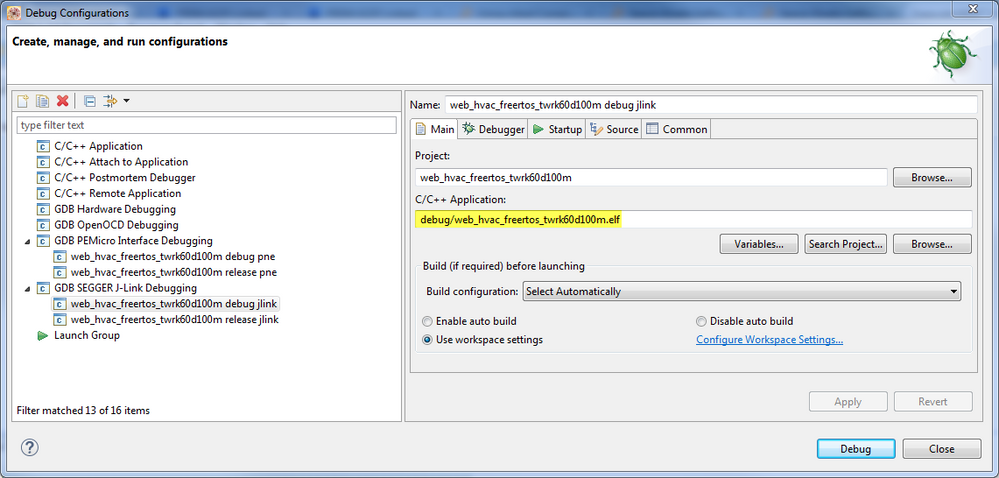
After that, correctly set debugger.
Please, have you followed all mentioned steps?
Please take a look at importing demo projects, describing here i can import ,sample codes of ksdk for mk22f in kds3.0,it shows Program "make" not found in PATH er...
and let me know.
If your issue still persists, please let us know.
Thank you.
Have a nice day.
Iva
ivadorazinova
- 新着としてマーク
- ブックマーク
- 購読
- ミュート
- RSS フィードを購読する
- ハイライト
- 印刷
- 不適切なコンテンツを報告
Hi Simon,
it looks you have not compiled libraries.
I recommend you Getting Started with KSDK 1.3
Please, have you tried import .wsd file? I described it here
Let me know, if it helps you.
Best Regards,
Iva
- 新着としてマーク
- ブックマーク
- 購読
- ミュート
- RSS フィードを購読する
- ハイライト
- 印刷
- 不適切なコンテンツを報告
Did you watch the video in section 3 Build, Run and went through the steps?
(i.e. updating Eclipse, building platform library)
- 新着としてマーク
- ブックマーク
- 購読
- ミュート
- RSS フィードを購読する
- ハイライト
- 印刷
- 不適切なコンテンツを報告
Hi Joerg. Yes I did :smileysad:
ivadorazinova
- 新着としてマーク
- ブックマーク
- 購読
- ミュート
- RSS フィードを購読する
- ハイライト
- 印刷
- 不適切なコンテンツを報告
Hi Simon,
please, also, take a look at videos series
I hope this helps as well.
Best Regards,
Iva
- 新着としてマーク
- ブックマーク
- 購読
- ミュート
- RSS フィードを購読する
- ハイライト
- 印刷
- 不適切なコンテンツを報告
Ok, there is a trap in the documentation.
The step "Build, Download and Run" is not well explained.
You have to use a different firmware for your board, i.e. Segger J-Link or PE-Micro.
The default firmware will not work.
Try the combination Segger J-Link (it's free) and KDS.
In this case you have to download the bootloader on your board first.
Take a look at:
https://community.freescale.com/docs/DOC-105199
and
Skip the sections IAR, Keil, TrueStudio and ARM GCC.
When you've updated the firmware on the board,
you'll use the Debug, not Run. It will also flash.
Described on page 29 of the doc in the 2nd link.
Good luck,
Joerg
