
- Forums
- Product Forums
- General Purpose MicrocontrollersGeneral Purpose Microcontrollers
- i.MX Forumsi.MX Forums
- QorIQ Processing PlatformsQorIQ Processing Platforms
- Identification and SecurityIdentification and Security
- Power ManagementPower Management
- Wireless ConnectivityWireless Connectivity
- RFID / NFCRFID / NFC
- Advanced AnalogAdvanced Analog
- MCX Microcontrollers
- S32G
- S32K
- S32V
- MPC5xxx
- Other NXP Products
- S12 / MagniV Microcontrollers
- Powertrain and Electrification Analog Drivers
- Sensors
- Vybrid Processors
- Digital Signal Controllers
- 8-bit Microcontrollers
- ColdFire/68K Microcontrollers and Processors
- PowerQUICC Processors
- OSBDM and TBDML
- S32M
- S32Z/E
-
- Solution Forums
- Software Forums
- MCUXpresso Software and ToolsMCUXpresso Software and Tools
- CodeWarriorCodeWarrior
- MQX Software SolutionsMQX Software Solutions
- Model-Based Design Toolbox (MBDT)Model-Based Design Toolbox (MBDT)
- FreeMASTER
- eIQ Machine Learning Software
- Embedded Software and Tools Clinic
- S32 SDK
- S32 Design Studio
- GUI Guider
- Zephyr Project
- Voice Technology
- Application Software Packs
- Secure Provisioning SDK (SPSDK)
- Processor Expert Software
- Generative AI & LLMs
-
- Topics
- Mobile Robotics - Drones and RoversMobile Robotics - Drones and Rovers
- NXP Training ContentNXP Training Content
- University ProgramsUniversity Programs
- Rapid IoT
- NXP Designs
- SafeAssure-Community
- OSS Security & Maintenance
- Using Our Community
-
- Cloud Lab Forums
-
- Knowledge Bases
- ARM Microcontrollers
- i.MX Processors
- Identification and Security
- Model-Based Design Toolbox (MBDT)
- QorIQ Processing Platforms
- S32 Automotive Processing Platform
- Wireless Connectivity
- CodeWarrior
- MCUXpresso Suite of Software and Tools
- MQX Software Solutions
- RFID / NFC
- Advanced Analog
-
- NXP Tech Blogs
- Home
- :
- 通用微控制器
- :
- Kinetis微控制器
- :
- Why all the kinetis MCU that I have try dont'work if I set MCG frequency under 100kHz?
Why all the kinetis MCU that I have try dont'work if I set MCG frequency under 100kHz?
Why all the kinetis MCU that I have try dont'work if I set MCG frequency under 100kHz?

Hi Jingjimg Zhou, Thanks for your answer!
I'm using OpenSDA so it's possible that I have this problem. When I can, I will try at download the code directly on flash.
Have a great day,
Alessio


Hi Alessio Paolucci,
You can put the JLINK_OPENSDA firmware into your bootloader, then your debugger will be a JLINK.
If you use the Jlink, you can debug your code even your MCG frequency under 100khz.
KL03 and KL25, please use the attached Jlink firmware: JLink_OpenSDA_KL25_KL03.rar
KL64, please downloader OPENSDA v2 from this link: https://www.segger.com/opensda.html
About how to put the Jlink firmware into your bootloader, please follow this steps:
1: unplug the USB cable
2: press and hold the reset button on the board
3: plug the USB cable between the OPENSDA USB connector and your computer
4, release the reset button , you will find a "BOOTLOADER" disc in your computer
5, Send "JLink_OpenSDA.sda" to your "Bootloader"
6, repower on again
Then, your debugger will be a Jlink, you can use it to debug your code.
Wish it helps you!
If you still have problem, please contact me!
Have a great day,
Jingjing
-----------------------------------------------------------------------------------------------------------------------
Note: If this post answers your question, please click the Correct Answer button. Thank you!
-----------------------------------------------------------------------------------------------------------------------
Hi Alessio Paolucci,
Could you tell me what debugger you are using?
If you are using OPENSDA, it really have a debugger problem when the MCG clock is very slow, but you can download the code to your flash, and test the code function without the debuger.
I create a KL25 project, the MCG output is 32.768Khz, the code function is toggle PTB18.
My code configuration is as follows:
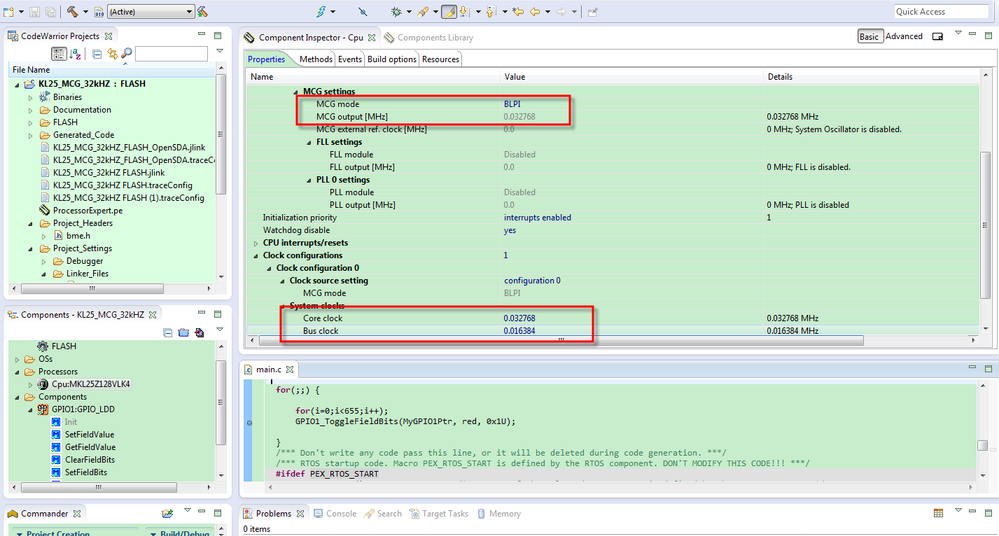
The test result is :
(1). With OPENSDA debugger, just can download code to flash, the code function is OK.
(2). With Jlink debugger, it can do debug operation, the code function is OK.
I think the opensda debugger have clock limitation, so if you are using low mcg out clock, you can choose Jlink.
I also attached my testing code, you can refer to it.
Wish it helps you!
If you still have problem, please contact me!
Have a great day,
Jingjing
-----------------------------------------------------------------------------------------------------------------------
Note: If this post answers your question, please click the Correct Answer button. Thank you!
-----------------------------------------------------------------------------------------------------------------------
