
- Forums
- Product Forums
- General Purpose MicrocontrollersGeneral Purpose Microcontrollers
- i.MX Forumsi.MX Forums
- QorIQ Processing PlatformsQorIQ Processing Platforms
- Identification and SecurityIdentification and Security
- Power ManagementPower Management
- Wireless ConnectivityWireless Connectivity
- RFID / NFCRFID / NFC
- Advanced AnalogAdvanced Analog
- Neural Processing UnitsNeural Processing Units
- MCX Microcontrollers
- S32G
- S32K
- S32V
- MPC5xxx
- Other NXP Products
- S12 / MagniV Microcontrollers
- Powertrain and Electrification Analog Drivers
- Sensors
- Vybrid Processors
- Digital Signal Controllers
- 8-bit Microcontrollers
- ColdFire/68K Microcontrollers and Processors
- PowerQUICC Processors
- OSBDM and TBDML
- S32M
- S32Z/E
-
- Solution Forums
- Software Forums
- MCUXpresso Software and ToolsMCUXpresso Software and Tools
- CodeWarriorCodeWarrior
- MQX Software SolutionsMQX Software Solutions
- Model-Based Design Toolbox (MBDT)Model-Based Design Toolbox (MBDT)
- FreeMASTER
- eIQ Machine Learning Software
- Embedded Software and Tools Clinic
- S32 SDK
- S32 Design Studio
- GUI Guider
- Zephyr Project
- Voice Technology
- Application Software Packs
- Secure Provisioning SDK (SPSDK)
- Processor Expert Software
- Generative AI & LLMs
-
- Topics
- Mobile Robotics - Drones and RoversMobile Robotics - Drones and Rovers
- NXP Training ContentNXP Training Content
- University ProgramsUniversity Programs
- Rapid IoT
- NXP Designs
- SafeAssure-Community
- OSS Security & Maintenance
- Using Our Community
-
- Cloud Lab Forums
-
- Knowledge Bases
- ARM Microcontrollers
- i.MX Processors
- Identification and Security
- Model-Based Design Toolbox (MBDT)
- QorIQ Processing Platforms
- S32 Automotive Processing Platform
- Wireless Connectivity
- CodeWarrior
- MCUXpresso Suite of Software and Tools
- MQX Software Solutions
- RFID / NFC
- Advanced Analog
- Neural Processing Units
-
- NXP Tech Blogs
- Home
- :
- ARM Microcontrollers
- :
- Kinetis Microcontrollers Knowledge Base
- :
- [USB stack ver 4.1.1] a code issue in msd_mfs_generic host demo
[USB stack ver 4.1.1] a code issue in msd_mfs_generic host demo
- Subscribe to RSS Feed
- Mark as New
- Mark as Read
- Bookmark
- Subscribe
- Printer Friendly Page
- Report Inappropriate Content
[USB stack ver 4.1.1] a code issue in msd_mfs_generic host demo
[USB stack ver 4.1.1] a code issue in msd_mfs_generic host demo
The USB OTG module in Kinetis parts uses a Buffer Descriptor Table (BDT) in system memory to manage USB endpoint communications, the BDT is a a 512-byte buffer and there are 3 registers in USB module to contain the base address for it, and it must be 512-byte aligned otherwise there would be issue during transfer.
In USB stack ver 4.1.1, some Kinetis old parts like K60N512, K20D72M have the demo project basked on CodeWarrior ARM compiler, and in khci_kinetis.c, bdt is defined as following:
#define _BDT_RESERVED_SECTION_
#if(defined _BDT_RESERVED_SECTION_)
#ifdef __CWCC__
#pragma define_section usb_bdt ".usb_bdt" RW
__declspec(usb_bdt) uint_8_ptr bdt;
but since the base address is defined as below:
| #define BDT_BASE | ((uint_32*)(bdt)) |
so the bdt definition is not correct , and we have to change it as below:
#define _BDT_RESERVED_SECTION_
#if(defined _BDT_RESERVED_SECTION_)
#ifdef __CWCC__
#pragma define_section usb_bdt ".usb_bdt" RW
__declspec(usb_bdt) uint_8 bdt[512];//uint_8_ptr bdt;
and the definition for usb_dbt section can be found in MK20X256_flash.lcf.
with above modification, we can make the demo of "msd_mfs_generic" work well as expected.
Please kindly refer to the following result got from TWR-K20D72M.
FAT demo
Waiting for USB mass storage to be attached...
Mass Storage Device Attached
******************************************************************************
* FATfs DEMO *
* Configuration: LNF Enabled, Code page =1258 *
******************************************************************************
******************************************************************************
* DRIVER OPERATION *
******************************************************************************
- 1. Demo function: f_mount
Initializing logical drive 0...
Initialization complete
-----------------------------------------------------------------------------
- 2. Demo functions:f_getfree, f_opendir, f_readdir
getting drive 0 attributes...............
Logical drive 0 attributes:
FAT type = FAT16
Bytes/Cluster = 2048
Number of FATs = 2
Root DIR entries = 512
Sectors/FAT = 250
Number of clusters = 63858
FAT start (lba) = 36
DIR start (lba,clustor) = 536
Data start (lba) = 568
...
127716 KB total disk space.
127624 KB available.
-----------------------------------------------------------------------------
******************************************************************************
* DRECTORY OPERATION *
******************************************************************************
- 1. Demo functions:f_opendir, f_readdir
Directory listing...
----A 2014/04/16 17:25 32253 tek00000.png
----A 2014/04/16 17:34 31451 tek00001.png
----A 2014/07/04 14:57 20549 tek00002.png
DR--- 2010/12/25 23:30 0 DIRECT~1
D---- 2010/01/01 00:00 0 DIRECT~2
3 File(s), 84253 bytes total
2 Dir(s)
-----------------------------------------------------------------------------
- 2. Demo functions:f_mkdir
- 2.0. Create <Directory_1>
- 2.1. Create <Directory_2>
- 2.2. Create <Sub1> as a sub directory of <Directory_1>
- 2.3. Directory list
Directory listing...
----A 2014/04/16 17:25 32253 tek00000.png
----A 2014/04/16 17:34 31451 tek00001.png
----A 2014/07/04 14:57 20549 tek00002.png
DR--- 2010/12/25 23:30 0 DIRECT~1
D---- 2010/01/01 00:00 0 DIRECT~2
3 File(s), 84253 bytes total
2 Dir(s)
-----------------------------------------------------------------------------
- 3. Demo functions:f_getcwd, f_chdir
- 3.0. Get the current directory
CWD: 0:/
- 3.1. Change current directory to <Directory_1>
- 3.2. Directory listing
Directory listing...
D---- 2010/01/01 00:00 0 .
D---- 2010/01/01 00:00 0 ..
D---- 2010/01/01 00:00 0 sub1
0 File(s), 0 bytes total
3 Dir(s)
- 3.3. Get the current directory
CWD: 0:/Directory_1
-----------------------------------------------------------------------------
- 4. Demo functions:f_stat(File status), f_chmod, f_utime
- 4.1. Get directory information of <Directory_1>
DR--- 2010/12/25 23:30 0 Directory_1
- 4.2 Change the timestamp of Directory_1 to 12.25.2010: 23h 30' 20
- 4.3. Set Read Only Attribute to Directory_1
- 4.4. Get directory information (Directory_1)
DR--- 2010/12/25 23:30 0 Directory_1
-----------------------------------------------------------------------------
- 5. Demo functions:f_rename
Rename <sub1> to <sub1_renamed> and move it to <Directory_2>
Directory listing...
D---- 2010/01/01 00:00 0 .
D---- 2010/01/01 00:00 0 ..
D---A 2010/01/01 00:00 0 SUB1_R~1
0 File(s), 0 bytes total
3 Dir(s)
-----------------------------------------------------------------------------
- 6. Demo functions:f_unlink
Delete Directory_1/sub1_renamed
Directory listing...
D---- 2010/01/01 00:00 0 .
D---- 2010/01/01 00:00 0 ..
0 File(s), 0 bytes total
2 Dir(s)
******************************************************************************
* FILE OPERATION *
******************************************************************************
- 1. Demo functions:f_open,f_write, f_printf, f_putc, f_puts, fclose
- 1.0. Create new file <New_File_1> (f_open)
File size = 0
- 1.1. Write data to <New_File_1>(f_write)
- 1.2. Flush cached data
File size = 52
- 1.3. Write data to <New_File_1> (f_printf)
- 1.4. Flush cached data
File size = 103
- 1.5. Write data to <New_File_1> (f_puts)
- 1.6. Flush cached data
File size = 152
- 1.7. Write data to <New_File_1> uses f_putc function
- 1.8. Flush cached data
File size = 199
- 1.9. Close file <New_File_1>
-----------------------------------------------------------------------------
- 2. Demo functions:f_open,f_read, f_seek, f_gets, f_close
- 2.0. Open <New_File_1> to read (f_open)
- 2.1. Get a string from file (f_gets)
Line 1: Write data to file uses f_write function
- 2.2. Get the rest of file content (f_read)
Line 2: Write data to file uses f_printf function
Line 3: Write data to file uses f_puts function
Line 4: Write data to file uses f_putc functionûöF¬
â•:7Rz}™ yzjw8¸×áÀ—»ÃйòÍ
ä‹Hïk¨Wã½c'
²7këÞÑ%VrC×»Ô¼ÒSÈÑèR+NjD¡¾òû>ú3‰SËþo^ÎI Pë±ñ‰þ/Directory_1[1]
- 2.3. Close file (f_close)
-----------------------------------------------------------------------------
- 3. Demo functions:f_stat, f_utime, f_chmod
- 3.1. Get information of <New_File_1> file (f_stat)
----A 2010/01/01 00:00 199 New_File_1.dat
- 3.2 Change the timestamp of Directory_1 to 12.25.2010: 23h 30' 20 (f_utime)
- 3.3. Set Read Only Attribute to <New_File_1> (f_chmod)
- 3.4. Get directory information of <New_File_1> (f_stat)
-R--A 2010/12/25 23:30 199 New_File_1.dat
- 3.5. Clear Read Only Attribute of <New_File_1> (f_chmod)
- 3.6. Get directory information of <New_File_1>
----A 2010/12/25 23:30 199 New_File_1.dat
-----------------------------------------------------------------------------
- 4. Demo functions:f_ulink
Rename <New_File_1.dat> to <File_Renamed.txt>
Directory listing...
D---- 2010/01/01 00:00 0 .
D---- 2010/01/01 00:00 0 ..
----A 2010/12/25 23:30 199 FILE_R~1.TXT
1 File(s), 199 bytes total
2 Dir(s)
-----------------------------------------------------------------------------
- 5. Demo functions:f_truncate
Truncate file <File_Renamed.txt>
- 5.0. Open <File_Renamed.txt> to write
- 5.1. Seek file pointer
Current file pointer: 0
File pointer after seeking: 102
- 5.2. Truncate file
File size = 102
- 5.3. Close file
-----------------------------------------------------------------------------
- 6. Demo functions:f_forward
- 6.0. Open <File_Renamed.txt> to read
- 6.1. Forward file to terminal
Line 1: Write data to file uses f_write function
Line 2: Write data to file uses f_printf function
- 6.2. Close file
-----------------------------------------------------------------------------
- 7. Demo functions:f_ulink
Delete <File_Renamed.txt>
Directory listing...
D---- 2010/01/01 00:00 0 .
D---- 2010/01/01 00:00 0 ..
0 File(s), 0 bytes total
2 Dir(s)
*------------------------------ DEMO COMPLETED ------------------------ *
******************************************************************************

- Mark as Read
- Mark as New
- Bookmark
- Permalink
- Report Inappropriate Content
The same issue IAR tools, when user build the stack with IAR, bdt is defined as below:
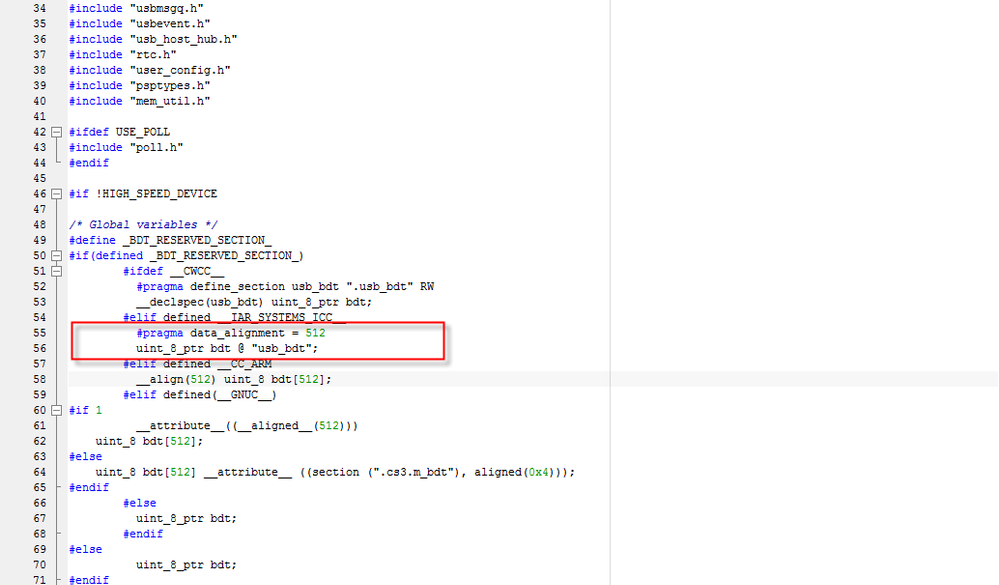
Since there is no section defined as usb_bdt, it would be pointed to 0x00000000 where internal flash is, so would cause bus error issue. It is fixed after changing the definition as the following:
| #elif defined __IAR_SYSTEMS_ICC__ | |
| #pragma segment = "usb_bdt" |
#pragma data_alignment = 512
__no_init static uint_8 bdt[512] @ "usb_bdt";
Hope that helps,
B.R
Kan

- Mark as Read
- Mark as New
- Bookmark
- Permalink
- Report Inappropriate Content
Hi Kan_LI,
I'm asking if my issue bellow is not linked with this note above?
https://community.nxp.com/message/848331?commentID=848331#comment-848331
But I'm not able to know if I'm concerned by this note??...
I'm on the K70 120m, with KDS, and MQX 4.1.1
Thank
