
- Forums
- Product Forums
- General Purpose MicrocontrollersGeneral Purpose Microcontrollers
- i.MX Forumsi.MX Forums
- QorIQ Processing PlatformsQorIQ Processing Platforms
- Identification and SecurityIdentification and Security
- Power ManagementPower Management
- Wireless ConnectivityWireless Connectivity
- RFID / NFCRFID / NFC
- Advanced AnalogAdvanced Analog
- Neural Processing UnitsNeural Processing Units
- MCX Microcontrollers
- S32G
- S32K
- S32V
- MPC5xxx
- Other NXP Products
- S12 / MagniV Microcontrollers
- Powertrain and Electrification Analog Drivers
- Sensors
- Vybrid Processors
- Digital Signal Controllers
- 8-bit Microcontrollers
- ColdFire/68K Microcontrollers and Processors
- PowerQUICC Processors
- OSBDM and TBDML
- S32M
- S32Z/E
-
- Solution Forums
- Software Forums
- MCUXpresso Software and ToolsMCUXpresso Software and Tools
- CodeWarriorCodeWarrior
- MQX Software SolutionsMQX Software Solutions
- Model-Based Design Toolbox (MBDT)Model-Based Design Toolbox (MBDT)
- FreeMASTER
- eIQ Machine Learning Software
- Embedded Software and Tools Clinic
- S32 SDK
- S32 Design Studio
- GUI Guider
- Zephyr Project
- Voice Technology
- Application Software Packs
- Secure Provisioning SDK (SPSDK)
- Processor Expert Software
- Generative AI & LLMs
-
- Topics
- Mobile Robotics - Drones and RoversMobile Robotics - Drones and Rovers
- NXP Training ContentNXP Training Content
- University ProgramsUniversity Programs
- Rapid IoT
- NXP Designs
- SafeAssure-Community
- OSS Security & Maintenance
- Using Our Community
-
- Cloud Lab Forums
-
- Knowledge Bases
- ARM Microcontrollers
- i.MX Processors
- Identification and Security
- Model-Based Design Toolbox (MBDT)
- QorIQ Processing Platforms
- S32 Automotive Processing Platform
- Wireless Connectivity
- CodeWarrior
- MCUXpresso Suite of Software and Tools
- MQX Software Solutions
- RFID / NFC
- Advanced Analog
- Neural Processing Units
-
- NXP Tech Blogs
- Home
- :
- 通用微控制器
- :
- Kinetis微控制器
- :
- Open SDA device not registering (FRDM-KL02Z)
Open SDA device not registering (FRDM-KL02Z)
Open SDA device not registering (FRDM-KL02Z)

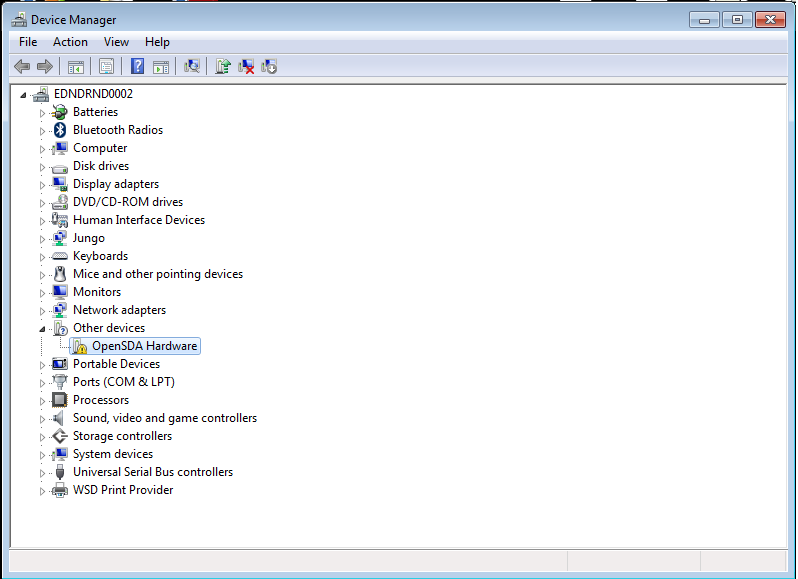
I have followed all the tutorials/posts/freescale opensda guides for installing the debug app and have followed them to the letter, however my freedom board driver does not successfully install when enumerating.
As far as I'm aware my board is up to date (see below)
(boot-loader V 1.11, debug V 1.14)
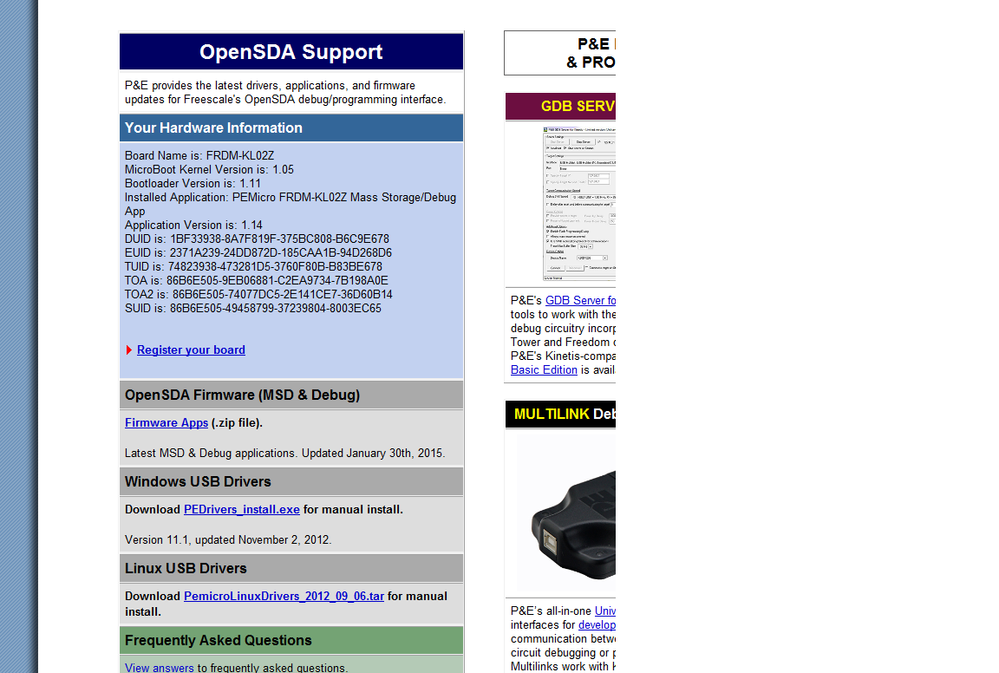
I have also installed the latest driver (V11.1) which has installed on my C drive.
I have tried updating the driver both with automatic windows detection and by browse, physically pointing to the folder which holds the driver, with neither working. Has anyone else had this problem/no how to fix it.

 adriancano
Hi,
You might find useful this thread:
No port select available in setting a debugger connection.
It discusses a similar problem.
Hope this information can help you
Best Regards,
Adrian Sanchez Cano
Technical Support Engineer
-----------------------------------------------------------------------------------------------------------------------
Note: If this post answers your question, please click the Correct Answer button. Thank you!
-----------------------------------------------------------------------------------------------------------------------
 ivadorazinova
Hi sam moreland,
please, what tutorial do you tried? Did you try proceed according to these steps? OpenSDA on the Freedom KL25Z Board | MCU on Eclipse
Best Regards,
Iva
I've had a look a several of the MCU on eclispe threads (including that one). The methods they described are the ones I've followed. I've upgraded the bootload version and Debug app version using this method.
Also the debug configuration cant see the device board as the driver for it does not install correctly during enumeration i.e. shows no driver installed. I have got the latest driver installed from the P&E website. I've been evaluating different low power MCU's and this is the first time I've had a problem interfacing with one of them so I don't think it is anything to do with my computer, but I haven't used a freescale MCU before.
ivadorazinova
Hi sam moreland,
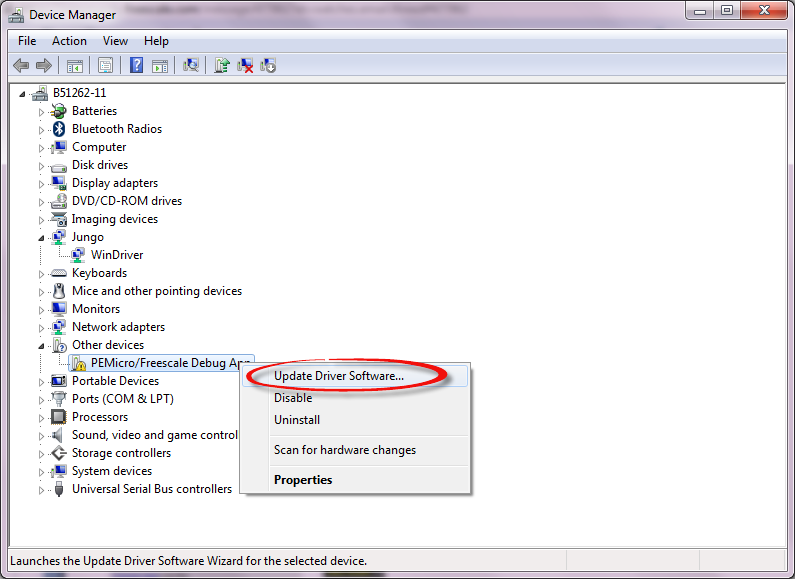
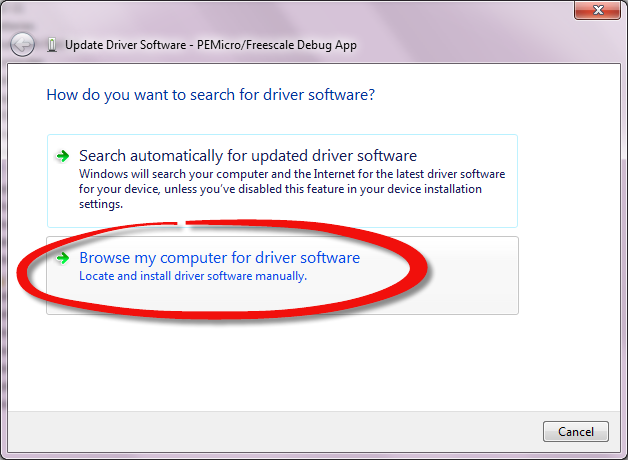
Have you tried to update driver manually?
ok - if you follow all of mentioned steps, please, tell us exact procedure what are you doing.
Best Regards,
Iva
1. Start the device in MSD mode (holding reset button while powering up)
2. Opened SDA_INFO to check the version I had on the board.
3.Dowload and installed latest windows USB drivers (V.11.1) from the P&E micro site
4. Downloaded the Firmware Apps.zp file from the P&E micro site and extract locally on the computer
5. Drag and drop the latest debug app version "MSD-DEBUG-FRDM-KL02Z_Pemicro_v114.SDA"
6. Cycle power (remove and replace usb cable), box pops up saying unable to install drivers
7.Check in device manager for it to enumerate as a serial port, which it doesn't. Also check by trying to debug in codewarrior (V10.6) which cant see it (checking though all port connection in the P&E connection assistant, including "OpenSDA - USB Port")
8.Start the device in MSD mode (holding reset button while powering up)
9. Drag and dropped the latest firmware version "BOOTUPDATEAPP_Pemicro_v111.SDA"
10. Cycle power (remove and replace usb cable), box pops up saying unable to install drivers and double check codewarrior which is still unable to see it.
In device manager its just appears in other devices with the driver status being "The drivers for this device are not installed. (Code 28)"
I also have the latest Intel Chipset Software Installation Utility file
ivadorazinova
Dear sam moreland,
I created screenshots for you. Please, follow it.
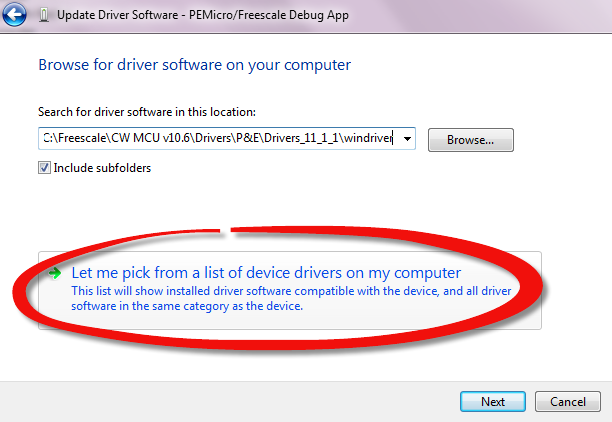
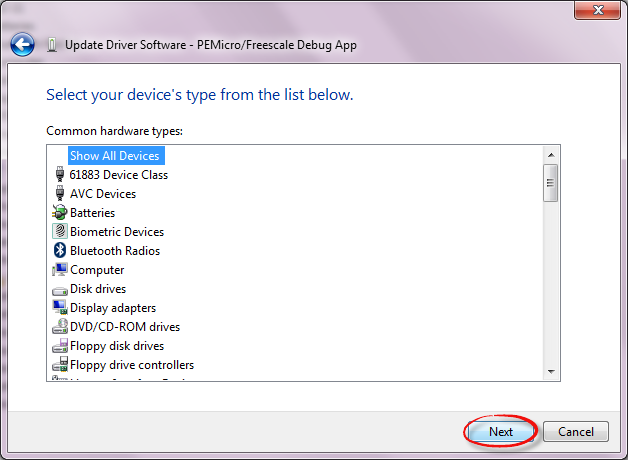
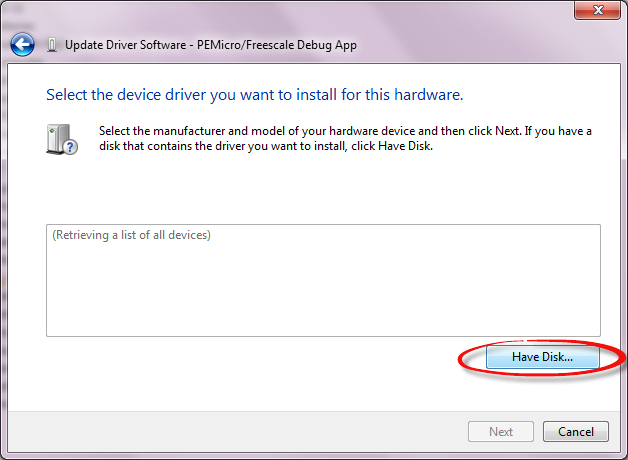
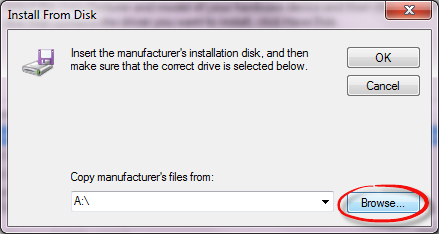
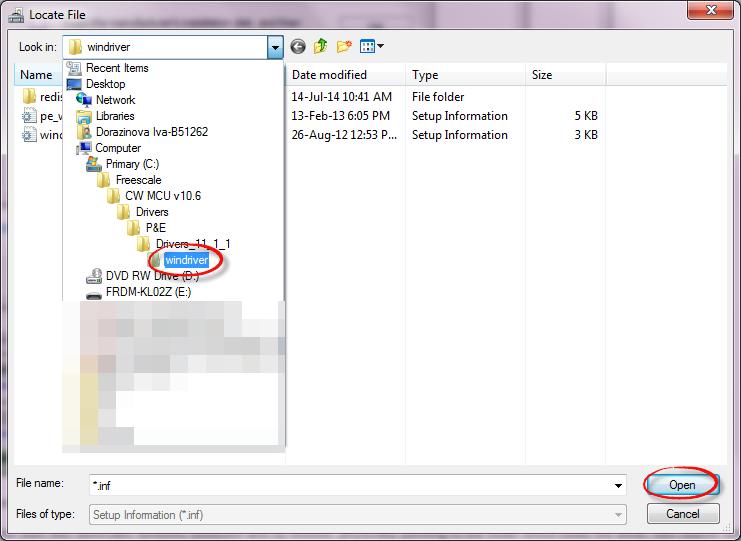
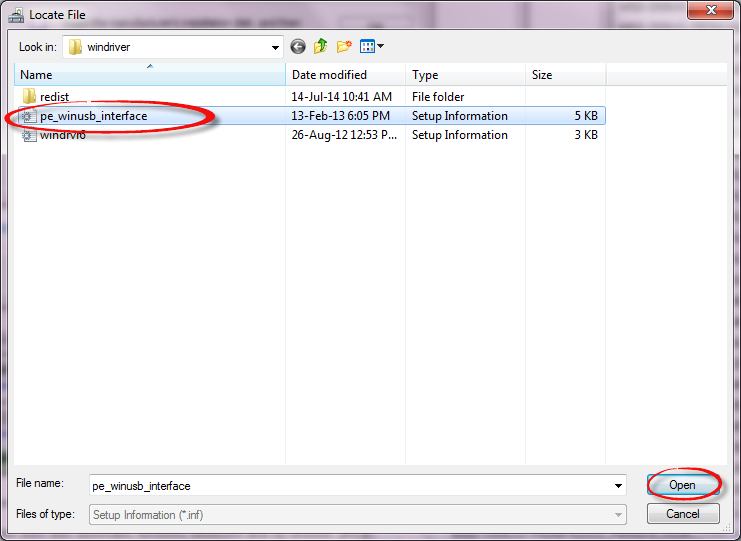
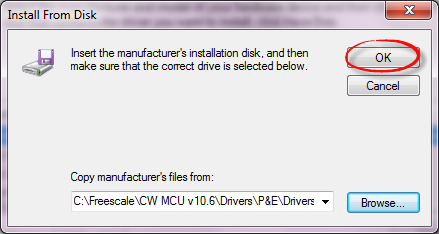
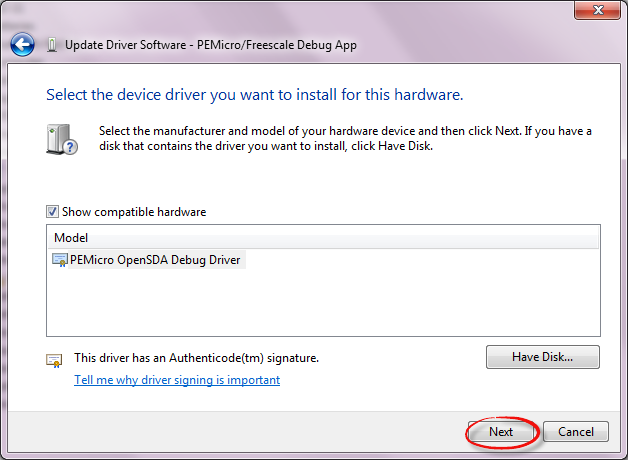
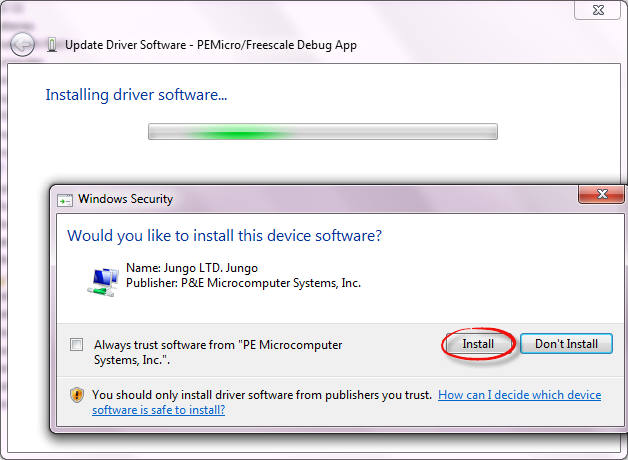
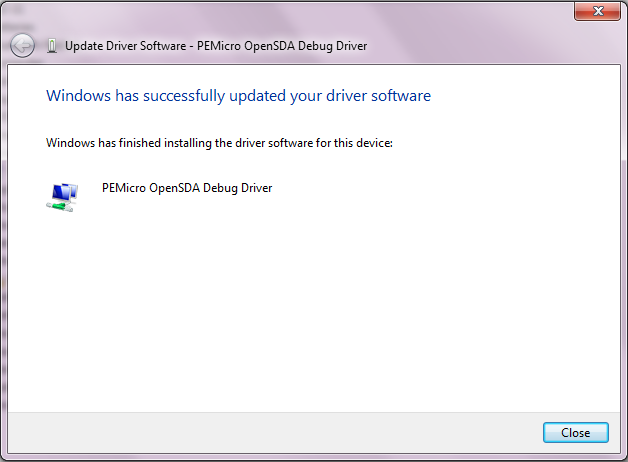
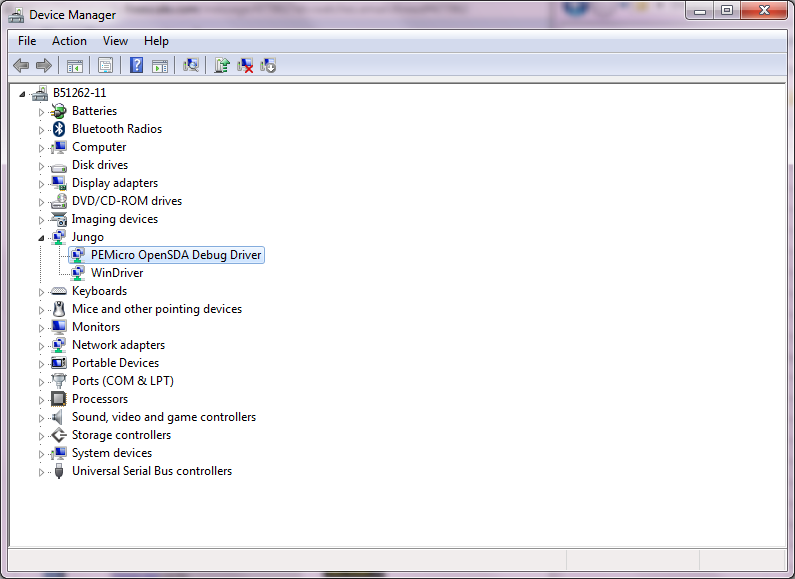
I hope it helps you,
Iva
Hi Iva,
I'm afraid that didn't work. (see attachment)
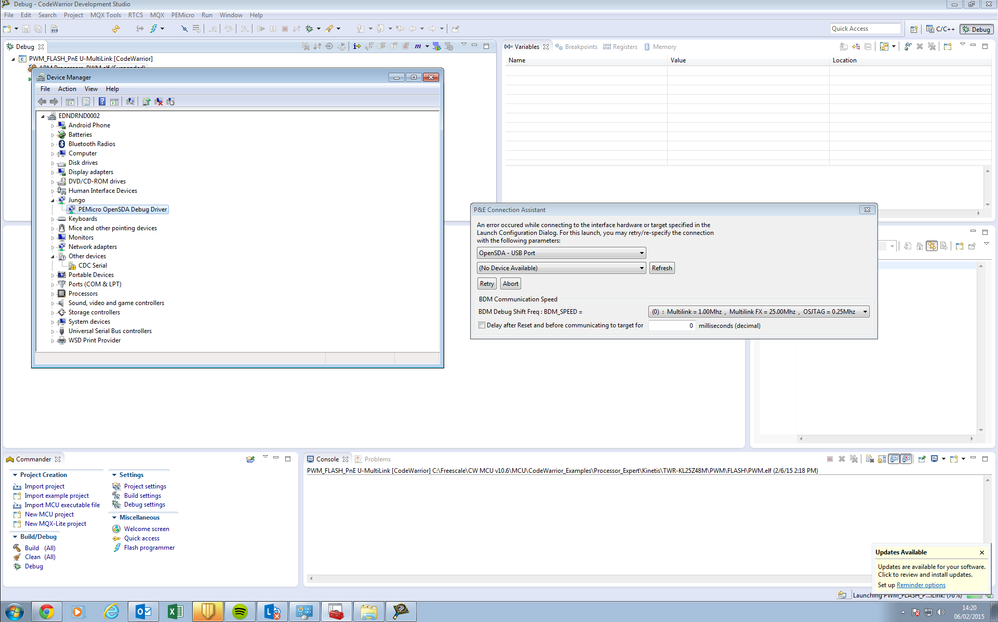 ivadorazinova
Hi sam moreland,
yes. You also need to install WinDriver in Jungo. The procedure is the same, but you choose WinDriver.
Here is step by step manual:
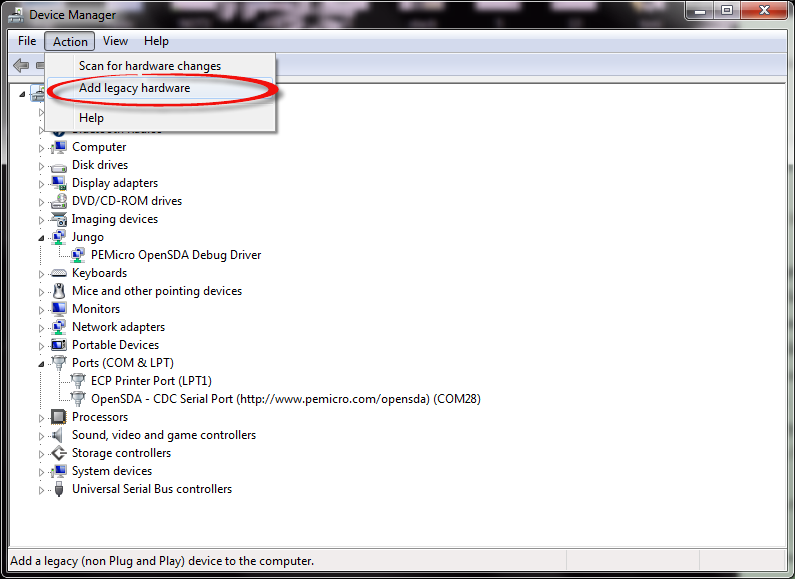
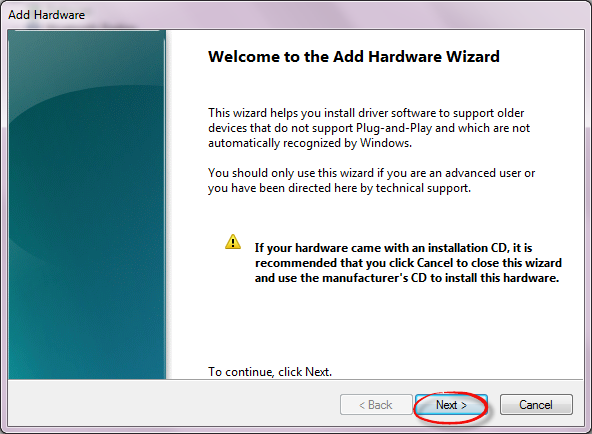
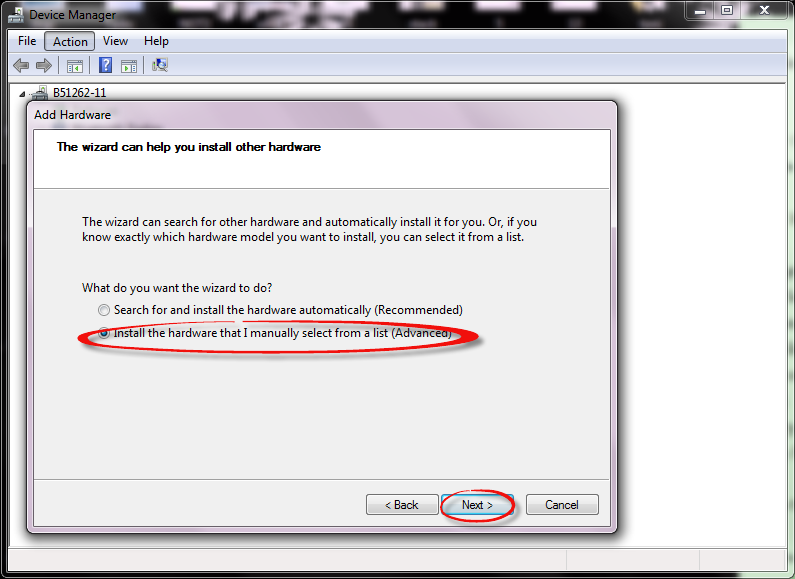
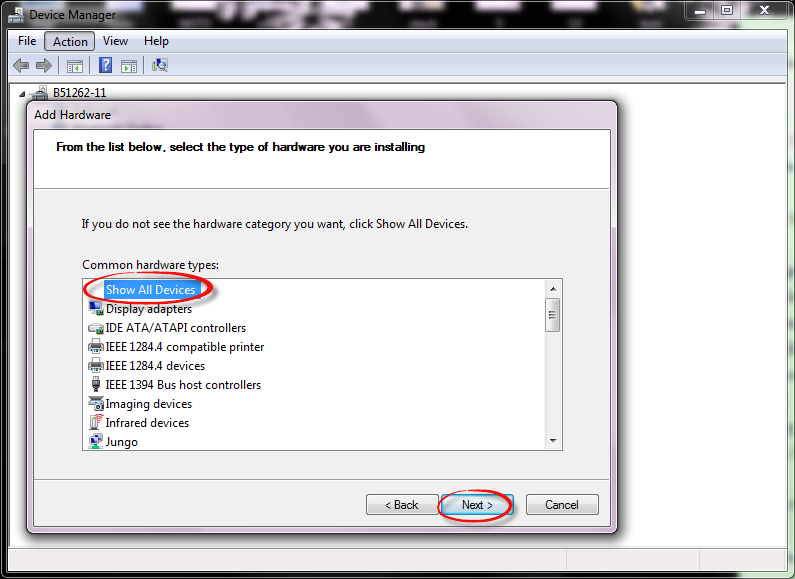
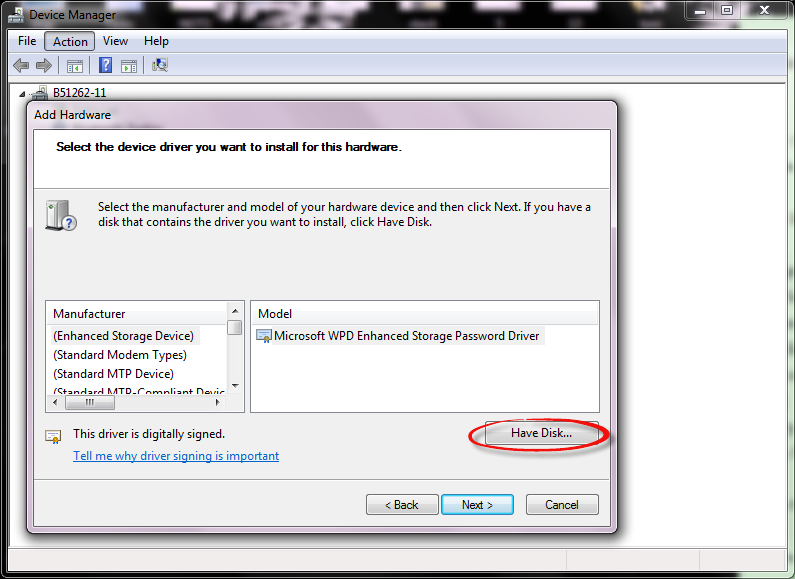
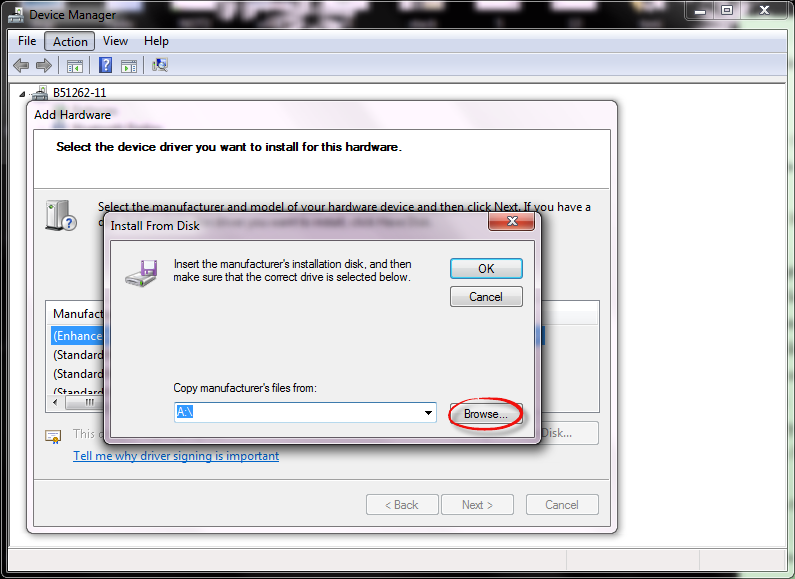
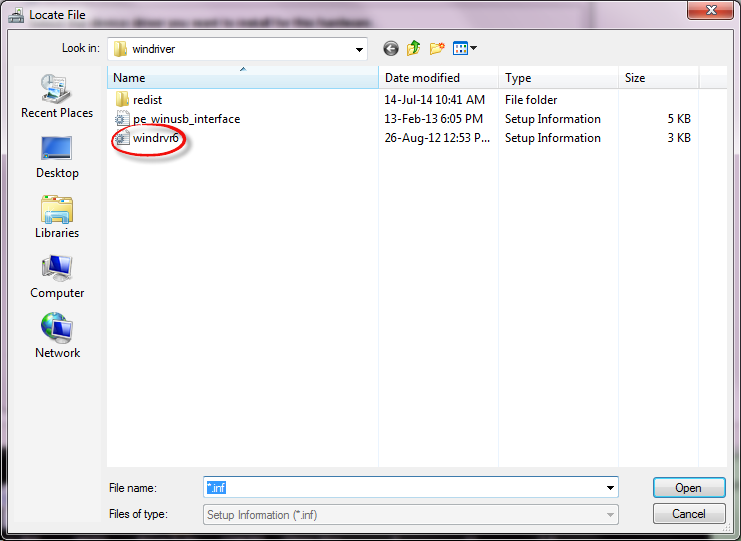
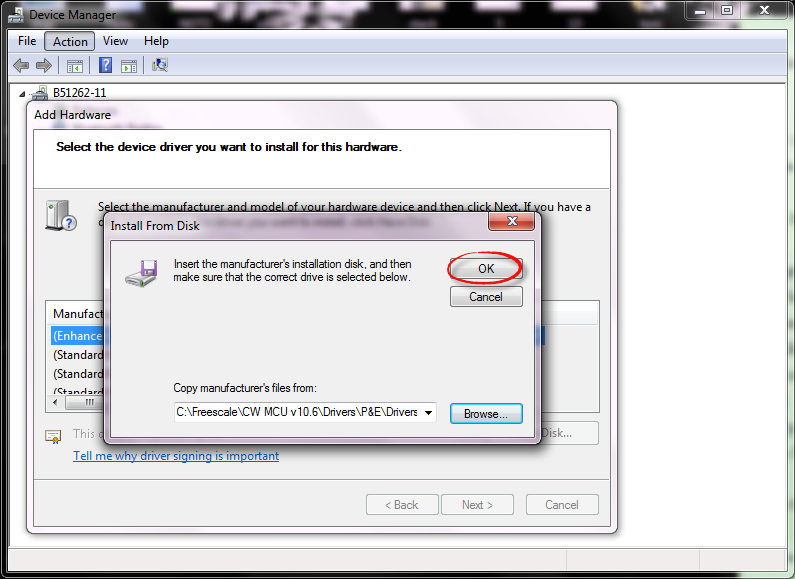
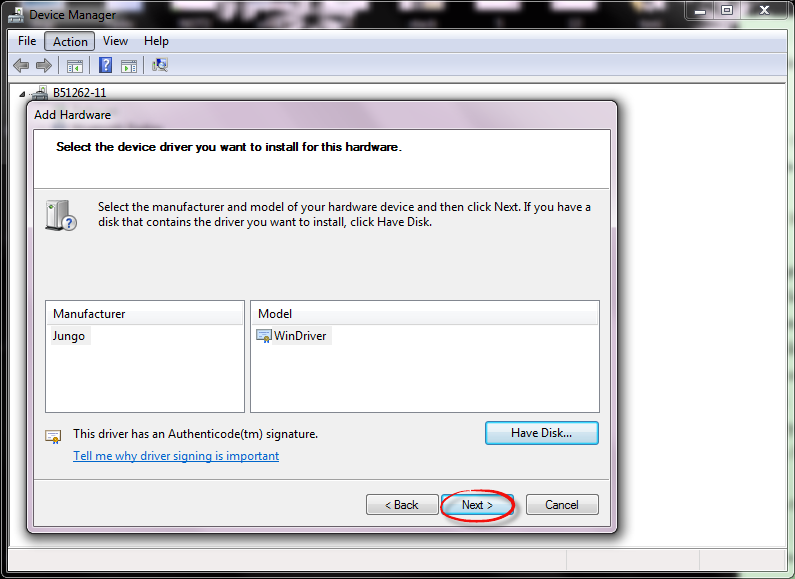
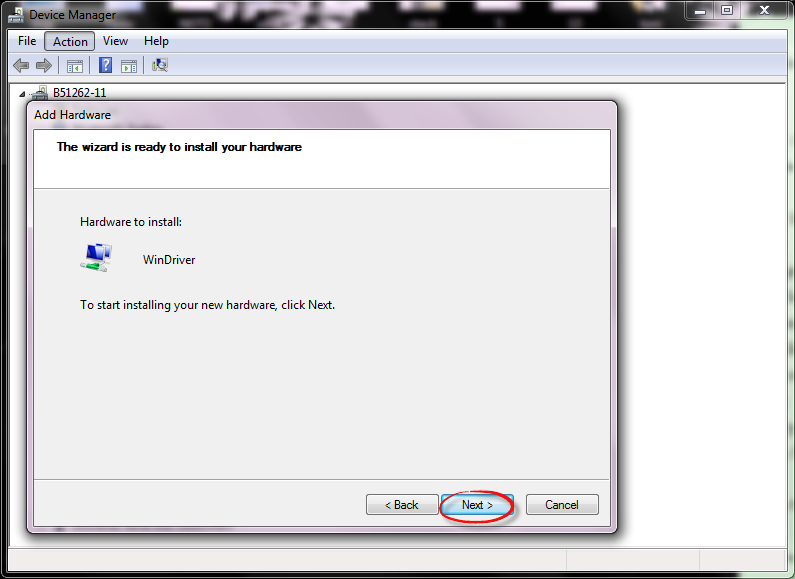
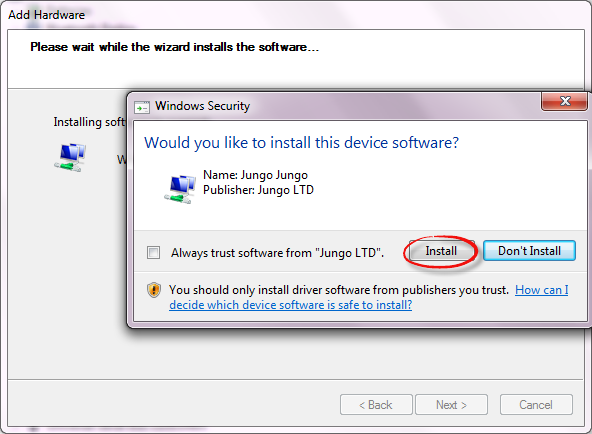
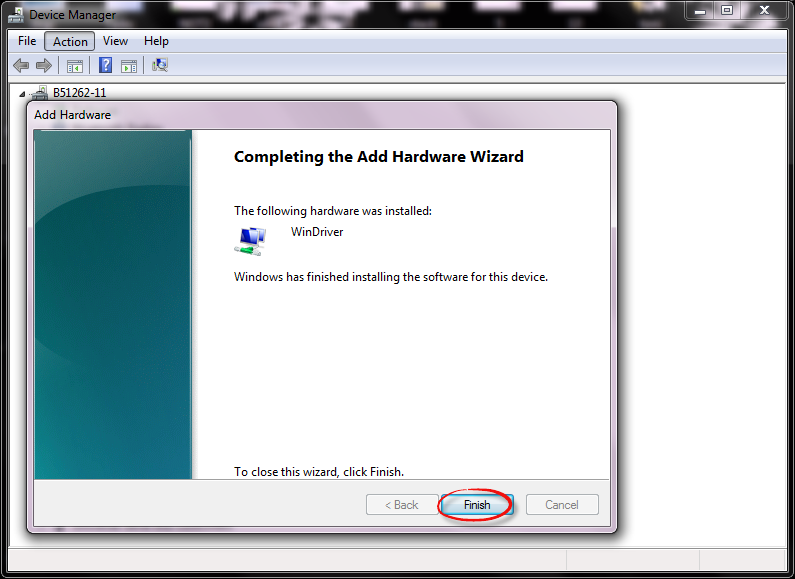
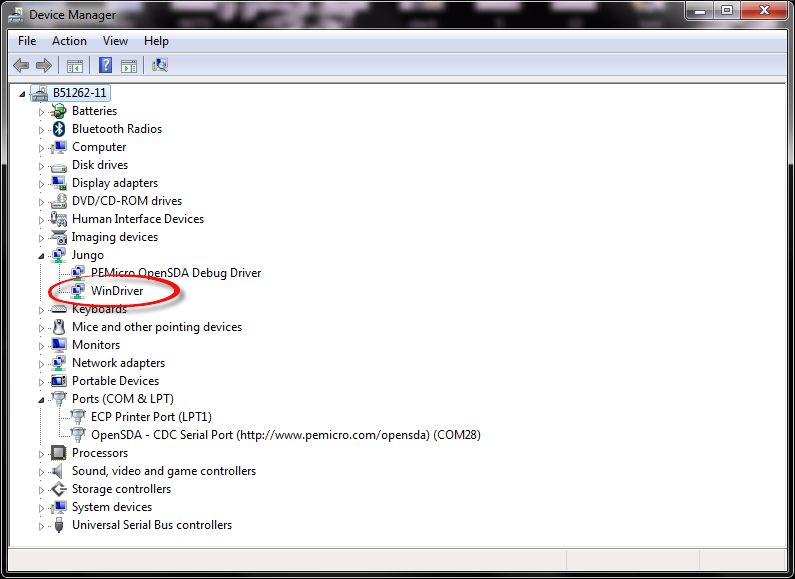
I hope it helps you,
Best Regards,
Iva
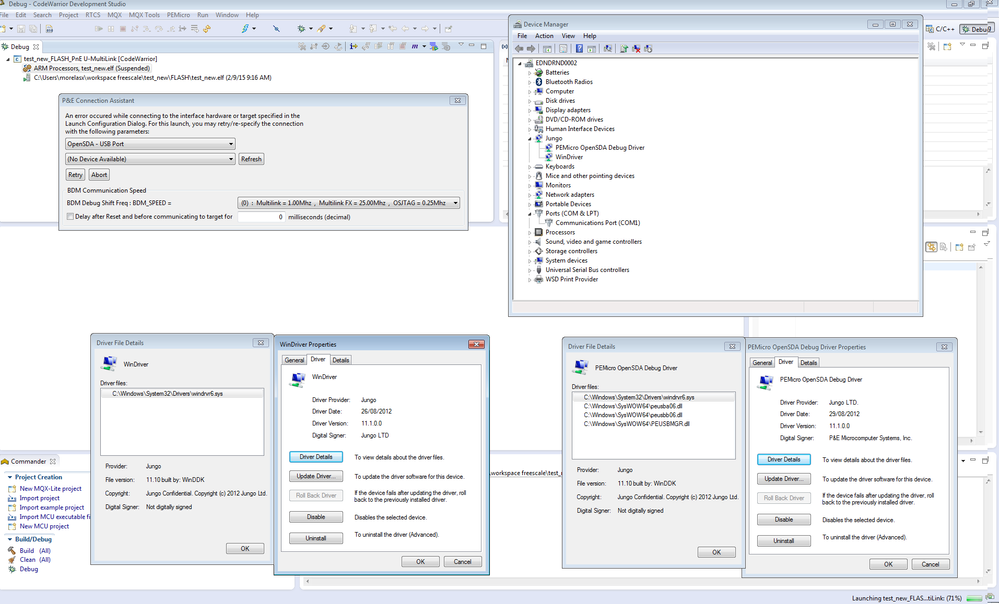
Im afraid that still isn't working, I originally had that driver installed and uninstalled it when testing different configurations. Please see the screenshot below. I am also unable to take down firewalls/anti-virus at work as it is against company policy.
 ivadorazinova
Hi sam moreland,
yes. The drivers are ok.
Please, also, did you try the board on another computer or did you try another board?
Iva
adriancano
Hi,
Your Device Manager does not show the WinDriver under the Jungo tree, please check this post it might be useful:
Fixing the USB Drivers | MCU on Eclipse
Hope this information can help you
Best Regards,
Adrian Sanchez Cano
Technical Support Engineer
-----------------------------------------------------------------------------------------------------------------------
Note: If this post answers your question, please click the Correct Answer button. Thank you!
-----------------------------------------------------------------------------------------------------------------------
