
- Forums
- Product Forums
- General Purpose MicrocontrollersGeneral Purpose Microcontrollers
- i.MX Forumsi.MX Forums
- QorIQ Processing PlatformsQorIQ Processing Platforms
- Identification and SecurityIdentification and Security
- Power ManagementPower Management
- Wireless ConnectivityWireless Connectivity
- RFID / NFCRFID / NFC
- Advanced AnalogAdvanced Analog
- Neural Processing UnitsNeural Processing Units
- MCX Microcontrollers
- S32G
- S32K
- S32V
- MPC5xxx
- Other NXP Products
- S12 / MagniV Microcontrollers
- Powertrain and Electrification Analog Drivers
- Sensors
- Vybrid Processors
- Digital Signal Controllers
- 8-bit Microcontrollers
- ColdFire/68K Microcontrollers and Processors
- PowerQUICC Processors
- OSBDM and TBDML
- S32M
- S32Z/E
-
- Solution Forums
- Software Forums
- MCUXpresso Software and ToolsMCUXpresso Software and Tools
- CodeWarriorCodeWarrior
- MQX Software SolutionsMQX Software Solutions
- Model-Based Design Toolbox (MBDT)Model-Based Design Toolbox (MBDT)
- FreeMASTER
- eIQ Machine Learning Software
- Embedded Software and Tools Clinic
- S32 SDK
- S32 Design Studio
- GUI Guider
- Zephyr Project
- Voice Technology
- Application Software Packs
- Secure Provisioning SDK (SPSDK)
- Processor Expert Software
- Generative AI & LLMs
-
- Topics
- Mobile Robotics - Drones and RoversMobile Robotics - Drones and Rovers
- NXP Training ContentNXP Training Content
- University ProgramsUniversity Programs
- Rapid IoT
- NXP Designs
- SafeAssure-Community
- OSS Security & Maintenance
- Using Our Community
-
- Cloud Lab Forums
-
- Knowledge Bases
- ARM Microcontrollers
- i.MX Processors
- Identification and Security
- Model-Based Design Toolbox (MBDT)
- QorIQ Processing Platforms
- S32 Automotive Processing Platform
- Wireless Connectivity
- CodeWarrior
- MCUXpresso Suite of Software and Tools
- MQX Software Solutions
- RFID / NFC
- Advanced Analog
- Neural Processing Units
-
- NXP Tech Blogs
- Home
- :
- 汎用マイクロコントローラ
- :
- Kinetisマイクロコントローラ
- :
- Re: MKE18F512VLL16 cannot download program anymore!
MKE18F512VLL16 cannot download program anymore!
- RSS フィードを購読する
- トピックを新着としてマーク
- トピックを既読としてマーク
- このトピックを現在のユーザーにフロートします
- ブックマーク
- 購読
- ミュート
- 印刷用ページ
MKE18F512VLL16 cannot download program anymore!

- 新着としてマーク
- ブックマーク
- 購読
- ミュート
- RSS フィードを購読する
- ハイライト
- 印刷
- 不適切なコンテンツを報告
Hi:
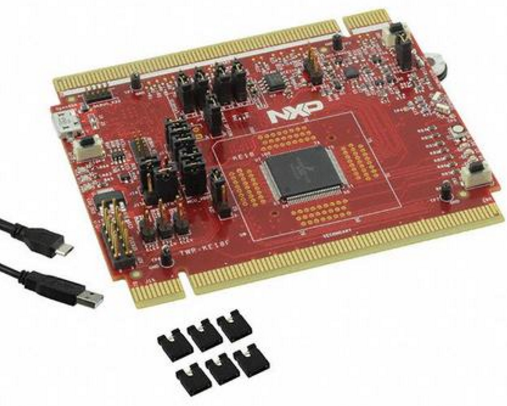
My MKE18F512VLL16 cannot download program anymore!The reason is that the JTAG/SWD pin is used as a GPIO,and then the board cannot download program anymore!
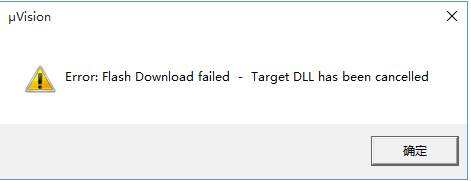
We have the following error message after click "Load" icon in spite of complete build without error.
Program Size: Code=980 RO-data=1076 RW-data=12 ZI-data=2060
"release\led_blinky.out" - 0 Error(s), 0 Warning(s).
Build Time Elapsed: 00:00:04
Load "release\\led_blinky.out"
Error: Flash Download failed - Target DLL has been cancelled
Flash Load finished at 10:49:46
Here is screen shot.

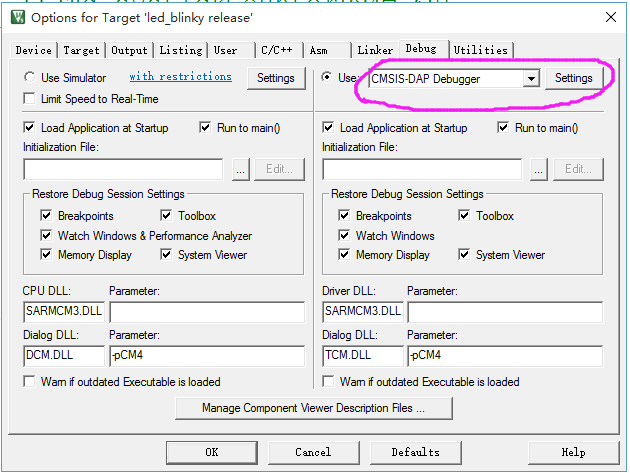
And the screen shot of "Options for Target" as following:
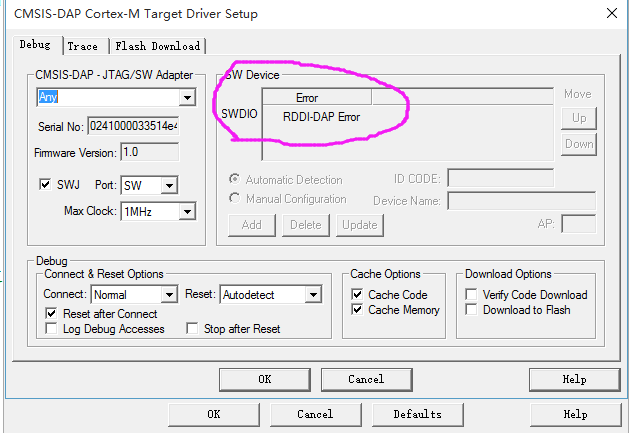
Now I want to know how to download program to cover the previous code.
Please help me,thanks!
- 新着としてマーク
- ブックマーク
- 購読
- ミュート
- RSS フィードを購読する
- ハイライト
- 印刷
- 不適切なコンテンツを報告
Hi everyone,
Thanks for your attentions. Now my board can work again under a warm - hearted man's great answer, as the following websit.
Your kindly attention is enough to warm a world. Have a good day and wish you good luck.
qzy

 kerryzhou
- 新着としてマーク
- ブックマーク
- 購読
- ミュート
- RSS フィードを購読する
- ハイライト
- 印刷
- 不適切なコンテンツを報告
Hi zy,
Please don't worry.
If you didn't also modify the reset pin to gpio, it's ok to recovery it.
Now, please change the on board debugger to JLINK at first. Then use the JLINK commander to do the mass erase at first.
1. change the on board debugger to JLINK
enter the bootloader mode, copy the JLINK firmware to the bootloader.
The firmware can be downloaded from this link:
SEGGER - The Embedded Experts - Downloads
The Jlink driver you also need to installed:
SEGGER - The Embedded Experts - Downloads
2. After you change your on board debugger to JLINK
open JLINK commander under the JLINK driver, press the reset button, then try to connect it.
If you can't connect it, press the reset button, and hold on it.
in the JLINK commander, input: unlock kinetis
This command will do the mass erase, then your SWD will be saved.
Please try it on your side.
If you still have question about it, please kindly let me know.
Have a great day,
Kerry
-----------------------------------------------------------------------------------------------------------------------
Note: If this post answers your question, please click the Correct Answer button. Thank you!
-----------------------------------------------------------------------------------------------------------------------
- 新着としてマーク
- ブックマーク
- 購読
- ミュート
- RSS フィードを購読する
- ハイライト
- 印刷
- 不適切なコンテンツを報告
Hi Kerry,
Today, I retry to input the "unlock kinetis" command with the J-LINK commander tool. And it writes that "Found SWD-DP with ID 0x2BA01477 Unlocking device...O.K."
But when I turn buck to bootloader mode, it is also cannot dowload program.
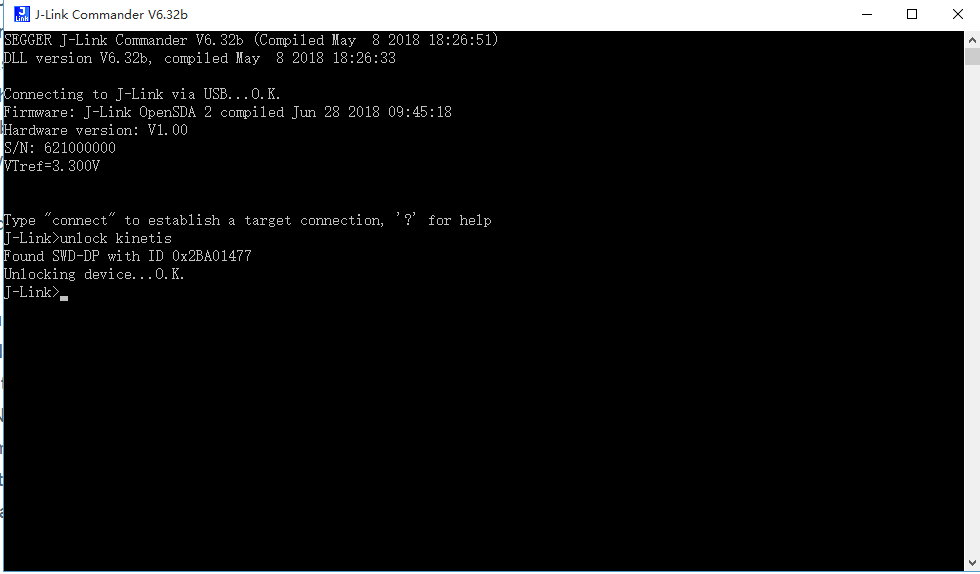
After the command--"unlock kinetis" works out , what should I do.
Looking for your help.Have a good day.
qzy
- 新着としてマーク
- ブックマーク
- 購読
- ミュート
- RSS フィードを購読する
- ハイライト
- 印刷
- 不適切なコンテンツを報告
Hi Kerry,
I suddenly find that I did also modify the reset pin to gpio. I am very worry that If it cannot to be recovered.
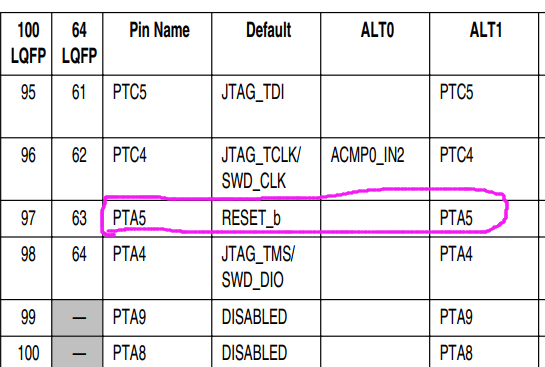
I am so sorry to my board, making it being a unuseful brick.
Looking for your reply again.Have a good day.
qzy
kerryzhou
- 新着としてマーク
- ブックマーク
- 購読
- ミュート
- RSS フィードを購読する
- ハイライト
- 印刷
- 不適切なコンテンツを報告
Hi qzy,
Now, please follow my step at first.
1. power off the board
2. press the reset button, hold on it.
3. power on the board with usb cable, can you find the bootloader device?
Please check it at first.
After you test it, please let me know ASAP.
Have a great day,
Kerry
-----------------------------------------------------------------------------------------------------------------------
Note: If this post answers your question, please click the Correct Answer button. Thank you!
-----------------------------------------------------------------------------------------------------------------------
- 新着としてマーク
- ブックマーク
- 購読
- ミュート
- RSS フィードを購読する
- ハイライト
- 印刷
- 不適切なコンテンツを報告
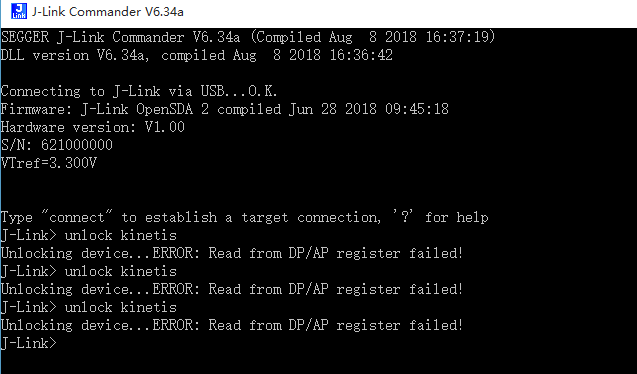
Hi Kerry,
As you can see in the following figure, the J-link isn't connect successfully. And when I write "unlock kinetis", it warning that “Read from DP/AP register failed!”
- 新着としてマーク
- ブックマーク
- 購読
- ミュート
- RSS フィードを購読する
- ハイライト
- 印刷
- 不適切なコンテンツを報告
Hi Kerry,
Thanks for your reply.
The bootloader device is as the following figure?
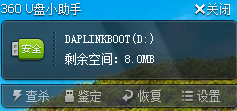
Looking for your reply again.Have a good day.
qzy
- 新着としてマーク
- ブックマーク
- 購読
- ミュート
- RSS フィードを購読する
- ハイライト
- 印刷
- 不適切なコンテンツを報告
Hi Kerry,
Firstly, thank you for your quick reply. I think your idea is great, but I find it that my board hasn't a Interface of JLINK.
So, if there is another methods to solve this tricky problem?
Looking for your reply again.Have a good day.
qzy
