
- Forums
- Product Forums
- General Purpose MicrocontrollersGeneral Purpose Microcontrollers
- i.MX Forumsi.MX Forums
- QorIQ Processing PlatformsQorIQ Processing Platforms
- Identification and SecurityIdentification and Security
- Power ManagementPower Management
- Wireless ConnectivityWireless Connectivity
- RFID / NFCRFID / NFC
- Advanced AnalogAdvanced Analog
- MCX Microcontrollers
- S32G
- S32K
- S32V
- MPC5xxx
- Other NXP Products
- S12 / MagniV Microcontrollers
- Powertrain and Electrification Analog Drivers
- Sensors
- Vybrid Processors
- Digital Signal Controllers
- 8-bit Microcontrollers
- ColdFire/68K Microcontrollers and Processors
- PowerQUICC Processors
- OSBDM and TBDML
- S32M
- S32Z/E
-
- Solution Forums
- Software Forums
- MCUXpresso Software and ToolsMCUXpresso Software and Tools
- CodeWarriorCodeWarrior
- MQX Software SolutionsMQX Software Solutions
- Model-Based Design Toolbox (MBDT)Model-Based Design Toolbox (MBDT)
- FreeMASTER
- eIQ Machine Learning Software
- Embedded Software and Tools Clinic
- S32 SDK
- S32 Design Studio
- GUI Guider
- Zephyr Project
- Voice Technology
- Application Software Packs
- Secure Provisioning SDK (SPSDK)
- Processor Expert Software
- Generative AI & LLMs
-
- Topics
- Mobile Robotics - Drones and RoversMobile Robotics - Drones and Rovers
- NXP Training ContentNXP Training Content
- University ProgramsUniversity Programs
- Rapid IoT
- NXP Designs
- SafeAssure-Community
- OSS Security & Maintenance
- Using Our Community
-
- Cloud Lab Forums
-
- Knowledge Bases
- ARM Microcontrollers
- i.MX Processors
- Identification and Security
- Model-Based Design Toolbox (MBDT)
- QorIQ Processing Platforms
- S32 Automotive Processing Platform
- Wireless Connectivity
- CodeWarrior
- MCUXpresso Suite of Software and Tools
- MQX Software Solutions
- RFID / NFC
- Advanced Analog
-
- NXP Tech Blogs
- Home
- :
- 通用微控制器
- :
- Kinetis微控制器
- :
- Having a Problem with connecting to the TWRK65F180M mcu, and I definitely need help
Having a Problem with connecting to the TWRK65F180M mcu, and I definitely need help

When I plug in the board, the MCU does not turn on. Only when I press the reset button does the D3 LCD start blinking. my computer then recognizes it as a device, pulls up the BOOTLOADER drive, but I can only access it for about 10 seconds until the computer does not recognize it as a device anymore. The D3 LCD continues blinking even though the MCU is not recognized by the computer. Does anyone know how I can fix this?
已解决! 转到解答。


Hi,
First of all, please refer TWR-K65F180M board user guide table 4 to set Jumper with default setting.
I would recommend customer to check here to updated the TWR-K65F180M board OpenSDA firmware.

Please select one firmware of the latest firmware application and copy to the Bootloader disk (press the reset button and then power the board at USB J7 port):
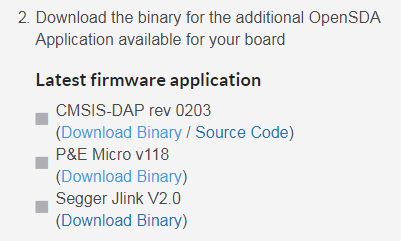
After that, power up the board again (release reset button), you could find related debugger was recognized at Computer device manager panel.
If there without any modification, I think the on board OpenSDA was damaged.
Customer could download the OpenSDA bootloader image and program the MK20 chip with related SWD interface (J5).
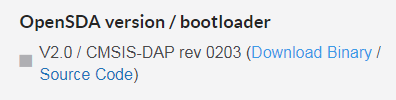
Wish it helps.
Have a great day,
Ma Hui
-----------------------------------------------------------------------------------------------------------------------
Note: If this post answers your question, please click the Correct Answer button. Thank you!
-----------------------------------------------------------------------------------------------------------------------
Hi,
First of all, please refer TWR-K65F180M board user guide table 4 to set Jumper with default setting.
I would recommend customer to check here to updated the TWR-K65F180M board OpenSDA firmware.
Please select one firmware of the latest firmware application and copy to the Bootloader disk (press the reset button and then power the board at USB J7 port):
After that, power up the board again (release reset button), you could find related debugger was recognized at Computer device manager panel.
If there without any modification, I think the on board OpenSDA was damaged.
Customer could download the OpenSDA bootloader image and program the MK20 chip with related SWD interface (J5).
Wish it helps.
Have a great day,
Ma Hui
-----------------------------------------------------------------------------------------------------------------------
Note: If this post answers your question, please click the Correct Answer button. Thank you!
-----------------------------------------------------------------------------------------------------------------------
