
- Forums
- Product Forums
- General Purpose MicrocontrollersGeneral Purpose Microcontrollers
- i.MX Forumsi.MX Forums
- QorIQ Processing PlatformsQorIQ Processing Platforms
- Identification and SecurityIdentification and Security
- Power ManagementPower Management
- Wireless ConnectivityWireless Connectivity
- RFID / NFCRFID / NFC
- Advanced AnalogAdvanced Analog
- Neural Processing UnitsNeural Processing Units
- MCX Microcontrollers
- S32G
- S32K
- S32V
- MPC5xxx
- Other NXP Products
- S12 / MagniV Microcontrollers
- Powertrain and Electrification Analog Drivers
- Sensors
- Vybrid Processors
- Digital Signal Controllers
- 8-bit Microcontrollers
- ColdFire/68K Microcontrollers and Processors
- PowerQUICC Processors
- OSBDM and TBDML
- S32M
- S32Z/E
-
- Solution Forums
- Software Forums
- MCUXpresso Software and ToolsMCUXpresso Software and Tools
- CodeWarriorCodeWarrior
- MQX Software SolutionsMQX Software Solutions
- Model-Based Design Toolbox (MBDT)Model-Based Design Toolbox (MBDT)
- FreeMASTER
- eIQ Machine Learning Software
- Embedded Software and Tools Clinic
- S32 SDK
- S32 Design Studio
- GUI Guider
- Zephyr Project
- Voice Technology
- Application Software Packs
- Secure Provisioning SDK (SPSDK)
- Processor Expert Software
- Generative AI & LLMs
-
- Topics
- Mobile Robotics - Drones and RoversMobile Robotics - Drones and Rovers
- NXP Training ContentNXP Training Content
- University ProgramsUniversity Programs
- Rapid IoT
- NXP Designs
- SafeAssure-Community
- OSS Security & Maintenance
- Using Our Community
-
- Cloud Lab Forums
-
- Knowledge Bases
- ARM Microcontrollers
- i.MX Processors
- Identification and Security
- Model-Based Design Toolbox (MBDT)
- QorIQ Processing Platforms
- S32 Automotive Processing Platform
- Wireless Connectivity
- CodeWarrior
- MCUXpresso Suite of Software and Tools
- MQX Software Solutions
- RFID / NFC
- Advanced Analog
- Neural Processing Units
-
- NXP Tech Blogs
- Home
- :
- 通用微控制器
- :
- Kinetis微控制器
- :
- Re: FRDM KL46 KSDK MSD example
FRDM KL46 KSDK MSD example

Hi all,
i'm trying to use the sample for the MSD present in the KSDK 1.1.0 library. I have loaded the : Freescale\KSDK_1.1.0\usb\example\device\msd\sdk\kds\dev_msd_disk_frdmkl46z_bm sample and compile using the guide C:\Freescale\KSDK_1.1.0\usb\doc\Integration of the USB Stack and Kinetis SDK, but when i debug the code i didn't see the freedom baord like MSD. During the debug the function USB_MSC_DEVICE_GET_INFO (in disk.c function USB_App_Class_Callback) is called but after that nothing happen (as visible in the image).
Thanks
已解决! 转到解答。
This is what happen .....
I am trying to interpret whether the USB is operating on your board or not - these are the checks that can be done:
1. Green light blinks at 2.5Hz (I think that this is OK)
- YES it work
2. In the SLCD on the board the ':' sign also blinks at the same speed.
- YES it work
3. When the USB connector is attached to K46USB the device enumerates and "USb" is displayed in the SLCD
- NO this not happen
4. If you press either SW1 or SW3 the mouse will move left and right
- NO this not happen
In the case of the harddrive - the PC will normally show a dialog that the disk needs to be formatted (pops up after a few seconds) but it depends on the Windows version and might have to be searched for under "This Computer" or something similar.
OOOOkkkkk, stupid solution .....
I thought That could be a hardware problem and in fact .... i did not have the J7 shorted ... Now everything works.
Sorry for the time lost !!!
Thanks
Daniele


Hi Daniele,
I am sorry, but when I downloaded the demo code into FRDM-KL46Z, the Host recognized this MSD device and promoted for a format, did you see that on your side? Please kindly refer to the following for more details.
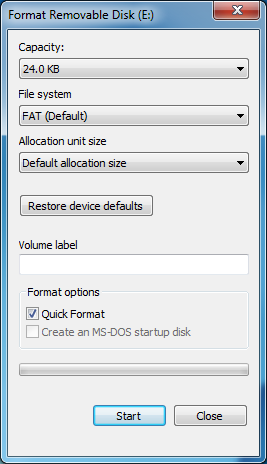
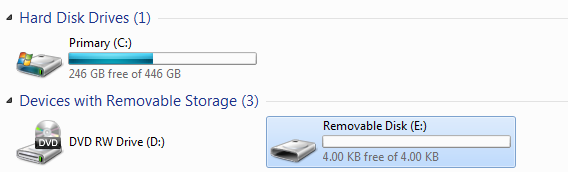

Would you help to clarify how you run that demo? Have you also connected the USB port of FRDM board with PC Host?
Thanks for your patience!
Best Regards,
Kan
Hi, yes i have connect the usb port of the FRDM to a PC USB port. I have tried with two FRDM kl46 and on XP and windows 7 but they didn't see the FRDM.... There are some hardware connection to do on the board? Thanks
With the debugger i see the USB_MSC_DEVICE_GET_INFO event execute twice time but after that nothing else.
Could you send me your s19 file so i can check if there are some software differences? Thanks
Daniele

Hi Daniele
Load the binary in the link to your board to check that your HW is OK.
Also attach a binary from your build so that I can check that it shows the same problem on my FRDM-KL46Z.
I have various USB tools which I use for solving USB problems for customers and I can probably quickly tell you where to look so get over any difficulties.
Regards
Mark
Kinetis: µTasker Kinetis support
KL46: µTasker FRDM-KL46Z support / µTasker Kinetis TWR-KL46Z48M support
Composite USB: µTasker USB Device Configuration
USB User's Guide: http://www.utasker.com/docs/uTasker/USB_User_Guide.PDF
utFAT2.0: http://www.utasker.com/docs/uTasker/uTasker_utFAT.PDF
For the complete "out-of-the-box" Kinetis experience and faster time to market
Hi Mark,
i have convert the bin file to s19 so to load this with opensda, i can't load directly the bin. I recieve an error of file not recognize when i try to load the bin file.
The FRDM have the led D7 blinking every 0.5 sec more or less but the pc didn't find any MSD, i can load the shell using the usb-kb command. You can find the s19 file attached.
PS: my board is a SCH rev c
Hi Daniele
I also have a Rev C board but can load either the binary or the S19 file with the same results. However since the code has been loaded and is basially running I don't thik that this is a major issue; just strange because I work only with binary files on 12 different FRDM boards and never had a problem.
I note that you posted my code as S19 but it would be more interesting to try to run the code that you built to verify that it operates on my board (the s19 that you attached loads and runs correctly on my board - I get a keyboard, mouse and hard drive operation).
I am trying to interpret whether the USB is operating on your board or not - these are the checks that can be done:
1. Green light blinks at 2.5Hz (I think that this is OK)
2. In the SLCD on the board the ':' sign also blinks at the same speed.
3. When the USB connector is attached to K46USB the device enumerates and "USb" is displayed in the SLCD
4. If you press either SW1 or SW3 the mouse will move left and right
In the case of the harddrive - the PC will normally show a dialog that the disk needs to be formatted (pops up after a few seconds) but it depends on the Windows version and might have to be searched for under "This Computer" or something similar.
The disk should however always be visible in the device manager under hard drive:
Note that also the loader of the FRDM-KL46Z is seen there.
Basically, if you see the "USb" in the SLCD and the mouse operates I would say that USB is OK. If not it means that the USB interface on your board is not operating correctly.
Regards
Mark
Kinetis: µTasker Kinetis support
KL46: µTasker FRDM-KL46Z support / µTasker Kinetis TWR-KL46Z48M support
Composite USB: µTasker USB Device Configuration
USB User's Guide: http://www.utasker.com/docs/uTasker/USB_User_Guide.PDF
utFAT2.0: http://www.utasker.com/docs/uTasker/uTasker_utFAT.PDF
For the complete "out-of-the-box" Kinetis experience and faster time to market
This is what happen .....
I am trying to interpret whether the USB is operating on your board or not - these are the checks that can be done:
1. Green light blinks at 2.5Hz (I think that this is OK)
- YES it work
2. In the SLCD on the board the ':' sign also blinks at the same speed.
- YES it work
3. When the USB connector is attached to K46USB the device enumerates and "USb" is displayed in the SLCD
- NO this not happen
4. If you press either SW1 or SW3 the mouse will move left and right
- NO this not happen
In the case of the harddrive - the PC will normally show a dialog that the disk needs to be formatted (pops up after a few seconds) but it depends on the Windows version and might have to be searched for under "This Computer" or something similar.
OOOOkkkkk, stupid solution .....
I thought That could be a hardware problem and in fact .... i did not have the J7 shorted ... Now everything works.
Sorry for the time lost !!!
Thanks
Daniele
Hi Daniele
OK - it is not normal to have to connect J7 because there is a shorting track below it; supposedly you cut that track at some earlier point for some other tests (?).
You should now also see that the reference allows you to format the internal Flash as FAT, as well as to use the composite HID devices in parallel.
Regards
Mark
Kinetis: µTasker Kinetis support
KL46: µTasker FRDM-KL46Z support / µTasker Kinetis TWR-KL46Z48M support
Composite USB: µTasker USB Device Configuration
USB User's Guide: http://www.utasker.com/docs/uTasker/USB_User_Guide.PDF
utFAT2.0: http://www.utasker.com/docs/uTasker/uTasker_utFAT.PDF
For the complete "out-of-the-box" Kinetis experience and faster time to market
Hi Daniele
There are some other threads about the RAM disk application on the forum and if I understand the situation correctly it can't run on a device with low RAM and so is limited to demonstrating how the enumeration is possible, but without storage capability.
Take a look at the following which allows the FRDM-KL46Z to operate as a USB-MSD device using part of its internal Flash as a flash disk:
http://www.utasker.com/kinetis/FRDM-KL46Z.html#MSD
The USB device in the image is configured as a composite USB-MSD and HID mouse / keyboard (details at the links) but also allows the FRDM-KL46Z to operates with up to three USB-MSD disk drives (internal Flash, SD card via SPI and SPI Flash via SPI).
Regards
Mark
Kinetis: µTasker Kinetis support
KL46: µTasker FRDM-KL46Z support / µTasker Kinetis TWR-KL46Z48M support
Composite USB: µTasker USB Device Configuration
USB User's Guide: http://www.utasker.com/docs/uTasker/USB_User_Guide.PDF
utFAT2.0: http://www.utasker.com/docs/uTasker/uTasker_utFAT.PDF
For the complete "out-of-the-box" Kinetis experience and faster time to market
Hi, thanks for the reply. I know that with so few flash is not possible to have a partition on this but the problem is that the device will not be enumerated by the PC. I can't see the FRDM in the devices connected to the PC.
