
- Forums
- Product Forums
- General Purpose MicrocontrollersGeneral Purpose Microcontrollers
- i.MX Forumsi.MX Forums
- QorIQ Processing PlatformsQorIQ Processing Platforms
- Identification and SecurityIdentification and Security
- Power ManagementPower Management
- Wireless ConnectivityWireless Connectivity
- RFID / NFCRFID / NFC
- Advanced AnalogAdvanced Analog
- Neural Processing UnitsNeural Processing Units
- MCX Microcontrollers
- S32G
- S32K
- S32V
- MPC5xxx
- Other NXP Products
- S12 / MagniV Microcontrollers
- Powertrain and Electrification Analog Drivers
- Sensors
- Vybrid Processors
- Digital Signal Controllers
- 8-bit Microcontrollers
- ColdFire/68K Microcontrollers and Processors
- PowerQUICC Processors
- OSBDM and TBDML
- S32M
- S32Z/E
-
- Solution Forums
- Software Forums
- MCUXpresso Software and ToolsMCUXpresso Software and Tools
- CodeWarriorCodeWarrior
- MQX Software SolutionsMQX Software Solutions
- Model-Based Design Toolbox (MBDT)Model-Based Design Toolbox (MBDT)
- FreeMASTER
- eIQ Machine Learning Software
- Embedded Software and Tools Clinic
- S32 SDK
- S32 Design Studio
- GUI Guider
- Zephyr Project
- Voice Technology
- Application Software Packs
- Secure Provisioning SDK (SPSDK)
- Processor Expert Software
- Generative AI & LLMs
-
- Topics
- Mobile Robotics - Drones and RoversMobile Robotics - Drones and Rovers
- NXP Training ContentNXP Training Content
- University ProgramsUniversity Programs
- Rapid IoT
- NXP Designs
- SafeAssure-Community
- OSS Security & Maintenance
- Using Our Community
-
- Cloud Lab Forums
-
- Knowledge Bases
- ARM Microcontrollers
- i.MX Processors
- Identification and Security
- Model-Based Design Toolbox (MBDT)
- QorIQ Processing Platforms
- S32 Automotive Processing Platform
- Wireless Connectivity
- CodeWarrior
- MCUXpresso Suite of Software and Tools
- MQX Software Solutions
- RFID / NFC
- Advanced Analog
- Neural Processing Units
-
- NXP Tech Blogs
- Home
- :
- 通用微控制器
- :
- Kinetis微控制器
- :
- FreeMaster
FreeMaster

I would like to connect my PC with mt FRDM-KL25Z for demo purposes.
For development/debugging I am using Keil and CMSIS-DAP, but I want people to lay with my application with a simple interface.
Freemaster would seemd the perfect solution, but I am getting lost in all the options.
There is a posting somwehere else on this forum:Touch sensing demo for Freedom KL25z for MSD bootloader
where it seems that this is possible.
What are the requirements though for the driverless configuration?
- Is the connection through the OpenSDA interface of the onboard USB?
- can I leave CMSIS_DAP on the OpenSDA chip, or something specific is needed there?
What additional requirements for the operation with the Freemaster driver?
Thanks!
已解决! 转到解答。

Hi Andrea Gorgerino,
Did you can't run the posting: Touch sensing demo for Freedom KL25z for MSD bootloader correctly?
1, you should make sure your board mode is in MSD bootloader,
you can find this bootloader in the quick start package, please download it from this link:
FRDM-KL25Z: Freescale Freedom Development Platform for Kinetis KL14/15/24/25 MCUs
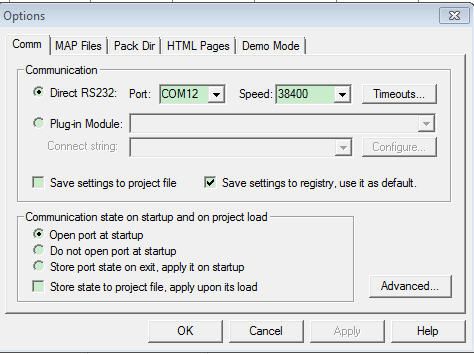
2,Actually, the connection between the FreeMaster and FRDM-KL25Z is the uart0, so you should choose the correct COM and configure the baud rate to 38400.
you can configure it in the freemaster softe: Project->options, then like the following picture:
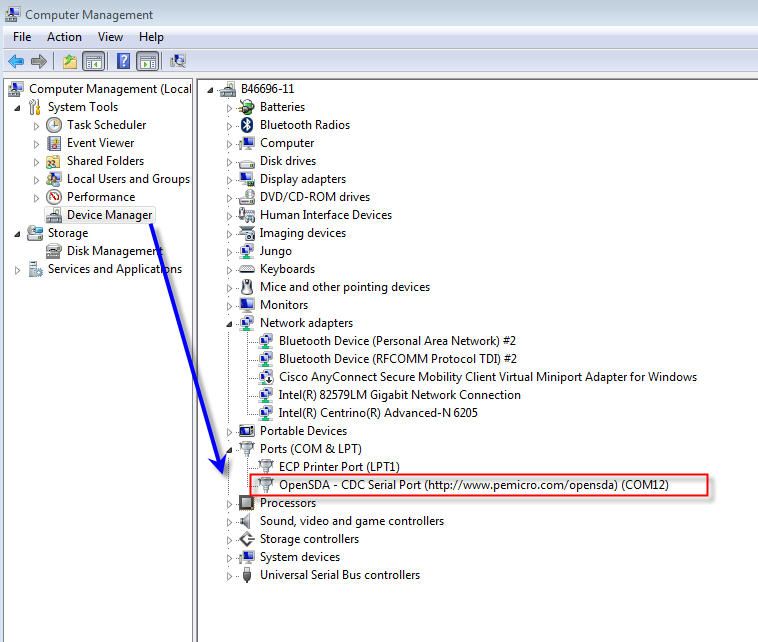
you can find your com port from your computer management, like the following:
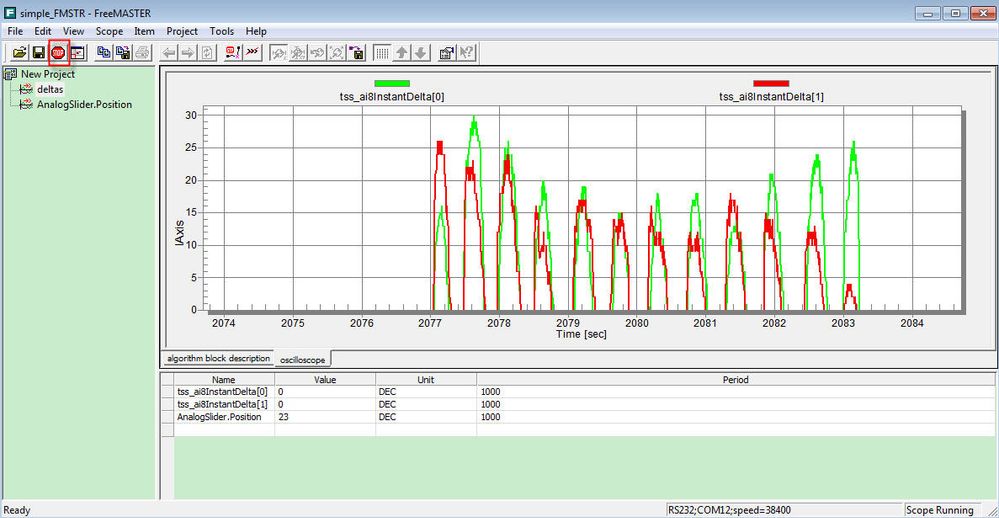
then start the freemaster, and touch the slide in the freedom board, you will find the freemaster scope like the following:
I wish it helps you!
If you still have question ,please let me know~!
Best regards!
Jingjing

 ivadorazinova
Hi Andrea Gorgerino,
I would like to notice that you can also work with remote access.
You can invite the possibility - communication between 2 computers.
You can try it with HTTP or DCOM.
Please, visit the document FREEMASTER: Remote Server Tutorial
I hope you find it also useful.
Best Regards,
Iva
Hi Andrea Gorgerino,
Did you can't run the posting: Touch sensing demo for Freedom KL25z for MSD bootloader correctly?
1, you should make sure your board mode is in MSD bootloader,
you can find this bootloader in the quick start package, please download it from this link:
FRDM-KL25Z: Freescale Freedom Development Platform for Kinetis KL14/15/24/25 MCUs
2,Actually, the connection between the FreeMaster and FRDM-KL25Z is the uart0, so you should choose the correct COM and configure the baud rate to 38400.
you can configure it in the freemaster softe: Project->options, then like the following picture:
you can find your com port from your computer management, like the following:
then start the freemaster, and touch the slide in the freedom board, you will find the freemaster scope like the following:
I wish it helps you!
If you still have question ,please let me know~!
Best regards!
Jingjing
Thanks Jingjing, the example works great now!
It actually worked with both the PEMicro MSD bootloader, but also with the PEMicro debug app (as well as the latest integrated version 114 from PEMicro) . I guess that's because they both implement the serial pass through.
So I will try and use the PEMicro for debug instead of CMSIS DAP...
Could you briefly outline the steps needed to add this basic functionality to my application? (let's say I just want to view/edit one variable)
1/ do I need to make any changes to my code (I would like to use driverless mode if possible)
2/ how do I configure the TSA table in Freemaster?
3/ In the file FMSTRUG it says that there is a plugin for P&E BDM, however in version 1.4 I could only find 2 plugins: iSystem winIDEA, and Segger/Jlink. Has the P&E been deprecated in this version? Is it available in older versions? Do you know which one?
Thanks for your help!
