
- Forums
- Product Forums
- General Purpose MicrocontrollersGeneral Purpose Microcontrollers
- i.MX Forumsi.MX Forums
- QorIQ Processing PlatformsQorIQ Processing Platforms
- Identification and SecurityIdentification and Security
- Power ManagementPower Management
- Wireless ConnectivityWireless Connectivity
- RFID / NFCRFID / NFC
- Advanced AnalogAdvanced Analog
- Neural Processing UnitsNeural Processing Units
- MCX Microcontrollers
- S32G
- S32K
- S32V
- MPC5xxx
- Other NXP Products
- S12 / MagniV Microcontrollers
- Powertrain and Electrification Analog Drivers
- Sensors
- Vybrid Processors
- Digital Signal Controllers
- 8-bit Microcontrollers
- ColdFire/68K Microcontrollers and Processors
- PowerQUICC Processors
- OSBDM and TBDML
- S32M
- S32Z/E
-
- Solution Forums
- Software Forums
- MCUXpresso Software and ToolsMCUXpresso Software and Tools
- CodeWarriorCodeWarrior
- MQX Software SolutionsMQX Software Solutions
- Model-Based Design Toolbox (MBDT)Model-Based Design Toolbox (MBDT)
- FreeMASTER
- eIQ Machine Learning Software
- Embedded Software and Tools Clinic
- S32 SDK
- S32 Design Studio
- GUI Guider
- Zephyr Project
- Voice Technology
- Application Software Packs
- Secure Provisioning SDK (SPSDK)
- Processor Expert Software
- Generative AI & LLMs
-
- Topics
- Mobile Robotics - Drones and RoversMobile Robotics - Drones and Rovers
- NXP Training ContentNXP Training Content
- University ProgramsUniversity Programs
- Rapid IoT
- NXP Designs
- SafeAssure-Community
- OSS Security & Maintenance
- Using Our Community
-
- Cloud Lab Forums
-
- Knowledge Bases
- ARM Microcontrollers
- i.MX Processors
- Identification and Security
- Model-Based Design Toolbox (MBDT)
- QorIQ Processing Platforms
- S32 Automotive Processing Platform
- Wireless Connectivity
- CodeWarrior
- MCUXpresso Suite of Software and Tools
- MQX Software Solutions
- RFID / NFC
- Advanced Analog
- Neural Processing Units
-
- NXP Tech Blogs
- Home
- :
- 软件论坛
- :
- GUI Guider
- :
- Re: GuiGuider 1.5.0 Cannot install fonts.
GuiGuider 1.5.0 Cannot install fonts.
GuiGuider 1.5.0 Cannot install fonts.

I cannot install fonts in V1.5.0.
The font will be mplus-2p.
With V1.4.1, I was able to install them without any problem.
Do you have any information on this problem?

 CarlosGarabito
Inside the folder ej. \GUI-Guider-1.5.0-GA\environment\fonts, then you have to add the fonts you want to use in your project before creating it, that way the corresponding libraries are pulled, if you already created your project, then you enter with the explorer to your project, and from there to import and then font, is there where you add your fonts you want to use.
not quite as you describe....
In GuiGuider 1.4.1 you didn't have a font resource overview, just the 'Assets' tab with your resource images. Importing fonts was a single menu-action and there was no overview of 'installed' fonts on the Assets tab
In GuiGuider 1.5.0 the 'Resource Manager' is introduced and the tabsheets show the images, fonts, Lottie content and Video content. The problem is that, if you import a font in the font tabsheet the font indeed is imported (you can use the new font to use with your widgets) but the new font is NOT added to the list of fonts in the tabsheet of the resource manager. That list only and ever shows the pre-installed fonts that come with the GuiGuider installation.
That's confusing and, again, there is no clue for what the Generate Font button is for
Kind regards,
Rob
I experience the same difficulties here with installing my own fonts in 1.5.0. Eventually they seem to get generated after adding the .ttf files in the IDE font resource manager. I can choose my 'installed' fonts in my widget but they won't show up in the resource manager. No idea how my new fonts got in the list of fonts to choose from in the font property of a widget. It is all somewhat not working as expected......
- should I always 'generate' a self added font or is that done when the output files get generated?
- what is the exact method/order to add a font to your project. The manual is not clear about it
Thanks
Rob
zhenhualuo
Hi @PragmaLab,
There is bug of font import in GUI Guider v1.5.0, can you please try the following workaround?
* Rename the font file to ensure only letter, number and underscore
* Import the font in GUI Guider IDE
* Restart GUI Guider
You will be able to see the imported font in both resource manager and widget attribute window. We will address the issue in new release.
Best Regards,
Zhenhua
Dear Zhenua,
how come this basic behavior isn't tested before releasing? Just add a font and come to the conclusion that it is not added to the overview of fonts?
To be honest, GuiGuider had quite some flaws. One of these flaws is that the .guiguider file uses absolute paths to store resources:
"src_released": "C:\\NXP\\GUI-Guider-Projects\\magic_display_b\\import\\image\\unselected_dot.jpg",
Why? It makes it impossible to move/exchange a project. Just use relative paths and use the project folder as root
Up to this point support is great, but my impression is that the application needs to be optimised first before adding new functionality. Too many moments of unexpected behavior occur for now.
Thanks for your reply
kind regards,
Rob
zhenhualuo
Hi Rob,
Thanks you so much for your valuable feedback and suggestion.
We will optimize the weakness areas and strengthen testing to improve UX/DX of GUI Guider. Look forward to more suggestions from you.
Best Regards,
Zhenhua
Dear Zhenhualuo,
pls explain what I should enter in the 'Word' field so I can generate a fontsize for a self-imported font
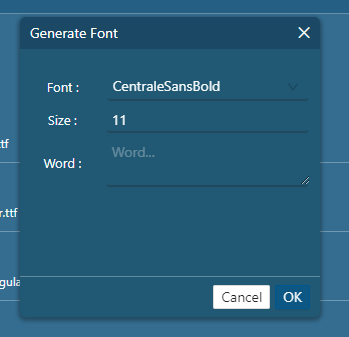
There is no explanation in the Manual. Should all symbols that need to be generated be present in that field?
Thanks,
Rob
zhenhualuo
Hi Rob,
The function is usually used for non-English languages, for example, Chinese. The purpose is to avoid large font file in GUI application, user can only includes the characters to be used in the application, it is useful for resource constrained MCU, the details is available in Chapter “3.9 Generate fonts" of User Guide.
Best Regards,
Zhenhua
