
- Forums
- Product Forums
- General Purpose MicrocontrollersGeneral Purpose Microcontrollers
- i.MX Forumsi.MX Forums
- QorIQ Processing PlatformsQorIQ Processing Platforms
- Identification and SecurityIdentification and Security
- Power ManagementPower Management
- Wireless ConnectivityWireless Connectivity
- RFID / NFCRFID / NFC
- Advanced AnalogAdvanced Analog
- Neural Processing UnitsNeural Processing Units
- MCX Microcontrollers
- S32G
- S32K
- S32V
- MPC5xxx
- Other NXP Products
- S12 / MagniV Microcontrollers
- Powertrain and Electrification Analog Drivers
- Sensors
- Vybrid Processors
- Digital Signal Controllers
- 8-bit Microcontrollers
- ColdFire/68K Microcontrollers and Processors
- PowerQUICC Processors
- OSBDM and TBDML
- S32M
- S32Z/E
-
- Solution Forums
- Software Forums
- MCUXpresso Software and ToolsMCUXpresso Software and Tools
- CodeWarriorCodeWarrior
- MQX Software SolutionsMQX Software Solutions
- Model-Based Design Toolbox (MBDT)Model-Based Design Toolbox (MBDT)
- FreeMASTER
- eIQ Machine Learning Software
- Embedded Software and Tools Clinic
- S32 SDK
- S32 Design Studio
- GUI Guider
- Zephyr Project
- Voice Technology
- Application Software Packs
- Secure Provisioning SDK (SPSDK)
- Processor Expert Software
- Generative AI & LLMs
-
- Topics
- Mobile Robotics - Drones and RoversMobile Robotics - Drones and Rovers
- NXP Training ContentNXP Training Content
- University ProgramsUniversity Programs
- Rapid IoT
- NXP Designs
- SafeAssure-Community
- OSS Security & Maintenance
- Using Our Community
-
- Cloud Lab Forums
-
- Knowledge Bases
- ARM Microcontrollers
- i.MX Processors
- Identification and Security
- Model-Based Design Toolbox (MBDT)
- QorIQ Processing Platforms
- S32 Automotive Processing Platform
- Wireless Connectivity
- CodeWarrior
- MCUXpresso Suite of Software and Tools
- MQX Software Solutions
- RFID / NFC
- Advanced Analog
- Neural Processing Units
-
- NXP Tech Blogs
- Home
- :
- Software Forums
- :
- FreeMASTER
- :
- Re: Where is MCAT?
Where is MCAT?
- Subscribe to RSS Feed
- Mark Topic as New
- Mark Topic as Read
- Float this Topic for Current User
- Bookmark
- Subscribe
- Mute
- Printer Friendly Page

- Mark as New
- Bookmark
- Subscribe
- Mute
- Subscribe to RSS Feed
- Permalink
- Report Inappropriate Content
I give up. Where are you hiding MCAT?
I have MCUXpresso 11.3, KV31F SDK v2.9, and FreeMASTER 3.1. It isn't in any of them. It's supposed to be a plug-in for FreeMASTER, but it isn't on any menu, and the help files have never heard of it.
I have AN4642,AN4870 and AN4912, which all assume MCAT is already running.
So, where is it?
Solved! Go to Solution.

 iulian_stan
- Mark as New
- Bookmark
- Subscribe
- Mute
- Subscribe to RSS Feed
- Permalink
- Report Inappropriate Content
Hi @GaryOlmstead,
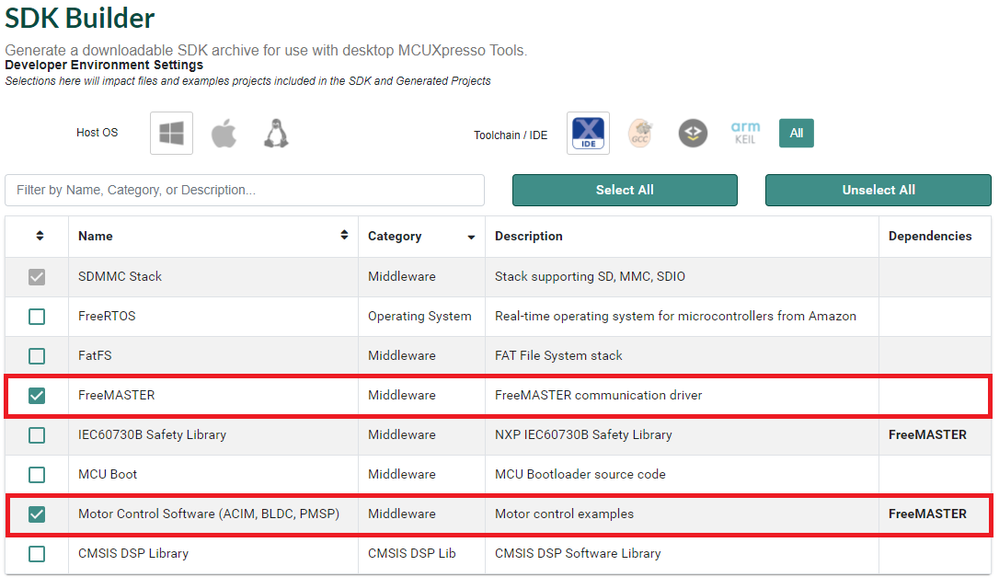
MCAT is part of the SDK and can imported from packaged "demo apps". So here are the steps (the first one is just there to validate you got everything in your SDK):
1. Generate SDK with Motor Control option selected (it will automatically select FreeMASTER as well)
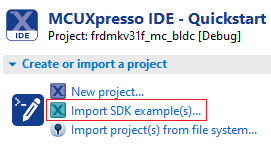
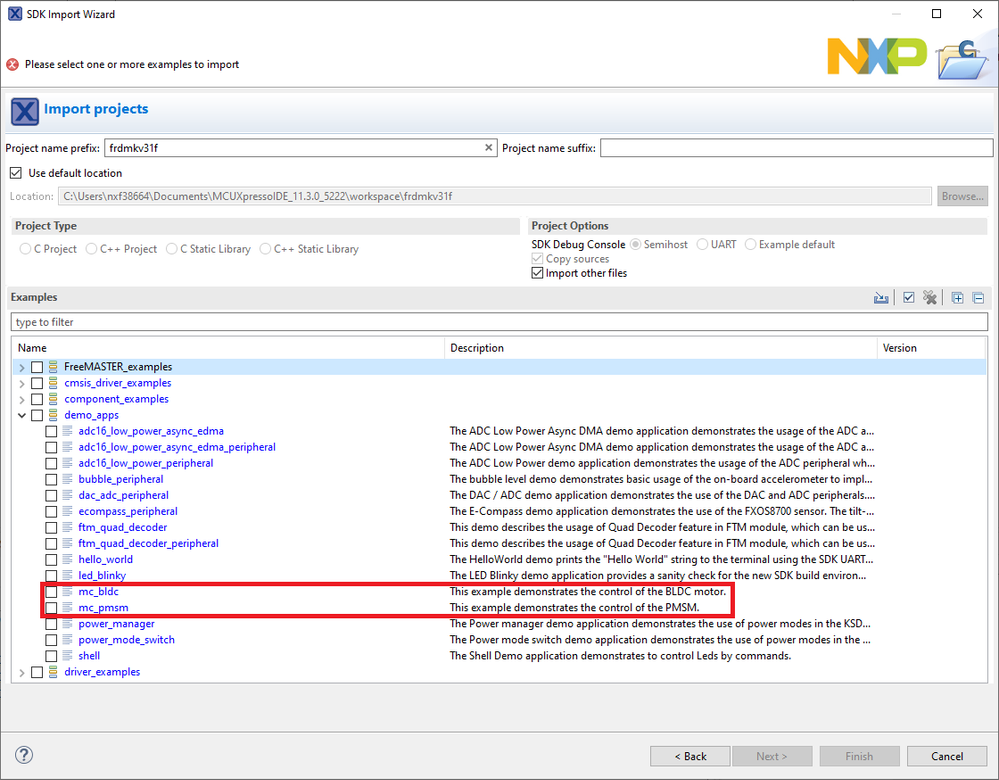
2. Once the SDK is added to MCUXpresso IDE, import the project from SDK examples
3. FreeMASTER project is located in motor_control → freemaster → bldc.pmp (or pmsm.pmp)
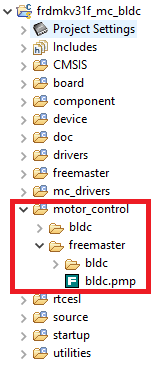
4. You can launch "pmp" file directly from project explorer which will open it in FreeMASTER tool.
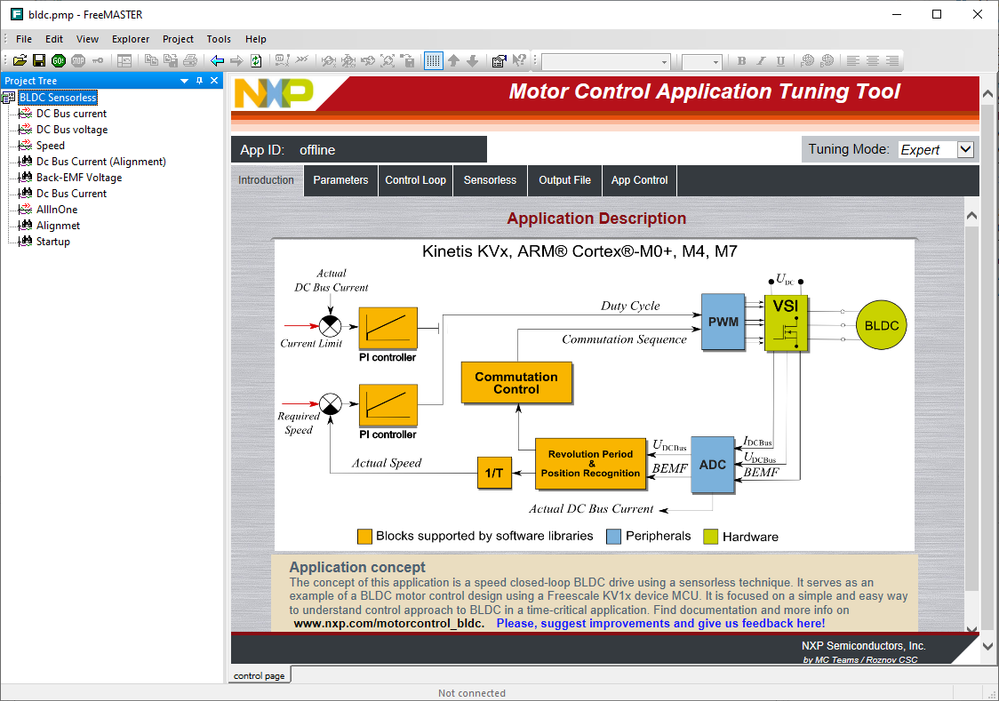
Kind regards,
Iulian
- Mark as New
- Bookmark
- Subscribe
- Mute
- Subscribe to RSS Feed
- Permalink
- Report Inappropriate Content
Hi Iulian --
Got it!! It works!!
Thanks!!
Gary Olmstead
iulian_stan
- Mark as New
- Bookmark
- Subscribe
- Mute
- Subscribe to RSS Feed
- Permalink
- Report Inappropriate Content
Hi @GaryOlmstead,
MCAT is part of the SDK and can imported from packaged "demo apps". So here are the steps (the first one is just there to validate you got everything in your SDK):
1. Generate SDK with Motor Control option selected (it will automatically select FreeMASTER as well)
2. Once the SDK is added to MCUXpresso IDE, import the project from SDK examples
3. FreeMASTER project is located in motor_control → freemaster → bldc.pmp (or pmsm.pmp)
4. You can launch "pmp" file directly from project explorer which will open it in FreeMASTER tool.
Kind regards,
Iulian
