
- Forums
- Product Forums
- General Purpose MicrocontrollersGeneral Purpose Microcontrollers
- i.MX Forumsi.MX Forums
- QorIQ Processing PlatformsQorIQ Processing Platforms
- Identification and SecurityIdentification and Security
- Power ManagementPower Management
- Wireless ConnectivityWireless Connectivity
- RFID / NFCRFID / NFC
- Advanced AnalogAdvanced Analog
- Neural Processing UnitsNeural Processing Units
- MCX Microcontrollers
- S32G
- S32K
- S32V
- MPC5xxx
- Other NXP Products
- S12 / MagniV Microcontrollers
- Powertrain and Electrification Analog Drivers
- Sensors
- Vybrid Processors
- Digital Signal Controllers
- 8-bit Microcontrollers
- ColdFire/68K Microcontrollers and Processors
- PowerQUICC Processors
- OSBDM and TBDML
- S32M
- S32Z/E
-
- Solution Forums
- Software Forums
- MCUXpresso Software and ToolsMCUXpresso Software and Tools
- CodeWarriorCodeWarrior
- MQX Software SolutionsMQX Software Solutions
- Model-Based Design Toolbox (MBDT)Model-Based Design Toolbox (MBDT)
- FreeMASTER
- eIQ Machine Learning Software
- Embedded Software and Tools Clinic
- S32 SDK
- S32 Design Studio
- GUI Guider
- Zephyr Project
- Voice Technology
- Application Software Packs
- Secure Provisioning SDK (SPSDK)
- Processor Expert Software
- Generative AI & LLMs
-
- Topics
- Mobile Robotics - Drones and RoversMobile Robotics - Drones and Rovers
- NXP Training ContentNXP Training Content
- University ProgramsUniversity Programs
- Rapid IoT
- NXP Designs
- SafeAssure-Community
- OSS Security & Maintenance
- Using Our Community
-
- Cloud Lab Forums
-
- Knowledge Bases
- ARM Microcontrollers
- i.MX Processors
- Identification and Security
- Model-Based Design Toolbox (MBDT)
- QorIQ Processing Platforms
- S32 Automotive Processing Platform
- Wireless Connectivity
- CodeWarrior
- MCUXpresso Suite of Software and Tools
- MQX Software Solutions
- RFID / NFC
- Advanced Analog
- Neural Processing Units
-
- NXP Tech Blogs
- Home
- :
- CodeWarrior
- :
- CodeWarrior for QorIQ
- :
- Re: CodeWarrior cannot connect to CWTAP
CodeWarrior cannot connect to CWTAP
- Subscribe to RSS Feed
- Mark Topic as New
- Mark Topic as Read
- Float this Topic for Current User
- Bookmark
- Subscribe
- Mute
- Printer Friendly Page

- Mark as New
- Bookmark
- Subscribe
- Mute
- Subscribe to RSS Feed
- Permalink
- Report Inappropriate Content
Hello everyone,
I’m reaching out after spending several days attempting to bring up the CodeWarrior TAP with the FRWY-LS1046AGSG board for initial debug and SerDes configuration using QCVS. I have a strong embedded background and carefully verified all configuration steps, but my PCs failed to connect to CWTAP and fails to detect the target SoC.
Setup:
Board: FRWY-LS1046AGSG
CW TAP Kit:
CWH-CTP-BASE-HE
CWH-CTP-CTX10-YE
Connections -different PC/OS-:
PC (Windows 10 / Windows 11 / Linux) ↔ Ethernet/USB ↔ CWTAP ↔ JTAG ↔ LS1046
Software: CW4NET v2020.06, QCVS, CCS
What works:
CW TAP was configured via serial console (see screenshot below).

CWTAP and PC can ping each other.
I can run the following and get version response from CW TAP:

findcc discovers the TAP ( I've connected the USB and the Eth).

What fails:
cannot find the CWTAP USB

QCVS SerDes Configuration Tool Failed:

Target is powered, not held in reset, and run the default QSPI and tried to run the SD Card that comes with FREEWAY board which contains ubuntu 18. ( I interrupt u-boot)
Closest issue I found (but unresolved):
Thanks in advance.
Solved! Go to Solution.
- Mark as New
- Bookmark
- Subscribe
- Mute
- Subscribe to RSS Feed
- Permalink
- Report Inappropriate Content
Dear June thanks for your support I identified the main issue is the update, once I try to apply update as you mentioned or from online
I got this error

and if this error for some reasons the Target connections is dispersed and show an error once it been loaded
so the area in red is showing no devices

so I decide to skip the update and just install it the executable file and everything works fine

Thanks again!
 June_Lu
- Mark as New
- Bookmark
- Subscribe
- Mute
- Subscribe to RSS Feed
- Permalink
- Report Inappropriate Content
It seems idcode.tcl works well.
Try the command below:
ccs::config_chain{ ls1043a dap sap2}
display ::ccs::get_config_chain
Thanks
- Mark as New
- Bookmark
- Subscribe
- Mute
- Subscribe to RSS Feed
- Permalink
- Report Inappropriate Content
Please find the results here

this is the output of u-boot from freeway dev board

but still I cannot connect from cw !

June_Lu
- Mark as New
- Bookmark
- Subscribe
- Mute
- Subscribe to RSS Feed
- Permalink
- Report Inappropriate Content
Is the FRWY-LS1046A could bring up with logs output?
Have you every linked the CWTAP with the ethernet?
- Mark as New
- Bookmark
- Subscribe
- Mute
- Subscribe to RSS Feed
- Permalink
- Report Inappropriate Content
This is my first time using CWTAP.
June_Lu
- Mark as New
- Bookmark
- Subscribe
- Mute
- Subscribe to RSS Feed
- Permalink
- Report Inappropriate Content
CCS could connect the FRWY-LS1046A.
"duplicate" FRWY-LS1046A in the CodeWarrior(CW) IDE, set the "Target Configuration" with your Ethernet IP, run "Diagnose", if it passed, CW IDE works well.
How about your CodeWarrior(CW) IDE license?
Developer Suite Level
Specialist Suite Level
Only "Specialist Suite Level" could support DDR QCVS.
- Mark as New
- Bookmark
- Subscribe
- Mute
- Subscribe to RSS Feed
- Permalink
- Report Inappropriate Content
This is my CW version, and for now I'm using the evaluation license

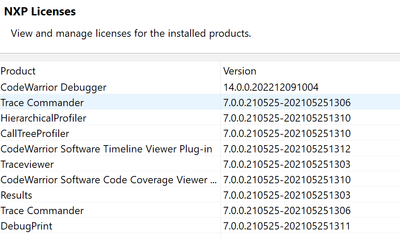
Regarding the Diagnostic, I opened the Target Connections Windows and try to add Board but it give me error
"Could not create new configuration due to start up errors.
Could not load internal database, path is invalid: C:\Freescale\CW4NET_v2020.06\CW_ARMv8\Config\SoCs\gta\SoCs"
while I can see the Connection View Windows I can add my target but the connection failed

Lastly, why we chose LS1043A and LS1046A not exist in CCS?

while LS1043A

June_Lu
- Mark as New
- Bookmark
- Subscribe
- Mute
- Subscribe to RSS Feed
- Permalink
- Report Inappropriate Content
Could you confirm if the evaluation version is not expired? When do you download the CodeWarrior?
Please install CodeWarrior® Development Suites for Networked Applications 11.5.12 to run the QCVS DDR.
Please find link below:
Select “DOWNLOAD EVAL”
Download update package
com.freescale.armv8.11.5.12.GA.Win.updatesite.221209.zip
Please open CodeWarrior from C:\Freescale\CW4NET_v2020.06\CW_ARMv8\fsl_eclipse.bat, and install the update package from Help->Install New Software->Add->Archive.
Please reopen CodeWarrior in a new workspace.
Please confirm the "Diagnose" works well, please follow C:\Freescale\CW4NET_v2020.06\CW_ARMv8\ARMv8\Help\PDF\ARMv8_Targeting_Manual, 5.1 Target Connection configurator overview
"duplicate" FRWY-LS1046A in the CodeWarrior(CW) IDE, set the "Target Configuration" with your Ethernet IP, run "Diagnose", if it passed, CW IDE works well.
If it could not work correctly please reinstall the CodeWarrior again.
After confirm above, try the QCVS again.
Please use "ccs::config_chain{ ls1043a dap sap2}" to connect LS1046A, any other command is not available.
- Mark as New
- Bookmark
- Subscribe
- Mute
- Subscribe to RSS Feed
- Permalink
- Report Inappropriate Content
Dear June thanks for your support I identified the main issue is the update, once I try to apply update as you mentioned or from online
I got this error
and if this error for some reasons the Target connections is dispersed and show an error once it been loaded
so the area in red is showing no devices
so I decide to skip the update and just install it the executable file and everything works fine
Thanks again!
June_Lu
- Mark as New
- Bookmark
- Subscribe
- Mute
- Subscribe to RSS Feed
- Permalink
- Report Inappropriate Content
Would your board in hand is FRWY-LS1046A(LS1046A Freeway Board) or customer board but designed based on the FRWY-LS1046A?
Thanks
- Mark as New
- Bookmark
- Subscribe
- Mute
- Subscribe to RSS Feed
- Permalink
- Report Inappropriate Content
- Mark as New
- Bookmark
- Subscribe
- Mute
- Subscribe to RSS Feed
- Permalink
- Report Inappropriate Content
if I source IDcode.tcl It confirms the setup is properly set

