How install (or check availability) patch and update under Eclipse ?

cancel
Showing results for 
Show  only  | Search instead for 
Did you mean: 

How install (or check availability) patch and update under Eclipse ?

How install (or check availability) patch and update under Eclipse ?

Eclipse - How can I install (check for) patch and update ?

            Valid for all Eclipse versions - CW for MCU, CW for PA, etc ...


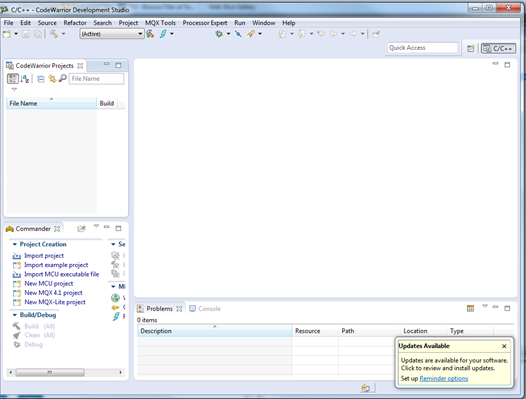
By default when an update (sometimes for patches too) is available a message will appear under Eclipse
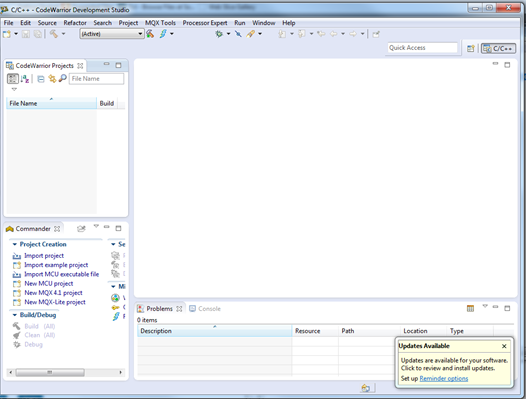
42315_42315.pngpastedImage_3.png


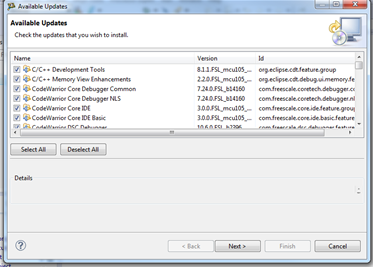
If you click on the message a new dialog will appear
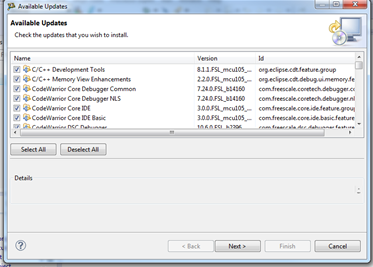
42317_42317.pngpastedImage_5.png


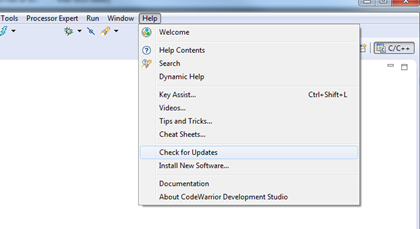
Via the Help Menu


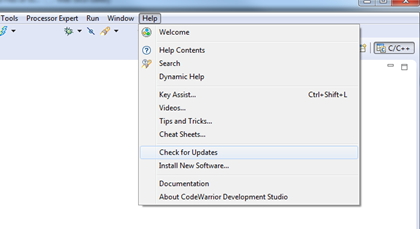
Via the Help Menu you can access 2 features:

  • Check for Updates:

to update packages already installed

  • Install New Software …

to install new plugins.
      42318_42318.pngpastedImage_6.png


Notes:

  • To avoid problem we recommend to execute “Check for Updates” after to have executed “Install New Software”.


Install New Software …


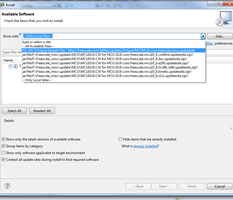
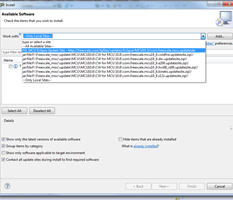
This is a generic Eclipse feature and you must select a Software Site which could be:

  • Associated to a web link

This is the case for CodeWarrior Eclipse tools: MCU V10.6 for instance.

The correct link is proposed in the Software Sites list.

http://freescale.com/lgfiles/updates/Eclipse/MCU10_6/com.freescale.mcu.updatesite
42319_42319.pngpastedImage_7.png


  • Associated to a local file

      You can download a patch on your PC (most of the time a .zip file) and install it.

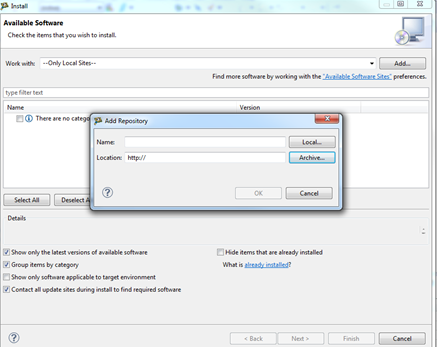
      After to have downloaded a patch, you must add it in the Software Sites.

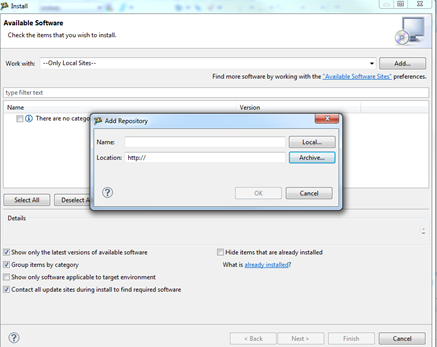
      Click on Add…
     42320_42320.pngpastedImage_9.png


                       Via Archive you can select the file you’ve downloaded.

                       It will be added in the Software Sites list.


Notes:

Sometimes you can not install all patches/Updates at same time.

Some patches/updates require a patch or an update already installed to be applied.

To install all patches and updates you could need to execute several time the process and re-start Eclipse between 2 processes.


Attached you will find a doc showing an example for MCU V10.6 using the 2 features:

  • Install New Software …
  • Check for Updates – not really used here.
Labels (1)
Attachments
%3CLINGO-SUB%20id%3D%22lingo-sub-1116988%22%20slang%3D%22en-US%22%20mode%3D%22CREATE%22%3EHow%20install%20(or%20check%20availability)%20patch%20and%20update%20under%20Eclipse%20%3F%3C%2FLINGO-SUB%3E%3CLINGO-BODY%20id%3D%22lingo-body-1116988%22%20slang%3D%22en-US%22%20mode%3D%22CREATE%22%3E%3CP%20align%3D%22center%22%20style%3D%22text-align%3A%20center%3B%22%3E%3CSPAN%20style%3D%22font-size%3A%2020.0pt%3B%22%3EEclipse%20-%20How%20can%20I%20install%20(check%20for)%20patch%20and%20update%20%3F%3C%2FSPAN%3E%3C%2FP%3E%3CP%20align%3D%22center%22%20style%3D%22text-align%3A%20center%3B%22%3E%3CEM%20style%3D%22font-size%3A%2012.0pt%3B%22%3E%26nbsp%3B%26nbsp%3B%26nbsp%3B%26nbsp%3B%26nbsp%3B%26nbsp%3B%26nbsp%3B%26nbsp%3B%26nbsp%3B%26nbsp%3B%26nbsp%3B%20Valid%20for%20all%20Eclipse%20versions%20-%20CW%20for%20MCU%2C%20CW%20for%20PA%2C%20etc%20...%3C%2FEM%3E%3C%2FP%3E%3CP%20style%3D%22min-height%3A%208pt%3B%20padding%3A%200px%3B%22%3E%26nbsp%3B%3C%2FP%3E%3CP%20style%3D%22min-height%3A%208pt%3B%20padding%3A%200px%3B%22%3E%26nbsp%3B%3C%2FP%3E%3CP%3EBy%20default%20when%20an%20update%20(sometimes%20for%20patches%20too)%20is%20available%20a%20message%20will%20appear%20under%20Eclipse%3C%2FP%3E%3CP%3E%3CSPAN%20class%3D%22lia-inline-image-display-wrapper%22%20image-alt%3D%2242315_42315.png%22%3E%3Cspan%20class%3D%22lia-inline-image-display-wrapper%22%20image-alt%3D%2242315_42315.png%22%20style%3D%22width%3A%20526px%3B%22%3E%3Cimg%20src%3D%22https%3A%2F%2Fcommunity.nxp.com%2Ft5%2Fimage%2Fserverpage%2Fimage-id%2F117592i1E440172CC763C12%2Fimage-size%2Flarge%3Fv%3Dv2%26amp%3Bpx%3D999%22%20role%3D%22button%22%20title%3D%2242315_42315.png%22%20alt%3D%2242315_42315.png%22%20%2F%3E%3C%2Fspan%3E%3C%2FSPAN%3E%3CSPAN%20class%3D%22lia-inline-image-display-wrapper%22%20image-alt%3D%22pastedImage_3.png%22%3E%3Cspan%20class%3D%22lia-inline-image-display-wrapper%22%20image-alt%3D%22pastedImage_3.png%22%20style%3D%22width%3A%20526px%3B%22%3E%3Cimg%20src%3D%22https%3A%2F%2Fcommunity.nxp.com%2Ft5%2Fimage%2Fserverpage%2Fimage-id%2F58566i5A48C3F322AF005F%2Fimage-size%2Flarge%3Fv%3Dv2%26amp%3Bpx%3D999%22%20role%3D%22button%22%20title%3D%22pastedImage_3.png%22%20alt%3D%22pastedImage_3.png%22%20%2F%3E%3C%2Fspan%3E%3C%2FSPAN%3E%20%3C%2FP%3E%3CP%20style%3D%22min-height%3A%208pt%3B%20padding%3A%200px%3B%22%3E%26nbsp%3B%3C%2FP%3E%3CP%3EIf%20you%20click%20on%20the%20message%20a%20new%20dialog%20will%20appear%3C%2FP%3E%3CP%3E%3CSPAN%20class%3D%22lia-inline-image-display-wrapper%22%20image-alt%3D%2242317_42317.png%22%3E%3Cspan%20class%3D%22lia-inline-image-display-wrapper%22%20image-alt%3D%2242317_42317.png%22%20style%3D%22width%3A%20373px%3B%22%3E%3Cimg%20src%3D%22https%3A%2F%2Fcommunity.nxp.com%2Ft5%2Fimage%2Fserverpage%2Fimage-id%2F117593i39BDCC610F52CA51%2Fimage-size%2Flarge%3Fv%3Dv2%26amp%3Bpx%3D999%22%20role%3D%22button%22%20title%3D%2242317_42317.png%22%20alt%3D%2242317_42317.png%22%20%2F%3E%3C%2Fspan%3E%3C%2FSPAN%3E%3CSPAN%20class%3D%22lia-inline-image-display-wrapper%22%20image-alt%3D%22pastedImage_5.png%22%3E%3Cspan%20class%3D%22lia-inline-image-display-wrapper%22%20image-alt%3D%22pastedImage_5.png%22%20style%3D%22width%3A%20373px%3B%22%3E%3Cimg%20src%3D%22https%3A%2F%2Fcommunity.nxp.com%2Ft5%2Fimage%2Fserverpage%2Fimage-id%2F58565i36ABFE78DE9CB835%2Fimage-size%2Flarge%3Fv%3Dv2%26amp%3Bpx%3D999%22%20role%3D%22button%22%20title%3D%22pastedImage_5.png%22%20alt%3D%22pastedImage_5.png%22%20%2F%3E%3C%2Fspan%3E%3C%2FSPAN%3E%20%3C%2FP%3E%3CP%20style%3D%22min-height%3A%208pt%3B%20padding%3A%200px%3B%22%3E%26nbsp%3B%3C%2FP%3E%3CP%20style%3D%22min-height%3A%208pt%3B%20padding%3A%200px%3B%22%3E%26nbsp%3B%3C%2FP%3E%3CP%3E%3CSTRONG%20style%3D%22%3A%20%3B%20text-decoration%3A%20underline%3B%20font-size%3A%2014.0pt%3B%22%3EVia%20the%20Help%20Menu%20%3C%2FSTRONG%3E%3C%2FP%3E%3CP%20style%3D%22min-height%3A%208pt%3B%20padding%3A%200px%3B%22%3E%26nbsp%3B%3C%2FP%3E%3CP%3EVia%20the%20Help%20Menu%20you%20can%20access%202%20features%3A%20%3C%2FP%3E%3CUL%20style%3D%22list-style-type%3A%20disc%3B%22%3E%3CLI%3ECheck%20for%20Updates%3A%20%3C%2FLI%3E%3C%2FUL%3E%3CP%20style%3D%22margin-left%3A%200.5in%3B%20text-indent%3A%200.5in%3B%22%3Eto%20update%20packages%20already%20installed%3C%2FP%3E%3CUL%20style%3D%22list-style-type%3A%20disc%3B%22%3E%3CLI%3EInstall%20New%20Software%20%E2%80%A6%3C%2FLI%3E%3C%2FUL%3E%3CP%20style%3D%22margin-left%3A%201in%3B%22%3Eto%20install%20new%20plugins.%3C%2FP%3E%3CP%3E%26nbsp%3B%26nbsp%3B%26nbsp%3B%26nbsp%3B%26nbsp%3B%20%3CSPAN%20class%3D%22lia-inline-image-display-wrapper%22%20image-alt%3D%2242318_42318.png%22%3E%3Cspan%20class%3D%22lia-inline-image-display-wrapper%22%20image-alt%3D%2242318_42318.png%22%20style%3D%22width%3A%20420px%3B%22%3E%3Cimg%20src%3D%22https%3A%2F%2Fcommunity.nxp.com%2Ft5%2Fimage%2Fserverpage%2Fimage-id%2F117594iD482802BCFE4E480%2Fimage-size%2Flarge%3Fv%3Dv2%26amp%3Bpx%3D999%22%20role%3D%22button%22%20title%3D%2242318_42318.png%22%20alt%3D%2242318_42318.png%22%20%2F%3E%3C%2Fspan%3E%3C%2FSPAN%3E%3CSPAN%20class%3D%22lia-inline-image-display-wrapper%22%20image-alt%3D%22pastedImage_6.png%22%3E%3Cspan%20class%3D%22lia-inline-image-display-wrapper%22%20image-alt%3D%22pastedImage_6.png%22%20style%3D%22width%3A%20420px%3B%22%3E%3Cimg%20src%3D%22https%3A%2F%2Fcommunity.nxp.com%2Ft5%2Fimage%2Fserverpage%2Fimage-id%2F58564i8211BD3713A41259%2Fimage-size%2Flarge%3Fv%3Dv2%26amp%3Bpx%3D999%22%20role%3D%22button%22%20title%3D%22pastedImage_6.png%22%20alt%3D%22pastedImage_6.png%22%20%2F%3E%3C%2Fspan%3E%3C%2FSPAN%3E%3C%2FP%3E%3CP%20style%3D%22min-height%3A%208pt%3B%20padding%3A%200px%3B%22%3E%26nbsp%3B%3C%2FP%3E%3CP%3E%3CEM%20style%3D%22color%3A%20%2300b050%3B%22%3ENotes%3A%3C%2FEM%3E%3C%2FP%3E%3CUL%20style%3D%22list-style-type%3A%20disc%3B%22%3E%3CLI%3E%3CEM%20style%3D%22color%3A%20%2300b050%3B%22%3ETo%20avoid%20problem%20we%20recommend%20to%20execute%20%E2%80%9CCheck%20for%20Updates%E2%80%9D%20after%20to%20have%20executed%20%3C%2FEM%3E%3CEM%20style%3D%22color%3A%20%2300b050%3B%22%3E%E2%80%9CInstall%20New%20Software%E2%80%9D.%3C%2FEM%3E%3C%2FLI%3E%3C%2FUL%3E%3CP%20style%3D%22min-height%3A%208pt%3B%20padding%3A%200px%3B%20text-indent%3A%200.5in%3B%22%3E%3CEM%3E%20%3C%2FEM%3E%26nbsp%3B%3C%2FP%3E%3CP%20style%3D%22min-height%3A%208pt%3B%20padding%3A%200px%3B%22%3E%26nbsp%3B%3C%2FP%3E%3CP%3E%3CSTRONG%20style%3D%22text-decoration%3A%20underline%3B%22%3EInstall%20New%20Software%20%E2%80%A6%3C%2FSTRONG%3E%3C%2FP%3E%3CP%20style%3D%22min-height%3A%208pt%3B%20padding%3A%200px%3B%22%3E%26nbsp%3B%3C%2FP%3E%3CP%3EThis%20is%20a%20generic%20Eclipse%20feature%20and%20you%20must%20select%20a%20Software%20Site%20which%20could%20be%3A%3C%2FP%3E%3CUL%20style%3D%22list-style-type%3A%20disc%3B%22%3E%3CLI%3EAssociated%20to%20a%20web%20link%3C%2FLI%3E%3C%2FUL%3E%3CP%20style%3D%22margin-left%3A%2048.75pt%3B%22%3EThis%20is%20the%20case%20for%20CodeWarrior%20Eclipse%20tools%3A%20MCU%20V10.6%20for%20instance.%3C%2FP%3E%3CP%20style%3D%22margin-left%3A%2048.75pt%3B%22%3EThe%20correct%20link%20is%20proposed%20in%20the%20Software%20Sites%20list.%3C%2FP%3E%3CP%20style%3D%22margin-left%3A%2048.75pt%3B%22%3E%3CA%20_jive_internal%3D%22true%22%20href%3D%22https%3A%2F%2Fcommunity.nxp.com%2Fexternal-link.jspa%3Furl%3Dhttp%253A%252F%252Ffreescale.com%252Flgfiles%252Fupdates%252FEclipse%252FMCU10_6%252Fcom.freescale.mcu.updatesite%22%20target%3D%22_blank%22%3E%3CEM%3E%3C%2FEM%3E%3C%2FA%3E%3CA%20href%3D%22http%3A%2F%2Ffreescale.com%2Flgfiles%2Fupdates%2FEclipse%2FMCU10_6%2Fcom.freescale.mcu.updatesite%22%20target%3D%22test_blank%22%20rel%3D%22nofollow%20noopener%20noreferrer%22%3Ehttp%3A%2F%2Ffreescale.com%2Flgfiles%2Fupdates%2FEclipse%2FMCU10_6%2Fcom.freescale.mcu.updatesite%3C%2FA%3E%3CEM%3E%20%3C%2FEM%3E%3C%2FP%3E%3CP%20style%3D%22margin-left%3A%2048.75pt%3B%22%3E%3CEM%3E%3CSPAN%20class%3D%22lia-inline-image-display-wrapper%22%20image-alt%3D%2242319_42319.png%22%3E%3Cspan%20class%3D%22lia-inline-image-display-wrapper%22%20image-alt%3D%2242319_42319.png%22%20style%3D%22width%3A%20233px%3B%22%3E%3Cimg%20src%3D%22https%3A%2F%2Fcommunity.nxp.com%2Ft5%2Fimage%2Fserverpage%2Fimage-id%2F117595i1CD00A89B9B3FC90%2Fimage-size%2Flarge%3Fv%3Dv2%26amp%3Bpx%3D999%22%20role%3D%22button%22%20title%3D%2242319_42319.png%22%20alt%3D%2242319_42319.png%22%20%2F%3E%3C%2Fspan%3E%3C%2FSPAN%3E%3CSPAN%20class%3D%22lia-inline-image-display-wrapper%22%20image-alt%3D%22pastedImage_7.png%22%3E%3Cspan%20class%3D%22lia-inline-image-display-wrapper%22%20image-alt%3D%22pastedImage_7.png%22%20style%3D%22width%3A%20233px%3B%22%3E%3Cimg%20src%3D%22https%3A%2F%2Fcommunity.nxp.com%2Ft5%2Fimage%2Fserverpage%2Fimage-id%2F58563i000E42C226A5113D%2Fimage-size%2Flarge%3Fv%3Dv2%26amp%3Bpx%3D999%22%20role%3D%22button%22%20title%3D%22pastedImage_7.png%22%20alt%3D%22pastedImage_7.png%22%20%2F%3E%3C%2Fspan%3E%3C%2FSPAN%3E%20%3C%2FEM%3E%3C%2FP%3E%3CP%20style%3D%22min-height%3A%208pt%3B%20padding%3A%200px%3B%22%3E%26nbsp%3B%3C%2FP%3E%3CUL%20style%3D%22list-style-type%3A%20disc%3B%22%3E%3CLI%3EAssociated%20to%20a%20local%20file%3C%2FLI%3E%3C%2FUL%3E%3CP%20style%3D%22margin-left%3A%200.5in%3B%22%3E%26nbsp%3B%26nbsp%3B%26nbsp%3B%26nbsp%3B%26nbsp%3B%20You%20can%20download%20a%20patch%20on%20your%20PC%20(most%20of%20the%20time%20a%20.zip%20file)%20and%20install%20it.%3C%2FP%3E%3CP%20style%3D%22margin-left%3A%200.5in%3B%22%3E%26nbsp%3B%26nbsp%3B%26nbsp%3B%26nbsp%3B%26nbsp%3B%20After%20to%20have%20downloaded%20a%20patch%2C%20you%20must%20add%20it%20in%20the%20Software%20Sites.%3C%2FP%3E%3CP%20style%3D%22margin-left%3A%200.5in%3B%22%3E%26nbsp%3B%26nbsp%3B%26nbsp%3B%26nbsp%3B%26nbsp%3B%20Click%20on%20Add%E2%80%A6%3C%2FP%3E%3CP%20style%3D%22margin-left%3A%200.5in%3B%22%3E%26nbsp%3B%26nbsp%3B%26nbsp%3B%26nbsp%3B%20%3CSPAN%20class%3D%22lia-inline-image-display-wrapper%22%20image-alt%3D%2242320_42320.png%22%3E%3Cspan%20class%3D%22lia-inline-image-display-wrapper%22%20image-alt%3D%2242320_42320.png%22%20style%3D%22width%3A%20437px%3B%22%3E%3Cimg%20src%3D%22https%3A%2F%2Fcommunity.nxp.com%2Ft5%2Fimage%2Fserverpage%2Fimage-id%2F117596iE39B00BB6D7023D2%2Fimage-size%2Flarge%3Fv%3Dv2%26amp%3Bpx%3D999%22%20role%3D%22button%22%20title%3D%2242320_42320.png%22%20alt%3D%2242320_42320.png%22%20%2F%3E%3C%2Fspan%3E%3C%2FSPAN%3E%3CSPAN%20class%3D%22lia-inline-image-display-wrapper%22%20image-alt%3D%22pastedImage_9.png%22%3E%3Cspan%20class%3D%22lia-inline-image-display-wrapper%22%20image-alt%3D%22pastedImage_9.png%22%20style%3D%22width%3A%20437px%3B%22%3E%3Cimg%20src%3D%22https%3A%2F%2Fcommunity.nxp.com%2Ft5%2Fimage%2Fserverpage%2Fimage-id%2F58562iBA2AB4A15C967F02%2Fimage-size%2Flarge%3Fv%3Dv2%26amp%3Bpx%3D999%22%20role%3D%22button%22%20title%3D%22pastedImage_9.png%22%20alt%3D%22pastedImage_9.png%22%20%2F%3E%3C%2Fspan%3E%3C%2FSPAN%3E%3C%2FP%3E%3CP%20style%3D%22min-height%3A%208pt%3B%20padding%3A%200px%3B%20margin-left%3A%200.5in%3B%22%3E%26nbsp%3B%3C%2FP%3E%3CP%3E%26nbsp%3B%26nbsp%3B%26nbsp%3B%26nbsp%3B%26nbsp%3B%26nbsp%3B%26nbsp%3B%26nbsp%3B%26nbsp%3B%26nbsp%3B%26nbsp%3B%26nbsp%3B%26nbsp%3B%26nbsp%3B%26nbsp%3B%26nbsp%3B%26nbsp%3B%26nbsp%3B%26nbsp%3B%26nbsp%3B%26nbsp%3B%26nbsp%3B%20Via%20Archive%20you%20can%20select%20the%20file%20you%E2%80%99ve%20downloaded.%3C%2FP%3E%3CP%3E%26nbsp%3B%26nbsp%3B%26nbsp%3B%26nbsp%3B%26nbsp%3B%26nbsp%3B%26nbsp%3B%26nbsp%3B%26nbsp%3B%26nbsp%3B%26nbsp%3B%26nbsp%3B%26nbsp%3B%26nbsp%3B%26nbsp%3B%26nbsp%3B%26nbsp%3B%26nbsp%3B%26nbsp%3B%26nbsp%3B%26nbsp%3B%26nbsp%3B%20It%20will%20be%20added%20in%20the%20Software%20Sites%20list.%3C%2FP%3E%3CP%20style%3D%22min-height%3A%208pt%3B%20padding%3A%200px%3B%22%3E%26nbsp%3B%3C%2FP%3E%3CP%20style%3D%22min-height%3A%208pt%3B%20padding%3A%200px%3B%22%3E%26nbsp%3B%3C%2FP%3E%3CP%3E%3CEM%20style%3D%22color%3A%20%2300b050%3B%22%3ENotes%3A%3C%2FEM%3E%3C%2FP%3E%3CP%20style%3D%22text-indent%3A%200.5in%3B%22%3E%3CEM%20style%3D%22color%3A%20%2300b050%3B%22%3ESometimes%20you%20can%20not%20install%20all%20patches%2FUpdates%20at%20same%20time.%3C%2FEM%3E%3C%2FP%3E%3CP%20style%3D%22text-indent%3A%200.5in%3B%22%3E%3CEM%20style%3D%22color%3A%20%2300b050%3B%22%3ESome%20patches%2Fupdates%20require%20a%20patch%20or%20an%20update%20already%20installed%20to%20be%20applied.%3C%2FEM%3E%3C%2FP%3E%3CP%20style%3D%22text-indent%3A%200.5in%3B%22%3E%3CEM%20style%3D%22color%3A%20%2300b050%3B%22%3ETo%20install%20all%20patches%20and%20updates%20you%20could%20need%20to%20execute%20several%20time%20the%20process%20and%20%3C%2FEM%3E%3CEM%20style%3D%22color%3A%20%2300b050%3B%22%3Ere-start%20Eclipse%20between%202%20processes.%3C%2FEM%3E%3C%2FP%3E%3CP%20style%3D%22min-height%3A%208pt%3B%20padding%3A%200px%3B%22%3E%26nbsp%3B%3C%2FP%3E%3CP%20style%3D%22min-height%3A%208pt%3B%20padding%3A%200px%3B%22%3E%26nbsp%3B%3C%2FP%3E%3CP%3EAttached%20you%20will%20find%20a%20doc%20showing%20an%20example%20for%20MCU%20V10.6%20using%20the%202%20features%3A%3C%2FP%3E%3CUL%20style%3D%22list-style-type%3A%20disc%3B%22%3E%3CLI%3EInstall%20New%20Software%20%E2%80%A6%3C%2FLI%3E%3CLI%3ECheck%20for%20Updates%20%E2%80%93%20not%20really%20used%20here.%3C%2FLI%3E%3C%2FUL%3E%3C%2FLINGO-BODY%3E%3CLINGO-LABS%20id%3D%22lingo-labs-1116988%22%20slang%3D%22en-US%22%20mode%3D%22CREATE%22%3E%3CLINGO-LABEL%3EGeneral%3C%2FLINGO-LABEL%3E%3C%2FLINGO-LABS%3E
No ratings
Version history
Last update:
‎06-25-2015 11:00 PM
Updated by: