Convert a Processor Expert project from linked mode to standalone mode

cancel
Showing results for 
Show  only  | Search instead for 
Did you mean: 

Convert a Processor Expert project from linked mode to standalone mode

Convert a Processor Expert project from linked mode to standalone mode

Processor Expert offers static code which allows choosing standalone mode and linked mode for each project. You can select either linked mode or standalone mode for static code during project creation. But what if you want to change mode for a created project? With the below steps you can learn how to convert a project from linked mode to standalone mode in CodeWarrior v10.6.


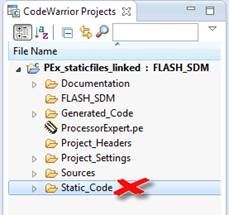
1. From the original linked mode PEx project, remove the “static_code” folder.
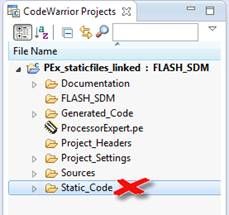
14392_14392.jpgimage001.jpg

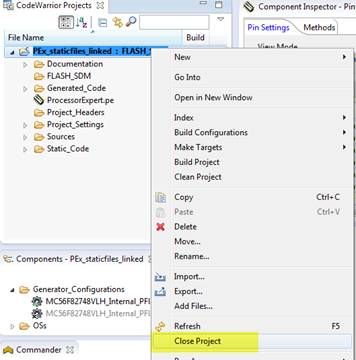
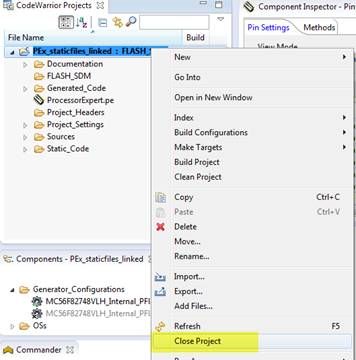
2. Close the project in CW10.6.

14396_14396.jpgimage002.jpg

Navigate to the top folder of the project, then open the ProcessorExpert.pe file using text editor software, for example, windows notepad.
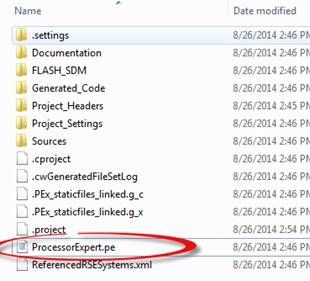
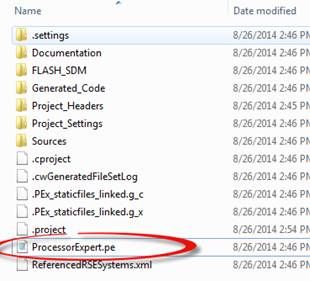
14397_14397.jpgimage003.jpg


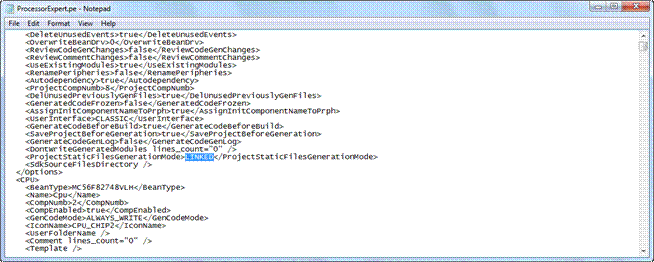
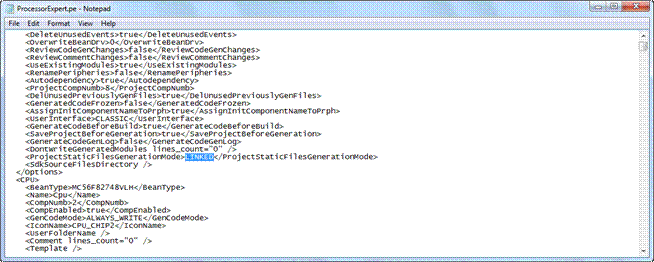
3. Seach the key world “LINKED” in the ProcessorExpert.pe file.
14398_14398.gifimage004.gif

Replace the line

<ProjectStaticFilesGenerationMode>LINKED</ProjectStaticFilesGenerationMode>

with

<ProjectStaticFilesGenerationMode>STANDALONE</ProjectStaticFilesGenerationMode>


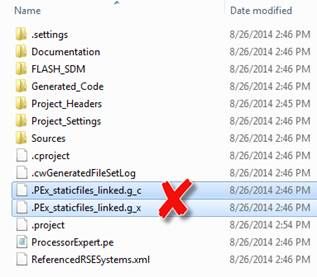
4. Remove the .ProcessorExpert.g_c file and .ProcessorExpert.g_x file under the top folder of the project.
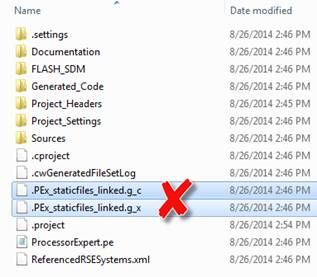
14399_14399.jpgimage005.jpg

5. Then re-open the project in CW10.6.
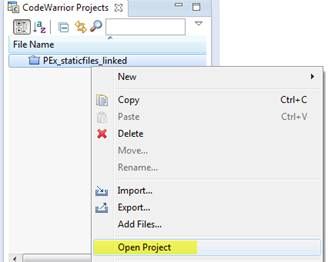
14400_14400.jpgimage006.jpg

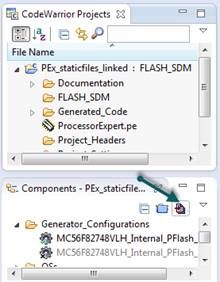
Click “Generate PEx Code” button from Pex components view.
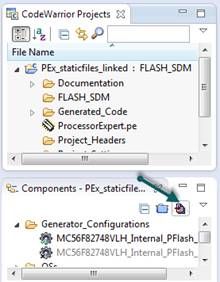
14401_14401.jpgimage007.jpg


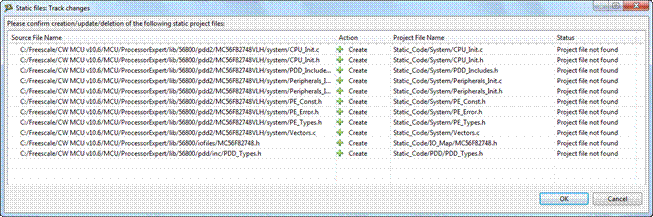
You will see a “static files track changes” dialog pop up. Click OK, PEx will create static files under the project folder.
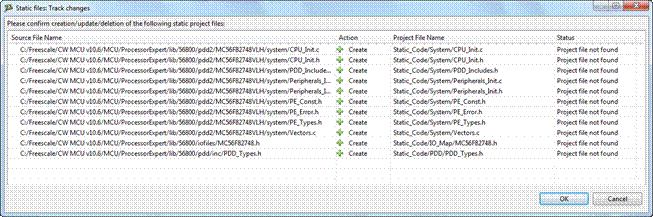
14402_14402.gifimage008.gif

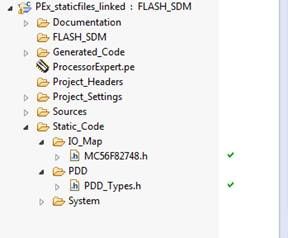
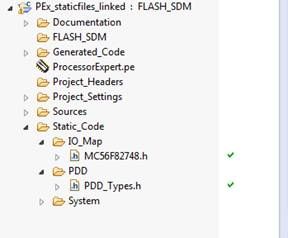
6. You will see that IO_Map, PDD and System files have been generated under Static_Code folder.
14403_14403.jpgimage009.jpg


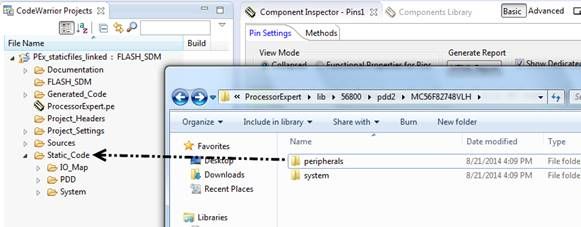
Unfortunately PEx doesn’t generate Peripherals files automatically. So you need copy the Peripherals files to the project manually. For dsc 56F82748 MCU in this case, the peripherals static files are located under the “C:\Freescale\CW MCU v10.6\MCU\ProcessorExpert\lib\56800\pdd2\MC56F82748VLH\perihperals” folder on my machine. You can simply drag and drop the folder to the project.
14404_14404.jpgimage010.jpg


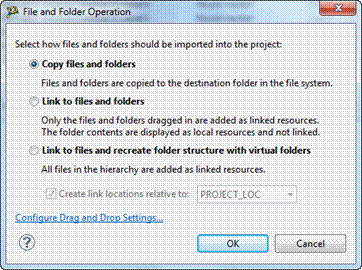
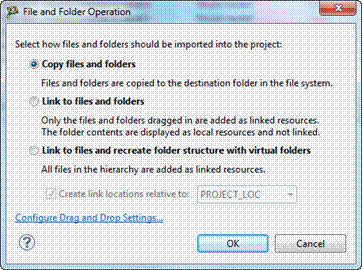
Then select “Copy files and folders” option and click “OK”.
14405_14405.gifimage011.gif


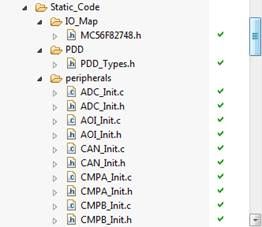
7. Now you can see that the static files are placed under the project folder now. You can verify this by checking if there is an arrow mark on the static file icons. Alternatively, you can also check by right clicking on a static file and then click “Show In Windows Explorer” item from the context menu. The stitic files should be located under the project folder.
14406_14406.jpgimage012.jpg


With above tricks, you can also convert a project from standalone mode to linked mode easily.

Labels (1)
Tags (1)
%3CLINGO-SUB%20id%3D%22lingo-sub-1109016%22%20slang%3D%22en-US%22%20mode%3D%22CREATE%22%3EConvert%20a%20Processor%20Expert%20project%20from%20linked%20mode%20to%20standalone%20mode%3C%2FLINGO-SUB%3E%3CLINGO-BODY%20id%3D%22lingo-body-1109016%22%20slang%3D%22en-US%22%20mode%3D%22CREATE%22%3E%3CP%20class%3D%22DocTitle%22%3E%3CSPAN%20style%3D%22color%3A%20windowtext%3B%22%3EProcessor%20Expert%20offers%20static%20code%20which%20allows%20choosing%20standalone%20mode%20and%20linked%20mode%20for%20each%20project.%20You%20can%20select%20either%20linked%20mode%20or%20standalone%20mode%20for%20static%20code%20during%20project%20creation.%20But%20what%20if%20you%20want%20to%20change%20mode%20for%20a%20created%20project%3F%20With%20the%20below%20steps%20you%20can%20learn%20how%20to%20convert%20a%20project%20from%20linked%20mode%20to%20standalone%20mode%20in%20CodeWarrior%20v10.6.%20%3C%2FSPAN%3E%3C%2FP%3E%3CP%20style%3D%22min-height%3A%208pt%3B%20padding%3A%200px%3B%22%3E%26nbsp%3B%3C%2FP%3E%3CP%3E%3CSPAN%20style%3D%22color%3A%20windowtext%3B%20font-size%3A%2010pt%3B%20line-height%3A%201.5em%3B%22%3E1.%20From%20the%20original%20linked%20mode%20PEx%20project%2C%20remove%20the%20%E2%80%9Cstatic_code%E2%80%9D%20folder.%3C%2FSPAN%3E%3C%2FP%3E%3CP%3E%3CSPAN%20class%3D%22lia-inline-image-display-wrapper%22%20image-alt%3D%2214392_14392.jpg%22%3E%3Cspan%20class%3D%22lia-inline-image-display-wrapper%22%20image-alt%3D%2214392_14392.jpg%22%20style%3D%22width%3A%20229px%3B%22%3E%3Cimg%20src%3D%22https%3A%2F%2Fcommunity.nxp.com%2Ft5%2Fimage%2Fserverpage%2Fimage-id%2F117269i47B96CEBA5164B9F%2Fimage-size%2Flarge%3Fv%3Dv2%26amp%3Bpx%3D999%22%20role%3D%22button%22%20title%3D%2214392_14392.jpg%22%20alt%3D%2214392_14392.jpg%22%20%2F%3E%3C%2Fspan%3E%3C%2FSPAN%3E%3CSPAN%20class%3D%22lia-inline-image-display-wrapper%22%20image-alt%3D%22image001.jpg%22%3E%3Cspan%20class%3D%22lia-inline-image-display-wrapper%22%20image-alt%3D%22image001.jpg%22%20style%3D%22width%3A%20229px%3B%22%3E%3Cimg%20src%3D%22https%3A%2F%2Fcommunity.nxp.com%2Ft5%2Fimage%2Fserverpage%2Fimage-id%2F45569iFBC1BAD652BF0764%2Fimage-size%2Flarge%3Fv%3Dv2%26amp%3Bpx%3D999%22%20role%3D%22button%22%20title%3D%22image001.jpg%22%20alt%3D%22image001.jpg%22%20%2F%3E%3C%2Fspan%3E%3C%2FSPAN%3E%3C%2FP%3E%3CP%3E%3CSPAN%20style%3D%22color%3A%20windowtext%3B%22%3E2.%20%3C%2FSPAN%3E%3CSPAN%20style%3D%22color%3A%20windowtext%3B%22%3EClose%20the%20project%20in%20CW10.6.%3C%2FSPAN%3E%3C%2FP%3E%3CP%3E%3CSPAN%20class%3D%22lia-inline-image-display-wrapper%22%20image-alt%3D%2214396_14396.jpg%22%3E%3Cspan%20class%3D%22lia-inline-image-display-wrapper%22%20image-alt%3D%2214396_14396.jpg%22%20style%3D%22width%3A%20356px%3B%22%3E%3Cimg%20src%3D%22https%3A%2F%2Fcommunity.nxp.com%2Ft5%2Fimage%2Fserverpage%2Fimage-id%2F117270i123CD54EF2800DC5%2Fimage-size%2Flarge%3Fv%3Dv2%26amp%3Bpx%3D999%22%20role%3D%22button%22%20title%3D%2214396_14396.jpg%22%20alt%3D%2214396_14396.jpg%22%20%2F%3E%3C%2Fspan%3E%3C%2FSPAN%3E%3CSPAN%20class%3D%22lia-inline-image-display-wrapper%22%20image-alt%3D%22image002.jpg%22%3E%3Cspan%20class%3D%22lia-inline-image-display-wrapper%22%20image-alt%3D%22image002.jpg%22%20style%3D%22width%3A%20356px%3B%22%3E%3Cimg%20src%3D%22https%3A%2F%2Fcommunity.nxp.com%2Ft5%2Fimage%2Fserverpage%2Fimage-id%2F40437iD8E07A2FA0193B0E%2Fimage-size%2Flarge%3Fv%3Dv2%26amp%3Bpx%3D999%22%20role%3D%22button%22%20title%3D%22image002.jpg%22%20alt%3D%22image002.jpg%22%20%2F%3E%3C%2Fspan%3E%3C%2FSPAN%3E%3C%2FP%3E%3CP%3E%3CSPAN%20style%3D%22color%3A%20windowtext%3B%22%3ENavigate%20to%20the%20top%20folder%20of%20the%20project%2C%20then%20open%20the%20ProcessorExpert.pe%20file%20using%20text%20editor%20software%2C%20for%20example%2C%20windows%20notepad.%3C%2FSPAN%3E%3C%2FP%3E%3CP%3E%3CSPAN%20style%3D%22color%3A%20windowtext%3B%22%3E%3CSPAN%20class%3D%22lia-inline-image-display-wrapper%22%20image-alt%3D%2214397_14397.jpg%22%3E%3Cspan%20class%3D%22lia-inline-image-display-wrapper%22%20image-alt%3D%2214397_14397.jpg%22%20style%3D%22width%3A%20310px%3B%22%3E%3Cimg%20src%3D%22https%3A%2F%2Fcommunity.nxp.com%2Ft5%2Fimage%2Fserverpage%2Fimage-id%2F117271i00BB384BF3A84D18%2Fimage-size%2Flarge%3Fv%3Dv2%26amp%3Bpx%3D999%22%20role%3D%22button%22%20title%3D%2214397_14397.jpg%22%20alt%3D%2214397_14397.jpg%22%20%2F%3E%3C%2Fspan%3E%3C%2FSPAN%3E%3CSPAN%20class%3D%22lia-inline-image-display-wrapper%22%20image-alt%3D%22image003.jpg%22%3E%3Cspan%20class%3D%22lia-inline-image-display-wrapper%22%20image-alt%3D%22image003.jpg%22%20style%3D%22width%3A%20310px%3B%22%3E%3Cimg%20src%3D%22https%3A%2F%2Fcommunity.nxp.com%2Ft5%2Fimage%2Fserverpage%2Fimage-id%2F45779i6AF053B1A68E40A2%2Fimage-size%2Flarge%3Fv%3Dv2%26amp%3Bpx%3D999%22%20role%3D%22button%22%20title%3D%22image003.jpg%22%20alt%3D%22image003.jpg%22%20%2F%3E%3C%2Fspan%3E%3C%2FSPAN%3E%3CBR%20%2F%3E%3C%2FSPAN%3E%3C%2FP%3E%3CP%3E%3CSPAN%20style%3D%22color%3A%20windowtext%3B%22%3E%3CBR%20%2F%3E%3C%2FSPAN%3E%3C%2FP%3E%3CP%3E%3CSPAN%20style%3D%22color%3A%20windowtext%3B%22%3E3.%20%3C%2FSPAN%3E%3CSPAN%20style%3D%22color%3A%20windowtext%3B%22%3ESeach%20the%20key%20world%20%E2%80%9CLINKED%E2%80%9D%20in%20the%20ProcessorExpert.pe%20file.%3C%2FSPAN%3E%3C%2FP%3E%3CP%3E%3CSPAN%20class%3D%22lia-inline-image-display-wrapper%22%20image-alt%3D%2214398_14398.gif%22%3E%3Cspan%20class%3D%22lia-inline-image-display-wrapper%22%20image-alt%3D%2214398_14398.gif%22%20style%3D%22width%3A%20654px%3B%22%3E%3Cimg%20src%3D%22https%3A%2F%2Fcommunity.nxp.com%2Ft5%2Fimage%2Fserverpage%2Fimage-id%2F117272i729E21E155847A7F%2Fimage-size%2Flarge%3Fv%3Dv2%26amp%3Bpx%3D999%22%20role%3D%22button%22%20title%3D%2214398_14398.gif%22%20alt%3D%2214398_14398.gif%22%20%2F%3E%3C%2Fspan%3E%3C%2FSPAN%3E%3CSPAN%20class%3D%22lia-inline-image-display-wrapper%22%20image-alt%3D%22image004.gif%22%3E%3Cspan%20class%3D%22lia-inline-image-display-wrapper%22%20image-alt%3D%22image004.gif%22%20style%3D%22width%3A%20654px%3B%22%3E%3Cimg%20src%3D%22https%3A%2F%2Fcommunity.nxp.com%2Ft5%2Fimage%2Fserverpage%2Fimage-id%2F45786iD09C7D367F7084BA%2Fimage-size%2Flarge%3Fv%3Dv2%26amp%3Bpx%3D999%22%20role%3D%22button%22%20title%3D%22image004.gif%22%20alt%3D%22image004.gif%22%20%2F%3E%3C%2Fspan%3E%3C%2FSPAN%3E%3C%2FP%3E%3CP%3E%3CSPAN%20style%3D%22color%3A%20windowtext%3B%22%3EReplace%20the%20line%3C%2FSPAN%3E%3C%2FP%3E%3CP%3E%3CSPAN%20style%3D%22color%3A%20windowtext%3B%22%3E%3CPROJECTSTATICFILESGENERATIONMODE%3ELINKED%3C%2FPROJECTSTATICFILESGENERATIONMODE%3E%3C%2FSPAN%3E%3C%2FP%3E%3CP%3E%3CSPAN%20style%3D%22color%3A%20windowtext%3B%22%3Ewith%3C%2FSPAN%3E%3C%2FP%3E%3CP%3E%3CSPAN%20style%3D%22color%3A%20windowtext%3B%22%3E%3CPROJECTSTATICFILESGENERATIONMODE%3ESTANDALONE%3C%2FPROJECTSTATICFILESGENERATIONMODE%3E%3C%2FSPAN%3E%3C%2FP%3E%3CP%20style%3D%22min-height%3A%208pt%3B%20padding%3A%200px%3B%22%3E%26nbsp%3B%3C%2FP%3E%3CP%3E%3CSPAN%20style%3D%22color%3A%20windowtext%3B%22%3E4.%20Remove%20the%20.ProcessorExpert.g_c%20file%20and%20.ProcessorExpert.g_x%20file%20under%20the%20top%20folder%20of%20the%20project.%3C%2FSPAN%3E%3C%2FP%3E%3CP%3E%3CSPAN%20class%3D%22lia-inline-image-display-wrapper%22%20image-alt%3D%2214399_14399.jpg%22%3E%3Cspan%20class%3D%22lia-inline-image-display-wrapper%22%20image-alt%3D%2214399_14399.jpg%22%20style%3D%22width%3A%20317px%3B%22%3E%3Cimg%20src%3D%22https%3A%2F%2Fcommunity.nxp.com%2Ft5%2Fimage%2Fserverpage%2Fimage-id%2F117273iD940D91D37BADBCF%2Fimage-size%2Flarge%3Fv%3Dv2%26amp%3Bpx%3D999%22%20role%3D%22button%22%20title%3D%2214399_14399.jpg%22%20alt%3D%2214399_14399.jpg%22%20%2F%3E%3C%2Fspan%3E%3C%2FSPAN%3E%3CSPAN%20class%3D%22lia-inline-image-display-wrapper%22%20image-alt%3D%22image005.jpg%22%3E%3Cspan%20class%3D%22lia-inline-image-display-wrapper%22%20image-alt%3D%22image005.jpg%22%20style%3D%22width%3A%20317px%3B%22%3E%3Cimg%20src%3D%22https%3A%2F%2Fcommunity.nxp.com%2Ft5%2Fimage%2Fserverpage%2Fimage-id%2F45728iDB7C824017F98895%2Fimage-size%2Flarge%3Fv%3Dv2%26amp%3Bpx%3D999%22%20role%3D%22button%22%20title%3D%22image005.jpg%22%20alt%3D%22image005.jpg%22%20%2F%3E%3C%2Fspan%3E%3C%2FSPAN%3E%3C%2FP%3E%3CP%3E%3CSPAN%20style%3D%22color%3A%20windowtext%3B%22%3E5.%20%3C%2FSPAN%3E%3CSPAN%20style%3D%22color%3A%20windowtext%3B%22%3EThen%20re-open%20the%20project%20in%20CW10.6.%3C%2FSPAN%3E%3C%2FP%3E%3CP%3E%3CSPAN%20class%3D%22lia-inline-image-display-wrapper%22%20image-alt%3D%2214400_14400.jpg%22%3E%3Cspan%20class%3D%22lia-inline-image-display-wrapper%22%20image-alt%3D%2214400_14400.jpg%22%20style%3D%22width%3A%20328px%3B%22%3E%3Cimg%20src%3D%22https%3A%2F%2Fcommunity.nxp.com%2Ft5%2Fimage%2Fserverpage%2Fimage-id%2F117274iEE9BC3AF0F97D1C9%2Fimage-size%2Flarge%3Fv%3Dv2%26amp%3Bpx%3D999%22%20role%3D%22button%22%20title%3D%2214400_14400.jpg%22%20alt%3D%2214400_14400.jpg%22%20%2F%3E%3C%2Fspan%3E%3C%2FSPAN%3E%3CSPAN%20class%3D%22lia-inline-image-display-wrapper%22%20image-alt%3D%22image006.jpg%22%3E%3Cspan%20class%3D%22lia-inline-image-display-wrapper%22%20image-alt%3D%22image006.jpg%22%20style%3D%22width%3A%20328px%3B%22%3E%3Cimg%20src%3D%22https%3A%2F%2Fcommunity.nxp.com%2Ft5%2Fimage%2Fserverpage%2Fimage-id%2F45568iAE1CE98B1227E8F6%2Fimage-size%2Flarge%3Fv%3Dv2%26amp%3Bpx%3D999%22%20role%3D%22button%22%20title%3D%22image006.jpg%22%20alt%3D%22image006.jpg%22%20%2F%3E%3C%2Fspan%3E%3C%2FSPAN%3E%3C%2FP%3E%3CP%3E%3CSPAN%20style%3D%22color%3A%20windowtext%3B%22%3EClick%20%E2%80%9CGenerate%20PEx%20Code%E2%80%9D%20button%20from%20Pex%20components%20view.%20%3C%2FSPAN%3E%3C%2FP%3E%3CP%3E%3CSPAN%20class%3D%22lia-inline-image-display-wrapper%22%20image-alt%3D%2214401_14401.jpg%22%3E%3Cspan%20class%3D%22lia-inline-image-display-wrapper%22%20image-alt%3D%2214401_14401.jpg%22%20style%3D%22width%3A%20220px%3B%22%3E%3Cimg%20src%3D%22https%3A%2F%2Fcommunity.nxp.com%2Ft5%2Fimage%2Fserverpage%2Fimage-id%2F117275iD8AF01DFD414981E%2Fimage-size%2Flarge%3Fv%3Dv2%26amp%3Bpx%3D999%22%20role%3D%22button%22%20title%3D%2214401_14401.jpg%22%20alt%3D%2214401_14401.jpg%22%20%2F%3E%3C%2Fspan%3E%3C%2FSPAN%3E%3CSPAN%20class%3D%22lia-inline-image-display-wrapper%22%20image-alt%3D%22image007.jpg%22%3E%3Cspan%20class%3D%22lia-inline-image-display-wrapper%22%20image-alt%3D%22image007.jpg%22%20style%3D%22width%3A%20220px%3B%22%3E%3Cimg%20src%3D%22https%3A%2F%2Fcommunity.nxp.com%2Ft5%2Fimage%2Fserverpage%2Fimage-id%2F42875i2D870DA0FF57A6B6%2Fimage-size%2Flarge%3Fv%3Dv2%26amp%3Bpx%3D999%22%20role%3D%22button%22%20title%3D%22image007.jpg%22%20alt%3D%22image007.jpg%22%20%2F%3E%3C%2Fspan%3E%3C%2FSPAN%3E%3C%2FP%3E%3CP%20style%3D%22min-height%3A%208pt%3B%20padding%3A%200px%3B%22%3E%26nbsp%3B%3C%2FP%3E%3CP%3E%3CSPAN%20style%3D%22color%3A%20windowtext%3B%22%3EYou%20will%20see%20a%20%E2%80%9Cstatic%20files%20track%20changes%E2%80%9D%20dialog%20pop%20up.%20Click%20OK%2C%20PEx%20will%20create%20static%20files%20under%20the%20project%20folder.%3C%2FSPAN%3E%3C%2FP%3E%3CP%3E%3CSPAN%20class%3D%22lia-inline-image-display-wrapper%22%20image-alt%3D%2214402_14402.gif%22%3E%3Cspan%20class%3D%22lia-inline-image-display-wrapper%22%20image-alt%3D%2214402_14402.gif%22%20style%3D%22width%3A%20653px%3B%22%3E%3Cimg%20src%3D%22https%3A%2F%2Fcommunity.nxp.com%2Ft5%2Fimage%2Fserverpage%2Fimage-id%2F117276i52D3F87918469BF4%2Fimage-size%2Flarge%3Fv%3Dv2%26amp%3Bpx%3D999%22%20role%3D%22button%22%20title%3D%2214402_14402.gif%22%20alt%3D%2214402_14402.gif%22%20%2F%3E%3C%2Fspan%3E%3C%2FSPAN%3E%3CSPAN%20class%3D%22lia-inline-image-display-wrapper%22%20image-alt%3D%22image008.gif%22%3E%3Cspan%20class%3D%22lia-inline-image-display-wrapper%22%20image-alt%3D%22image008.gif%22%20style%3D%22width%3A%20653px%3B%22%3E%3Cimg%20src%3D%22https%3A%2F%2Fcommunity.nxp.com%2Ft5%2Fimage%2Fserverpage%2Fimage-id%2F43467iE0169FB7FE40236E%2Fimage-size%2Flarge%3Fv%3Dv2%26amp%3Bpx%3D999%22%20role%3D%22button%22%20title%3D%22image008.gif%22%20alt%3D%22image008.gif%22%20%2F%3E%3C%2Fspan%3E%3C%2FSPAN%3E%3C%2FP%3E%3CP%3E%3CSPAN%20style%3D%22color%3A%20windowtext%3B%22%3E6.%20%3C%2FSPAN%3E%3CSPAN%20style%3D%22color%3A%20windowtext%3B%22%3EYou%20will%20see%20that%20IO_Map%2C%20PDD%20and%20System%20files%20have%20been%20generated%20under%20Static_Code%20folder.%20%3C%2FSPAN%3E%3C%2FP%3E%3CP%3E%3CSPAN%20class%3D%22lia-inline-image-display-wrapper%22%20image-alt%3D%2214403_14403.jpg%22%3E%3Cspan%20class%3D%22lia-inline-image-display-wrapper%22%20image-alt%3D%2214403_14403.jpg%22%20style%3D%22width%3A%20288px%3B%22%3E%3Cimg%20src%3D%22https%3A%2F%2Fcommunity.nxp.com%2Ft5%2Fimage%2Fserverpage%2Fimage-id%2F117277i5752AEC011F79622%2Fimage-size%2Flarge%3Fv%3Dv2%26amp%3Bpx%3D999%22%20role%3D%22button%22%20title%3D%2214403_14403.jpg%22%20alt%3D%2214403_14403.jpg%22%20%2F%3E%3C%2Fspan%3E%3C%2FSPAN%3E%3CSPAN%20class%3D%22lia-inline-image-display-wrapper%22%20image-alt%3D%22image009.jpg%22%3E%3Cspan%20class%3D%22lia-inline-image-display-wrapper%22%20image-alt%3D%22image009.jpg%22%20style%3D%22width%3A%20288px%3B%22%3E%3Cimg%20src%3D%22https%3A%2F%2Fcommunity.nxp.com%2Ft5%2Fimage%2Fserverpage%2Fimage-id%2F41033i1E55E3F45399927F%2Fimage-size%2Flarge%3Fv%3Dv2%26amp%3Bpx%3D999%22%20role%3D%22button%22%20title%3D%22image009.jpg%22%20alt%3D%22image009.jpg%22%20%2F%3E%3C%2Fspan%3E%3C%2FSPAN%3E%3C%2FP%3E%3CP%20style%3D%22min-height%3A%208pt%3B%20padding%3A%200px%3B%22%3E%26nbsp%3B%3C%2FP%3E%3CP%3E%3CSPAN%20style%3D%22color%3A%20windowtext%3B%22%3E%3CSPAN%20style%3D%22font-size%3A%2010.0pt%3B%20font-family%3A%20'Helvetica'%2C'sans-serif'%3B%22%3EUnfortunately%20PEx%20doesn%E2%80%99t%20generate%20Peripherals%20files%20automatically.%20%3C%2FSPAN%3ESo%20you%20need%20copy%20the%20Peripherals%20files%20to%20the%20project%20manually.%20For%20dsc%2056F82748%20MCU%20in%20this%20case%2C%20the%20peripherals%20static%20files%20are%20located%20under%20the%20%E2%80%9CC%3A%5CFreescale%5CCW%20MCU%20v10.6%5CMCU%5CProcessorExpert%5Clib%5C56800%5Cpdd2%5CMC56F82748VLH%5Cperihperals%E2%80%9D%20folder%20on%20my%20machine.%20You%20can%20simply%20drag%20and%20drop%20the%20folder%20to%20the%20project.%3C%2FSPAN%3E%3C%2FP%3E%3CP%3E%3CSPAN%20style%3D%22color%3A%20windowtext%3B%22%3E%3CSPAN%20class%3D%22lia-inline-image-display-wrapper%22%20image-alt%3D%2214404_14404.jpg%22%3E%3Cspan%20class%3D%22lia-inline-image-display-wrapper%22%20image-alt%3D%2214404_14404.jpg%22%20style%3D%22width%3A%20581px%3B%22%3E%3Cimg%20src%3D%22https%3A%2F%2Fcommunity.nxp.com%2Ft5%2Fimage%2Fserverpage%2Fimage-id%2F117278iBCDFA8F3701A2864%2Fimage-size%2Flarge%3Fv%3Dv2%26amp%3Bpx%3D999%22%20role%3D%22button%22%20title%3D%2214404_14404.jpg%22%20alt%3D%2214404_14404.jpg%22%20%2F%3E%3C%2Fspan%3E%3C%2FSPAN%3E%3CSPAN%20class%3D%22lia-inline-image-display-wrapper%22%20image-alt%3D%22image010.jpg%22%3E%3Cspan%20class%3D%22lia-inline-image-display-wrapper%22%20image-alt%3D%22image010.jpg%22%20style%3D%22width%3A%20581px%3B%22%3E%3Cimg%20src%3D%22https%3A%2F%2Fcommunity.nxp.com%2Ft5%2Fimage%2Fserverpage%2Fimage-id%2F12246i2EB8D57EB2B7C3F3%2Fimage-size%2Flarge%3Fv%3Dv2%26amp%3Bpx%3D999%22%20role%3D%22button%22%20title%3D%22image010.jpg%22%20alt%3D%22image010.jpg%22%20%2F%3E%3C%2Fspan%3E%3C%2FSPAN%3E%3CBR%20%2F%3E%3C%2FSPAN%3E%3C%2FP%3E%3CP%20style%3D%22min-height%3A%208pt%3B%20padding%3A%200px%3B%22%3E%26nbsp%3B%3C%2FP%3E%3CP%20style%3D%22min-height%3A%208pt%3B%20padding%3A%200px%3B%22%3E%26nbsp%3B%3C%2FP%3E%3CP%3E%3CSPAN%20style%3D%22color%3A%20windowtext%3B%22%3EThen%20select%20%E2%80%9CCopy%20files%20and%20folders%E2%80%9D%20option%20and%20click%20%E2%80%9COK%E2%80%9D.%3C%2FSPAN%3E%3C%2FP%3E%3CP%3E%3CSPAN%20class%3D%22lia-inline-image-display-wrapper%22%20image-alt%3D%2214405_14405.gif%22%3E%3Cspan%20class%3D%22lia-inline-image-display-wrapper%22%20image-alt%3D%2214405_14405.gif%22%20style%3D%22width%3A%20362px%3B%22%3E%3Cimg%20src%3D%22https%3A%2F%2Fcommunity.nxp.com%2Ft5%2Fimage%2Fserverpage%2Fimage-id%2F117279iE5D25AC8D4D04F42%2Fimage-size%2Flarge%3Fv%3Dv2%26amp%3Bpx%3D999%22%20role%3D%22button%22%20title%3D%2214405_14405.gif%22%20alt%3D%2214405_14405.gif%22%20%2F%3E%3C%2Fspan%3E%3C%2FSPAN%3E%3CSPAN%20class%3D%22lia-inline-image-display-wrapper%22%20image-alt%3D%22image011.gif%22%3E%3Cspan%20class%3D%22lia-inline-image-display-wrapper%22%20image-alt%3D%22image011.gif%22%20style%3D%22width%3A%20362px%3B%22%3E%3Cimg%20src%3D%22https%3A%2F%2Fcommunity.nxp.com%2Ft5%2Fimage%2Fserverpage%2Fimage-id%2F42265i1CE1CCA126B78F5D%2Fimage-size%2Flarge%3Fv%3Dv2%26amp%3Bpx%3D999%22%20role%3D%22button%22%20title%3D%22image011.gif%22%20alt%3D%22image011.gif%22%20%2F%3E%3C%2Fspan%3E%3C%2FSPAN%3E%3C%2FP%3E%3CP%20style%3D%22min-height%3A%208pt%3B%20padding%3A%200px%3B%22%3E%26nbsp%3B%3C%2FP%3E%3CP%20style%3D%22min-height%3A%208pt%3B%20padding%3A%200px%3B%22%3E%26nbsp%3B%3C%2FP%3E%3CP%3E%3CSPAN%20style%3D%22color%3A%20windowtext%3B%22%3E7.%20%3C%2FSPAN%3E%3CSPAN%20style%3D%22color%3A%20windowtext%3B%22%3ENow%20you%20can%20see%20that%20the%20static%20files%20are%20placed%20under%20the%20project%20folder%20now.%20You%20can%20verify%20this%20by%20checking%20if%20there%20is%20an%20arrow%20mark%20on%20the%20static%20file%20icons.%20%3CSPAN%20style%3D%22color%3A%20%23000000%3B%22%3EAlternatively%2C%20you%20can%20also%20check%20by%20right%20clicking%20on%20a%20static%20file%20and%20then%20click%20%E2%80%9CShow%20In%20Windows%20Explorer%E2%80%9D%20item%20from%20the%20context%20menu.%20The%20stitic%20files%20should%20be%20located%20under%20the%20project%20folder.%3C%2FSPAN%3E%3C%2FSPAN%3E%3C%2FP%3E%3CP%3E%3CSPAN%20class%3D%22lia-inline-image-display-wrapper%22%20image-alt%3D%2214406_14406.jpg%22%3E%3Cspan%20class%3D%22lia-inline-image-display-wrapper%22%20image-alt%3D%2214406_14406.jpg%22%20style%3D%22width%3A%20262px%3B%22%3E%3Cimg%20src%3D%22https%3A%2F%2Fcommunity.nxp.com%2Ft5%2Fimage%2Fserverpage%2Fimage-id%2F117280i062144315E6A613F%2Fimage-size%2Flarge%3Fv%3Dv2%26amp%3Bpx%3D999%22%20role%3D%22button%22%20title%3D%2214406_14406.jpg%22%20alt%3D%2214406_14406.jpg%22%20%2F%3E%3C%2Fspan%3E%3C%2FSPAN%3E%3CSPAN%20class%3D%22lia-inline-image-display-wrapper%22%20image-alt%3D%22image012.jpg%22%3E%3Cspan%20class%3D%22lia-inline-image-display-wrapper%22%20image-alt%3D%22image012.jpg%22%20style%3D%22width%3A%20262px%3B%22%3E%3Cimg%20src%3D%22https%3A%2F%2Fcommunity.nxp.com%2Ft5%2Fimage%2Fserverpage%2Fimage-id%2F42979i3C47D81633253F18%2Fimage-size%2Flarge%3Fv%3Dv2%26amp%3Bpx%3D999%22%20role%3D%22button%22%20title%3D%22image012.jpg%22%20alt%3D%22image012.jpg%22%20%2F%3E%3C%2Fspan%3E%3C%2FSPAN%3E%3C%2FP%3E%3CP%20style%3D%22min-height%3A%208pt%3B%20padding%3A%200px%3B%22%3E%26nbsp%3B%3C%2FP%3E%3CP%3E%3CSPAN%20style%3D%22color%3A%20windowtext%3B%22%3EWith%20above%20tricks%2C%20you%20can%20also%20convert%20a%20project%20from%20standalone%20mode%20to%20linked%20mode%20easily.%3C%2FSPAN%3E%3C%2FP%3E%3C%2FLINGO-BODY%3E%3CLINGO-LABS%20id%3D%22lingo-labs-1109016%22%20slang%3D%22en-US%22%20mode%3D%22CREATE%22%3E%3CLINGO-LABEL%3EGeneral%3C%2FLINGO-LABEL%3E%3C%2FLINGO-LABS%3E
No ratings
Version history
Last update:
‎08-26-2014 06:56 PM
Updated by: