
- Forums
- Product Forums
- General Purpose MicrocontrollersGeneral Purpose Microcontrollers
- i.MX Forumsi.MX Forums
- QorIQ Processing PlatformsQorIQ Processing Platforms
- Identification and SecurityIdentification and Security
- Power ManagementPower Management
- Wireless ConnectivityWireless Connectivity
- RFID / NFCRFID / NFC
- Advanced AnalogAdvanced Analog
- Neural Processing UnitsNeural Processing Units
- MCX Microcontrollers
- S32G
- S32K
- S32V
- MPC5xxx
- Other NXP Products
- S12 / MagniV Microcontrollers
- Powertrain and Electrification Analog Drivers
- Sensors
- Vybrid Processors
- Digital Signal Controllers
- 8-bit Microcontrollers
- ColdFire/68K Microcontrollers and Processors
- PowerQUICC Processors
- OSBDM and TBDML
- S32M
- S32Z/E
-
- Solution Forums
- Software Forums
- MCUXpresso Software and ToolsMCUXpresso Software and Tools
- CodeWarriorCodeWarrior
- MQX Software SolutionsMQX Software Solutions
- Model-Based Design Toolbox (MBDT)Model-Based Design Toolbox (MBDT)
- FreeMASTER
- eIQ Machine Learning Software
- Embedded Software and Tools Clinic
- S32 SDK
- S32 Design Studio
- GUI Guider
- Zephyr Project
- Voice Technology
- Application Software Packs
- Secure Provisioning SDK (SPSDK)
- Processor Expert Software
- Generative AI & LLMs
-
- Topics
- Mobile Robotics - Drones and RoversMobile Robotics - Drones and Rovers
- NXP Training ContentNXP Training Content
- University ProgramsUniversity Programs
- Rapid IoT
- NXP Designs
- SafeAssure-Community
- OSS Security & Maintenance
- Using Our Community
-
- Cloud Lab Forums
-
- Knowledge Bases
- ARM Microcontrollers
- i.MX Processors
- Identification and Security
- Model-Based Design Toolbox (MBDT)
- QorIQ Processing Platforms
- S32 Automotive Processing Platform
- Wireless Connectivity
- CodeWarrior
- MCUXpresso Suite of Software and Tools
- MQX Software Solutions
- RFID / NFC
- Advanced Analog
- Neural Processing Units
-
- NXP Tech Blogs
- Home
- :
- General Purpose Microcontrollers
- :
- LPC Microcontrollers
- :
- LPC546XX USB failed to apply 45Ω HS resistor
LPC546XX USB failed to apply 45Ω HS resistor
- Subscribe to RSS Feed
- Mark Topic as New
- Mark Topic as Read
- Float this Topic for Current User
- Bookmark
- Subscribe
- Mute
- Printer Friendly Page

- Mark as New
- Bookmark
- Subscribe
- Mute
- Subscribe to RSS Feed
- Permalink
- Report Inappropriate Content
Hello:
I use lpc546xx as a usb composite device. And I've found one of my developing board failed in USB enumeration(I have several the same boards) , but the rests work fine(with the same fireware).
And then I used usb analyzer tools tracing USB Packets, and found that lpc546xx failed during RESET stage.
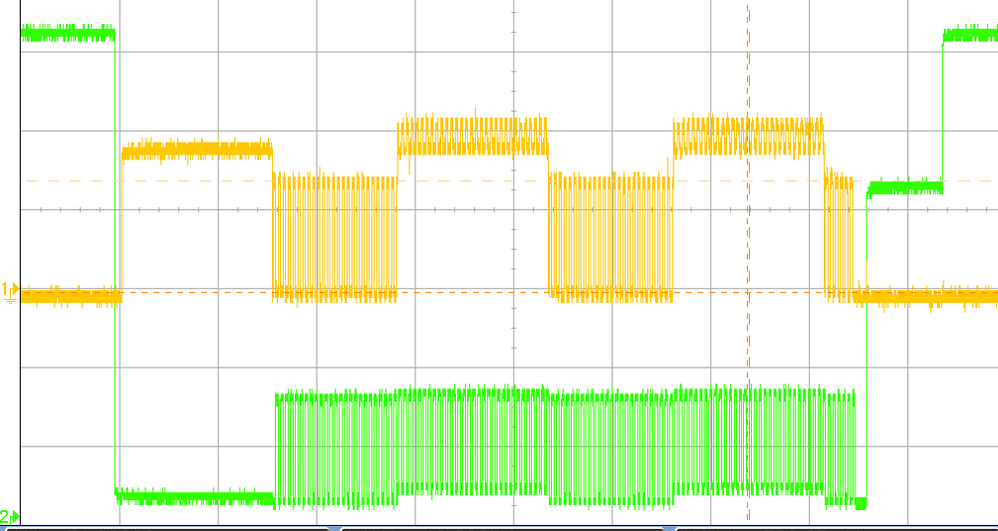
Then I've used OSC to view USB D+/D- wave. After Reset, the device sended Chirp-K, and then Hub sended K-J pairs; but The device doesn't apply 45Ω HS resistor termination to D+/D-. So K/J pairs remains 800mV, and this maybe the reason USB device failed in enumeration.
So, my question here:
1. Is there any register control the 45Ω termination directly in lpc546xx ? So I could test the termination without USB HUB;
2. I've checked the PCB routing and connection, D+/D- are well connected to MCU pins; and mcu internal 1.5KΩ pull-up resistor also works well. So HighSpeed terminals failed to apply could be mcu IC problems?
Thanks for your advice !
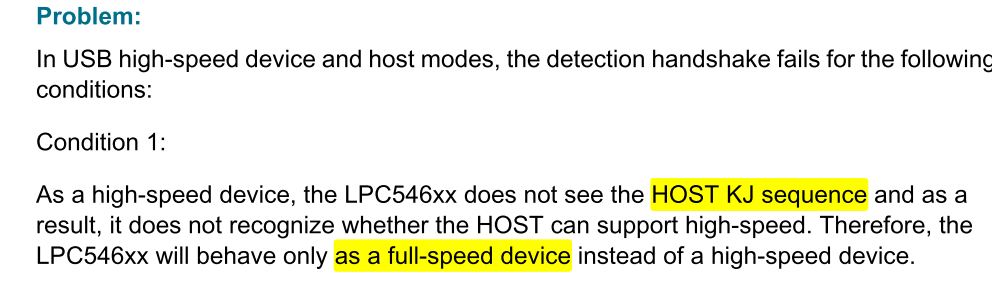
3. I've checked the Errata Sheet. It says device can't see KJ Chirps (page 12) . Could this be the reason of enumeration failure? The Errata also point out the SDK had made a soft walk-around. Would you please tell me the places of corresponding modification in SDK? I want to be sure if I implemented the modified SDK.
Ps: OSC signal wave (Green for D+ , Yellow for D-)
Solved! Go to Solution.

- Mark as New
- Bookmark
- Subscribe
- Mute
- Subscribe to RSS Feed
- Permalink
- Report Inappropriate Content
Summary
I worked through NXP support to identify the workaround in the SDK. The workaround is implemented in a single example within the SDK. The USB.6 errata states "the software work-around is implemented on the SDK software platform for the LPC546xx device and must be used to avoid this issue", which I find to be harmfully misleading at best. If you use the SDK and the USB stack in your application, the workaround for errata USB.6 is NOT APPLIED. You will see failures on about 20% of your units in production with some hosts & hubs! The good news is that the workaround is effective, but you must manually modify your USB code to apply it.
Details
I submitted Case #00220077 to NXP on Jun 27, 2019, and nxf46116 was assigned to the case. She initially tried to find the workaround in the SDK. Like me, she didn't find the workaround, so she contacted an application engineer. On July 11, 2019, I received a response:
I receive an answer from the application engineer, it looks like this workaround is only implemented in the dev_hid_mouse example...
The workaround is only in one specific example of the SDK, and only in the bare metal version. As of SDK 2.5 with the LPC54608, see USB_Device_HsPhyChirpIssueWorkaround in:
boards\lpcxpresso54608\usb_examples\usb_device_hid_mouse\bm\mouse.c
Here is a brief description of the USB.6 errata:
- LPC546xx attempts to connect to the USB host. The host may signal K-J chirp pairs to request high-speed.
- If the LPC does not see the K-J pairs (the defect), then it will incorrectly be in full-speed mode. Future communication will fail.
I have built approximately 450 units so far using the LPC54608, and testing found 63 failed to establish a connection with one specific Windows 10 PC and hub configuration (14%). However, this testing is not exhaustive of this issue, and I suspect some liability with other units in other configurations.
Here is how this workaround works:
- When the LPC negotiates full-speed mode, don't trust it. Enter the test_force_enable USB test mode which forces the device into high-speed mode.
- Wait for 100 ms and attempt to see if the frame number changes. If the LPC is receiving SOF, then the host is in high-speed mode.
- Disable the test_force_enable test mode.
- Whether the host is in high-speed mode or full-speed mode, the LPC is now in violation of the USB spec. Disconnect, wait 510 ms, and reconnect. The host will then renegotiate. For some reason, the LPC will see the high-speed K-J chirp pairs this time and work correctly. If the host is really full-speed, don't do this workaround again and accept the full-speed connection.
Even with the workaround, the LPC546xx will violate the USB specification which is a non-starter for some applications. The errata should clearly state this!
With this workaround applied, I have confirmed that all previously failing units now correctly connect to the Windows 10 host. I also previously observed a particularly unusual hub that even caused "working" devices to later disconnect when the device started full-rate data streaming at 8 MB/s. This hub is perhaps slightly out of spec. With this fix applied, I no longer observe these disconnects. Testing on Linux and macOS also works.
Thank you to nxf46116 for your support in identifying this critical issue for my product. Unfortunately, I am disturbed by the "LPC5456xx Errata sheet" USB.6 write-up which is misleading at best. Although an example of the workaround may be found in the SDK, neither me nor Alexis could find it. If an application uses the SDK platform, this workaround is not applied by the SDK. All chips of any complexity have errata, and sometimes the errata fixes do not work as well as hoped. However, this USB.6 LPC546xx errata is the first one I have encountered in my career that gave a harmfully misleading statement (lie?) about the workaround being applied.
- Mark as New
- Bookmark
- Subscribe
- Mute
- Subscribe to RSS Feed
- Permalink
- Report Inappropriate Content
Summary
I worked through NXP support to identify the workaround in the SDK. The workaround is implemented in a single example within the SDK. The USB.6 errata states "the software work-around is implemented on the SDK software platform for the LPC546xx device and must be used to avoid this issue", which I find to be harmfully misleading at best. If you use the SDK and the USB stack in your application, the workaround for errata USB.6 is NOT APPLIED. You will see failures on about 20% of your units in production with some hosts & hubs! The good news is that the workaround is effective, but you must manually modify your USB code to apply it.
Details
I submitted Case #00220077 to NXP on Jun 27, 2019, and nxf46116 was assigned to the case. She initially tried to find the workaround in the SDK. Like me, she didn't find the workaround, so she contacted an application engineer. On July 11, 2019, I received a response:
I receive an answer from the application engineer, it looks like this workaround is only implemented in the dev_hid_mouse example...
The workaround is only in one specific example of the SDK, and only in the bare metal version. As of SDK 2.5 with the LPC54608, see USB_Device_HsPhyChirpIssueWorkaround in:
boards\lpcxpresso54608\usb_examples\usb_device_hid_mouse\bm\mouse.c
Here is a brief description of the USB.6 errata:
- LPC546xx attempts to connect to the USB host. The host may signal K-J chirp pairs to request high-speed.
- If the LPC does not see the K-J pairs (the defect), then it will incorrectly be in full-speed mode. Future communication will fail.
I have built approximately 450 units so far using the LPC54608, and testing found 63 failed to establish a connection with one specific Windows 10 PC and hub configuration (14%). However, this testing is not exhaustive of this issue, and I suspect some liability with other units in other configurations.
Here is how this workaround works:
- When the LPC negotiates full-speed mode, don't trust it. Enter the test_force_enable USB test mode which forces the device into high-speed mode.
- Wait for 100 ms and attempt to see if the frame number changes. If the LPC is receiving SOF, then the host is in high-speed mode.
- Disable the test_force_enable test mode.
- Whether the host is in high-speed mode or full-speed mode, the LPC is now in violation of the USB spec. Disconnect, wait 510 ms, and reconnect. The host will then renegotiate. For some reason, the LPC will see the high-speed K-J chirp pairs this time and work correctly. If the host is really full-speed, don't do this workaround again and accept the full-speed connection.
Even with the workaround, the LPC546xx will violate the USB specification which is a non-starter for some applications. The errata should clearly state this!
With this workaround applied, I have confirmed that all previously failing units now correctly connect to the Windows 10 host. I also previously observed a particularly unusual hub that even caused "working" devices to later disconnect when the device started full-rate data streaming at 8 MB/s. This hub is perhaps slightly out of spec. With this fix applied, I no longer observe these disconnects. Testing on Linux and macOS also works.
Thank you to nxf46116 for your support in identifying this critical issue for my product. Unfortunately, I am disturbed by the "LPC5456xx Errata sheet" USB.6 write-up which is misleading at best. Although an example of the workaround may be found in the SDK, neither me nor Alexis could find it. If an application uses the SDK platform, this workaround is not applied by the SDK. All chips of any complexity have errata, and sometimes the errata fixes do not work as well as hoped. However, this USB.6 LPC546xx errata is the first one I have encountered in my career that gave a harmfully misleading statement (lie?) about the workaround being applied.
- Mark as New
- Bookmark
- Subscribe
- Mute
- Subscribe to RSS Feed
- Permalink
- Report Inappropriate Content
Thanks a lot ,Matt!
You've gived a lot of details, and the workaround did only applied in one demo, but there are dozens of USB demos. I developed my project based on a lastyears' SDK, and this issue also had bothered me as your experienced.
This workaround did violent the USB2.0 specfications, and also, I wish NXP state this not only in Errata ,but also in all their USB demos.
- Mark as New
- Bookmark
- Subscribe
- Mute
- Subscribe to RSS Feed
- Permalink
- Report Inappropriate Content
I just went to production with a product that includes the LPC54608J512E180E operating as a USB high-speed device. I am finding that about 20% of the devices have trouble enumerating with certain hubs. I have one particular hub configuration where more than 50% of the devices failed. I just upgraded to MCUExpresso 11 with SDK 2.6 and tried the lpcxpresso54608_dev_cdc_vcom_freertos example, and the problem remains. It appears the errata USB.6 is not addressed in the SDK. I have been digging through the code, and have yet to come across any fix that would force high speed mode on RESET (see section 7.1.7.5 of the USB specification for what should happen with high-speed device negotiation).
I have captured the negotiation using a TotalPhase Beagle 480 Power
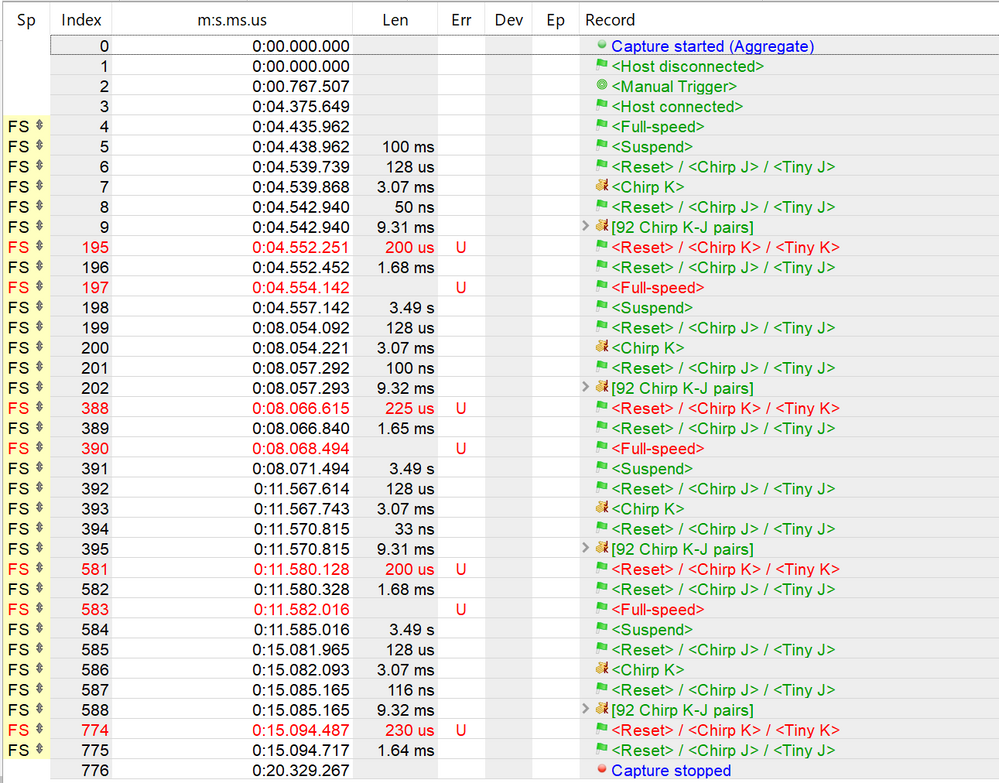
This shows the device requesting high speed using <Chirp K> after reset and the host performing Chirp K-J pairs. However, the device never fully reaches the high-speed default state with enabled high-speed terminations.
I have the following questions:
1. Could you please direct me to the lines of code (any public SDK version is acceptable to me) where errata USB.6 was addressed?
2. Could you explain how this fix works? I don't see how a workaround is possible, at least with the publically available registers.
This issue is very critical to me, and I appreciate any help!
- Matt

 Alexis_A
- Mark as New
- Bookmark
- Subscribe
- Mute
- Subscribe to RSS Feed
- Permalink
- Report Inappropriate Content
Dear Roc Lee,
I will suggest first to swap the MCUs of two boards (the bad one and one of the good ones) and see if the problem follow the MCU or is in the board. With this we can discard a hardware problem.
Best Regards,
Alexis Andalon
