
- Forums
- Product Forums
- General Purpose MicrocontrollersGeneral Purpose Microcontrollers
- i.MX Forumsi.MX Forums
- QorIQ Processing PlatformsQorIQ Processing Platforms
- Identification and SecurityIdentification and Security
- Power ManagementPower Management
- Wireless ConnectivityWireless Connectivity
- RFID / NFCRFID / NFC
- Advanced AnalogAdvanced Analog
- Neural Processing UnitsNeural Processing Units
- MCX Microcontrollers
- S32G
- S32K
- S32V
- MPC5xxx
- Other NXP Products
- S12 / MagniV Microcontrollers
- Powertrain and Electrification Analog Drivers
- Sensors
- Vybrid Processors
- Digital Signal Controllers
- 8-bit Microcontrollers
- ColdFire/68K Microcontrollers and Processors
- PowerQUICC Processors
- OSBDM and TBDML
- S32M
- S32Z/E
-
- Solution Forums
- Software Forums
- MCUXpresso Software and ToolsMCUXpresso Software and Tools
- CodeWarriorCodeWarrior
- MQX Software SolutionsMQX Software Solutions
- Model-Based Design Toolbox (MBDT)Model-Based Design Toolbox (MBDT)
- FreeMASTER
- eIQ Machine Learning Software
- Embedded Software and Tools Clinic
- S32 SDK
- S32 Design Studio
- GUI Guider
- Zephyr Project
- Voice Technology
- Application Software Packs
- Secure Provisioning SDK (SPSDK)
- Processor Expert Software
- Generative AI & LLMs
-
- Topics
- Mobile Robotics - Drones and RoversMobile Robotics - Drones and Rovers
- NXP Training ContentNXP Training Content
- University ProgramsUniversity Programs
- Rapid IoT
- NXP Designs
- SafeAssure-Community
- OSS Security & Maintenance
- Using Our Community
-
- Cloud Lab Forums
-
- Knowledge Bases
- ARM Microcontrollers
- i.MX Processors
- Identification and Security
- Model-Based Design Toolbox (MBDT)
- QorIQ Processing Platforms
- S32 Automotive Processing Platform
- Wireless Connectivity
- CodeWarrior
- MCUXpresso Suite of Software and Tools
- MQX Software Solutions
- RFID / NFC
- Advanced Analog
- Neural Processing Units
-
- NXP Tech Blogs
- Home
- :
- MCUXpresso Software and Tools
- :
- Kinetis Design Studio
- :
- FRDM-K82 QSPI XIP problem
FRDM-K82 QSPI XIP problem
- Subscribe to RSS Feed
- Mark Topic as New
- Mark Topic as Read
- Float this Topic for Current User
- Bookmark
- Subscribe
- Mute
- Printer Friendly Page

- Mark as New
- Bookmark
- Subscribe
- Mute
- Subscribe to RSS Feed
- Permalink
- Report Inappropriate Content
Hello. I am trying to load the 'led_demo_qspi_0000' project from: <NXP_Kinetis_Bootloader_2_0_0>/apps/demo_qspi/led_demo/targets/FRDM-K82F/kds/led_demo_qspi_0000
loaded onto the QSPI on the FRDM-K82 board and am running into the following issue:
1) I can write the QSPI config:
blhost.exe -p COM5 -- write-memory 0x20000000 qcb_MX25U3235F_parallel_mode.bin
...
Response status = 0 (0x0) Success.
blhost.exe -p COM5 -- configure-quadspi 1 0x20000000...
Response status = 0 (0x0) Success.
blhost.exe -p COM5 -- write-memory 0x68000000 qcb_MX25U3235F_parallel_mode.bin...
Response status = 0 (0x0) Success.
2) I can write an SB file, by using the board file 'qspi_image_0000.bd':
# The sources block assigns file names to identifiers sources
{ # SREC File path
mySrecFile = "led_demo_qspi_0000.srec";
# QCB file path
qspiConfigBlock = "qcb_MX25U3235F_parallel_mode.bin";
}
# The section block specifies the sequence of boot commands to be written to
# the SB file
section (0)
{
#1. Erase the vector table and flash config field.
erase 0..0x800;
# Step 2 and Step 3 are optional if the QuadSPI is configured at startup.
#2. Load the QCB to RAM
load qspiConfigBlock > 0x20000000;
#3. Configure QuadSPI with the QCB above
enable qspi 0x20000000;
#4. Erase the QuadSPI memory region before programming.
erase 0x68000000..0x68004000;
#5.Load the QCB above to the start address of QuadSPI memory
load qspiConfigBlock > 0x68000000;
#6,7. Load all the RO data from srec file, including vector table, flash config field and codes.
load mySrecFile;
#8. Reset target.
reset;
}
and using the command :
./elftosb.exe -V -c qspi_image_0000.bd -o qspi_image_0000.sb
3) But when I try and write the sb file using blhost I get an error:
blhost.exe -p COM5 -- receive-sb-file qspi_image_0000.sb
Ping responded in 1 attempt(s)
Inject command 'receive-sb-file'
Preparing to send 3904 (0xf40) bytes to the target.
Successful generic response to command 'receive-sb-file'
Data phase write aborted by status 0x2712 kStatus_AbortDataPhase
Response status = 10200 (0x27d8) kStatusMemoryRangeInvalid
Wrote 128 of 3904 bytes.
Additionally -- if I try and go through the steps in the sb file manually:
blhost.exe -p COM5 -- flash-erase-region 0x000 2048
Ping responded in 1 attempt(s)
Inject command 'flash-erase-region'
Response status = 10200 (0x27d8) kStatusMemoryRangeInvalid
So I suspect that the initial step in the SB file 'erase 0 ... 0x800' is failing.
Is there a write protect step I should be disabling? I don't think that I have a key for this image:
blhost -p COM5 -- read-memory 0x400 12
Ping responded in 1 attempt(s)
Inject command 'read-memory'
Successful response to command 'read-memory'
ff ff ff ff ff ff ff ff ff ff ff ff
Successful generic response to command 'read-memory'
Response status = 0 (0x0) Success.
Response word 1 = 12 (0xc)
Read 12 of 12 bytes.
Find attached: the map and linker files for this project:
MK82FN256xxx15_qspi_0000.ld = linker file for led_demo_qspi_0000
led_demo_qspi_0000.map = map file for led_demo_qspi_0000
MK82FN256xxx15_application_0x0000.ld = linker for freedom k82 bootloader
freedom_bootloader.map = map file for freedom k82 bootloader
What I want is for the freedom bootloader to execute in flash, initialize the QSPI in parallel mode, then jump to 0x68001000 and start execution of the led_demo_qspi housed there.
Please let me know what I have done wrong.
Solved! Go to Solution.

 Alice_Yang
- Mark as New
- Bookmark
- Subscribe
- Mute
- Subscribe to RSS Feed
- Permalink
- Report Inappropriate Content
Hello John,
I use the .srec file you shared , it also can work well :
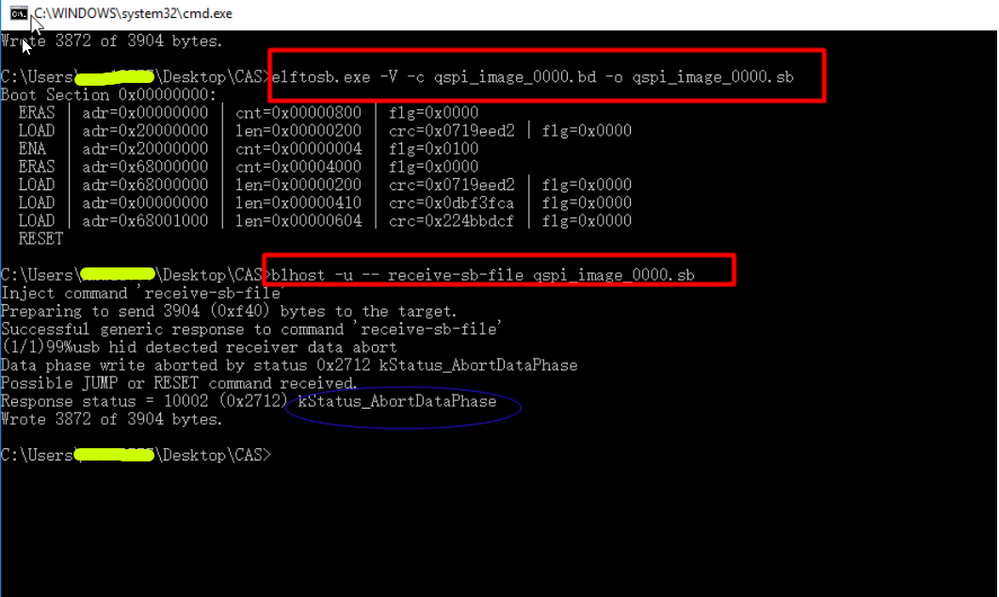
I put the two .exe and the ralted files into one folder, then generate .sb file :

I attached all the files.
And please erase the flash to have try refer to "Kinetis Bootloader QuadSPI User's Guide.pdf"
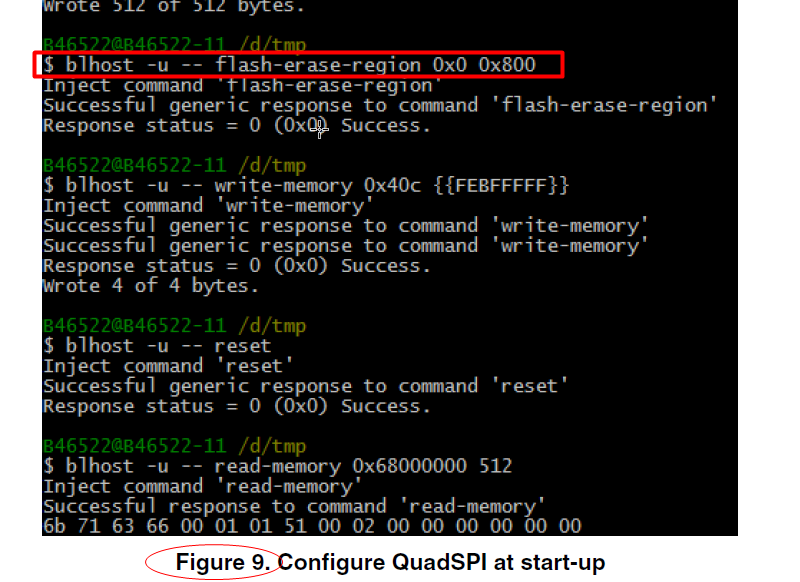
Have a great day,
TIC
-----------------------------------------------------------------------------------------------------------------------
Note: If this post answers your question, please click the Correct Answer button. Thank you!
-----------------------------------------------------------------------------------------------------------------------
- Mark as New
- Bookmark
- Subscribe
- Mute
- Subscribe to RSS Feed
- Permalink
- Report Inappropriate Content
blhost -u -- read-memory 0x40c 4
Inject command 'read-memory'
Successful response to command 'read-memory'
fe 3d ff ff
Successful generic response to command 'read-memory'
Response status = 0 (0x0) Success.
Response word 1 = 4 (0x4)
Read 4 of 4 bytes.
blhost -u -- write-memory 0x40c {{FEBFFFFF}}
Inject command 'write-memory'
Successful generic response to command 'write-memory'
Response status = 105 (0x69) kStatus_FlashCommandFailure
Wrote 4 of 4 bytes.
blhost -u -- read-memory 0x40c 4
Inject command 'read-memory'
Successful response to command 'read-memory'
fe 3d ff ff
Successful generic response to command 'read-memory'
Response status = 0 (0x0) Success.
Response word 1 = 4 (0x4) Read 4 of 4 bytes.
Another data point is that I cannot write to the FOPT as the "Kinetis Bootloader QuadSPI User's Guide.pdf" suggests -- is this a security feature perhaps? Is there another user guide that describes how to enable QuadSPI for K82?
Alice_Yang
- Mark as New
- Bookmark
- Subscribe
- Mute
- Subscribe to RSS Feed
- Permalink
- Report Inappropriate Content
Hello John,
Please refer to "Kinetis Bootloader QuadSPI User's Guide.pdf" (path:NXP_Kinetis_Bootloader_2_0_0\doc) .
About the QCB file , you can directly use KBOOT provicde : NXP_Kinetis_Bootloader_2_0_0\apps\QCBGenerator\binaries\qspi_config_block.bin
About the .BD file , you can first use KBOOT provide :NXP_Kinetis_Bootloader_2_0_0\apps\demo_qspi\bdfile\qspi_image_0000.bd
I test with the usb port of FRDM-K82F board, it can work well .
Please refer to it have a try, if still have question , please contact us without any hesitate .
Hope it helps
Have a great day,
TIC
-----------------------------------------------------------------------------------------------------------------------
Note: If this post answers your question, please click the Correct Answer button. Thank you!
-----------------------------------------------------------------------------------------------------------------------
- Mark as New
- Bookmark
- Subscribe
- Mute
- Subscribe to RSS Feed
- Permalink
- Report Inappropriate Content
Howdy Alice,
I've re-run elftosb.exe -V -c qspi_image_0000.bd -o qspi_image_0000.sb against the files you mentioned to generate a new .sb file, however I'm still seeing a "kStatusMemoryRangeInvalid" error after 160 bytes on my FRDM-k82F board:
blhost -u -- receive-sb-file qspi_image_0000.sb
Inject command 'receive-sb-file'
Preparing to send 3904 (0xf40) bytes to the target.
Successful generic response to command 'receive-sb-file'
usb hid detected receiver data abort
Data phase write aborted by status 0x2712 kStatus_AbortDataPhase
Response status = 10200 (0x27d8) kStatusMemoryRangeInvalid
Wrote 160 of 3904 bytes.
Find attached, my led_demo_qspi_0000.srec file, which was from the project located at: NXP_Kinetis_Bootloader_2_0_0/apps/demo_qspi/led_demo/targets/FRDM-K82F/kds/led_demo_qspi_0000/release
To generate the .srec file, the following command was used:
arm-none-eabi-objcopy -v -O srec "${BuildArtifactFileName}" "${BuildArtifactFileBaseName}.srec"
Alice_Yang
- Mark as New
- Bookmark
- Subscribe
- Mute
- Subscribe to RSS Feed
- Permalink
- Report Inappropriate Content
Hello John,
I use the .srec file you shared , it also can work well :
I put the two .exe and the ralted files into one folder, then generate .sb file :
I attached all the files.
And please erase the flash to have try refer to "Kinetis Bootloader QuadSPI User's Guide.pdf"
Have a great day,
TIC
-----------------------------------------------------------------------------------------------------------------------
Note: If this post answers your question, please click the Correct Answer button. Thank you!
-----------------------------------------------------------------------------------------------------------------------
- Mark as New
- Bookmark
- Subscribe
- Mute
- Subscribe to RSS Feed
- Permalink
- Report Inappropriate Content
Ah you're right -- I need to erase the memory before it can be written -- thank you!
