
- Forums
- Product Forums
- General Purpose MicrocontrollersGeneral Purpose Microcontrollers
- i.MX Forumsi.MX Forums
- QorIQ Processing PlatformsQorIQ Processing Platforms
- Identification and SecurityIdentification and Security
- Power ManagementPower Management
- Wireless ConnectivityWireless Connectivity
- RFID / NFCRFID / NFC
- Advanced AnalogAdvanced Analog
- Neural Processing UnitsNeural Processing Units
- MCX Microcontrollers
- S32G
- S32K
- S32V
- MPC5xxx
- Other NXP Products
- S12 / MagniV Microcontrollers
- Powertrain and Electrification Analog Drivers
- Sensors
- Vybrid Processors
- Digital Signal Controllers
- 8-bit Microcontrollers
- ColdFire/68K Microcontrollers and Processors
- PowerQUICC Processors
- OSBDM and TBDML
- S32M
- S32Z/E
-
- Solution Forums
- Software Forums
- MCUXpresso Software and ToolsMCUXpresso Software and Tools
- CodeWarriorCodeWarrior
- MQX Software SolutionsMQX Software Solutions
- Model-Based Design Toolbox (MBDT)Model-Based Design Toolbox (MBDT)
- FreeMASTER
- eIQ Machine Learning Software
- Embedded Software and Tools Clinic
- S32 SDK
- S32 Design Studio
- GUI Guider
- Zephyr Project
- Voice Technology
- Application Software Packs
- Secure Provisioning SDK (SPSDK)
- Processor Expert Software
- Generative AI & LLMs
-
- Topics
- Mobile Robotics - Drones and RoversMobile Robotics - Drones and Rovers
- NXP Training ContentNXP Training Content
- University ProgramsUniversity Programs
- Rapid IoT
- NXP Designs
- SafeAssure-Community
- OSS Security & Maintenance
- Using Our Community
-
- Cloud Lab Forums
-
- Knowledge Bases
- ARM Microcontrollers
- i.MX Processors
- Identification and Security
- Model-Based Design Toolbox (MBDT)
- QorIQ Processing Platforms
- S32 Automotive Processing Platform
- Wireless Connectivity
- CodeWarrior
- MCUXpresso Suite of Software and Tools
- MQX Software Solutions
- RFID / NFC
- Advanced Analog
- Neural Processing Units
-
- NXP Tech Blogs
- Home
- :
- i.MX Forums
- :
- i.MX Processors
- :
- i.MX6DL Driver and Getting Windows 7 To Communicate As An Android Device
i.MX6DL Driver and Getting Windows 7 To Communicate As An Android Device
- Subscribe to RSS Feed
- Mark Topic as New
- Mark Topic as Read
- Float this Topic for Current User
- Bookmark
- Subscribe
- Mute
- Printer Friendly Page
i.MX6DL Driver and Getting Windows 7 To Communicate As An Android Device

- Mark as New
- Bookmark
- Subscribe
- Mute
- Subscribe to RSS Feed
- Permalink
- Report Inappropriate Content
Hi Freescale Community,
I'm trying to get my i.MX6DL device (Installed with Android OS 4.3) recognized by my host PC (Installed with Windows 7 Pro x64) as an android device and not as a generic FTDI com port.
I have followed the instructions carefully on this forum:
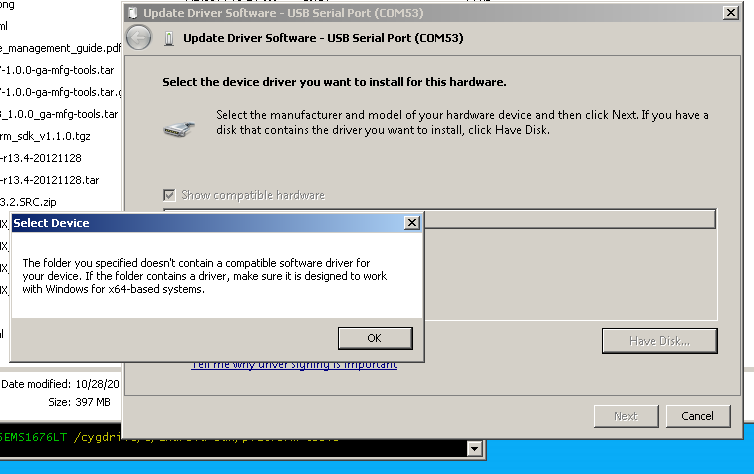
I'm having difficulty with how to do step 6. I went through Device Manager on my Windows machine and right-clicked on the USB port where my tablet is connected and selected "Update Driver Software". I, then, pick from a list of drivers from my computer to select the specific file, "tetherxp.inf". From there, I tried to get that file installed, but it comes up with this (screenshot attached) saying it needs to be x64-based systems. Are there any updated drivers out there for i.MX6DL?
The overall goal is that I'm trying to get this i.MX6Q (installed with Android OS 4.3) to work with SmartBear, a third party test automation software, to conduct automated black-box testing. I managed to get my Windows PC to communicate with a cheap android tablet with Lollipop Android OS installed.
How can I get my i.MX6DL device to communicate with my Windows PC? What files/components am I missing?
If I asked any obvious questions, sorry, I'm really new to this. Thanks in advance.
-Kelly

 Yuri
Yuri
- Mark as New
- Bookmark
- Subscribe
- Mute
- Subscribe to RSS Feed
- Permalink
- Report Inappropriate Content
Hello, Kelly !
Please try recommendations of section 3 (How do I use ADB over Ethernet?) in
"Android_Frequently_Asked_Questions.pdf" in android_jb4.3_1.1.0-ga documentation package :
---
From Adroid JB4.2.2, security ADB is enabled by default (ro.adb.security is set to 1). In security ADB mode, the ADB over
ethernet is not allowed. For more details, see How do I enable and disable security ADB?. To use the ADB over ethernet,
there are two steps to follow:
1. Disable the security ADB by changing ADB security setting in init.rc
2. Delete or comment the below line, and then rebuild the boot.img. setprop ro.adb.security 1.
3. Keep the board connecting with usb to the PC, and enable the ‘usb debuging’ from Setting->Developer Options and
then follow the steps below to set up ADB over ethernet.
On the Linux PC, assuming you had built Android code or had installed Android SDK), complete the following actions to use
ADB over ethernet:
$ ping IP_OF_YOUR_BOARD (run "netcfg" on board to get IP address)
$ export ADBHOST=IP_OF_YOUR_BOARD
"adb" is a host tool created during Android build.It's under out/host/linux-x86/bin/. Make
sure you set path properly.
$ adb kill-server (Not sure why this step is needed. Just re-start adb daemon on board.)
$ adb shell
Set the ADB port properly on the device:
$ setprop service.adb.tcp.port 5555
After setting up the ADB listener port, re-enable the USB debug function in the Settings application.
---
Have a great day,
Yuri
-----------------------------------------------------------------------------------------------------------------------
Note: If this post answers your question, please click the Correct Answer button. Thank you!
-----------------------------------------------------------------------------------------------------------------------
