
- Forums
- Product Forums
- General Purpose MicrocontrollersGeneral Purpose Microcontrollers
- i.MX Forumsi.MX Forums
- QorIQ Processing PlatformsQorIQ Processing Platforms
- Identification and SecurityIdentification and Security
- Power ManagementPower Management
- Wireless ConnectivityWireless Connectivity
- RFID / NFCRFID / NFC
- Advanced AnalogAdvanced Analog
- Neural Processing UnitsNeural Processing Units
- MCX Microcontrollers
- S32G
- S32K
- S32V
- MPC5xxx
- Other NXP Products
- S12 / MagniV Microcontrollers
- Powertrain and Electrification Analog Drivers
- Sensors
- Vybrid Processors
- Digital Signal Controllers
- 8-bit Microcontrollers
- ColdFire/68K Microcontrollers and Processors
- PowerQUICC Processors
- OSBDM and TBDML
- S32M
- S32Z/E
-
- Solution Forums
- Software Forums
- MCUXpresso Software and ToolsMCUXpresso Software and Tools
- CodeWarriorCodeWarrior
- MQX Software SolutionsMQX Software Solutions
- Model-Based Design Toolbox (MBDT)Model-Based Design Toolbox (MBDT)
- FreeMASTER
- eIQ Machine Learning Software
- Embedded Software and Tools Clinic
- S32 SDK
- S32 Design Studio
- GUI Guider
- Zephyr Project
- Voice Technology
- Application Software Packs
- Secure Provisioning SDK (SPSDK)
- Processor Expert Software
- Generative AI & LLMs
-
- Topics
- Mobile Robotics - Drones and RoversMobile Robotics - Drones and Rovers
- NXP Training ContentNXP Training Content
- University ProgramsUniversity Programs
- Rapid IoT
- NXP Designs
- SafeAssure-Community
- OSS Security & Maintenance
- Using Our Community
-
- Cloud Lab Forums
-
- Knowledge Bases
- ARM Microcontrollers
- i.MX Processors
- Identification and Security
- Model-Based Design Toolbox (MBDT)
- QorIQ Processing Platforms
- S32 Automotive Processing Platform
- Wireless Connectivity
- CodeWarrior
- MCUXpresso Suite of Software and Tools
- MQX Software Solutions
- RFID / NFC
- Advanced Analog
- Neural Processing Units
-
- NXP Tech Blogs
- Home
- :
- i.MX Forums
- :
- i.MX Processors
- :
- iMX6 ESAI TDM with underrun and overrun support
iMX6 ESAI TDM with underrun and overrun support
- Subscribe to RSS Feed
- Mark Topic as New
- Mark Topic as Read
- Float this Topic for Current User
- Bookmark
- Subscribe
- Mute
- Printer Friendly Page
iMX6 ESAI TDM with underrun and overrun support

- Mark as New
- Bookmark
- Subscribe
- Mute
- Subscribe to RSS Feed
- Permalink
- Report Inappropriate Content
I am trying to use the ESAI of the iMX6...
I need to use 2x 32 slots of 8 bits at 8Khz, and I am in slave mode since i am listenning Frame Synchro and Tx Clock
I am testing the interface simply sending a word of 0xAA on slot 0 and slot 15, the others are 0x00
I am probably facing the underrun and overrun chip errata (ERR008000) on ESAI since my channels are switching randomly ...
I already tested the kernel from :
-> git://git.freescale.com/imx/linux-2.6-imx.git --- branch : imx_3.10.31_1.1.0_alpha
-> git://git.freescale.com/imx/linux-2.6-imx.git --- branch : imx_3.10.31_1.1.0_beta2
And now I am trying to use the main kernel stable git :
-> git://git.kernel.org/pub/scm/linux/kernel/git/stable/linux-stable.git --- branch master
But I have some trouble actually with the mailine kernel :
[ 745.648380] fsl-esai-dai 2024000.esai: Missing dma channel for stream: 0
[ 745.655198] fsl-esai-dai 2024000.esai: ASoC: pcm constructor failed: -22
I figured out that the imx6qdl.dtsi was not giving enough information to use the ESAI so I add to my own dts :
pinctrl_esai_gip2: esaigrp-gip2 {
fsl,pins = <
MX6QDL_PAD_GPIO_2__ESAI_TX_FS 0x1b030
MX6QDL_PAD_GPIO_3__XTALOSC_REF_CLK_24M 0x1b030
MX6QDL_PAD_GPIO_1__ESAI_RX_CLK 0x1b030
MX6QDL_PAD_GPIO_6__ESAI_TX_CLK 0x1b030
MX6QDL_PAD_GPIO_17__ESAI_TX0 0x1b030
MX6QDL_PAD_GPIO_8__ESAI_TX5_RX0 0x1b030
MX6QDL_PAD_GPIO_9__ESAI_RX_FS 0x1b030
MX6QDL_PAD_GPIO_18__ESAI_TX1 0x1b030
MX6QDL_PAD_GPIO_7__ESAI_TX4_RX1 0x1b030
>;
&esai {
dma-names = "rx", "tx";
clocks = <&clks 228>, <&clks 229>, <&clks 118>, <&clks 228>, <&clks 156>;
clock-names = "core", "mem", "extal", "fsys", "dma";
compatible = "fsl,imx35-esai";
fsl,esai-dma-events = <24 23>;
pinctrl-names = "default";
pinctrl-0 = <&pinctrl_esai_gip2>;
fsl,esai-synchronous;
fsl,fifo-depth = <64>; /* Transmit FIFO watermark => the Transmit FIFO Empty flag will set => 32 slots * 2 bus of TX the same for RX */
status = "okay";
};
sound {
compatible = "fsl,imx6q-gipc-generic-esai",
"fsl,imx-audio-generic-esai";
model = "generic-esai-audio";
esai-controller = <&esai>;
};
I do have in my .config :
#
# SoC Audio for Freescale CPUs
#
#
# Common SoC Audio options for Freescale CPUs:
#
# CONFIG_SND_SOC_FSL_ASRC is not set
CONFIG_SND_SOC_FSL_SAI=y
CONFIG_SND_SOC_FSL_SSI=y
CONFIG_SND_SOC_FSL_SPDIF=y
CONFIG_SND_SOC_FSL_ESAI=y
CONFIG_SND_SOC_FSL_UTILS=y
CONFIG_SND_SOC_IMX_PCM_DMA=y
CONFIG_SND_SOC_IMX_AUDMUX=y
CONFIG_SND_IMX_SOC=y
CONFIG_SND_SOC_IMX_PCM_FIQ=y
I simply make a module that connect to a dummy codec the dai interface ESAI to use it in a generic way : http://pastebin.com/CupYva7Z
thank you for your return
Aurelien BOUIN

- Mark as New
- Bookmark
- Subscribe
- Mute
- Subscribe to RSS Feed
- Permalink
- Report Inappropriate Content
Hi Aurelien,
I assume that you have this working now. Will you please share the device tree configuration? I'm working on a similar project and I hope to start from a working configuration.
Thanks,
Catalin Petrescu.
- Mark as New
- Bookmark
- Subscribe
- Mute
- Subscribe to RSS Feed
- Permalink
- Report Inappropriate Content
Hi,
Unfortunately I have never had the chance to make it work ... not enough support of the ESAI iMX6 black box ...
Sorry
Regards,
- Mark as New
- Bookmark
- Subscribe
- Mute
- Subscribe to RSS Feed
- Permalink
- Report Inappropriate Content
Hello,
I get back to linux branch imx_3.10.31_1.1.0_beta2 at git://git.freescale.com/imx/linux-2.6-imx.git
I figured out that the TIE and TEIE bits in the TCR register are not set at any moment ...
So I add in the fsl_esai_set_dai_fmt
#define MAKE_TCR_INTERRUPTIBLE
#ifdef MAKE_TCR_INTERRUPTIBLE
//make it interruptible
printk(KERN_ERR"%s(%d)\n",__func__,__LINE__);
mask |= ESAI_xCR_xEIE_MASK | ESAI_xCR_xIE_MASK;
xcr |= ESAI_xCR_xEIE | ESAI_xCR_xIE;
//make it interruptible
#endif /* MAKE_TCR_INTERRUPTIBLE */
I also add a dump function that show the register at fsl_esai_hw_params : ESAI_TCR 0x00728100
I also add debug in the function fsl_esai_check_xrun that show the saisr register
When underrun occured (when I see that with an oscilloscope)
There is no interrupt generated ...
FYI here is my fsl_esai.c modified : fsl_esai.c - Pastebin.com
Thank you for your help,
Sincerely,
Aurelien BOUIN
- Mark as New
- Bookmark
- Subscribe
- Mute
- Subscribe to RSS Feed
- Permalink
- Report Inappropriate Content
For your information the problem occured only in slave mode ... (Clock and Frame Synchro is in input)
It is working correctly apparently in master mode ... but the clock and the frame synchro are not correct ... When I ask 2048000Hz I get 2207000 hz
If you have any suggestion ...
Thank you for your help
- Mark as New
- Bookmark
- Subscribe
- Mute
- Subscribe to RSS Feed
- Permalink
- Report Inappropriate Content
Why the problem is marked as solved ??? it is definitely not the case ...

 ZeeFrench
- Mark as New
- Bookmark
- Subscribe
- Mute
- Subscribe to RSS Feed
- Permalink
- Report Inappropriate Content
Bonjour Aurélien,
Your problem seems to have multiple aspects, setting dma was one of it and the oscilloscope above looks like a channel swapping issue (in case of overrun) that is supposed to be fixed by an other group of patches in Yocto http://git.freescale.com/git/cgit.cgi/imx/linux-2.6-imx.git/log/sound/soc/fsl/fsl_esai.c?h=imx_3.10.... (apparently not in the mainline kernel). This is becoming difficult to follow (do you still have swapping now you are back on beta2 ?), especially if you add a new issue below that is not your use case (looking at our alsa driver documentation, 22 kHz is a standard frequency but no trace of 20 kHz).
I think we need to dig the root cause of underun (and / or overrun ?), not necessary in the esai driver but maybe in dma, since you open a new thread, i propose to follow on that one if that ofk with you ?
Best regards, Philippe.
 fabio_estevam
- Mark as New
- Bookmark
- Subscribe
- Mute
- Subscribe to RSS Feed
- Permalink
- Report Inappropriate Content
Yes, Philippe's suggestion is a good one. Could you please try 3.10.53 GA kernel?
http://git.freescale.com/git/cgit.cgi/imx/linux-2.6-imx.git/log/?h=imx_3.10.53_1.1.0_ga
Regards,
Fabio Estevam
- Mark as New
- Bookmark
- Subscribe
- Mute
- Subscribe to RSS Feed
- Permalink
- Report Inappropriate Content
Hello Philippe and Fabio,
I keep getting swapping channels with the linux branch imx_3.10.31_1.1.0_beta2 at git://git.freescale.com/imx/linux-2.6-imx.git and it is the same implementation that the one you give me (http://git.freescale.com/git/cgit.cgi/imx/linux-2.6-imx.git/log/sound/soc/fsl/fsl_esai.c?h=imx_3.10....
Again in this driver the implementation is limited to 16 channels (why ?)
FYI here is my fsl_esai.c modified :[C] fsl_esai_updated.c - Pastebin.com
I don't understand 20KHz trace ?
I am using 64 slots of 8 bits word at 8000Hz => mclk=2048000Hz
Thank you for your interest in my problem, I really appreciate it
Aurelien BOUIN
fabio_estevam
- Mark as New
- Bookmark
- Subscribe
- Mute
- Subscribe to RSS Feed
- Permalink
- Report Inappropriate Content
Hi Aurelien,
3.10.53 has some additional esai patches that seem to be important for your case.
Please see this one about channel swap:
linux-2.6-imx.git - Freescale i.MX Linux Tree
I would suggest you to try 3.10.53.
Regards,
Fabio Estevam
- Mark as New
- Bookmark
- Subscribe
- Mute
- Subscribe to RSS Feed
- Permalink
- Report Inappropriate Content
Hi again,
I add the patch (http://git.freescale.com/git/cgit.cgi/imx/linux-2.6-imx.git/commit/sound/soc/fsl/fsl_esai.c?h=imx_3....) but i keep getting swapping
My new code is now http://pastebin.com/66GkXME2
Regards,
Aurelien BOUIN
ZeeFrench
- Mark as New
- Bookmark
- Subscribe
- Mute
- Subscribe to RSS Feed
- Permalink
- Report Inappropriate Content
The patch set is not only affecting esai driver, I haven't locate something (need to dig in the sdma) that could explain this phenomenum but it would still be interresting to test a complete kernel. The workaround to the hardware errata is to manage startup condition and reset esai in case of overrun but I don't see any fix in case of underrun : your message below seems to indicate you are experiencing both over and underruns ?
Cheers, Philippe.
- Mark as New
- Bookmark
- Subscribe
- Mute
- Subscribe to RSS Feed
- Permalink
- Report Inappropriate Content
Hello,
So I git clone the linux branch imx_3.10.53_1.1.0_ga on git://git.freescale.com/imx/linux-2.6-imx.git
I patched it with this : http://pastebin.com/RM8pyUSA
It makes 64 slots available and set a correct clock to pll4 to get 2048000Hz
Unfortunetaly I also get swapping without anything un debug that can help me detect it ...
Thank you again for your suggestions,
Regards
Aurelien BOUIN
- Mark as New
- Bookmark
- Subscribe
- Mute
- Subscribe to RSS Feed
- Permalink
- Report Inappropriate Content
Hi,
Like I already told, this swapping happen in slave mode ... not in master mode (apparently)
Also sometimes when I start playing on one of my 64 channels, it is played on a different slot tahn the one usually used ...
i don't know if it can give you some clue ...
Thank you again for your support
Aurélien BOUIN
ZeeFrench
- Mark as New
- Bookmark
- Subscribe
- Mute
- Subscribe to RSS Feed
- Permalink
- Report Inappropriate Content
Bonjour Aurelien,
Checking the patches, looks like the workaround is checking both ROE and TUE bits to reset ESAI. Other customers are able to use it but not a lot with the full 64 channels, what is the situation if you lower them to 16 or 32 ?
Best regards, Philippe.
- Mark as New
- Bookmark
- Subscribe
- Mute
- Subscribe to RSS Feed
- Permalink
- Report Inappropriate Content
Hello Philippe,
I am still wondering what is the purpose of HCKT in the ESAI module
I tune to get 2048000Hz like is the tx clock for 8Khz Frame Synchro
Maybe there is some recommandation somewhere to put it at a higher level ?
For memory I use the ESAI module with 64 slots (in total) of 8 bits on 2 TX/RX pins at a bandwidth of 8000Hz ... clock bit is at 2048000Hz
I use of course network mode in synchronous mode.
Externally I only use those pins :
| MX6QDL_PAD_GPIO_2__ESAI_TX_FS | 0x1b030 |
| MX6QDL_PAD_GPIO_6__ESAI_TX_CLK | 0x1b030 |
MX6QDL_PAD_GPIO_17__ESAI_TX0 0x1b030
| MX6QDL_PAD_GPIO_8__ESAI_TX5_RX0 | 0x1b030 |
| MX6QDL_PAD_GPIO_18__ESAI_TX1 | 0x1b030 |
| MX6QDL_PAD_GPIO_7__ESAI_TX4_RX1 | 0x1b030 |
Thank you for any advice ...
Regards,
Aurelien BOUIN
- Mark as New
- Bookmark
- Subscribe
- Mute
- Subscribe to RSS Feed
- Permalink
- Report Inappropriate Content
Hello Philippe,
If I lower to 16 bits the situation stay the same ... there is swapping ...
I can't understand Why I do not get at least a DMA problem ...
Thank you for your support philippe.
Best regards,
Aurelien BOUIN
- Mark as New
- Bookmark
- Subscribe
- Mute
- Subscribe to RSS Feed
- Permalink
- Report Inappropriate Content
So I am using the ESAI with the master branch of the main git git://git.kernel.org/pub/scm/linux/kernel/git/stable/linux-stable.git
And I can see that my channels are randomly switching ... seems like the ESAI chip errata is here ...
On the fallowing pictures you can see in blue datas, in yellow frame synchro
You can see on the first attached picture the initial situation : channel[0] et channel[16] have 0xAA, and others 0x0
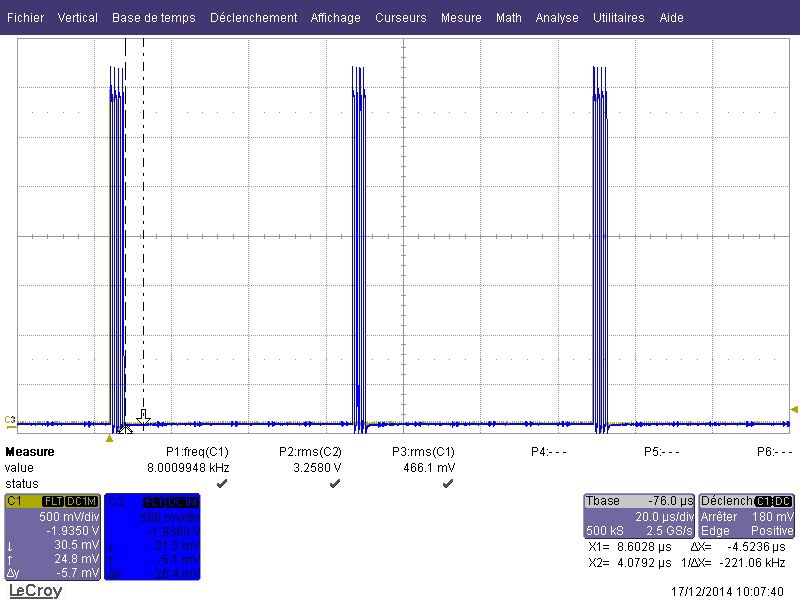
And after sometimes we get that :
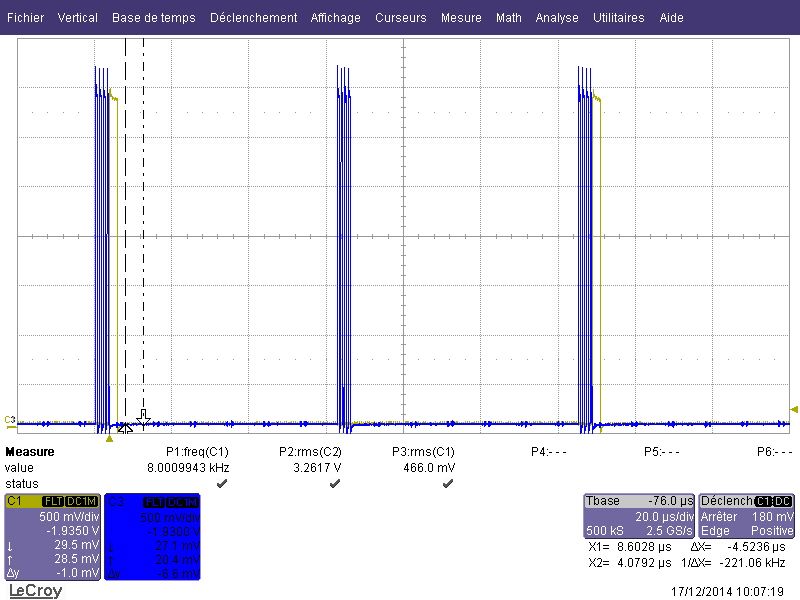
I don't see any debug message concerning xrun or underrrun ...
Thank you for your help,
Regards
Aurelien BOUIN
- Mark as New
- Bookmark
- Subscribe
- Mute
- Subscribe to RSS Feed
- Permalink
- Report Inappropriate Content
Hi again,
When I speak about fake codec I am actually speaking about the snd-soc-dummy that I declared on my module : http://pastebin.com/CupYva7Z :
- static struct snd_soc_dai_link snd_soc_dapm_route[] = {
- {
- .name = "HiFi",
- .stream_name = "HiFi",
- .codec_name = "snd-soc-dummy",
- .codec_dai_name = "snd-soc-dummy-dai",
- .ignore_pmdown_time = 1,
- .ops = &imx_generic_esai_surround_ops,
- },
- };
I feel like I won't be able to do the same, just with the devicetree ?!
Thank you for your reply,
Regards,
Aurelien BOUIN
fabio_estevam
- Mark as New
- Bookmark
- Subscribe
- Mute
- Subscribe to RSS Feed
- Permalink
- Report Inappropriate Content
why do you need the snd-soc-dummy?
Don't you have a real audio codec connected in your hardware?
- Mark as New
- Bookmark
- Subscribe
- Mute
- Subscribe to RSS Feed
- Permalink
- Report Inappropriate Content
Nope I don't ! I directly connect my ESAI bus to another processor ... They just exchange audio datas directly ...
