
- Forums
- Product Forums
- General Purpose MicrocontrollersGeneral Purpose Microcontrollers
- i.MX Forumsi.MX Forums
- QorIQ Processing PlatformsQorIQ Processing Platforms
- Identification and SecurityIdentification and Security
- Power ManagementPower Management
- Wireless ConnectivityWireless Connectivity
- RFID / NFCRFID / NFC
- Advanced AnalogAdvanced Analog
- Neural Processing UnitsNeural Processing Units
- MCX Microcontrollers
- S32G
- S32K
- S32V
- MPC5xxx
- Other NXP Products
- S12 / MagniV Microcontrollers
- Powertrain and Electrification Analog Drivers
- Sensors
- Vybrid Processors
- Digital Signal Controllers
- 8-bit Microcontrollers
- ColdFire/68K Microcontrollers and Processors
- PowerQUICC Processors
- OSBDM and TBDML
- S32M
- S32Z/E
-
- Solution Forums
- Software Forums
- MCUXpresso Software and ToolsMCUXpresso Software and Tools
- CodeWarriorCodeWarrior
- MQX Software SolutionsMQX Software Solutions
- Model-Based Design Toolbox (MBDT)Model-Based Design Toolbox (MBDT)
- FreeMASTER
- eIQ Machine Learning Software
- Embedded Software and Tools Clinic
- S32 SDK
- S32 Design Studio
- GUI Guider
- Zephyr Project
- Voice Technology
- Application Software Packs
- Secure Provisioning SDK (SPSDK)
- Processor Expert Software
- Generative AI & LLMs
-
- Topics
- Mobile Robotics - Drones and RoversMobile Robotics - Drones and Rovers
- NXP Training ContentNXP Training Content
- University ProgramsUniversity Programs
- Rapid IoT
- NXP Designs
- SafeAssure-Community
- OSS Security & Maintenance
- Using Our Community
-
- Cloud Lab Forums
-
- Knowledge Bases
- ARM Microcontrollers
- i.MX Processors
- Identification and Security
- Model-Based Design Toolbox (MBDT)
- QorIQ Processing Platforms
- S32 Automotive Processing Platform
- Wireless Connectivity
- CodeWarrior
- MCUXpresso Suite of Software and Tools
- MQX Software Solutions
- RFID / NFC
- Advanced Analog
- Neural Processing Units
-
- NXP Tech Blogs
- Home
- :
- i.MX Forums
- :
- i.MX RT Crossover MCUs
- :
- imxrt1176 freertos linkerscript file problem
imxrt1176 freertos linkerscript file problem
- Subscribe to RSS Feed
- Mark Topic as New
- Mark Topic as Read
- Float this Topic for Current User
- Bookmark
- Subscribe
- Mute
- Printer Friendly Page

- Mark as New
- Bookmark
- Subscribe
- Mute
- Subscribe to RSS Feed
- Permalink
- Report Inappropriate Content
I am trying to debug my project with freertos. However, I could not debug it. After some digging,
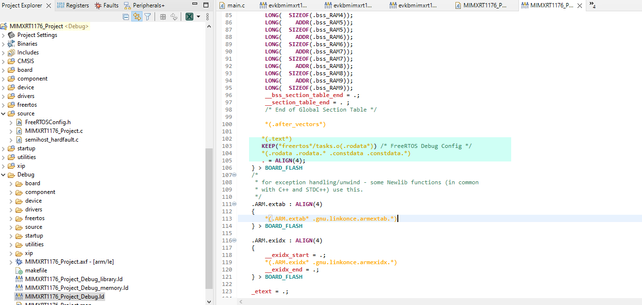
I found that project.ld (linker file) does not include the below line. (blue marked line).
This below SS belongs to app which can be debug.

However, in my project, linker script file is as below;

There must be a line between marked two lines in blue.
Since this linker script file is located in "Debug folder", it is deleted when I add the required command manually. Therefore I need that code line. How can I add it in order for linkerscript add automatically?
Solved! Go to Solution.

 diego_charles
- Mark as New
- Bookmark
- Subscribe
- Mute
- Subscribe to RSS Feed
- Permalink
- Report Inappropriate Content
Hi @burhanhagi
To avoid your linker script modifications getting overwriten you can un-tick the Manage linker script
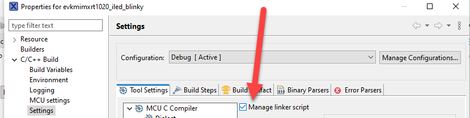
But this may not be the best solution since MCUXpresso will not longer update the linker script.
This section should be included to new project when the FreeRTOS OS is selected. See the below snapshot.

Now, if you do not want to create a new project, you can use the Manage SDK options and select FreeRTOS.
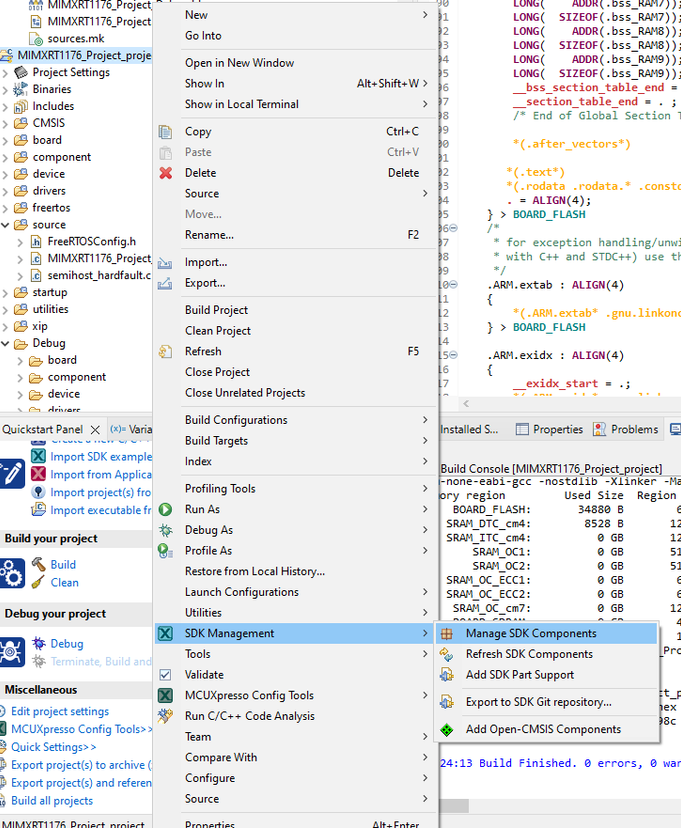

After clicking OK the below window will pop-up. Please consider that the IDE will ask if you wish to update your current SDK drivers, depending on your project and its configuration this could, in the worst scenario some clonficts, just be aware of that.

After buiding, you should see the missing section.
I really hope this could help you
Diego
- Mark as New
- Bookmark
- Subscribe
- Mute
- Subscribe to RSS Feed
- Permalink
- Report Inappropriate Content
@diego_charles thank you very much
diego_charles
- Mark as New
- Bookmark
- Subscribe
- Mute
- Subscribe to RSS Feed
- Permalink
- Report Inappropriate Content
Hi @burhanhagi
To avoid your linker script modifications getting overwriten you can un-tick the Manage linker script
But this may not be the best solution since MCUXpresso will not longer update the linker script.
This section should be included to new project when the FreeRTOS OS is selected. See the below snapshot.
Now, if you do not want to create a new project, you can use the Manage SDK options and select FreeRTOS.
After clicking OK the below window will pop-up. Please consider that the IDE will ask if you wish to update your current SDK drivers, depending on your project and its configuration this could, in the worst scenario some clonficts, just be aware of that.
After buiding, you should see the missing section.
I really hope this could help you
Diego
