
- Forums
- Product Forums
- General Purpose MicrocontrollersGeneral Purpose Microcontrollers
- i.MX Forumsi.MX Forums
- QorIQ Processing PlatformsQorIQ Processing Platforms
- Identification and SecurityIdentification and Security
- Power ManagementPower Management
- Wireless ConnectivityWireless Connectivity
- RFID / NFCRFID / NFC
- Advanced AnalogAdvanced Analog
- Neural Processing UnitsNeural Processing Units
- MCX Microcontrollers
- S32G
- S32K
- S32V
- MPC5xxx
- Other NXP Products
- S12 / MagniV Microcontrollers
- Powertrain and Electrification Analog Drivers
- Sensors
- Vybrid Processors
- Digital Signal Controllers
- 8-bit Microcontrollers
- ColdFire/68K Microcontrollers and Processors
- PowerQUICC Processors
- OSBDM and TBDML
- S32M
- S32Z/E
-
- Solution Forums
- Software Forums
- MCUXpresso Software and ToolsMCUXpresso Software and Tools
- CodeWarriorCodeWarrior
- MQX Software SolutionsMQX Software Solutions
- Model-Based Design Toolbox (MBDT)Model-Based Design Toolbox (MBDT)
- FreeMASTER
- eIQ Machine Learning Software
- Embedded Software and Tools Clinic
- S32 SDK
- S32 Design Studio
- GUI Guider
- Zephyr Project
- Voice Technology
- Application Software Packs
- Secure Provisioning SDK (SPSDK)
- Processor Expert Software
- Generative AI & LLMs
-
- Topics
- Mobile Robotics - Drones and RoversMobile Robotics - Drones and Rovers
- NXP Training ContentNXP Training Content
- University ProgramsUniversity Programs
- Rapid IoT
- NXP Designs
- SafeAssure-Community
- OSS Security & Maintenance
- Using Our Community
-
- Cloud Lab Forums
-
- Knowledge Bases
- ARM Microcontrollers
- i.MX Processors
- Identification and Security
- Model-Based Design Toolbox (MBDT)
- QorIQ Processing Platforms
- S32 Automotive Processing Platform
- Wireless Connectivity
- CodeWarrior
- MCUXpresso Suite of Software and Tools
- MQX Software Solutions
- RFID / NFC
- Advanced Analog
- Neural Processing Units
-
- NXP Tech Blogs
- Home
- :
- i.MX论坛
- :
- i.MX RT 交叉 MCU
- :
- USB host example code for mimxrt1170-evk not working as expected.
USB host example code for mimxrt1170-evk not working as expected.
USB host example code for mimxrt1170-evk not working as expected.

I loaded the example code given to connect USB virtual printer. The code compiles properly giving no errors. But when the code is loaded, the expected functionality doesn't take place. The overview of the full example project and expected functionality is explained in the attached pdf.
The example project name is "dev_printer_virtual_text_bm_cm7"
The project can be accessed through following link Link to project
iMXRT1170


Hi @Shehan_Janidu,
I believe this is a duplicated post from the following link: https://community.nxp.com/t5/i-MX-RT/USB-host-example-code-for-mimxrt1170-evk-not-working-properly/t...
If it is ok with you, I will continue supporting on that other post in order to prevent double efforts.
BR,
Edwin.
I found the solution for the post you are referring.
Yes this post is about the same code but different issue. I only need your support for this particular post @EdwinHz
More specifically the problem I have is, according to the documentation given, a software should installed automatically after running the code. But when I am running the code, the expected software does not get installed. Thats problem now I am dealing with. iMXRT1170
Hi @Shehan_Janidu,
You should be able to install the driver manually by following this community post: https://community.nxp.com/t5/Kinetis-Microcontrollers/quot-MCU-VIRTUAL-COM-DEMO-quot-and-demo-app-fo...
Rather than using the path specified by that post, however, you would use the following:
"<SDK installation root>\SDK_2_14_0_MIMXRT1170-EVKB.zip\middleware\usb"
By default, the SDK installation root is:
"C:\Users\<user>\mcuxpresso\02\SDKPackages"
I hope this helps,
Edwin,
I ran the code again and followed following steps,
in device manager following icons were displayed,

After that I updated the drivers both ways, manually and by clicking on "let me pick"

But even after doing that, still generic printer is not shown in the printer section,
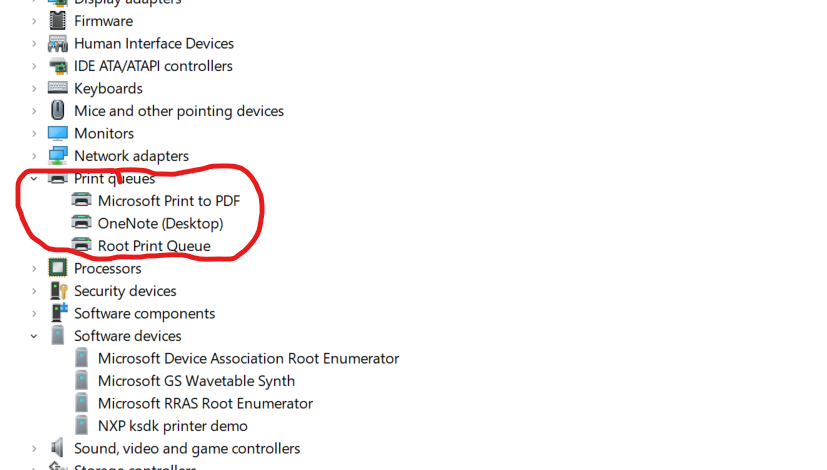
And when I go to devices and printers folder, it shows like this,
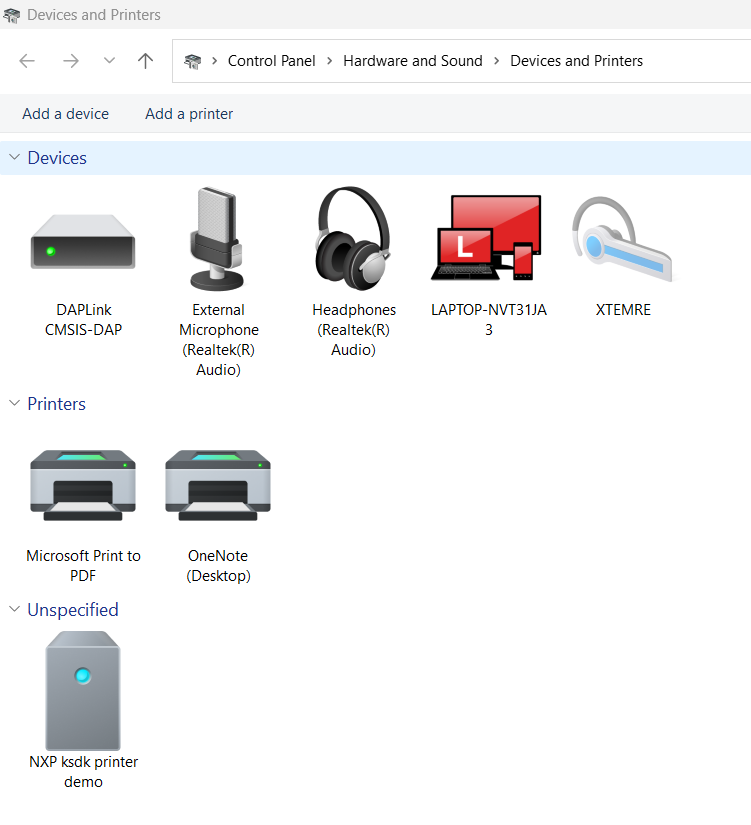
Can u suggest what can I do to fix this issue. In addition I have a doubt to clear out. The printing process that we going to do here is fully virtual one instead of physical one. Am I right ?
@EdwinHz iMXRT1170
