
- Forums
- Product Forums
- General Purpose MicrocontrollersGeneral Purpose Microcontrollers
- i.MX Forumsi.MX Forums
- QorIQ Processing PlatformsQorIQ Processing Platforms
- Identification and SecurityIdentification and Security
- Power ManagementPower Management
- Wireless ConnectivityWireless Connectivity
- RFID / NFCRFID / NFC
- Advanced AnalogAdvanced Analog
- MCX Microcontrollers
- S32G
- S32K
- S32V
- MPC5xxx
- Other NXP Products
- S12 / MagniV Microcontrollers
- Powertrain and Electrification Analog Drivers
- Sensors
- Vybrid Processors
- Digital Signal Controllers
- 8-bit Microcontrollers
- ColdFire/68K Microcontrollers and Processors
- PowerQUICC Processors
- OSBDM and TBDML
- S32M
- S32Z/E
-
- Solution Forums
- Software Forums
- MCUXpresso Software and ToolsMCUXpresso Software and Tools
- CodeWarriorCodeWarrior
- MQX Software SolutionsMQX Software Solutions
- Model-Based Design Toolbox (MBDT)Model-Based Design Toolbox (MBDT)
- FreeMASTER
- eIQ Machine Learning Software
- Embedded Software and Tools Clinic
- S32 SDK
- S32 Design Studio
- GUI Guider
- Zephyr Project
- Voice Technology
- Application Software Packs
- Secure Provisioning SDK (SPSDK)
- Processor Expert Software
- Generative AI & LLMs
-
- Topics
- Mobile Robotics - Drones and RoversMobile Robotics - Drones and Rovers
- NXP Training ContentNXP Training Content
- University ProgramsUniversity Programs
- Rapid IoT
- NXP Designs
- SafeAssure-Community
- OSS Security & Maintenance
- Using Our Community
-
- Cloud Lab Forums
-
- Knowledge Bases
- ARM Microcontrollers
- i.MX Processors
- Identification and Security
- Model-Based Design Toolbox (MBDT)
- QorIQ Processing Platforms
- S32 Automotive Processing Platform
- Wireless Connectivity
- CodeWarrior
- MCUXpresso Suite of Software and Tools
- MQX Software Solutions
- RFID / NFC
- Advanced Analog
-
- NXP Tech Blogs
- Home
- :
- i.MX论坛
- :
- i.MX RT 交叉 MCU
- :
- SDK Creation MIMXRT117x Problem with "boards folder"
SDK Creation MIMXRT117x Problem with "boards folder"
SDK Creation MIMXRT117x Problem with "boards folder"

Hi everyone,
i am using the MIMXRT117x processor for my custom Board and i would like to create my own SDK.
I created a new one with the SDK Wizard and tried to setup a "Hello World" project.
At the new project i found out that there are 2 folders "board" and "boards" at the project explorer. The boards folder inlucdes all my required settings. An Error at main appeared, because the include paths of the boards folder wasn't automtically included.
Is there any way to create a new project based on the custom SDK with correct include paths and only one folder for board settings?
I using the MCUXpresso IDE v11.3.1 for softwaredevelopment. Also i tried v11.4.1.
Looking forward for some answers!
Thank you!
Hi jay_heng,
thank you for your answer. I already created a project with my prefered source code for my project. My aim now is it to create a custom SDK for a custom board. I looked at the video "Creating a Custom Board SDK and Migrating Code Between Boards" at the NXP webpage.
I followed the steps at the second part of the video, but there is one different for my custom SDK. When creating a new project based on the custom SDK a additional "boards" folder is created by the MCUXpresso IDE. (It contains files like: board.c, pin_mux.h and the .mex file). For my knowledge there should be only the "board" folder.
Custom SDK:
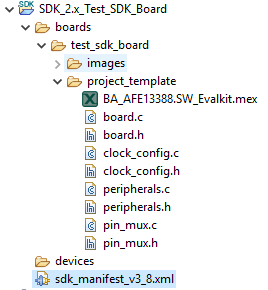
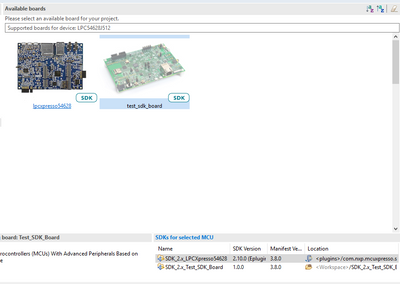
New project based on the custom SDK:
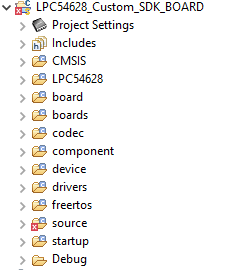
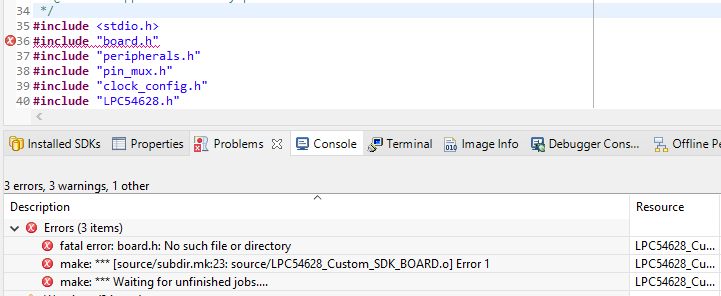
So my main questions is: Is there a way to load the board configuration directy into the "board" folder and avoid the "boards" folder.
I don't want to add the "include path" for the boards folder manually after project import/creation.
Is there a mistake at my custom SDK creation?
Looking forward for some answer!
Thank you!

 FelipeGarcia
Hi Bernhard,
Does this issue happen with all SDK? There is also a more detailed guide here: How to Create Custom Board MCUXpresso SDK - NXP Community
Best regards,
Felipe
Hi Felipe,
i tried out the SDK's for the MIMXRT1170 and the LPCXpresso54628 Boards. But the problem
appears at both SDKs. I also looked at the detailed guide, but the result is the same.
Do you have another idea of solving the issue?
Best regards
Bernhard
FelipeGarcia
Hi Bernhard,
Sorry for the late reply. I have contacted MCUXpresso team to see if this is a bug or if there is something wrong with the configuration. Any update I will let you know.
Best regards,
Felipe
Hi Felipe,
did you get some new informations about "customSDK" with the MCUXpresso IDE.
Best regards
Bernhard
FelipeGarcia
Hi Bernhard,
I have received an update from MCUXpresso team. Seems this is a bug that can be avoided in MCUXpresso IDE 11.5 that will be released early next year.
The “boards” folder appears due to the fact that IDE is trying to copy the modified files from the created Board SDK. The path to those files from the created project is identical to the ones from the created SDK: /boards/<board_name>/project_template. This is the structure of an SDK.
Due to manifest schema modification, we missed a parameter in Board SDK code. His absence cause copying files to boards folder and not to board folder.
The problem can be solved if you follow the below steps on 11.5.0 release which will be available next year:
1. Create your project and do the necessary settings with Config Tools.
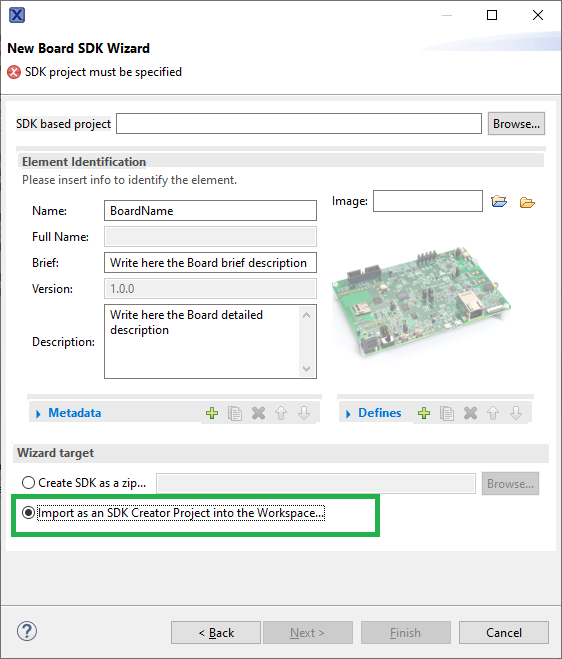
2. Create a Board SDK wizard (please select the option marked with green so you can do changes in the SDK/to be editable)
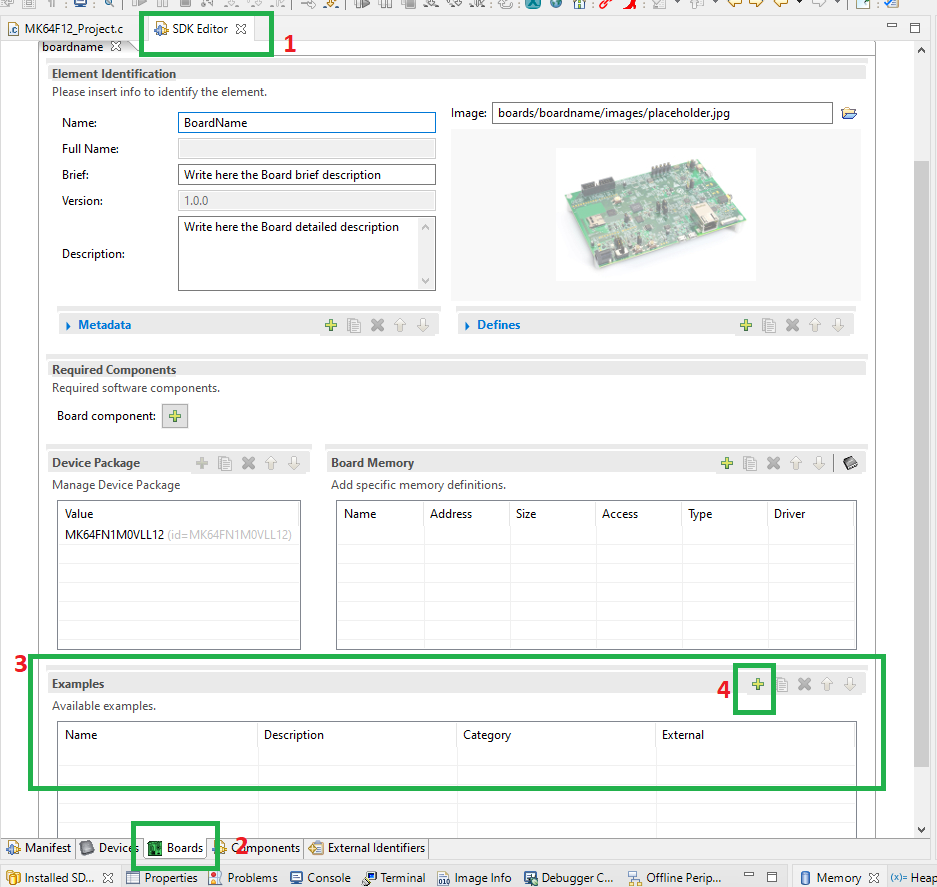
3. Go to Example section from Boards tab in SDK Editor after the Board SDK was created and click on plus button.
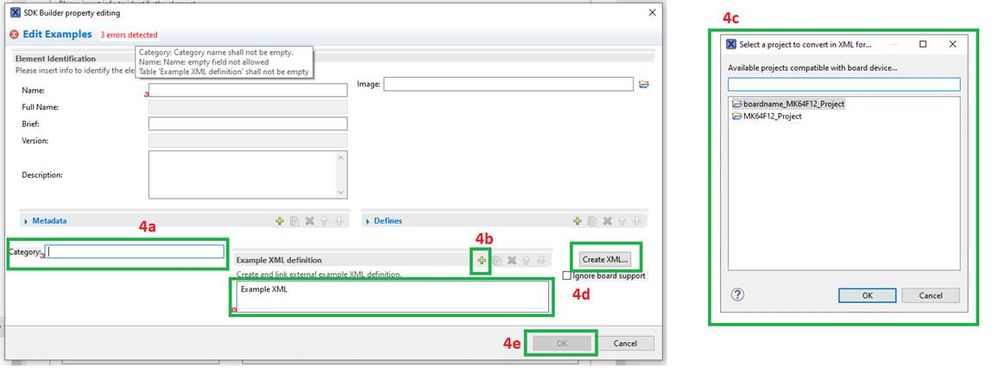
4. A new window call “SDK Builder property editing” will open. Here you have to link the example modified before.
4a. Enter a category under which your example will be created.
4b. Click on the plus/Add button from “Example xml definition”.
4c. Choose your modified example from the new window and click on OK.
4d. Click on the added entry from “Example xml”. (If you don’t see any entry, expand/click on “>”) and click on the “Create XML...” button.
The name for the example will be automatically complete in “SDK Builder property editing”.
4e. All the errors from “SDK Builder property editing” will be resolved after the above steps and you can click on OK button.
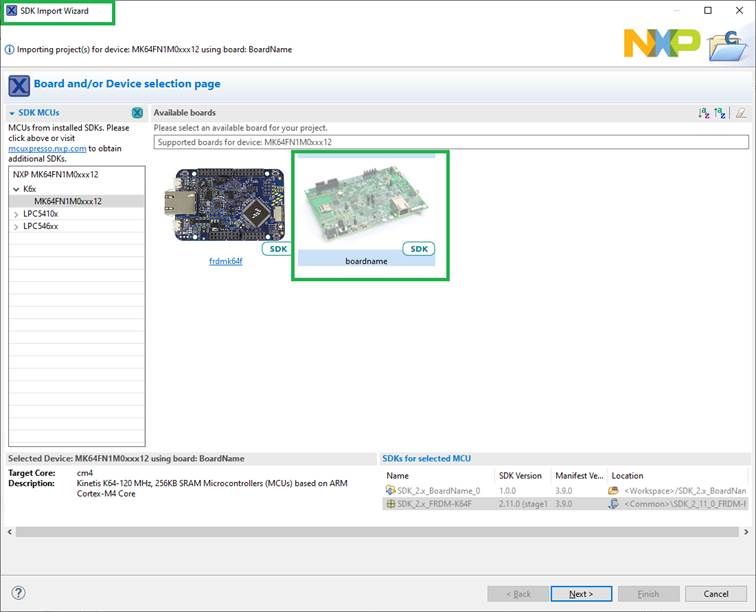
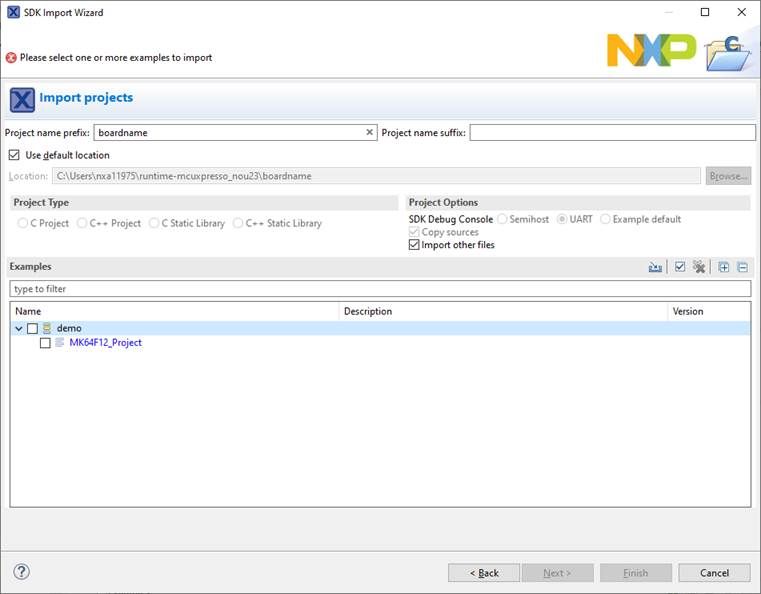
5. Save the modification and create a new project with “Import SDK example” wizard.
! You must have the original SDK too. The modified files are copied from your SDK, but the dependencies are copied from the original SDK.
The new created project will have all your changes and will compile.
Best regards,
Felipe
-------------------------------------------------------------------------------
Note:
- If this post answers your question, please click the "Mark Correct" button. Thank you!
- We are following threads for 7 weeks after the last post, later replies are ignored. Please open a new thread and refer to the closed one, if you have a related question at a later point in time.
------------------------------------------------------------------------------

Hi jay_heng,
thank you for your answer. I already created a project with my prefered source code for my project. My aim now is it to create a custom SDK for a custom board. I saw the video "Creating a Custom Board SDK and Migrating Code Between Boards" at the NXP webpage.
I followed the steps at the second part of the video, but there is one different for my custom SDK. When creating a new project based on the custom SDK a additional "boards" folder is created by the MCUXpresso IDE. (It contains files like: board.c, pin_mux.h and the .mex file). For my knowledge there should be only the "board" folder.
Custom SDK:
New project based on the custom SDK:
So my main questions is: Is there a way to load the board configuration directy into the "board" folder and avoid the "boards" folder.
I don't want to add the "include path" for the boards folder manually after project import/creation.
Is there a mistake at my custom SDK creation?
Looking forward for some answer!
Thank you!
